
Virtual Museum
Product by Flyover Zone
Facts checked: Not yet checked
Our take (not a Learning Standard rating). This label applies to learning-science judgments throughout this overview.
Our take (not a Learning Standard rating)
Virtual Museum provides high-quality 3D models for visual inspection, but it functions as a reference tool rather than a structured instructional system. It lacks active retrieval practice, scaffolding, or formative assessment. Your child can explore historically accurate artifacts, but they must rely on external guidance to build durable historical knowledge.
Pros
- Provides photogrammetric 3D scans that allow students to manipulate and observe artifacts from multiple angles.
- Includes scientifically accurate reconstructions to help learners visualize historical context.
- Embeds detailed metadata and external resource links directly alongside the 3D models to support deeper independent research.
Cons
- Lacks embedded assessments or retrieval practice mechanisms to test student comprehension.
- Offers no structured progression or scaffolding to guide novice learners through the material.
- Relies heavily on text-heavy metadata without multimedia instructional overlays to explain complex historical concepts.
What Do We Know About Virtual Museum?
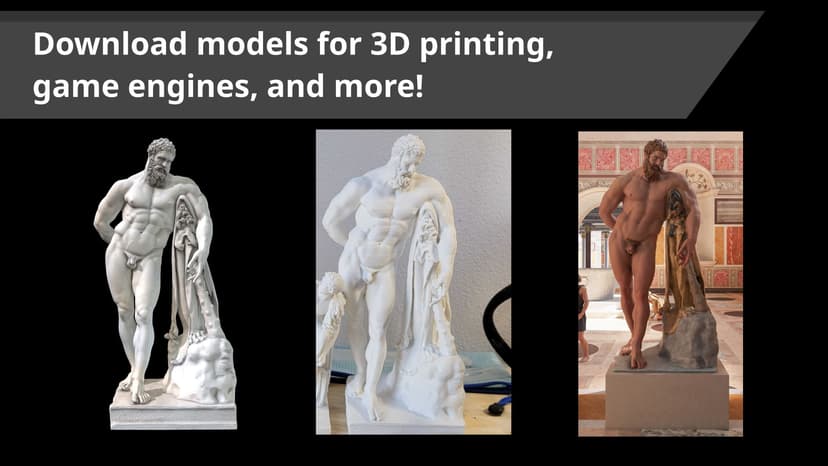
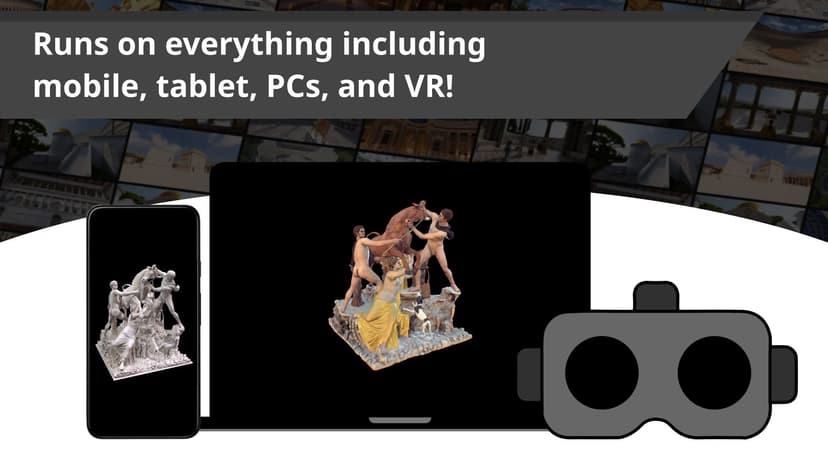
Virtual Museum is an effective supplementary reference tool for visual exploration, but it does not independently teach historical concepts. Think of it as a highly detailed digital encyclopedia rather than a structured course. The app provides access to over 750 interactive 3D models of classical sculptures, allowing your child to zoom, rotate, and examine photogrammetric scans of real-world artifacts. This immersive approach leverages dual coding theory by pairing visual spatial data with text-based metadata, which can help strengthen your child's mental models of history and art. However, because the app lacks direct instruction, quizzes, or spaced repetition, it relies entirely on the student's intrinsic motivation or a teacher's lesson plan to drive learning. Your child will not be tested on their knowledge, nor will the app guide them from beginner to advanced topics. It is best used alongside a formal curriculum where an educator assigns specific artifacts for analysis. If your child is highly curious about history or classical art, they will find the scientifically accurate reconstructions fascinating. Just remember that active learning, such as writing a summary or discussing the artifact, must happen outside the app for durable retention to occur.
How Does Virtual Museum Work?
Virtual Museum uses an immersive, self-directed exploration approach centered on digital object-based learning. Students open the application to browse a repository of more than 750 fully interactive 3D models of historical sculptures and artifacts. When a student selects an object, they enter an interactive viewer where they can manipulate the scan by rotating, zooming, and panning to examine fine physical details that are often inaccessible in a traditional textbook. Alongside the visual model, the platform displays detailed text-based metadata. This includes information about the object's origin, historical significance, and physical properties. Some models feature scientifically accurate reconstructions, toggling between the artifact's current ruined state and its original appearance to help learners contextualize its historical reality. The app does not force a specific learning path; learners navigate freely based on search terms or categories. Because there are no built-in quizzes, flashcards, or progress trackers, the learning mechanics depend heavily on the user reading the provided text and following external links to related academic resources for deeper investigation.
Strengths and tradeoffs of Virtual Museum
Virtual Museum's biggest strength is its highly detailed, interactive visual representations of historical artifacts, while its biggest weakness is the complete absence of built-in formative assessment or retrieval practice. Visual-Spatial Learning: By utilizing photogrammetry, the app excels at providing immersive visual data. Allowing students to manipulate 3D models taps into spatial learning, helping them notice physical details, tool marks, and proportions that flat 2D images fail to convey. Contextualization: The inclusion of scientifically accurate reconstructions is a major pedagogical asset. Comparing a weathered artifact to its original form provides a visual worked example of historical preservation and degradation, aiding cognitive schema formation for archeological concepts. Lack of Cognitive Friction: The app functions purely as a reference library. Without retrieval practice (such as low-stakes quizzes to recall metadata facts) or spaced repetition, students are prone to the illusion of competence. They may feel they understand an artifact just by looking at it, but they will likely forget the historical context shortly after closing the app. No Scaffolding: Because there is no structured progression, novice learners may experience cognitive overload when faced with dense metadata. The platform assumes the user already possesses the foundational knowledge necessary to interpret the classical sculptures effectively.
Who Might Benefit From Virtual Museum?
Best for middle school through university students who need a high-quality visual reference tool to supplement structured history or art classes. Virtual Museum is not a standalone teaching app for casual learners. It is designed for institutional use, making it ideal for educators teaching humanities, social sciences, or classical history who want to bring object-based learning into their blended classrooms. Because the reading level of the metadata is high and requires self-directed focus, it is less suitable for elementary students or those needing guided, step-by-step instruction.
Data Transparency
Does Not Meet Data Transparency Standard
Virtual Museum does not meet our data transparency standard. Its privacy policy does not document basic protections, including a commitment against targeted advertising and limits on sharing children's data.
16 of 35 checks passed
Evaluated September 2026
Flyover Zone →Level 1 · Basic protections
Does not sell data or target ads at students, limits sharing, and lets parents see and delete their child's data.
Not documented: a commitment against targeted advertising, limits on sharing children's data
Level 2 · Parent control (meets the standard)
Families can get their data out, know who processes it, and know how long it is kept.
Not documented: a data retention timeline, self-service deletion
Level 3 · Direct data access
Families or schools can pull their own data through an API, in a stated format.
Not documented: an API for retrieving their own data, a named export format
View all 35 checks
Parent Access7/8
Does the policy mention parents specifically?
“If you are under the age of eighteen (18), you are not authorized to access or use the App without the consent of a parent or legal guardian.”
Can parents view their child's data?
“Only you or a person registered with the California Secretary of State that you authorize to act on your behalf may make a verifiable consumer request related to your Personal Information if you provide the authorized agent written permission signed by you or pursuant to a valid Power of Attorney. You may also make a verifiable consumer request on behalf of your minor child.”
Can parents modify their child's data?
The policy lets parents make requests on behalf of a minor child but lists only access, data portability and deletion as rights exercised that way, so parental correction is not clearly provided.
Can parents delete their child's account?
“To exercise the access, data portability, and deletion rights described above, please submit a verifiable consumer request to us by either:”
Is there a dedicated Children's Privacy section?
“If we become aware that you are under the age of 13 and are attempting to or have submitted Personal Information via the Services, we will not accept such information and we will take steps to remove such information from our records.”
Does it reference COPPA compliance?
“Flyover Zone is committed to complying with applicable U.S. federal and state laws governing students’ privacy, including the Family Educational Rights and Privacy Act (FERPA), the Pupil Privacy Protection Amendment (PPRA) and the Children’s Online Privacy Protection Act (COPPA).”
Does it reference FERPA compliance?
“Flyover Zone is committed to complying with applicable U.S. federal and state laws governing students’ privacy, including the Family Educational Rights and Privacy Act (FERPA), the Pupil Privacy Protection Amendment (PPRA) and the Children’s Online Privacy Protection Act (COPPA).”
Is parental consent required for child accounts?
“If you are under the age of eighteen (18), you are not authorized to access or use the App without the consent of a parent or legal guardian.”
Data Portability2/5
Can users access their personal data?
“You may at any time, request access to your Personal Information collected by Flyover Zone, request that inaccurate information be amended, or that the collected Personal Information be erased.”
Can users download/export their data?
“The specific pieces of Personal Information we collected about you (also called a data portability request).”
Is there a self-service data access tool?
The policy offers access only through a request form, email or registered letter, not a tool users operate themselves.
Is a specific data format mentioned for export?
The policy says only that the company will choose a "readily useable" format, without naming one.
Is there an API for data access?
The policy does not address API access to user data.
Data Minimization1/6
Is data collection itemized?
“contact information, such as name, surname, company, address, country, email address;”
Can the app be used without a real name?
The policy collects contact information including name and surname.
Can the app be used without an email?
The policy collects email addresses as contact information.
Does it state collection is limited to what is necessary?
The policy does not state that collection is limited to what is necessary.
Is IP address anonymized or truncated?
The policy collects IP addresses and does not say they are anonymized or truncated.
Is location tracking explicitly excluded?
The policy states that geolocation data (physical location) is collected.
Third-Party Protection4/7
Does it explicitly state no selling of data?
“We do not sell your Personal Information.”
Are third-party providers named?
“We may collect information about your computer, including your IP address, operating system and browser type, for system administration and in order to create reports, using Google Analytics.”
Are providers contractually restricted?
“While Flyover Zone may share your Personal Information with agents and contractors in order to perform the functions listed above, including hosting services and App management, we require that they treat your Personal Information, and limit their use, in accordance with the standards specified in this Privacy Policy.”
No-targeted-advertising commitment?
The policy contains no commitment against targeted advertising.
Is AI/ML data sharing addressed?
The policy does not address AI or machine learning.
Child-specific sharing restriction?
The policy has no child-specific sharing restriction and reserves the right to share data to protect minors' safety.
Cookies/tracking limited or opt-out?
“You can opt out of Google Analytics without affecting how You visit our site”
Deletion & Retention2/5
Can users delete their account?
“If You would like us to delete, correct, amend or update your Personal Information in our system, please let us know by e-mail at the following address contact@flyoverzone.com and we will attempt to accommodate your request if we do not have any legal obligation to retain the record.”
Self-service deletion mechanism?
The policy handles deletion only through email or form requests, with no self-service mechanism.
Specific data retention timeline?
The policy says data may be hosted indefinitely or kept until no longer needed, with no specific timeline.
Auto-deletion of inactive accounts?
The policy does not address automatic deletion of inactive accounts.
Post-deletion handling described?
“Please note that any information that we have copied may remain in back-up storage for some period of time after your deletion request.”
Advertising0/4
Advertising model explicitly disclosed?
The policy does not describe an advertising model or say the product has no ads.
Free from third-party advertisements?
The policy does not state that the product is free of third-party ads, and the license agreement mentions presenting advertisements.
Children excluded from ad targeting?
The policy does not exclude children from ad targeting.
Ad-free option available?
The policy does not mention an ad-free option or say the product has no ads.
What This Means
The policy review did not meet our data transparency standard. The checks above show the documented findings and unknowns. A missing statement does not establish how the app handles data in practice.
About this evaluation: Based on automated analysis of Flyover Zone against 35 policy-disclosure questions, including questions adapted from the Common Sense Privacy Program's published evaluation questions. TLS is not affiliated with Common Sense Media, and this is not a Common Sense rating. Quoted text is copied from the policy; unquoted notes are our summary. Results describe what the policy documents, not the company's actual practices. Privacy policies can change: this review reflects the version we analyzed and does not determine legal compliance.
Sources and review method
TLS combines product information and editorial analysis to explain how Virtual Museum works, its tradeoffs, and the questions to ask before choosing it. Product features, an instructional rationale and evidence of learning outcomes are different kinds of information.
Formal Learning Standard assessment: not yet completed. Data Transparency findings are reported separately and do not establish learning effectiveness. Read our methodology.
Frequently Asked Questions About Virtual Museum
Is Virtual Museum free?
No, Virtual Museum is not free. Pricing is designed for educational institutions and is determined by the full-time enrollment (FTE) of the school or university. The developer offers annual subscription tiers or a one-time purchase option that includes an ongoing yearly maintenance fee after the first five years.
Is Virtual Museum good for middle school students?
Yes, but only with teacher guidance. The app is rated for grades 6 and up. While middle schoolers will enjoy manipulating the interactive 3D models, the text-heavy metadata and lack of embedded assessments mean they will need a teacher or parent to provide structured learning activities alongside the app.
What does Virtual Museum teach?
Virtual Museum covers humanities, social science, and classical art history. It allows students to explore classical sculptures and artifacts through photogrammetric scans. Students learn about the physical properties, historical context, and original appearances of these pieces through embedded metadata and scientifically accurate digital reconstructions.
Has Virtual Museum been evaluated by The Learning Standard?
No, Virtual Museum is currently pending evaluation by our team. Our experts have not yet conducted a full empirical review of its pedagogical effectiveness. You can read more about how we rate educational technology on our methodology page.
Virtual Museum vs Google Arts & Culture: Which is better?
Google Arts & Culture offers a broader, free collection of 2D art and 3D models across many eras, making it better for general exploration. Virtual Museum is better for deep, specialized academic study of classical sculptures, offering scientifically accurate reconstructions and targeted metadata designed specifically for institutional and higher-education curriculums.
Has The Learning Standard evaluated Virtual Museum?
TLS has not yet completed a Learning Standard evaluation of how well Virtual Museum teaches. Its privacy policy has been reviewed for Data Transparency and does not yet document the basic protections (Level 1).
Is Virtual Museum COPPA compliant?
The reviewed privacy policy references COPPA. A policy reference alone does not establish COPPA compliance. Policy review note: The policy commits to COPPA compliance.
Is Virtual Museum FERPA compliant?
The reviewed privacy policy references FERPA. A policy reference alone does not establish FERPA compliance. Policy review note: The policy commits to FERPA compliance.
Does Virtual Museum have a children's privacy policy?
The reviewed policy includes a dedicated children's privacy section. Policy review note: The California notice has a dedicated section headed "Children".
Does Virtual Museum sell student data?
The reviewed policy states that the app does not sell data. This is a policy statement; actual data practices were not verified. Policy review note: The policy explicitly says it does not sell personal information.
Can you delete your data from Virtual Museum?
The reviewed privacy policy describes account deletion. We have not tested the deletion process. Policy review note: Users can request deletion of their personal information.
Follow TLS Research
Subscribe to future TLS research updates: app reviews, findings, and what the evidence shows.
Screenshots


Take Action
For Virtual Museum
If you represent Flyover Zone and have a correction or new evidence, send the relevant source so we can review and update this page.
Submit a correctionDetails
- Pricing
- Pricing is determined by the full-time enrollment (FTE) of your institution. We currently offer: annual-based subscriptions, one-time purchase (with a maintenance fee of $500/yr after 5 years of use).
- Platforms
- Web Browser
- Grade Levels
- 6th Grade, 7th Grade, 8th Grade, 9th Grade, 10th Grade, 11th Grade, 12th Grade, Associate's degree, Bachelor's degree, Master's Degree, Doctoral Degree
- Website
- Visit site