
Typing Training
Product by Sunburst Digital
Facts checked: Not yet checked
Our take (not a Learning Standard rating). This label applies to learning-science judgments throughout this overview.
Our take (not a Learning Standard rating)
While Typing Training provides the high-volume practice necessary for motor skill acquisition, its effectiveness relies heavily on external teacher guidance. The finger isolation technique builds mechanical memory well, but the program lacks the adaptive scaffolding required to sustain independent student engagement without active classroom support.
Pros
- Isolates specific finger movements to build foundational motor skills before introducing complex keystrokes.
- Provides extensive repetitive practice through a massive library of over 2500 distinct exercises.
- Integrates cross-curricular vocabulary from science and humanities into typing drills to reinforce academic knowledge.
Cons
- Requires a minimum purchase of ten licenses, making it entirely inaccessible for individual home use.
- Lacks algorithmic adaptive learning to automatically adjust difficulty based on real-time keystroke errors.
- Relies heavily on direct instruction rather than self-guided discovery or intrinsic gamified motivation.
What Do We Know About Typing Training?
Typing Training is partially effective for teaching keyboarding skills because it provides massive amounts of repetitive practice, though it is completely inaccessible for individual home use. You cannot buy a single license for your child, as the developer requires a minimum purchase of ten seats. If your child's school uses this program, they will experience a very traditional, direct instruction approach to typing. The software focuses heavily on motor skill acquisition by isolating individual finger movements before asking your child to type full words. This aligns with cognitive load theory by preventing early learners from being overwhelmed by the entire keyboard at once. However, the program lacks the modern adaptive scaffolding found in newer applications. If your child struggles with the middle row, the software does not automatically generate personalized intervention drills. It instead relies on the classroom teacher to monitor progress and assign appropriate exercises from its massive library. Because it integrates vocabulary from science and social studies into the typing exercises, your child will get incidental exposure to cross-curricular academic content while they type. Just be aware that this tool functions entirely as a classroom supplement rather than a standalone, at-home learning solution.
How Does Typing Training Work?
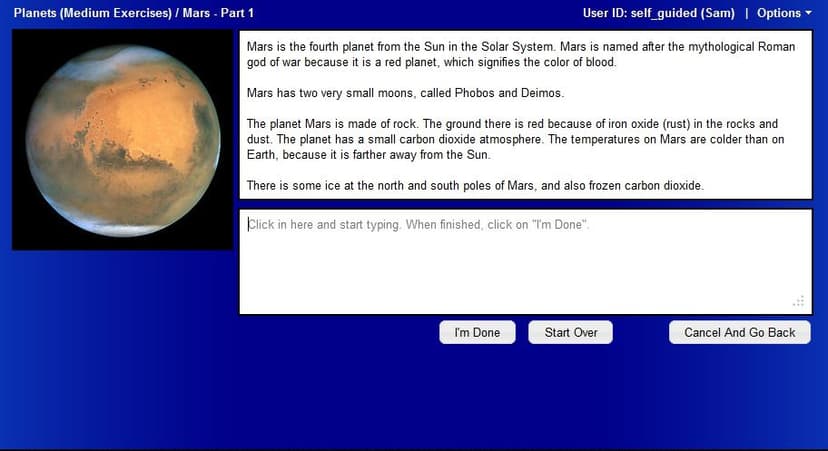
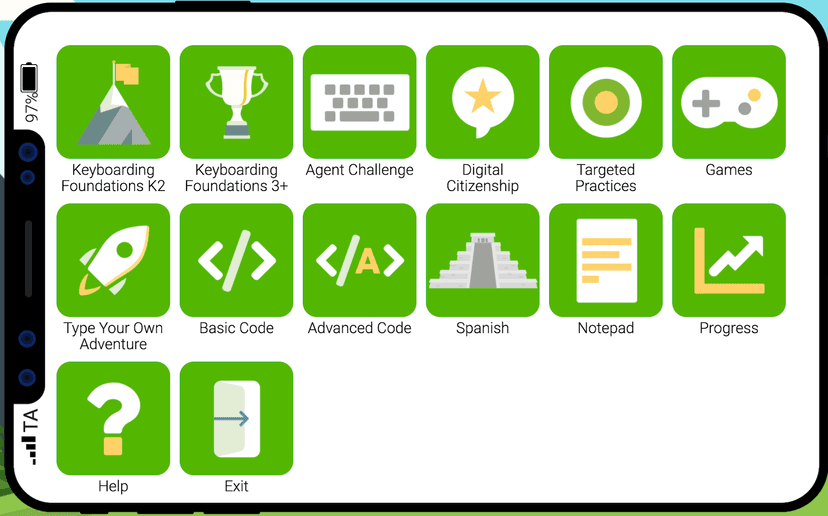
Typing Training uses direct instruction and massed practice to build muscle memory for keyboarding. The core learning mechanic breaks typing down into isolated finger movements, training the hands based on anatomical function rather than simply moving left to right across the keyboard. Students watch animated guides demonstrate proper finger placement and stroke mechanics. After observing the worked example, students complete highly structured practice exercises targeting those specific movements. The system includes over 2500 exercises that gradually increase in complexity. As students progress, the drills incorporate cross-curricular academic content, requiring them to type text related to science, humanities, and career technical education. This allows for dual-coding, where students practice typing mechanics while simultaneously processing academic vocabulary. The software operates entirely in the cloud, allowing educators to deploy it across multiple devices in a school setting. Progression is largely linear and relies on the teacher to assign specific modules, rather than using an artificial intelligence engine to dictate the learning path.
Strengths and tradeoffs of Typing Training
The biggest strength of Typing Training is its precise isolation of motor skills, while its biggest weakness is the lack of adaptive difficulty adjustment. Motor skill acquisition requires deliberate practice, and this software delivers by breaking the keyboard down into individual finger functions. By forcing students to master isolated movements before integrating them into complex words, the program effectively manages cognitive load. This prevents the working memory from being overwhelmed during the early stages of learning to type. Additionally, the inclusion of cross-curricular content provides an element of spaced repetition for academic vocabulary, exposing students to science and humanities terms while they drill keystrokes. However, the software falls short in adaptive scaffolding. Modern learning science shows that immediate, personalized feedback accelerates skill mastery. Typing Training provides basic accuracy metrics but does not dynamically alter the lesson path when a student repeatedly makes the same error. It relies on massed practice rather than intelligent retrieval practice loops. Furthermore, the reliance on a teacher-led, blended learning model means the software functions much like a digital workbook. Without intrinsic gamification or algorithmic intervention, student engagement relies heavily on external classroom management.
Who Might Benefit From Typing Training?
Typing Training is best for middle school classrooms that need a structured, high-volume typing curriculum to supplement direct teacher instruction. Because the pricing model requires a minimum of ten licenses, it is exclusively suited for educational institutions, after-school programs, or large homeschooling co-ops. The platform serves students in grades 3 through 10 who are transitioning from basic digital literacy to formal keyboarding fluency. It works best in a blended learning environment where an educator can actively monitor progress, manually assign specific exercises from the massive library, and intervene when students struggle with specific motor patterns.
Data Transparency
Does Not Meet Data Transparency Standard
Typing Training does not meet our data transparency standard. Its privacy policy does not document basic protections, including limits on sharing children's data and contractual limits on service providers.
19 of 35 checks passed
Evaluated September 2026
Privacy Policy →Level 1 · Basic protections
Does not sell data or target ads at students, limits sharing, and lets parents see and delete their child's data.
Not documented: limits on sharing children's data, contractual limits on service providers
Level 2 · Parent control (meets the standard)
Families can get their data out, know who processes it, and know how long it is kept.
Level 3 · Direct data access
Families or schools can pull their own data through an API, in a stated format.
Not documented: an API for retrieving their own data, a named export format
View all 35 checks
Parent Access7/8
Does the policy mention parents specifically?
“Parents have the right to review and request deletion of any personal information that the site has collected and retained about their child.”
Can parents view their child's data?
“Students and their parents have full access to the student's personally generated content.”
Can parents modify their child's data?
“Errors in records or in personal information may be reported to a teacher, therapist, administrator, or similar individual who can made corrections using an administrator account.”
Can parents delete their child's account?
“If you would like to request that we delete any personal information we may have about your child (such as username, password, and performance information) or to request no further collection of personal information from your child, please contact us at”
Is there a dedicated Children's Privacy section?
“### FERPA and COPPA Compliance”
Does it reference COPPA compliance?
“TypingTraining.com is compliant with the provisions in the Children's Online Privacy and Protection Act (COPPA)”
Does it reference FERPA compliance?
“TypingTraining.com is compliant with the provisions in the Children's Online Privacy and Protection Act (COPPA) and the Family Educational Rights and Privacy Act (FERPA).”
Is parental consent required for child accounts?
The policy relies on consent from a teacher or school official and does not require parental consent.
Data Portability3/5
Can users access their personal data?
“Access: This includes your right to access the personal information we gather about you, and your right to obtain information about the sharing, storage, security and processing of that information.”
Can users download/export their data?
“This information may be viewed and downloaded from the "Reports" area after logging into the student's account.”
Is there a self-service data access tool?
“This information may be viewed and downloaded from the "Reports" area after logging into the student's account.”
Is a specific data format mentioned for export?
The policy does not name an export file format.
Is there an API for data access?
The policy does not mention an API for data access.
Data Minimization1/6
Is data collection itemized?
“- First and last name. - Username and password. - Email address (optional). - School or district ID number (optional) - Approximate age (child, teen, or adult)”
Can the app be used without a real name?
The policy says it collects students' first and last names.
Can the app be used without an email?
The policy lists student email address as optional information that may be collected.
Does it state collection is limited to what is necessary?
The policy limits how data is used but does not say collection is limited to what is necessary.
Is IP address anonymized or truncated?
The policy says IP addresses are collected and does not mention anonymizing or truncating them.
Is location tracking explicitly excluded?
The policy does not address location tracking.
Third-Party Protection4/7
Does it explicitly state no selling of data?
“Payment status information is shared with us. We will not sell, share, or disclose this information.”
Are third-party providers named?
“When optionally purchasing a paid account, a payment processing service, authorize.net, directly collects all personal payment information.”
Are providers contractually restricted?
The policy does not describe contracts that restrict its providers.
No-targeted-advertising commitment?
“Information collected is only used for educational purposes. It is never shared with third parties and is not used for targeted advertising.”
Is AI/ML data sharing addressed?
The policy does not address AI or machine learning.
Child-specific sharing restriction?
The policy limits how student information is used but has no sharing restriction specific to children beyond its general no-sharing statement.
Cookies/tracking limited or opt-out?
“Google Analytics data is not used for remarketing, targeted advertising, or any similar purpose. The relevent options for this are disabled in our Google Analytics account.”
Deletion & Retention3/5
Can users delete their account?
“You have the right to request that we delete any of your information we have collected.”
Self-service deletion mechanism?
“Authorized employees of the district have full authority to view, download, modify, and delete records as desired.”
Specific data retention timeline?
“Upon expiry of a subscription, student records are maintained in our database for a minimum of one year.”
Auto-deletion of inactive accounts?
The policy says inactive accounts are subject to deletion based on business need, not deleted automatically.
Post-deletion handling described?
The policy does not describe how data is handled after deletion, such as backups.
Advertising1/4
Advertising model explicitly disclosed?
The policy rules out targeted advertising but does not state whether the product carries advertising.
Free from third-party advertisements?
The policy does not state that the product has no third-party ads.
Children excluded from ad targeting?
“Information collected is only used for educational purposes. It is never shared with third parties and is not used for targeted advertising.”
Ad-free option available?
The policy does not state that the product is ad-free or offer an ad-free option.
What This Means
The policy review did not meet our data transparency standard. The checks above show the documented findings and unknowns. A missing statement does not establish how the app handles data in practice.
About this evaluation: Based on automated analysis of Privacy Policy against 35 policy-disclosure questions, including questions adapted from the Common Sense Privacy Program's published evaluation questions. TLS is not affiliated with Common Sense Media, and this is not a Common Sense rating. Quoted text is copied from the policy; unquoted notes are our summary. Results describe what the policy documents, not the company's actual practices. Privacy policies can change: this review reflects the version we analyzed and does not determine legal compliance.
Sources and review method
TLS combines product information and editorial analysis to explain how Typing Training works, its tradeoffs, and the questions to ask before choosing it. Product features, an instructional rationale and evidence of learning outcomes are different kinds of information.
Formal Learning Standard assessment: not yet completed. Data Transparency findings are reported separately and do not establish learning effectiveness. Read our methodology.
Frequently Asked Questions About Typing Training
Is Typing Training free?
No, Typing Training is not free. It operates on a subscription model requiring a one-year commitment. The developer requires a minimum purchase of ten licenses for $185, making it a paid tool aimed at schools rather than individual consumers.
Is Typing Training good for elementary and middle school students?
Yes, it is well-suited for students in grades 3 through 10. The interface and animated guides are designed to help younger learners visualize finger placement, while the cross-curricular reading passages keep older students engaged with age-appropriate academic content.
What does Typing Training teach?
Typing Training teaches formal keyboarding skills and motor memory. It isolates specific finger movements to build typing speed and accuracy. Additionally, it exposes students to vocabulary and reading passages covering science, social studies, and humanities subjects.
How does Typing Training compare to Typing Club?
Typing Training relies on a traditional, structured approach with heavy teacher oversight, whereas Typing Club offers more robust gamification and independent adaptive pathways. Typing Training is better for strict classroom integration, while Typing Club is more accessible for independent home practice.
Has The Learning Standard evaluated Typing Training?
TLS has not yet completed a Learning Standard evaluation of how well Typing Training teaches. Its privacy policy has been reviewed for Data Transparency and does not yet document the basic protections (Level 1).
Is Typing Training COPPA compliant?
The reviewed privacy policy references COPPA. A policy reference alone does not establish COPPA compliance. Policy review note: The policy states COPPA compliance.
Is Typing Training FERPA compliant?
The reviewed privacy policy references FERPA. A policy reference alone does not establish FERPA compliance. Policy review note: The policy states FERPA compliance.
Does Typing Training have a children's privacy policy?
The reviewed policy includes a dedicated children's privacy section. Policy review note: The policy has a section with its own COPPA heading.
Does Typing Training sell student data?
The reviewed policy states that the app does not sell data. This is a policy statement; actual data practices were not verified. Policy review note: The vendor states it will not sell this information.
Can you delete your data from Typing Training?
The reviewed privacy policy describes account deletion. We have not tested the deletion process. Policy review note: Users can ask for their data to be deleted.
Follow TLS Research
Subscribe to future TLS research updates: app reviews, findings, and what the evidence shows.
Screenshots

Take Action
For Typing Training
If you represent Sunburst Digital and have a correction or new evidence, send the relevant source so we can review and update this page.
Submit a correctionDetails
- Pricing
- 1-year subscription. Minimum package of 10 licences for $185.
- Platforms
- Web Browser, iOS (Apple mobile), iPadOS (Apple tablet), Windows (Microsoft), macOS (Apple), Chrome OS (Google), Other
- Grade Levels
- 3rd Grade, 4th Grade, 5th Grade, 6th Grade, 7th Grade, 8th Grade, 9th Grade, 10th Grade
- Website
- Visit site