Tinkercad
Product by Autodesk
Facts checked: Not yet checked
Our take (not a Learning Standard rating). This label applies to learning-science judgments throughout this overview.
Our take (not a Learning Standard rating)
Tinkercad provides a highly effective environment for project-based learning in spatial reasoning, basic electronics, and foundational coding. While not a direct instruction tool, it excels as an experiential sandbox where students apply geometric concepts and computational logic to construct tangible digital artifacts.
Pros
- Builds spatial reasoning skills through the direct manipulation of 3D geometric primitives.
- Supports experiential learning by allowing students to simulate electrical circuits and visualize code execution in real time.
- Reduces extraneous cognitive load for beginners with an intuitive drag-and-drop interface instead of complex CAD toolbars.
- Encourages iterative problem-solving because students can immediately test and modify their digital designs without penalty.
Cons
- Lacks structured, mastery-based instruction to guide students who do not know what to build next.
- Does not provide automated feedback on design efficiency, physical physics, or structural integrity.
- Offers limited advanced functionality, forcing older students to transition to professional CAD software for complex engineering projects.
What Do We Know About Tinkercad?
Tinkercad is a highly effective experiential sandbox for teaching spatial reasoning, electronics, and coding, though it requires self-direction. Your child will not find traditional lessons, quizzes, or structured skill progressions here. Instead, they learn entirely by doing. The platform provides a blank digital canvas where users drag, drop, and combine geometric shapes to build 3D models. This open-ended approach relies on project-based learning, meaning your child must set their own goals or follow external prompts from a teacher. While the app includes basic navigation tutorials, it does not evaluate whether a design is good, structurally sound, or efficient. This lack of automated feedback means parents or educators must step in to guide reflection and assess learning. However, the simulation tools are excellent for experiential learning. Your child can wire virtual circuits and watch LEDs light up, instantly testing their understanding of electrical flow without the risk of burning out real components. Because it is completely free and runs in a standard web browser, it removes traditional barriers to entry for computer-aided design. If your child struggles with open-ended tasks, they will need you to provide specific building challenges to keep them actively engaged.
How Does Tinkercad Work?
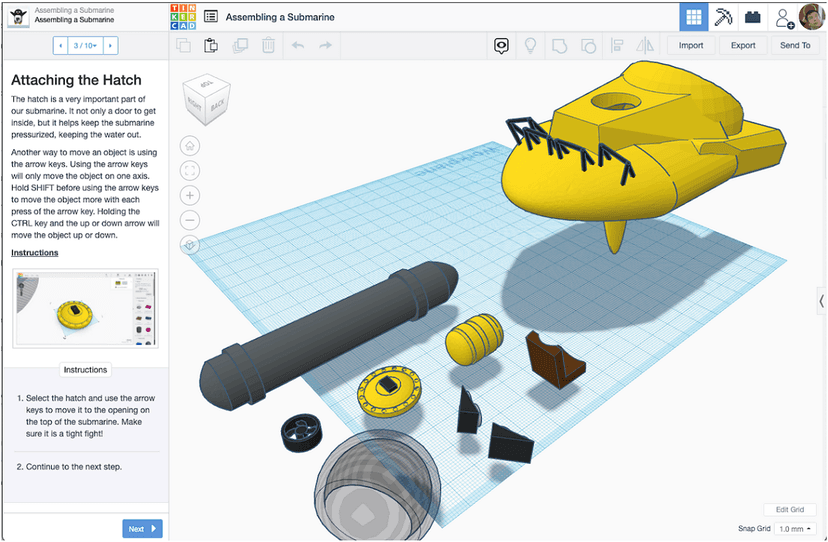
Tinkercad relies on constructivist, project-based learning where students build conceptual understanding through direct manipulation of digital objects. The platform is divided into three main workspaces: 3D Design, Circuits, and Codeblocks. In the 3D Design space, students use constructive solid geometry. They group basic solid shapes together or use hole shapes to carve out negative space, visually applying volume and coordinate plane concepts. The Circuits workspace functions as a virtual electronics breadboard. Students drag components like batteries, resistors, and microcontrollers into the workspace, wiring them together to create functional simulations. This provides immediate, observable feedback on whether a circuit loop is complete. Codeblocks introduces computational thinking by having students stack drag-and-drop command blocks to generate 3D shapes parametrically. Throughout all three environments, the app avoids direct instruction and rigid pathways. There are no grading mechanics or adaptive algorithms. Instead, the interface relies entirely on experiential learning, requiring students to test their designs, observe the visual results, and iteratively fix their mistakes.
Strengths and tradeoffs of Tinkercad
Tinkercad's biggest strength is its ability to lower the cognitive load of spatial design, while its biggest weakness is the absence of structured, adaptive feedback to guide struggling learners. Strengths: By replacing the overwhelming toolbars of professional CAD software with a simple drag-and-drop shape library, Tinkercad minimizes extraneous cognitive load. This allows students to focus entirely on the spatial relationships between objects. The immediate visual feedback in the Circuits and Codeblocks modules strongly supports experiential learning. When a student wires a virtual battery backward, the simulation simply fails to light the bulb, encouraging iterative problem-solving without the frustration of broken physical hardware. Weaknesses: The platform is a sandbox, not an automated tutor. Because it lacks computational evaluation, students do not receive targeted feedback on their models. A student might build a 3D object with non-manifold geometry or an inefficient circuit, and the app will not correct them. It does not utilize spaced repetition or retrieval practice to ensure students remember how to use specific tools. Consequently, learning heavily depends on the student's intrinsic motivation or an educator to provide scaffolding.
Who Might Benefit From Tinkercad?
Tinkercad is best for middle school students and beginners who need a low-friction entry point into 3D modeling and basic electronics. It serves grades 3 through 12, but its simplified interface is most appropriate for the younger half of that range or older students with no prior engineering experience. It is an ideal tool for classrooms integrating project-based STEM assignments, maker spaces, and robotics clubs. Parents will find it highly useful for children who enjoy building with physical blocks and are ready to transition into digital creation. However, students seeking rigorous, step-by-step engineering curriculum will need supplementary instruction.
Data Transparency
Meets Data Transparency Standard
Tinkercad meets our data transparency standard at Level 2 of 3 (Parent control). Level 3 needs the policy to document an API for retrieving their own data and a named export format.
27 of 35 checks passed
Level 1 · Basic protections
Does not sell data or target ads at students, limits sharing, and lets parents see and delete their child's data.
Level 2 · Parent control (meets the standard)
Families can get their data out, know who processes it, and know how long it is kept.
Level 3 · Direct data access
Families or schools can pull their own data through an API, in a stated format.
Not documented: an API for retrieving their own data, a named export format
View all 35 checks
Parent Access8/8
Does the policy mention parents specifically?
“Tinkercad may enable parents and guardians to “moderate” a child’s account, giving the moderator the ability to review how the child is using Tinkercad and allowing them to make certain choices about how the child’s personal data is processed.”
Can parents view their child's data?
“Moderators can access, change, or delete the personal data that we have collected from a child in one of the following ways:”
Can parents modify their child's data?
“Moderators can access, change, or delete the personal data that we have collected from a child in one of the following ways:”
Can parents delete their child's account?
“request that we delete from our records the personal data we have collected in connection with that account”
Is there a dedicated Children's Privacy section?
“How does Autodesk protect children and student data?”
Does it reference COPPA compliance?
“Tinkercad is certified as COPPA compliant by the kidSAFE Seal Program. kidSAFE is also a Federal Trade Commission-approved COPPA Safe Harbor provider.”
Does it reference FERPA compliance?
“to the extent that Education Providers subject to FERPA provide Autodesk with Student Data, Autodesk will be considered a “school official” (as that term is used in FERPA and its implementing regulations);”
Is parental consent required for child accounts?
“We do not knowingly allow a child to create an account without the consent of a parent/legal guardian.”
Data Portability3/5
Can users access their personal data?
“You have the right to access, update, delete, receive a copy of, or restrict our use of your personal data.”
Can users download/export their data?
“You have the right to access, update, delete, receive a copy of, or restrict our use of your personal data.”
Is there a self-service data access tool?
“Please log-in to your account to manage your personal data and content using our applications. You can also delete your personal data and close your account.”
Is a specific data format mentioned for export?
The policy only promises a 'portable' or 'readily usable' format and names no specific file format.
Is there an API for data access?
The policy does not describe an API that users, parents or schools can use to retrieve their data.
Data Minimization2/6
Is data collection itemized?
“When a student creates a student account to use Student Applications, we collect a student’s first and last name, email address, birthdate, school address and educational verification information.”
Can the app be used without a real name?
The policy says it collects a student's first and last name when the student creates an account.
Can the app be used without an email?
The policy says it collects a student's email address and a parent's email address.
Does it state collection is limited to what is necessary?
“We limit the collection of personal data to what is reasonable and necessary to provide our offerings.”
Is IP address anonymized or truncated?
The policy says it collects IP addresses but does not say they are anonymized or truncated.
Is location tracking explicitly excluded?
The policy says it collects geolocation information, including precise geolocation.
Third-Party Protection7/7
Does it explicitly state no selling of data?
“We do not sell children’s and students’ personal information to third parties.”
Are third-party providers named?
“we gather certain information automatically as part of your use of our products and services via Autodesk Genuine and analytics programs and tools, including third-party analytics tools, such as Google Analytics”
Are providers contractually restricted?
“Our service providers process your information subject to contractual terms that restrict their ability to use your information.”
No-targeted-advertising commitment?
“Autodesk and its third-party providers will not use children’s or students’ personal data for advertising purposes, to create a profile about a child and tie it to an application or for any other purpose prohibited by law”
Is AI/ML data sharing addressed?
“To develop and improve our current and future offerings and your experience, including through the use of automated systems that analyze data using machine learning and other analytic techniques, in furtherance of our legitimate interests or, where needed, with consent.”
Child-specific sharing restriction?
“We do not sell children’s and students’ personal information to third parties. Autodesk and its third-party providers will not use children’s or students’ personal data for advertising purposes”
Cookies/tracking limited or opt-out?
“Except as described in our Privacy Statement and our Cookie Statement, whether we collect data through the use of Cookies is up to you. You can change your mind at any time by going into your application settings or by clicking a link in the footer of our websites.”
Deletion & Retention5/5
Can users delete their account?
“Please log-in to your account to manage your personal data and content using our applications. You can also delete your personal data and close your account.”
Self-service deletion mechanism?
“Please log-in to your account to manage your personal data and content using our applications. You can also delete your personal data and close your account.”
Specific data retention timeline?
“If a child is inactive for twenty-four (24) consecutive months, our processes are designed to delete or de-identify their personal data associated with their account, unless the data is required to comply with legal, regulatory, or safety obligations.”
Auto-deletion of inactive accounts?
“If a child is inactive for twenty-four (24) consecutive months, our processes are designed to delete or de-identify their personal data associated with their account, unless the data is required to comply with legal, regulatory, or safety obligations.”
Post-deletion handling described?
“Please keep in mind that a request to delete records may lead to a termination of an account, membership, or other service and that any content saved in that account may no longer be accessible. Please note that Autodesk does not have control over third parties (e.g., other users) who may have copied or reposted publicly posted information.”
Advertising2/4
Advertising model explicitly disclosed?
“We use analytics tools and also work with one or more advertising networks and digital advertising partners (our “Ad Partners”) that use Cookies to collect information about application visitors, to serve ads, and to help us track results of advertising and marketing campaigns.”
Free from third-party advertisements?
The policy says Autodesk works with third-party Ad Partners that serve ads and does not say the product is free of ads.
Children excluded from ad targeting?
“We also maintain policies, procedures, and controls designed to prevent the use of the persistent identifiers we collect for other purposes, including behavioral advertising or amassing profiles about specific individuals.”
Ad-free option available?
The policy does not describe an ad-free option or say the product has no advertising.
Meets Data Transparency Standard
The reviewed policy met our data transparency standard. This result describes the policy disclosures we assessed. Actual practices and legal compliance were not verified.
About this evaluation: Based on automated analysis of Privacy Statement English and Children's Privacy Statement against 35 policy-disclosure questions, including questions adapted from the Common Sense Privacy Program's published evaluation questions. TLS is not affiliated with Common Sense Media, and this is not a Common Sense rating. Quoted text is copied from the policy; unquoted notes are our summary. Results describe what the policy documents, not the company's actual practices. Privacy policies can change: this review reflects the version we analyzed and does not determine legal compliance.
Sources and review method
TLS combines product information and editorial analysis to explain how Tinkercad works, its tradeoffs, and the questions to ask before choosing it. Product features, an instructional rationale and evidence of learning outcomes are different kinds of information.
Formal Learning Standard assessment: not yet completed. Data Transparency findings are reported separately and do not establish learning effectiveness. Read our methodology.
Frequently Asked Questions About Tinkercad
Is Tinkercad free?
Yes, Tinkercad is entirely free. Autodesk provides the platform without subscription fees, paywalls, or premium tiers, making it highly accessible for both schools and home users.
Is Tinkercad good for elementary students?
Yes, the interface is simple enough for students in 3rd grade and up. The drag-and-drop mechanics reduce the complex math required for traditional CAD software, allowing younger students to explore spatial reasoning and geometry intuitively.
What does Tinkercad teach?
Tinkercad teaches foundational spatial reasoning, 3D geometry, basic electronics, and introductory coding. Students learn to manipulate objects on an X, Y, and Z axis, understand electrical circuits, and use block-based logic to create parametric digital designs.
Tinkercad vs. SketchUp: Which is better for beginners?
Tinkercad is generally better for absolute beginners and younger students due to its simple shape-combination approach. SketchUp requires more direct manipulation of lines and faces, which introduces a steeper learning curve but offers more precision for architectural projects.
Has The Learning Standard evaluated Tinkercad?
TLS has not yet completed a Learning Standard evaluation of how well Tinkercad teaches. Its privacy policy has been reviewed for Data Transparency and reaches Level 2, Parent control.
Is Tinkercad COPPA compliant?
The reviewed privacy policy references COPPA. A policy reference alone does not establish COPPA compliance. Policy review note: The policy states Tinkercad is certified as COPPA compliant.
Is Tinkercad FERPA compliant?
The reviewed privacy policy references FERPA. A policy reference alone does not establish FERPA compliance. Policy review note: The policy describes Autodesk acting as a FERPA school official.
Does Tinkercad have a children's privacy policy?
The reviewed policy includes a dedicated children's privacy section. Policy review note: There is a dedicated children's section, plus a separate Children's Privacy Statement.
Does Tinkercad sell student data?
The reviewed policy states that the app does not sell data. This is a policy statement; actual data practices were not verified. Policy review note: Autodesk states it does not sell children's or students' personal information.
Can you delete your data from Tinkercad?
The reviewed privacy policy describes account deletion. We have not tested the deletion process. Policy review note: Users can delete their data and close their account.
Follow TLS Research
Subscribe to future TLS research updates: app reviews, findings, and what the evidence shows.
Screenshots
Latest News
All Tinkercad NewsTake Action
For Tinkercad
If you represent Autodesk and have a correction or new evidence, send the relevant source so we can review and update this page.
Submit a correctionDetails
- Pricing
- Free
- Platforms
- Web Browser, iPadOS (Apple tablet), Chrome OS (Google)
- Grade Levels
- 3rd Grade, 4th Grade, 5th Grade, 6th Grade, 7th Grade, 8th Grade, 9th Grade, 10th Grade, 11th Grade, 12th Grade
- Website
- Visit site