
SplashLearn
Product by SplashLearn
Facts checked: Not yet checked
Our take (not a Learning Standard rating). This label applies to learning-science judgments throughout this overview.
Our take (not a Learning Standard rating)
SplashLearn effectively provides repetitive practice for early math and reading skills through an adaptive algorithm, but its heavy reliance on gamification can distract from core learning objectives. While the spaced retrieval practice builds fluency, the game-based rewards frequently overshadow the educational content, making it better for supplementary drill than primary instruction.
Keep the SplashLearn decision brief
Keep the report exclusions, activity questions and a shared-purpose message in one page that helps caregivers make the same decision about extra app time. Subscribe to future TLS research updates and download the one-page PDF here immediately.
Pros
- Uses an adaptive algorithm to adjust question difficulty based on student response accuracy.
- Provides immediate corrective feedback during math drills to prevent the reinforcement of misconceptions.
- Features a comprehensive dashboard that allows parents to monitor specific skill mastery over time.
- Employs retrieval practice mechanics to build foundational math fact fluency in early grades.
Cons
- Heavy reliance on animations and digital rewards frequently distracts from the targeted learning objectives.
- Reading comprehension exercises lack the deep pedagogical scaffolding required for struggling readers.
- Fails to provide explicit instructional modeling before introducing new and complex math concepts.
- Gamification elements create a risk of students clicking through rapidly just to earn virtual currency.
What Do We Know About SplashLearn?
SplashLearn is an effective supplementary tool for practicing foundational math and reading skills, but it should not replace primary instruction. Your child will engage with highly interactive, game-based modules that disguise rote drill as play. The app utilizes an adaptive learning engine, meaning the difficulty of questions scales up or down based on how accurately your child answers. This ensures they are consistently challenged within their zone of proximal development. However, the heavy gamification is a double-edged sword. While the colorful animations and virtual rewards maintain engagement, they can also cause cognitive overload and distract from the actual academic content. You will need to monitor your child to ensure they are actually reading the prompts rather than just guessing to unlock the next game level. The parent dashboard is a strong feature, offering granular data on exactly which standards your child has mastered and where they are struggling. Because SplashLearn relies mostly on multiple-choice and drag-and-drop interactions, it excels at building basic fluency and recall but struggles to develop deep conceptual understanding or problem-solving skills. Use it to reinforce what your child is already learning in school, rather than expecting it to teach new concepts from scratch.
How Does SplashLearn Work?
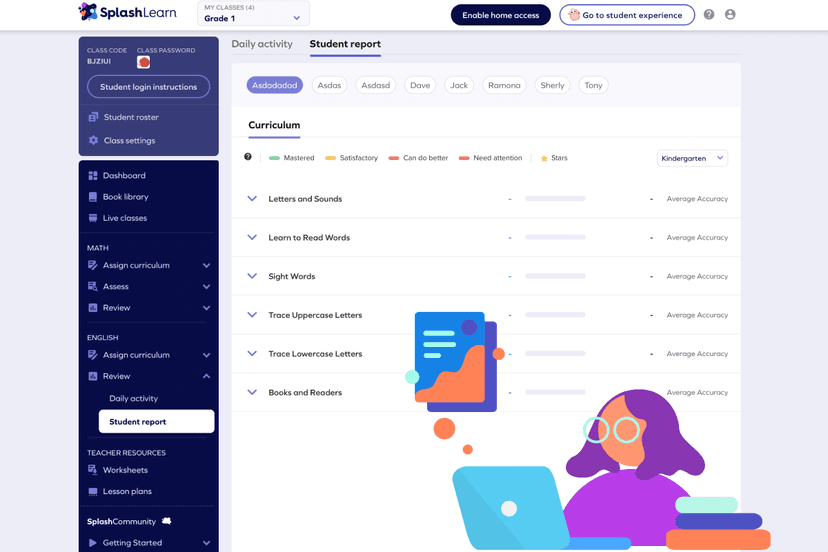
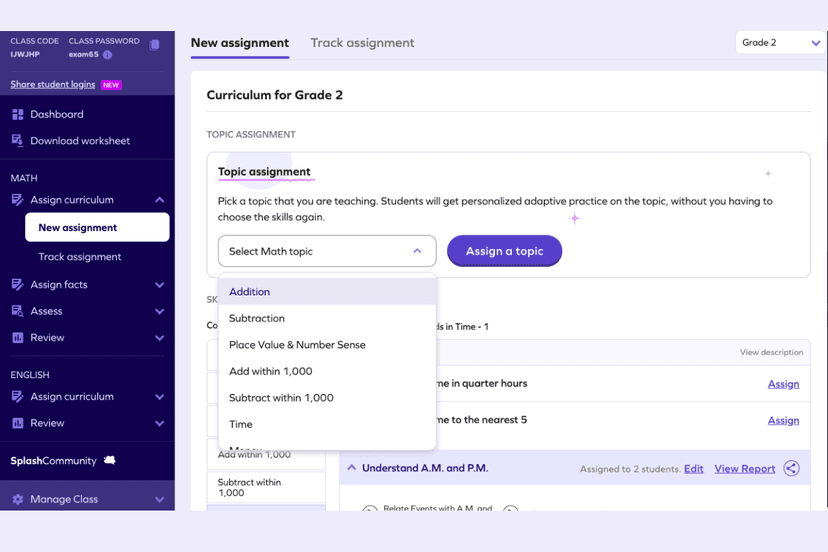
SplashLearn uses a gamified, adaptive mastery-based progression model to deliver math and reading practice. The core learning mechanic relies on immediate feedback and repetitive retrieval practice disguised within interactive digital environments. When your child logs in, they are placed on a structured learning path aligned to specific grade-level standards. They complete short, interactive games that require them to solve math equations, identify phonics sounds, or read short passages. The app's algorithm tracks their accuracy and response time, automatically adjusting the difficulty of subsequent questions. Correct answers earn virtual coins and unlock new digital pets or game areas, functioning as an extrinsic motivation system. Incorrect answers trigger brief visual corrections, though the app rarely provides deep, step-by-step worked examples. Once a child demonstrates consistent accuracy on a specific skill, the app marks it as mastered and progresses them to the next module. Teachers and parents view this progression through a backend dashboard that aggregates the performance data into actionable skill mastery reports.
Strengths and tradeoffs of SplashLearn
SplashLearn's biggest strength is its adaptive algorithm that provides targeted retrieval practice, while its biggest weakness is the over-reliance on extrinsic game rewards that can distract from learning. From a learning science perspective, the app effectively uses spaced repetition and retrieval practice to build automaticity in foundational skills like single-digit addition or early phonics. By constantly testing the user's recall in low-stakes environments, it helps move basic facts into long-term memory. The adaptive difficulty ensures learners are not frustrated by tasks that are too hard or bored by tasks that are too easy. Conversely, the heavy integration of game mechanics introduces extraneous cognitive load. The colorful animations, sound effects, and virtual currency systems compete for your child's working memory, potentially degrading the encoding of educational content. Furthermore, the app lacks robust instructional scaffolding. When a student struggles with a new concept, SplashLearn provides corrective feedback but often fails to supply explicit worked examples or conceptual modeling to explain the core reasoning behind the correct answer. Therefore, it is highly effective for fluency building but inadequate for initial concept acquisition.
Who Might Benefit From SplashLearn?
SplashLearn is best for Pre-Kindergarten through 5th-grade students who need engaging, repetitive drill practice to build basic math and reading fluency alongside formal classroom instruction. The platform is highly effective for children who struggle with motivation and respond well to extrinsic digital rewards and game-based learning environments. It serves parents looking for a structured, curriculum-aligned way to reinforce school lessons at home, as well as teachers needing an independent center activity. It is not suitable for students who require deep conceptual modeling, as the app prioritizes fast-paced practice over comprehensive, step-by-step instruction.
Data Transparency
Meets Data Transparency Standard
SplashLearn meets our data transparency standard at Level 2 of 3 (Parent control). Level 3 needs the policy to document an API for retrieving their own data and a named export format.
27 of 35 checks passed
Level 1 · Basic protections
Does not sell data or target ads at students, limits sharing, and lets parents see and delete their child's data.
Level 2 · Parent control (meets the standard)
Families can get their data out, know who processes it, and know how long it is kept.
Level 3 · Direct data access
Families or schools can pull their own data through an API, in a stated format.
Not documented: an API for retrieving their own data, a named export format
View all 35 checks
Parent Access7/8
Does the policy mention parents specifically?
“If you are a Parent of a Child User of our Services, you may contact us at any time to ask that (a) we stop collecting Personal Data from such Child User, (b) we delete any Personal Data already collected from such Child User”
Can parents view their child's data?
“For Child Users, no matter whether you're under the age of 13 or above, your Parent, teacher, or school administrator can view all information within or associated with your SplashLearn account”
Can parents modify their child's data?
“In order to access, modify or correct Child User Personal Data related to your account, your Parent or teacher (in case of school accounts) can do so by using such functionality provided within our services”
Can parents delete their child's account?
“Your Parent or teacher has the right to ask us to delete their account and/or the associated student accounts at any time.”
Is there a dedicated Children's Privacy section?
“Please read this Child User Privacy Policy to learn how we treat your personal data if you are a student user, a child under the age of 13 or deemed a child or minor by your state's law”
Does it reference COPPA compliance?
“The Children's Online Privacy Protection Act ("COPPA") requires that online service providers obtain parental consent before they knowingly collect personally identifiable information online from children who are under 13 years of age.”
Does it reference FERPA compliance?
The policy does not mention FERPA.
Is parental consent required for child accounts?
“SplashLearn obtains verifiable parental consent before collecting Personal Data from Child Users. If the Parent does not provide consent, we will not collect, use or disclose any Personal Data about the Child User.”
Data Portability3/5
Can users access their personal data?
“You may review, modify, stop collection of or remove your Personal Data or, if you are a Parent, your Child User's Personal Data identified below at any time by logging into your account and accessing features to edit your profile and/or account information.”
Can users download/export their data?
“You have the right to obtain copies of your information in a structured, commonly used format so that you can move your data between our service and the services of others.”
Is there a self-service data access tool?
“Some personal data, such as the account holder's name and email address can be found and updated using the account management tools on our website at "https://www.splashlearn.com/profile".”
Is a specific data format mentioned for export?
The policy only says "machine-readable" or "structured, commonly used format" and names no specific format.
Is there an API for data access?
The policy mentions only third-party APIs that the vendor uses, not an API for users to get their own data.
Data Minimization2/6
Is data collection itemized?
“We collect certain information about Child Users such as screen name, age and gender directly from Parents when such Parents set up an account.”
Can the app be used without a real name?
The policy says teachers or school administrators may provide a student's full name, so real names can be collected.
Can the app be used without an email?
The policy does not say that student email addresses are never collected, and it mentions deleting emails tied to accounts.
Does it state collection is limited to what is necessary?
“We do not condition participation in our Services on disclosure of more Personal Data from Child Users than is reasonably necessary for that participation”
Is IP address anonymized or truncated?
The policy says IP addresses are collected and are de-identified only when an account is deleted, not anonymized or truncated when collected.
Is location tracking explicitly excluded?
The policy says it may receive location information from mobile apps or location-enabled browsers.
Third-Party Protection6/7
Does it explicitly state no selling of data?
“We never sell Child User Personal Data collected and we do not share Child User Personal Data with third parties for their own marketing, advertising purposes, or creating advertising profiles.”
Are third-party providers named?
“Our payment processing partners, PayPal, Inc. ("PayPal") and Stripe, Inc. ("Stripe"), collect your voluntarily-provided payment card information necessary to process your payment.”
Are providers contractually restricted?
“contractually prohibits such partners from using the identifiers for their own independent purposes (including their own advertising, profiling, or cross-service tracking), and requires them to implement appropriate technical and organizational safeguards consistent with this Privacy Policy.”
No-targeted-advertising commitment?
“We do not use or disclose Personal Data of a Child User or any other information about a Child User collected through such Child User's School (whether Personal Data or otherwise) for behavioral targeting of advertisements or for creating a profile of such Child User.”
Is AI/ML data sharing addressed?
The policy does not address AI or machine learning data use or sharing.
Child-specific sharing restriction?
“We never share that Child User's Personal Data with any third party other than service providers.”
Cookies/tracking limited or opt-out?
“As applicable, you may opt-out from any "sales," "shares," or targeted advertising through Cookies, by using the following methods:”
Deletion & Retention5/5
Can users delete their account?
“You have the right to ask us to delete your account at any time.”
Self-service deletion mechanism?
“When a teacher or school administrator deletes an account from within their SplashLearn dashboard, the deleted accounts are kept in a recoverable state for 14 days before the deletion actually takes place.”
Specific data retention timeline?
“If neither the teacher, nor any of the Child Users associated with the teacher account have logged into their account in 2 years or performed any activity, the teacher and the associated Child User accounts will be anonymized.”
Auto-deletion of inactive accounts?
“For accounts created by Parents, if neither the Child User, nor Parent(s) or any of the other Child User accounts associated with the Parents' accounts have logged into their account in 2 years and the Parent does not hold an active paid subscription, the Parent and associated student account(s) will be anonymized.”
Post-deletion handling described?
“When an account is deleted at the request of a Parent, teacher, or school administrator, SplashLearn de-identifies or deletes Personal Data tied to the accounts, including emails, usernames, device tokens, device identifiers, and IP addresses.”
Advertising4/4
Advertising model explicitly disclosed?
“We also do not serve any advertisements including contextual and personalized ads on our services.”
Free from third-party advertisements?
“We do not display third party advertisements on our Services or use third party Cookies to track Child Users for advertising purposes.”
Children excluded from ad targeting?
“The Services do not use Child User Personal Data for the purpose of developing profiles for the behavioral targeting of advertisements.”
Ad-free option available?
“We also do not serve any advertisements including contextual and personalized ads on our services.”
Meets Data Transparency Standard
The reviewed policy met our data transparency standard. This result describes the policy disclosures we assessed. Actual practices and legal compliance were not verified.
About this evaluation: Based on automated analysis of Privacy Policy and Child User Privacy Policy against 35 policy-disclosure questions, including questions adapted from the Common Sense Privacy Program's published evaluation questions. TLS is not affiliated with Common Sense Media, and this is not a Common Sense rating. Quoted text is copied from the policy; unquoted notes are our summary. Results describe what the policy documents, not the company's actual practices. Privacy policies can change: this review reflects the version we analyzed and does not determine legal compliance.
Sources and review method
TLS combines product information and editorial analysis to explain how SplashLearn works, its tradeoffs, and the questions to ask before choosing it. Product features, an instructional rationale and evidence of learning outcomes are different kinds of information.
Formal Learning Standard assessment: not yet completed. Data Transparency findings are reported separately and do not establish learning effectiveness. Read our methodology.
Frequently Asked Questions About SplashLearn
Is SplashLearn free?
SplashLearn is entirely free for teachers and schools to use in the classroom during regular school hours. However, parents using the home version for after-school or weekend practice must purchase a subscription. This home access typically ranges from $7.99 to $11.99 per month depending on whether you choose a monthly or annual billing cycle. It provides full access to the parent dashboard and all subject areas.
Is SplashLearn good for elementary students?
Yes, SplashLearn is highly effective for elementary students who need supplemental practice alongside their regular schoolwork. It covers math from Pre-Kindergarten through 5th grade and reading from Pre-Kindergarten through 2nd grade. The gamified interface is specifically designed to hold the attention of younger children while they drill foundational skills, preventing the fatigue that often accompanies traditional worksheets.
What does SplashLearn teach?
SplashLearn teaches early childhood math and reading skills strictly aligned to standard school curriculums. The math modules comprehensively cover topics ranging from basic counting, addition, and subtraction in the early years to fractions, decimals, and early geometry in the upper elementary grades. The reading program focuses heavily on foundational phonics, sight word recognition, vocabulary building, and basic reading comprehension.
Has The Learning Standard evaluated SplashLearn?
TLS has not yet completed a Learning Standard evaluation of how well SplashLearn teaches. Its privacy policy has been reviewed for Data Transparency and reaches Level 2, Parent control.
Is SplashLearn COPPA compliant?
The reviewed privacy policy references COPPA. A policy reference alone does not establish COPPA compliance. Policy review note: The policy cites COPPA's parental consent requirement and says it follows it.
Is SplashLearn FERPA compliant?
A FERPA reference was not found in the reviewed privacy policy. This does not determine whether the app complies with FERPA. Policy review note: The policy does not mention FERPA.
Does SplashLearn have a children's privacy policy?
The reviewed policy includes a dedicated children's privacy section. Policy review note: There is a separate Child User Privacy Policy, which includes a section titled "Personal Data of Child Users".
Does SplashLearn sell student data?
The reviewed policy states that the app does not sell data. This is a policy statement; actual data practices were not verified. Policy review note: The vendor states it never sells child/student data, although the general policy discloses 'sales' of adult device and analytics data to advertising partners under state-law definitions.
Can you delete your data from SplashLearn?
The reviewed privacy policy describes account deletion. We have not tested the deletion process. Policy review note: Users can ask to have their account deleted.
Keep the SplashLearn decision brief
Keep the report exclusions, activity questions and a shared-purpose message in one page that helps caregivers make the same decision about extra app time. Subscribe to future TLS research updates and download the one-page PDF here immediately.
Screenshots
Take Action
For SplashLearn
If you represent SplashLearn and have a correction or new evidence, send the relevant source so we can review and update this page.
Submit a correctionDetails
- Pricing
- The program is free for teachers and schools to use. Depending on the plan the parents choose (home version), the cost varies as the subscription can range from $7.99 to $11.99 per month.
- Platforms
- Web Browser, iOS (Apple mobile), iPadOS (Apple tablet), Android (Google mobile), macOS (Apple), Chrome OS (Google)
- Grade Levels
- Preschool, Prekindergarten, Transitional Kindergarten, Kindergarten, 1st Grade, 2nd Grade, 3rd Grade, 4th Grade, 5th Grade
- Website
- Visit site