
Radius
Product by Radius Systems LLC
Facts checked: Not yet checked
Our take (not a Learning Standard rating). This label applies to learning-science judgments throughout this overview.
Our take (not a Learning Standard rating)
Radius does not teach students directly. Instead, it is an AI-powered generation tool designed for educators to produce worksheets and lesson plans. While it can generate materials that utilize proven learning science strategies like retrieval practice, the effectiveness of these resources depends entirely on the teacher's implementation rather than the app itself.
Pros
- Generates curriculum-aligned lesson plans rapidly to reduce educator preparation time.
- Allows teachers to customize worksheets to target specific retrieval practice or spaced repetition goals.
- Supports an extensive range of grade levels from early childhood through adult education.
Cons
- Operates on a restrictive credit-based system that limits the number of resources a teacher can generate per month.
- Requires heavy educator oversight to ensure AI-generated materials are factually accurate and pedagogically sound.
- Lacks any direct student interaction, automated feedback, or adaptive difficulty mechanisms.
What Do We Know About Radius?
Radius is not an app for your child to use independently, as it is a lesson-planning tool built strictly for teachers. You will not download this app on your child's tablet to teach them math or reading. Instead, your child's teacher might use Radius to generate the worksheets, project-based learning prompts, or direct instruction materials used in the classroom. Because this is a generative AI platform, the quality of the learning experience depends entirely on how the educator edits and deploys the materials. If a teacher uses the tool to generate high-quality retrieval practice exercises, your child will benefit from evidence-based learning. However, the app itself provides no automated feedback, no spaced repetition algorithms for students, and no adaptive difficulty. It functions strictly as a document creator. If your child's school uses materials generated by Radius, know that the teacher remains the primary driver of instruction, with the app acting only as an administrative assistant to save preparation time.
How Does Radius Work?
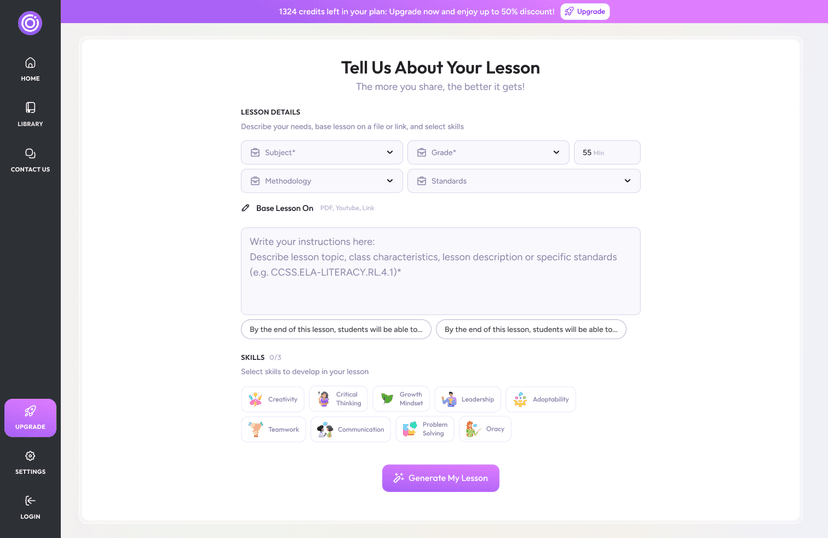
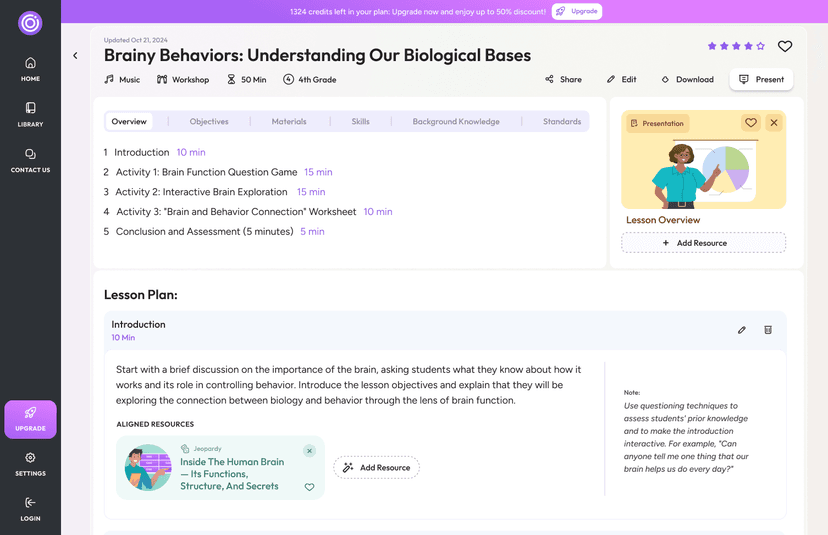
Radius uses AI-driven content generation to support direct instruction, game-based, and project-based learning. Educators input their curriculum standards, desired grade level, and subject matter into the platform. The AI then processes these parameters to output ready-to-use classroom materials, such as structured lesson plans, student worksheets, and classroom activities. The platform operates on a credit-based system, meaning teachers spend credits each time they generate a new resource. While the tool covers a massive range of subjects from infant care to adult professional credentialing, it does not interact with students. Teachers must print or digitally distribute the generated files through their own learning management systems. Because the AI compiles information based on prompts, educators must review all outputs for accuracy and align them with cognitive load theory to ensure the generated worksheets do not overwhelm students with poorly structured or extraneous information.
Strengths and tradeoffs of Radius
The biggest strength of Radius is its ability to rapidly generate diverse classroom materials, while its biggest weakness is its reliance on a credit-based subscription model that restricts heavy usage. Strengths: For educators managing heavy workloads, Radius drastically cuts down the time required to format direct instruction plans and worksheets. When prompted correctly, teachers can use the tool to design retrieval practice assessments and worked examples for complex math or science concepts. It covers an exhaustive list of grade levels, making it versatile across different educational contexts. Weaknesses: As an AI generator, Radius cannot replace the nuanced differentiation a human teacher provides. It does not feature adaptive learning pathways or provide immediate, corrective feedback to students. Additionally, because the Basic and Master Planner tiers run on a credit system, educators may find themselves rationing their generations rather than freely experimenting with different pedagogical designs. Furthermore, AI platforms are prone to hallucination, meaning educators must spend time verifying the factual and pedagogical accuracy of every generated document before putting it in front of students.
Who Might Benefit From Radius?
Radius is best for classroom teachers and curriculum designers who need to rapidly generate worksheets and lesson plans across multiple subjects. It is highly useful for educators managing broad age ranges, from early childhood to adult education, who understand how to structure prompts to create pedagogically sound materials. It is not suitable for parents seeking at-home tutoring software or students looking for independent study tools, as the platform lacks direct student-facing instruction, interactive elements, and feedback mechanisms.
Data Transparency
Does Not Meet Data Transparency Standard
Radius does not meet our data transparency standard. Its privacy policy does not document basic protections, including parents' right to see their child's data and parents' right to delete their child's data.
17 of 35 checks passed
Level 1 · Basic protections
Does not sell data or target ads at students, limits sharing, and lets parents see and delete their child's data.
Not documented: parents' right to see their child's data, parents' right to delete their child's data
Level 2 · Parent control (meets the standard)
Families can get their data out, know who processes it, and know how long it is kept.
Not documented: a data retention timeline, self-service deletion
Level 3 · Direct data access
Families or schools can pull their own data through an API, in a stated format.
Not documented: an API for retrieving their own data, a named export format
View all 35 checks
Parent Access5/8
Does the policy mention parents specifically?
“For users under the age of 13, Radius requires that Educational Institutions obtain parental consent on behalf of the student, as permitted under COPPA.”
Can parents view their child's data?
The policy does not give parents a right to view their child's data.
Can parents modify their child's data?
The policy does not give parents a right to modify their child's data.
Can parents delete their child's account?
The policy says Student Data can be deleted at the Educational Institution's request, but it does not say parents can request deletion.
Is there a dedicated Children's Privacy section?
“For users under the age of 13, Radius requires that Educational Institutions obtain parental consent on behalf of the student, as permitted under COPPA.”
Does it reference COPPA compliance?
“We comply with the Children’s Online Privacy Protection Act (COPPA) by relying on Educational Institutions to obtain parental consent for users under 13.”
Does it reference FERPA compliance?
“We comply with the Family Educational Rights and Privacy Act (FERPA) by acting as a "School Official" for Educational Institutions, processing Student Data only on their behalf.”
Is parental consent required for child accounts?
“Radius does not directly collect any personally identifiable information (PII) from students under 13 without parental consent facilitated by the Educational Institution.”
Data Portability2/5
Can users access their personal data?
“Right to Know: You can request details about the personal data we collect and how we use it.”
Can users download/export their data?
“Request data portability.”
Is there a self-service data access tool?
The policy describes no self-service tool for accessing data.
Is a specific data format mentioned for export?
The policy does not name any export format.
Is there an API for data access?
The policy does not describe an API for users or schools to retrieve their data.
Data Minimization2/6
Is data collection itemized?
“Student Data includes nickname, progress, and activity data within our educational services.”
Can the app be used without a real name?
The policy says Google Account sign-up asks for a name and that student PII may be collected with parental consent, so it does not rule out collecting real names.
Can the app be used without an email?
The policy says sign-up asks for an email address and does not state that student emails are never collected.
Does it state collection is limited to what is necessary?
“We collect personal information only as necessary to provide educational services.”
Is IP address anonymized or truncated?
The policy does not say IP addresses are anonymized or truncated.
Is location tracking explicitly excluded?
The policy says location information may be collected using IP address, GPS and other sensors.
Third-Party Protection6/7
Does it explicitly state no selling of data?
“Right to Opt-Out of Sale: We do not sell your personal data.”
Are third-party providers named?
“Our service, Radius, uses the YouTube API Services for educational content delivery.”
Are providers contractually restricted?
“Any data sharing will comply with applicable laws and will include data protection agreements with any subprocessors.”
No-targeted-advertising commitment?
“Student Data will not be used for marketing, targeted advertising, or profiling.”
Is AI/ML data sharing addressed?
The policy gives guidance on AI-generated content but does not address sharing data with AI/ML systems.
Child-specific sharing restriction?
“Radius does not disclose Student Data to third parties, except as necessary for the provision of the Services and as allowed by law.”
Cookies/tracking limited or opt-out?
“Additional processing is based on your consent (Article 6(1)(a)) for non-essential cookies, marketing communications, and other specific purposes.”
Deletion & Retention1/5
Can users delete their account?
“Right to Delete: You can request the deletion of your personal data, subject to legal exceptions.”
Self-service deletion mechanism?
The policy offers deletion only by request and describes no self-service deletion tool.
Specific data retention timeline?
The policy keeps data for the duration of the educational purpose or as the institution directs, with no specific timeline.
Auto-deletion of inactive accounts?
The policy does not address automatic deletion of inactive accounts.
Post-deletion handling described?
The policy only warns that data may not be recoverable once an account is closed and does not describe how data is handled after deletion.
Advertising1/4
Advertising model explicitly disclosed?
The policy has only generic Google-derived references to ads and does not explicitly describe the product's advertising model.
Free from third-party advertisements?
The policy does not state that the product has no third-party ads, and its generic text refers to ads.
Children excluded from ad targeting?
“Radius will not use Student Data for advertising, marketing, or profiling purposes.”
Ad-free option available?
The policy does not state that the product is ad-free or offer an ad-free option.
What This Means
The policy review did not meet our data transparency standard. The checks above show the documented findings and unknowns. A missing statement does not establish how the app handles data in practice.
About this evaluation: Based on automated analysis of Terms and Conditions and Radius against 35 policy-disclosure questions, including questions adapted from the Common Sense Privacy Program's published evaluation questions. TLS is not affiliated with Common Sense Media, and this is not a Common Sense rating. Quoted text is copied from the policy; unquoted notes are our summary. Results describe what the policy documents, not the company's actual practices. Privacy policies can change: this review reflects the version we analyzed and does not determine legal compliance.
Sources and review method
TLS combines product information and editorial analysis to explain how Radius works, its tradeoffs, and the questions to ask before choosing it. Product features, an instructional rationale and evidence of learning outcomes are different kinds of information.
Formal Learning Standard assessment: not yet completed. Data Transparency findings are reported separately and do not establish learning effectiveness. Read our methodology.
Frequently Asked Questions About Radius
Is Radius free?
No, Radius is not free. It operates on a subscription model starting at $17 per month for the Basic Plan and $27 per month for the Master Planner Plan. Both plans use a credit-based system, meaning heavy users may need to upgrade or purchase additional credits to generate more resources.
Is Radius good for elementary students?
Radius is not meant for students of any age to use directly. It is a teacher-facing tool used to generate lesson plans and worksheets for students from prekindergarten through adult education. The effectiveness for elementary students depends entirely on how the teacher utilizes the printed or digital outputs.
What does Radius teach?
Radius does not teach specific subjects directly. It is an AI generator that produces curriculum-aligned resources for early childhood education, humanities, STEM, and career and technical education. Educators input their desired topics, and the platform creates corresponding instructional materials.
Has The Learning Standard evaluated Radius?
TLS has not yet completed a Learning Standard evaluation of how well Radius teaches. Its privacy policy has been reviewed for Data Transparency and does not yet document the basic protections (Level 1).
Is Radius COPPA compliant?
The reviewed privacy policy references COPPA. A policy reference alone does not establish COPPA compliance. Policy review note: The policy states it complies with COPPA.
Is Radius FERPA compliant?
The reviewed privacy policy references FERPA. A policy reference alone does not establish FERPA compliance. Policy review note: The policy states it complies with FERPA.
Does Radius have a children's privacy policy?
The reviewed policy includes a dedicated children's privacy section. Policy review note: This text sits under its own "COPPA Compliance" heading.
Does Radius sell student data?
The reviewed policy states that the app does not sell data. This is a policy statement; actual data practices were not verified. Policy review note: The policy states it does not sell personal data.
Can you delete your data from Radius?
The reviewed privacy policy describes account deletion. We have not tested the deletion process. Policy review note: Users can request deletion of their personal data.
Follow TLS Research
Subscribe to future TLS research updates: app reviews, findings, and what the evidence shows.
Screenshots

Take Action
For Radius
If you represent Radius Systems LLC and have a correction or new evidence, send the relevant source so we can review and update this page.
Submit a correctionDetails
- Pricing
- Radius offers a subscription-based pricing model with two plans: Basic Plan at $17/month and Master Planner Plan at $27/month, both operating on a credits-based system for resource generation. Conditions that may affect costs include the level of usage, as higher resource demands may require upgrading to the Elite Plan for more credits. Discounts may be available for bulk purchases or educational institutions, and promotional offers, such as introductory rates or affiliate-driven discounts, may temporarily reduce costs.
- Platforms
- Web Browser
- Grade Levels
- Infant/Toddler, Preschool, Prekindergarten, Transitional Kindergarten, Kindergarten, 1st Grade, 2nd Grade, 3rd Grade, 4th Grade, 5th Grade, 6th Grade, 7th Grade, 8th Grade, 9th Grade, 10th Grade, 11th Grade, 12th Grade, Bachelor's degree, Adult Education, Professional or Technical Credential
- Website
- Visit site