
QuestionWell
Product by QuestionWell
Facts checked: Not yet checked
Our take (not a Learning Standard rating). This label applies to learning-science judgments throughout this overview.
Our take (not a Learning Standard rating)
QuestionWell does not teach students directly, but it equips educators with AI-generated quizzes based on input text. It effectively facilitates retrieval practice and frequent low-stakes testing, which learning science shows boosts retention. However, the quality of instruction depends entirely on the teacher's original source material and careful review of the AI output.
Pros
- Streamlines the creation of low-stakes quizzes to facilitate frequent retrieval practice.
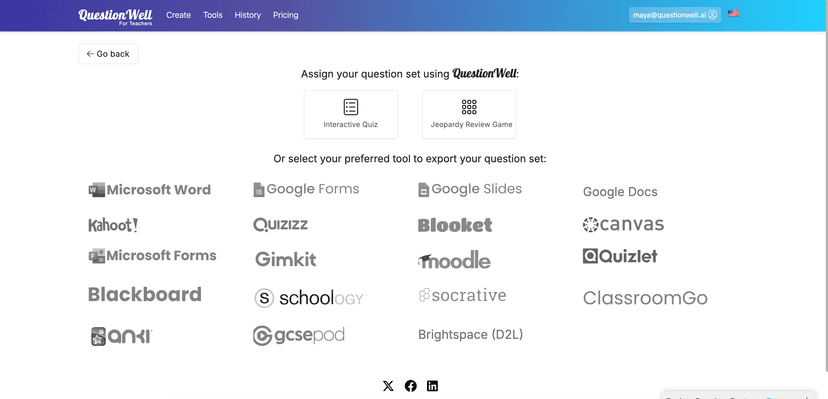
- Exports directly to popular edtech platforms to reduce administrative workload.
- Allows alignment with specific educational standards to ensure targeted competency-based learning.
- Supports a wide range of subjects and grade levels from elementary through higher education.
Cons
- Relies heavily on the accuracy of the user's input text, risking the generation of flawed learning materials.
- Lacks direct student-facing instruction, meaning it cannot replace core teaching tools.
- Requires the paid tier to upload files and align questions to specific learning standards.
- AI-generated distractors in multiple-choice questions may sometimes lack the necessary plausibility to effectively test deep understanding.
What Do We Know About QuestionWell?
QuestionWell is highly effective for generating practice materials, provided an adult carefully reviews the AI-generated content before assigning it. This tool does not teach your child directly. Instead, it serves as a co-pilot for educators and homeschooling parents to quickly build quizzes, vocabulary lists, and reading comprehension questions based on any text. Learning science consistently demonstrates that frequent low-stakes testing, known as retrieval practice, is one of the most effective methods for long-term memory retention. QuestionWell makes this easy to implement. You supply a reading passage, and the AI generates targeted questions. However, because it relies on generative AI, the system can sometimes produce inaccurate or poorly phrased questions. You must verify that the multiple-choice distractors are plausible and that the correct answers are truly accurate. While the free version allows basic question generation, you will need a paid subscription to upload documents or map the questions to specific academic standards. Ultimately, QuestionWell is a productivity multiplier that helps you implement evidence-based testing strategies, but it requires human oversight to ensure instructional quality.
How Does QuestionWell Work?
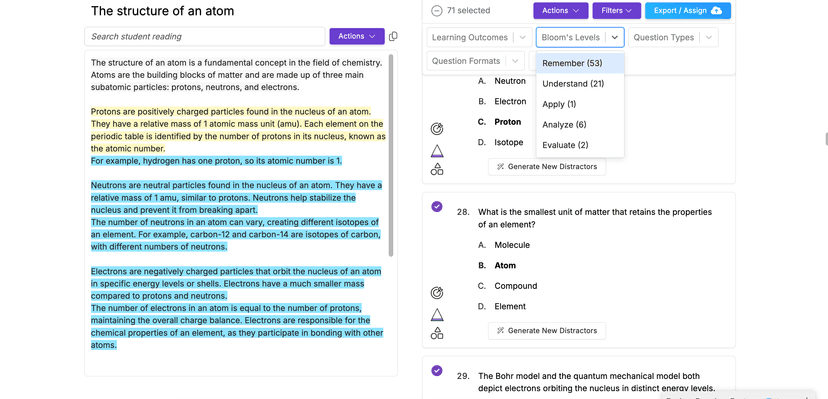
QuestionWell utilizes AI-driven content generation to support retrieval practice and direct instruction. You begin by pasting a text passage, entering a topic, or uploading a document into the system. The AI then processes this input to generate learning objectives, essential questions, reading passages, and multiple-choice questions. You can manually edit these questions, remove items that do not align with your goals, or ask the AI to generate more options. Once you finalize the question set, you can export the materials directly into platforms like Canvas, Kahoot, Quizizz, or Google Forms. This interoperability allows you to seamlessly integrate the generated questions into your existing gamified learning or mastery-based progression systems. The core mechanic relies entirely on the educator's curation. The app acts solely as an authoring tool, meaning it does not track student progress, provide adaptive feedback, or measure mastery directly within its own interface.
Strengths and tradeoffs of QuestionWell
QuestionWell's biggest strength is its ability to rapidly generate retrieval practice materials, while its biggest weakness is the inherent unreliability of AI-generated content without strict human oversight. Rapid Quiz Generation: The platform excels at reducing the time it takes to build formative assessments. By instantly generating questions from source text, it allows educators to employ spaced repetition and frequent testing, both of which are proven by learning science to strengthen memory consolidation. Platform Interoperability: The ability to export directly to 15 different edtech platforms means you can easily place these questions into systems that do track student mastery. Lack of Adaptive Feedback: Because QuestionWell is a teacher-facing generation tool, it offers no direct feedback loop for the student. If a student gets a question wrong on the exported platform, the remediation depends entirely on that secondary platform, not QuestionWell. Quality Control Risks: Generative AI often struggles to create multiple-choice distractors that effectively diagnose specific student misconceptions. You must carefully review the output to ensure the wrong answers are pedagogically useful rather than just obviously incorrect filler.
Who Might Benefit From QuestionWell?
QuestionWell is best for classroom teachers and homeschooling parents who need to quickly produce formative assessments and reading comprehension checks. It serves educators across a massive spectrum, from first-grade reading instructors to university professors, due to its subject-agnostic AI model. It is particularly useful for those who already use platforms like Quizizz or Canvas and want to speed up their content creation workflow. This is not a tool for students to use independently, nor is it suitable for educators looking for a standalone, comprehensive curriculum provider.
Data Transparency
Does Not Meet Data Transparency Standard
QuestionWell does not meet our data transparency standard. Its privacy policy does not document basic protections, including a COPPA or FERPA commitment, parents' right to see their child's data and parents' right to delete their child's data.
21 of 35 checks passed
Evaluated September 2026
Privacy Policy →Level 1 · Basic protections
Does not sell data or target ads at students, limits sharing, and lets parents see and delete their child's data.
Not documented: a COPPA or FERPA commitment, parents' right to see their child's data, parents' right to delete their child's data
Level 2 · Parent control (meets the standard)
Families can get their data out, know who processes it, and know how long it is kept.
Level 3 · Direct data access
Families or schools can pull their own data through an API, in a stated format.
Not documented: an API for retrieving their own data, a named export format
View all 35 checks
Parent Access2/8
Does the policy mention parents specifically?
“If we become aware that we have collected Personal Data from persons under the age of 18 without verification of parental consent, we take steps to remove that information from our servers.”
Can parents view their child's data?
The policy does not give parents any right to view their child's data.
Can parents modify their child's data?
The policy does not give parents any right to modify their child's data.
Can parents delete their child's account?
The policy does not give parents any right to delete their child's data or account.
Is there a dedicated Children's Privacy section?
“Our Website is not intended for use by those under the age of 18, nor is it targeted to those under the age of 18.”
Does it reference COPPA compliance?
The policy does not mention COPPA.
Does it reference FERPA compliance?
The policy does not mention FERPA.
Is parental consent required for child accounts?
The policy says the service is not for users under 18 and does not describe parental consent for child accounts.
Data Portability3/5
Can users access their personal data?
“You can ask to see, change, or delete your personal data, or limit how we use it.”
Can users download/export their data?
“You also have the right to transfer your data and to stop us from using your data for marketing.”
Is there a self-service data access tool?
“You can exercise these rights by managing your account settings or contacting us at security@questionwell.ai.”
Is a specific data format mentioned for export?
The policy does not name a format for exported data.
Is there an API for data access?
The policy mentions only the vendor's use of the OpenAI API, not an API that users can use to get their own data.
Data Minimization2/6
Is data collection itemized?
“Technologically Collected Information.** Our servers, managed by Microsoft, gather some standard technical details about your device and the programs you use, like the type of internet browser, your operating system, and your IP address”
Can the app be used without a real name?
The policy says signing in with Google or Microsoft gives the vendor the user's name.
Can the app be used without an email?
The policy says signing in with Google or Microsoft gives the vendor the user's email address.
Does it state collection is limited to what is necessary?
The policy limits how long data is kept and what it is used for, but does not say collection is limited to what is necessary.
Is IP address anonymized or truncated?
The policy says IP addresses are collected and usage data is aggregated, but does not say IP addresses are anonymized or truncated.
Is location tracking explicitly excluded?
“We do not collect biometric or specific location data.”
Third-Party Protection7/7
Does it explicitly state no selling of data?
“We do not sell your personal information to third parties, and you will never need to opt out of such practices with us because we simply don't engage in them.”
Are third-party providers named?
“We use the Application Program Interface (API) of OpenAI to power our services.”
Are providers contractually restricted?
“Your data remains fully under our control. HubSpot processes it on our behalf and cannot use it for independent purposes.”
No-targeted-advertising commitment?
“We do not share your personal information with third parties for targeted advertising. You are already opted out because we do not conduct these activities.”
Is AI/ML data sharing addressed?
“We have opted OUT of allowing OpenAI to use the data they get from us to train their models.”
Child-specific sharing restriction?
“We do not knowingly collect Personal Data from those under the age of 18, nor do we knowingly sell or otherwise disclose the Personal Data of those under the age of 18.”
Cookies/tracking limited or opt-out?
“You can adjust your cookie settings directly in each browser and device you use.”
Deletion & Retention3/5
Can users delete their account?
“If you want us to delete it, you have the right to do so, by emailing us at security@questionwell.ai. It will be deleted within 60 days.”
Self-service deletion mechanism?
“Individual users can choose to delete any data they’ve added to QuestionWell at any time.”
Specific data retention timeline?
“If you want us to delete it, you have the right to do so, by emailing us at security@questionwell.ai. It will be deleted within 60 days.”
Auto-deletion of inactive accounts?
The policy covers deleting data of schools that stop using the service, but not automatic deletion of inactive accounts.
Post-deletion handling described?
The policy gives a deletion deadline but does not say what happens to data after deletion, such as in backups.
Advertising4/4
Advertising model explicitly disclosed?
“No ads are displayed on this platform.”
Free from third-party advertisements?
“No ads are displayed on this platform.”
Children excluded from ad targeting?
“When we process information received via Clever, we do so to provide and support the integration and our Services, and we do not use student information received via Clever for advertising.”
Ad-free option available?
“No ads are displayed on this platform.”
What This Means
The policy review did not meet our data transparency standard. The checks above show the documented findings and unknowns. A missing statement does not establish how the app handles data in practice.
About this evaluation: Based on automated analysis of Privacy Policy against 35 policy-disclosure questions, including questions adapted from the Common Sense Privacy Program's published evaluation questions. TLS is not affiliated with Common Sense Media, and this is not a Common Sense rating. Quoted text is copied from the policy; unquoted notes are our summary. Results describe what the policy documents, not the company's actual practices. Privacy policies can change: this review reflects the version we analyzed and does not determine legal compliance.
Sources and review method
TLS combines product information and editorial analysis to explain how QuestionWell works, its tradeoffs, and the questions to ask before choosing it. Product features, an instructional rationale and evidence of learning outcomes are different kinds of information.
Formal Learning Standard assessment: not yet completed. Data Transparency findings are reported separately and do not establish learning effectiveness. Read our methodology.
Frequently Asked Questions About QuestionWell
Is QuestionWell free?
Yes, QuestionWell offers a generous free tier. The free version allows basic text input and question generation. However, features like uploading files, aligning questions to specific learning standards, and specifying exact question types require a paid subscription.
Is QuestionWell good for elementary students?
Yes, when mediated by a teacher or parent. The tool does not interact with the child directly. Instead, you use it to generate age-appropriate reading materials and quizzes for early grades, making it effective for building foundational vocabulary and comprehension.
What does QuestionWell teach?
QuestionWell does not teach a specific curriculum. It generates practice materials for Humanities, Math, Science, and more, based entirely on the text or topics you provide. It acts as an authoring tool rather than a source of original educational content.
QuestionWell vs. ChatGPT: Which is better for teachers?
QuestionWell is specifically optimized for educational workflows. While ChatGPT can generate questions, QuestionWell automatically formats those questions, aligns them to learning standards, and exports them directly into popular edtech platforms, saving educators significant administrative time.
Has The Learning Standard evaluated QuestionWell?
TLS has not yet completed a Learning Standard evaluation of how well QuestionWell teaches. Its privacy policy has been reviewed for Data Transparency and does not yet document the basic protections (Level 1).
Is QuestionWell COPPA compliant?
A COPPA reference was not found in the reviewed privacy policy. This does not determine whether the app complies with COPPA. Policy review note: The policy does not mention COPPA.
Is QuestionWell FERPA compliant?
A FERPA reference was not found in the reviewed privacy policy. This does not determine whether the app complies with FERPA. Policy review note: The policy does not mention FERPA.
Does QuestionWell have a children's privacy policy?
The reviewed policy includes a dedicated children's privacy section. Policy review note: The policy has a separate "Age of Consent" section about minors' data.
Does QuestionWell sell student data?
The reviewed policy states that the app does not sell data. This is a policy statement; actual data practices were not verified. Policy review note: The policy states the vendor does not sell personal information.
Can you delete your data from QuestionWell?
The reviewed privacy policy describes account deletion. We have not tested the deletion process. Policy review note: Users can ask for their personal data to be deleted.
Follow TLS Research
Subscribe to future TLS research updates: app reviews, findings, and what the evidence shows.
Screenshots
Take Action
For QuestionWell
If you represent QuestionWell and have a correction or new evidence, send the relevant source so we can review and update this page.
Submit a correctionDetails
- Pricing
- A generous free tier and affordable paid tiers for features such as uploading files, aligning to standards, and specifying question types.
- Platforms
- Web Browser, Chrome OS (Google)
- Grade Levels
- 1st Grade, 2nd Grade, 3rd Grade, 4th Grade, 5th Grade, 6th Grade, 7th Grade, 8th Grade, 9th Grade, 10th Grade, 11th Grade, 12th Grade, Associate's degree, Bachelor's degree, Post-baccalaureate certificate, Master's Degree
- Website
- Visit site