
Learning Lights Keyboard
Product by KeyMaster Keyboarding
Facts checked: Not yet checked
Our take (not a Learning Standard rating). This label applies to learning-science judgments throughout this overview.
Our take (not a Learning Standard rating)
While The Learning Standard has not yet formally evaluated the Learning Lights Keyboard, its hardware design effectively forces retrieval practice. By instantly blacking out key lettering, it removes visual scaffolding and compels students to rely on muscle memory. However, it requires separate software to provide actual instruction or feedback.
Pros
- Forces active recall and muscle memory development by completely removing visual key scaffolding.
- Allows immediate transition between learning mode and standard use with a single toggle button.
- Eliminates the need for easily bypassed keyboard covers or cardboard shields during typing practice.
Cons
- Requires pairing with third-party typing software since it provides no native instruction or progress tracking.
- Lacks adaptive feedback to correct specific finger placement errors or systemic typing mistakes.
- Represents a significant hardware cost compared to traditional keyboard covers or software-only solutions.
What Do We Know About Learning Lights Keyboard?
The Learning Lights Keyboard effectively forces typing memorization by completely removing visual crutches, though it relies entirely on third-party software for actual instruction. Your child cannot look at the keys to find a letter when the blackout feature is engaged. This mechanism directly applies the learning science principle of retrieval practice. By forcing the brain to recall key locations from memory rather than simply reading the letters, the keyboard accelerates the transition from hunt-and-peck typing to true touch typing. Without visible letters, students must rely on muscle memory. This is a significant improvement over easily bypassed rubber keyboard skins or cardboard boxes. However, parents and educators must understand that this is strictly a hardware tool. It does not track typing speed, monitor accuracy, or provide lesson plans. You will need to pair this device with an established typing curriculum or software program to guide your child's progression. The physical toggle allows the keyboard to function normally for homework and general computer use, making it a versatile physical addition to a learning station, even if it lacks internal software analytics.
How Does Learning Lights Keyboard Work?
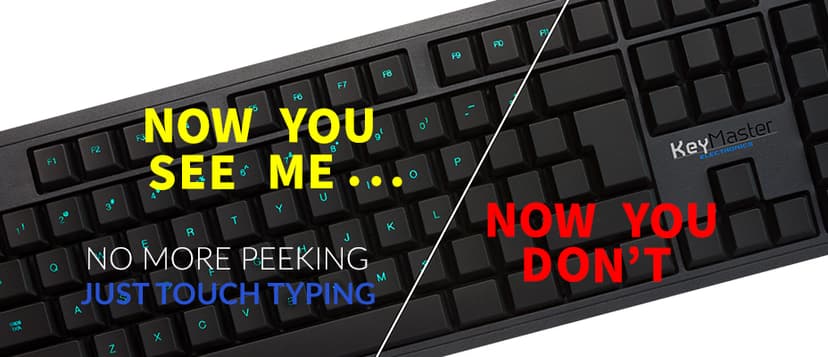
The Learning Lights Keyboard uses experiential learning and forced retrieval practice by physically altering the hardware interface during practice sessions. The device functions as a standard USB keyboard with an internal backlighting system that illuminates the keycap letters. When a student enters a typing lesson, they press a dedicated toggle button that immediately turns off the backlight, rendering the keycaps entirely blank. This eliminates visual scaffolding. When a student makes a mistake, they cannot visually search the keyboard for the correct key. Instead, they must mentally retrieve the location based on their home row finger positioning. Because the keyboard itself does not evaluate performance, the learning loop is completed by whatever typing software the school or parent chooses to run on the computer screen. Once the typing drill is finished, another press of the button restores the letters for normal navigation and non-typing tasks.
Strengths and tradeoffs of Learning Lights Keyboard
The biggest strength of the Learning Lights Keyboard is its uncompromising removal of visual scaffolding, while its biggest weakness is the complete lack of integrated instructional feedback. Forced Retrieval Practice: By turning off the key lights, the device prevents the visual hunt and peck method. Students must retrieve the key location from memory, which strengthens neural pathways and builds muscle memory much faster than typing with visible keys. Frictionless Transition: Traditional keyboard covers require physical removal and storage. This device's one-button toggle removes that friction, ensuring the blackout feature is actually used during practice and disabled for regular homework. Absence of Corrective Feedback: Because this is solely hardware, it cannot tell a student if they are using the correct finger for a specific key. A student could memorize the blank keyboard using entirely incorrect hand placements. Dependency on External Software: The device relies entirely on third-party programs to provide mastery-based progression, track words per minute, and measure accuracy.
Who Might Benefit From Learning Lights Keyboard?
This tool is best for elementary and middle school students who consistently cheat during typing practice by looking at their hands. Targeting grades 2 through 9, this hardware solves a specific behavioral issue in keyboarding education. It is ideal for computer lab settings or home learning environments where students already have access to high-quality typing software but struggle to build true touch-typing muscle memory. Because it functions as a normal keyboard when the lights are on, it works well for shared family or classroom computers where different users have different typing proficiencies.
Sources and review method
TLS combines product information and editorial analysis to explain how Learning Lights Keyboard works, its tradeoffs, and the questions to ask before choosing it. Product features, an instructional rationale and evidence of learning outcomes are different kinds of information.
Formal Learning Standard assessment: not yet completed. Data Transparency findings are reported separately and do not establish learning effectiveness. Read our methodology.
Frequently Asked Questions About Learning Lights Keyboard
Is Learning Lights Keyboard free?
No. The Learning Lights Keyboard is a physical hardware device that costs $54.99 per unit. KeyMaster Keyboarding does offer bulk purchasing discounts ranging from 10% to 20% for schools or districts buying multiple units for computer labs.
Is Learning Lights Keyboard good for elementary students?
Yes. It is highly effective for students in 2nd grade and up who are just beginning to learn keyboarding. By preventing the habit of looking at the keys early in their education, it forces the development of proper muscle memory and active recall.
What does Learning Lights Keyboard teach?
It facilitates touch typing and keyboard memorization. Through forced retrieval practice, it removes visual cues and trains students to map the QWERTY keyboard layout to their muscle memory, accelerating typing speed and accuracy when paired with typing software.
Does Learning Lights Keyboard include typing lessons?
No. The device is strictly a hardware tool. It does not include instructional software, games, or analytics. Parents and educators must provide their own typing curriculum or software program to track words per minute and accuracy.
Has The Learning Standard evaluated Learning Lights Keyboard?
TLS has not yet completed a Learning Standard evaluation of how well Learning Lights Keyboard teaches. TLS has not published a Data Transparency result for its privacy policy.
Follow TLS Research
Subscribe to future TLS research updates: app reviews, findings, and what the evidence shows.
Screenshots

Take Action
For Learning Lights Keyboard
If you represent KeyMaster Keyboarding and have a correction or new evidence, send the relevant source so we can review and update this page.
Submit a correctionDetails
- Pricing
- $54.99 per keyboard, discounts from 10% - 20% for bulk purchasing. More pricing info at https://keymasterkeyboarding.com/pages/discounts
- Platforms
- Windows (Microsoft), macOS (Apple), Other
- Grade Levels
- 2nd Grade, 3rd Grade, 4th Grade, 5th Grade, 6th Grade, 7th Grade, 8th Grade, 9th Grade
- Website
- Visit site