
Inspire AR/VR Laptop
Product by zSpace, Inc.
Facts checked: Not yet checked
Our take (not a Learning Standard rating). This label applies to learning-science judgments throughout this overview.
Our take (not a Learning Standard rating)
The zSpace Inspire AR/VR Laptop provides immersive experiential learning through high-fidelity spatial modeling, which effectively reduces cognitive load for complex science and technical subjects. However, because The Learning Standard has not yet evaluated this platform, we cannot definitively verify its long-term impact on knowledge retention or mastery.
Pros
- Leverages spatial contiguity by integrating 3D models with instructional text to reduce split-attention effects.
- Enables safe experiential learning for hazardous or expensive career and technical education simulations.
- Removes the need for a head-mounted display, eliminating the physical discomfort and isolation associated with VR.
Cons
- Relies entirely on school or district purchasing power, making it inaccessible for individual at-home learners.
- Lacks independent verification regarding its efficacy for teaching humanities and social sciences.
- Demands significant professional development for educators to effectively integrate spatial computing into standard lesson plans.
What Do We Know About Inspire AR/VR Laptop?
The zSpace Inspire AR/VR Laptop is a highly engaging experiential learning tool for complex spatial subjects, though its overall efficacy remains pending evaluation by The Learning Standard. This system replaces traditional textbooks with interactive 3D models that pop out of the screen without requiring VR glasses. For your child, this means interacting directly with a beating human heart or a complex engine block, allowing them to manipulate parts and observe spatial relationships in real-time. Learning science shows that this type of embodied cognition strengthens memory mapping and helps students grasp abstract concepts faster than static 2D images. Because this is a hardware and software bundle designed primarily for schools, you will not purchase this directly for your home. Instead, your child will encounter it in specialized STEM labs or Career and Technical Education programs. While the visual fidelity is impressive, technology alone does not guarantee learning. The effectiveness of the Inspire laptop relies heavily on how well your child's teachers align the 3D simulations with active retrieval practice and structured curriculum goals.
How Does Inspire AR/VR Laptop Work?
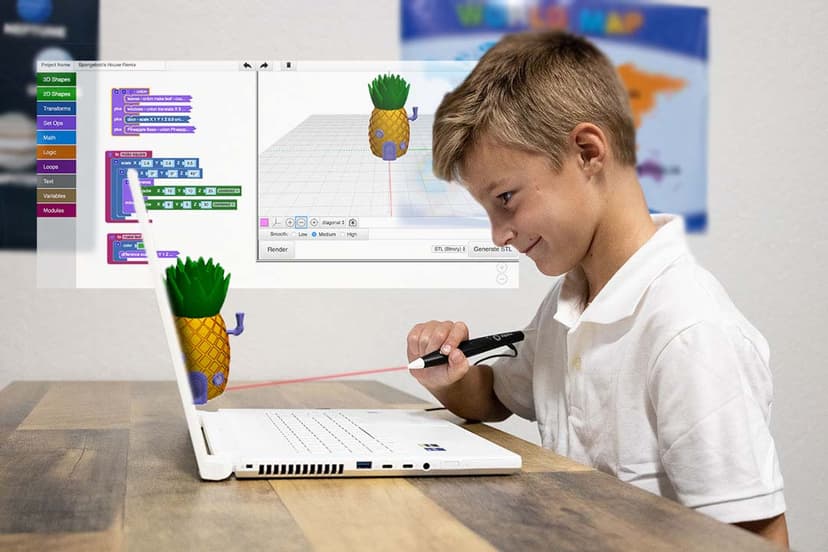
The zSpace Inspire uses experiential learning and spatial computing to teach complex subjects through interactive 3D simulations. The device itself is a specialized Windows laptop equipped with sensors and a 4K stereoscopic display. Rather than wearing a bulky headset, students use a specialized stylus to grab, rotate, and dissect virtual objects that appear to float in the space between the screen and the user. Software modules guide students through specific tasks, such as assembling a circuit board or analyzing geological formations. The platform incorporates game-based mechanics, prompting students to solve problems by manipulating the physical properties of virtual objects. This setup utilizes the modality principle of multimedia learning, ensuring that visual models are supported by interactive physical gestures, which deepens cognitive processing. Educators control the pacing and module selection, integrating these immersive labs directly into their standard lesson plans.
Strengths and tradeoffs of Inspire AR/VR Laptop
The biggest strength of the zSpace Inspire is its ability to make abstract spatial concepts concrete, while its biggest weakness is the high barrier to entry regarding cost and required teacher training. Spatial manipulation is where this platform excels. By allowing students to pull apart a virtual cell or mechanical engine, the system leverages embodied cognition, using physical movement to reinforce mental models. This directly lowers the intrinsic cognitive load for students struggling to visualize 3D structures from 2D textbook pages. Furthermore, the glasses-free design removes the friction and motion sickness commonly associated with traditional VR headsets, making it highly practical for a standard classroom period. On the downside, highly immersive environments often cause seductive detail effects, where students focus on the flashy graphics rather than the underlying learning objectives. Without structured guidance, students treat the simulations as a toy rather than a tool for mastery. Additionally, while the CTE and STEM applications are robust, the utility of expensive 3D hardware for humanities and social science remains less clear. Until The Learning Standard completes a full evaluation, the pedagogical depth of the included software modules remains unverified.
Who Might Benefit From Inspire AR/VR Laptop?
Best for middle school, high school, and CTE students who need hands-on practice with complex spatial concepts in STEM fields. The zSpace Inspire AR/VR laptop thrives in school environments that prioritize experiential learning, such as anatomy, engineering, and automotive repair classes. It allows students to safely practice high-stakes or dangerous procedures in a controlled virtual environment. Because it requires significant investment and professional development, it is not intended for casual home use by individual parents, but rather for well-funded districts looking to upgrade their technology labs and vocational training centers.
Sources and review method
TLS combines product information and editorial analysis to explain how Inspire AR/VR Laptop works, its tradeoffs, and the questions to ask before choosing it. Product features, an instructional rationale and evidence of learning outcomes are different kinds of information.
Formal Learning Standard assessment: not yet completed. Data Transparency findings are reported separately and do not establish learning effectiveness. Read our methodology.
Frequently Asked Questions About Inspire AR/VR Laptop
Is zSpace Inspire AR/VR Laptop free?
No. The zSpace Inspire AR/VR Laptop is a premium enterprise product purchased directly by schools and districts rather than individual consumers. Pricing is not publicly available on their website and requires school administrators to request a custom quote. This pricing structure bundles the specialized hardware, software licenses, ongoing technical support, and the required professional development for teachers to implement the system effectively in their classrooms.
Is zSpace Inspire AR/VR Laptop good for high school students?
Yes. It is particularly effective for high school students enrolled in Career and Technical Education or advanced STEM courses. The detailed 3D models allow older students to practice complex, real-world skills like medical dissection, veterinary science, or mechanical engineering safely and repeatedly. While younger learners use it, the advanced features better suit teenagers tackling high-level conceptual modeling.
What does zSpace Inspire AR/VR Laptop teach?
It teaches a wide range of subjects with a strong emphasis on STEM and vocational skills. Core content areas include biology, chemistry, physics, mathematics, and applied sciences. It also includes modules for humanities and social sciences, though spatial learning is typically less critical for those subjects compared to visualizing an engine block or a chemical molecule. The platform essentially acts as a virtual laboratory.
How does zSpace Inspire AR/VR Laptop compare to Meta Quest or traditional VR headsets?
The Inspire relies on a glasses-free stereoscopic display and a handheld stylus, rather than strapping a screen directly to the user's face. This makes it significantly easier to deploy in classrooms, allows for seamless collaboration between students sitting next to each other, and completely removes the hygiene concerns of sharing sweaty headsets across multiple class periods throughout the day.
Has The Learning Standard evaluated Inspire AR/VR Laptop?
TLS has not yet completed a Learning Standard evaluation of how well Inspire AR/VR Laptop teaches. TLS has not published a Data Transparency result for its privacy policy.
Follow TLS Research
Subscribe to future TLS research updates: app reviews, findings, and what the evidence shows.
Screenshots


Take Action
For Inspire AR/VR Laptop
If you represent zSpace, Inc. and have a correction or new evidence, send the relevant source so we can review and update this page.
Submit a correctionDetails
- Pricing
- Request a quote based on your school or district needs. Pricing includes hardware, software, PD and services.
- Platforms
- Windows (Microsoft)
- Website
- Visit site