
HUE Animation Studio
Product by HUE
Facts checked: Not yet checked
Our take (not a Learning Standard rating). This label applies to learning-science judgments throughout this overview.
Our take (not a Learning Standard rating)
While HUE Animation Studio is a powerful tool for project-based learning, it does not explicitly teach core subjects like math or science on its own. Instead, it effectively facilitates experiential learning by allowing your child to synthesize and demonstrate existing knowledge through stop-motion animation.
Pros
- Promotes constructivist learning by requiring students to actively build physical models and plan logical sequences.
- Develops executive functioning skills through storyboard planning and systematic frame-by-frame execution.
- Reduces the cognitive load of managing complex screen-based interfaces by using physical manipulatives and a dedicated camera.
- Encourages collaborative problem-solving and task delegation when used in group classroom settings.
Cons
- Lacks direct instruction or automated feedback mechanisms for core academic subjects.
- Requires significant adult scaffolding for younger learners to effectively map educational content to the animation process.
- Offers no adaptive pathways or built-in assessments to measure specific learning outcomes.
- Demands high levels of fine motor control and sustained attention, which may easily frustrate early elementary students.
What Do We Know About HUE Animation Studio ?
HUE Animation Studio is an effective tool for facilitating project-based learning, but it requires you to provide the educational content your child will animate. Because this is a creative sandbox rather than a direct-instruction curriculum, your child will not learn math or science facts simply by using the software. Instead, learning occurs through the process of synthesis. When your child designs a stop-motion video about the water cycle, they engage in active recall and sequence mapping, which deepens their existing understanding of the material. The kit includes a specialized camera, software, and a physical guidebook. This tactile approach supports experiential learning. By physically moving objects frame by frame, your child develops fine motor skills and practices sustained attention. However, you must be prepared to offer significant scaffolding. Younger children will struggle with the executive functioning demands of storyboarding, pacing, and editing without adult guidance. Do not expect this kit to act as a standalone tutor; view it as a high-engagement medium for your child to demonstrate what they have already learned through classroom instruction or targeted reading.
How Does HUE Animation Studio Work?
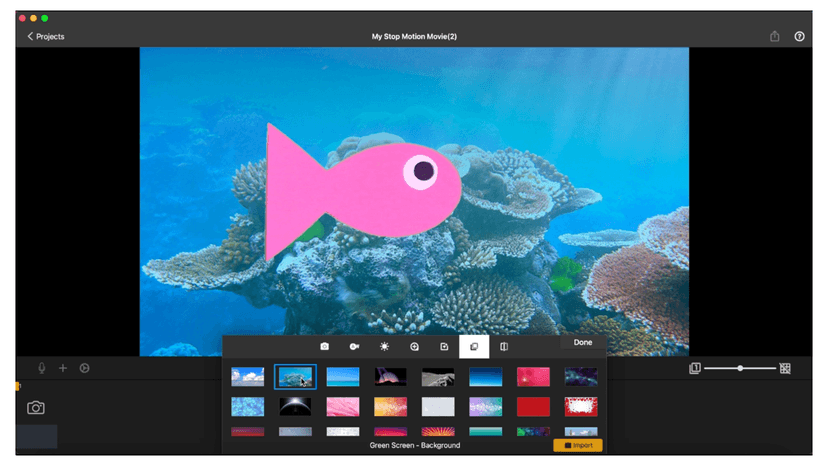
HUE Animation Studio relies on experiential, project-based learning where students construct knowledge by producing stop-motion films. The system operates primarily as a creative toolkit rather than a structured lesson path. Your child connects the flexible HUE HD camera to a computer and uses the proprietary software to capture individual still frames. By moving physical objects like clay figures, paper cutouts, or toys in small increments between shots, they create the illusion of movement. The software interface displays the previous frame as a transparent overlay, which provides immediate visual feedback and reduces the cognitive load required to track object placement. Students then record or import audio, add text, and edit the sequence timeline. The included HUE Book of Animation offers worked examples of different animation techniques, guiding your child through the mechanical process of filmmaking. Because the software does not track academic progress or provide corrective feedback on subject matter, all academic integration relies entirely on the parameters of the project assigned by the parent or educator.
Strengths and tradeoffs of HUE Animation Studio
The biggest strength of HUE Animation Studio is its ability to facilitate deep cognitive processing through project creation, while its biggest weakness is the complete lack of built-in academic instruction or feedback. Active construction of knowledge: The kit excels at experiential learning. When your child builds an animation to explain a historical event, they must break down complex information into sequential steps. This forces them to identify key concepts and organize them logically, a process that significantly improves long-term retention. Executive function demands: The stop-motion process heavily taxes executive function. Planning a storyboard and executing hundreds of micro-movements require high levels of sustained attention and working memory. While this builds valuable skills, it can easily frustrate younger learners without proper adult scaffolding. Absence of direct instruction: Unlike adaptive software, HUE Animation Studio provides no automated feedback loop for academic content. If your child misunderstands a scientific concept while animating it, the software will not correct them. Knowledge synthesis only happens if the foundational knowledge is already present. Therefore, this tool is highly effective for assessment and review, but poor for initial knowledge acquisition.
Who Might Benefit From HUE Animation Studio ?
HUE Animation Studio is best for elementary and middle school students who benefit from tactile, project-based ways to demonstrate their understanding of classroom topics. Aimed primarily at children aged seven and older, it serves as an excellent capstone project tool for parents and educators wanting to assess a child's grasp of a specific subject. Because it requires patience and fine motor control, it is highly suited for students working in cooperative learning groups where tasks like storyboarding, moving objects, and operating the camera can be divided. It is not suitable for students needing independent, direct instruction in core academic subjects.
Data Transparency
Does Not Meet Data Transparency Standard
HUE Animation Studio does not meet our data transparency standard. Its privacy policy does not document basic protections, including a commitment against targeted advertising, limits on sharing children's data and a COPPA or FERPA commitment.
16 of 35 checks passed
Evaluated September 2026
Privacy Policy →Level 1 · Basic protections
Does not sell data or target ads at students, limits sharing, and lets parents see and delete their child's data.
Not documented: a commitment against targeted advertising, limits on sharing children's data, a COPPA or FERPA commitment, parents' right to see their child's data
Level 2 · Parent control (meets the standard)
Families can get their data out, know who processes it, and know how long it is kept.
Level 3 · Direct data access
Families or schools can pull their own data through an API, in a stated format.
Not documented: an API for retrieving their own data, a named export format
View all 35 checks
Parent Access3/8
Does the policy mention parents specifically?
“If you become aware that your child has provided us with personal information without your consent, please [contact us](https://huehd.com/contact "Contact Us") for assistance.”
Can parents view their child's data?
The policy does not say parents can view their child's data.
Can parents modify their child's data?
The policy does not say parents can modify their child's data.
Can parents delete their child's account?
“If you become aware that your child has provided us with personal information without your consent, please [contact us](https://huehd.com/contact "Contact Us") for assistance. If we become aware that a child has provided us with personal information, we take steps to remove that information and terminate the corresponding account, if applicable.”
Is there a dedicated Children's Privacy section?
“For the purpose of this policy, a **child** is defined as a natural person under 16 years of age.”
Does it reference COPPA compliance?
The policy does not mention COPPA.
Does it reference FERPA compliance?
The policy does not mention FERPA.
Is parental consent required for child accounts?
The policy says HUE does not knowingly collect data from children and does not require parental consent for child accounts.
Data Portability3/5
Can users access their personal data?
“Right to access – meaning you have the right to access the data collected from/about you. This includes your right to request and obtain a copy of your Personal Data gathered.”
Can users download/export their data?
“Right to data portability – you have the right to obtain your Personal Data in a machine-readable format or if it is feasible, as a direct transfer from one Processor to another.”
Is there a self-service data access tool?
“Should you wish to see the data that we hold about you at any time, you can make use of our [self-service tools](https://huehd.com/privacy-policy/#gdprtools) to remove or delete your information.”
Is a specific data format mentioned for export?
The policy only says "machine-readable format" and names no specific format.
Is there an API for data access?
The policy does not mention an API for data access.
Data Minimization2/6
Is data collection itemized?
“Any other information is voluntary, unless you are placing an order through our website shop, in which case we will require your e-mail address, name, billing address, delivery address, country of use”
Can the app be used without a real name?
The policy says names are collected for shop orders and user names may be collected.
Can the app be used without an email?
The policy says an email address is required to register the software and to sign up for an account.
Does it state collection is limited to what is necessary?
“Processing is done with minimal data. We only gather and Process the minimal amount of Personal Data required for any purpose.”
Is IP address anonymized or truncated?
The policy says IP addresses are collected and does not say they are anonymized or truncated.
Is location tracking explicitly excluded?
The policy does not explicitly rule out location tracking.
Third-Party Protection4/7
Does it explicitly state no selling of data?
“Your information, whether public or private, will not be sold, exchanged, transferred, or given to any other company for any reason whatsoever, without your consent, other than for the express purpose of delivering products purchased by you through the website or providing the services to you.”
Are third-party providers named?
“[Amazon Web Services (AWS)](https://aws.amazon.com/compliance/gdpr-center/): Website hosting (storage).”
Are providers contractually restricted?
“Employees are trained to follow GDPR guidelines at all times as well as data processing agreements signed with third parties (whichever set of rules is the most secure).”
No-targeted-advertising commitment?
The policy makes no promise against targeted advertising.
Is AI/ML data sharing addressed?
The policy does not address sharing data with AI or machine-learning systems.
Child-specific sharing restriction?
The policy says HUE does not knowingly collect data from children but has no rule limiting sharing of children's data.
Cookies/tracking limited or opt-out?
“You can choose to refuse cookies and assistance with this is provided later in this document.”
Deletion & Retention4/5
Can users delete their account?
“We can [completely remove](https://huehd.com/privacy-policy/#removal) the e-mail address details from our system upon request, as with any personal data we have gathered.”
Self-service deletion mechanism?
“Should you wish to see the data that we hold about you at any time, you can make use of our [self-service tools](https://huehd.com/privacy-policy/#gdprtools) to remove or delete your information.”
Specific data retention timeline?
“We save your billing information and other information gathered about you for as long as needed for accounting purposes or other obligations deriving from law, but not longer than five years.”
Auto-deletion of inactive accounts?
The policy does not mention automatically deleting inactive accounts.
Post-deletion handling described?
“We save your billing information and other information gathered about you for as long as needed for accounting purposes or other obligations deriving from law, but not longer than five years. To the extent that these laws permit, we will delete or anonymise your Personal Data upon request.”
Advertising0/4
Advertising model explicitly disclosed?
The policy does not explain an advertising model or say the product has no ads.
Free from third-party advertisements?
The policy does not say the product is free of third-party ads.
Children excluded from ad targeting?
The policy does not exclude children from ad targeting.
Ad-free option available?
The policy does not mention an ad-free option or say the product has no ads.
What This Means
The policy review did not meet our data transparency standard. The checks above show the documented findings and unknowns. A missing statement does not establish how the app handles data in practice.
About this evaluation: Based on automated analysis of Privacy Policy against 35 policy-disclosure questions, including questions adapted from the Common Sense Privacy Program's published evaluation questions. TLS is not affiliated with Common Sense Media, and this is not a Common Sense rating. Quoted text is copied from the policy; unquoted notes are our summary. Results describe what the policy documents, not the company's actual practices. Privacy policies can change: this review reflects the version we analyzed and does not determine legal compliance.
Sources and review method
TLS combines product information and editorial analysis to explain how HUE Animation Studio works, its tradeoffs, and the questions to ask before choosing it. Product features, an instructional rationale and evidence of learning outcomes are different kinds of information.
Formal Learning Standard assessment: not yet completed. Data Transparency findings are reported separately and do not establish learning effectiveness. Read our methodology.
Frequently Asked Questions About HUE Animation Studio
Is HUE Animation Studio free?
No, the complete HUE Animation Studio kit costs $69.95 per unit. This upfront purchase includes a perpetual license for the animation software, the physical flexible HUE HD camera, and the companion guidebook. There are no recurring subscription fees or hidden in-app purchases required to access the core features. Bulk purchase discounts are available for schools and districts, but individual parents should expect to pay the full retail price for a single kit.
Is HUE Animation Studio good for young children?
Yes, it is suitable for children aged seven and up, but early elementary students will require substantial adult support. The software interface is relatively intuitive, but the physical stop-motion process demands high levels of patience, planning, and executive functioning that younger kids are still developing. Parents should expect to actively assist seven- and eight-year-olds with camera positioning, storyboarding, and timeline editing to prevent frustration. Older children can use the tool independently.
What does HUE Animation Studio teach?
The software itself teaches the technical skills of stop-motion animation, timeline editing, and audio syncing. It does not teach traditional academic subjects like math or science directly. Instead, it is a creative medium used to apply and demonstrate knowledge acquired elsewhere through project-based learning. For example, a student might use the kit to animate cell division, which reinforces their scientific knowledge through active recall and sequence mapping, but the software does not provide the biological facts.
How does HUE Animation Studio compare to standard video editing software?
HUE Animation Studio is purposefully constrained to stop-motion functionality, which significantly lowers the cognitive load for beginners compared to complex video editors like Adobe Premiere or iMovie. Features like onion skinning, which shows the previous frame as a translucent shadow, are built specifically to help children grasp frame-by-frame movement. This targeted design removes the distraction of advanced video transitions and effects, forcing the student to focus entirely on sequential planning and the mechanics of physical animation.
Has The Learning Standard evaluated HUE Animation Studio?
TLS has not yet completed a Learning Standard evaluation of how well HUE Animation Studio teaches. Its privacy policy has been reviewed for Data Transparency and does not yet document the basic protections (Level 1).
Is HUE Animation Studio COPPA compliant?
A COPPA reference was not found in the reviewed privacy policy. This does not determine whether the app complies with COPPA. Policy review note: The policy does not mention COPPA.
Is HUE Animation Studio FERPA compliant?
A FERPA reference was not found in the reviewed privacy policy. This does not determine whether the app complies with FERPA. Policy review note: The policy does not mention FERPA.
Does HUE Animation Studio have a children's privacy policy?
The reviewed policy includes a dedicated children's privacy section. Policy review note: The policy has a section headed "Children".
Does HUE Animation Studio sell student data?
The reviewed policy states that the app does not sell data. This is a policy statement; actual data practices were not verified. Policy review note: The policy says information will not be sold without consent.
Can you delete your data from HUE Animation Studio ?
The reviewed privacy policy describes account deletion. We have not tested the deletion process. Policy review note: Users can ask for all their personal data to be removed.
Follow TLS Research
Subscribe to future TLS research updates: app reviews, findings, and what the evidence shows.
Screenshots


Take Action
For HUE Animation Studio
If you represent HUE and have a correction or new evidence, send the relevant source so we can review and update this page.
Submit a correctionDetails
- Pricing
- The complete HUE Animation Studio kit is available to purchase for $69.95 per kit. Bulk purchase discounts are available for districts, schools, and individual educators.
- Platforms
- Windows (Microsoft), macOS (Apple)
- Grade Levels
- Kindergarten, 1st Grade, 2nd Grade, 3rd Grade, 4th Grade, 5th Grade, 6th Grade
- Website
- Visit site