Glowforge 3D Laser Printer
Product by Glowforge
Facts checked: Not yet checked
Our take (not a Learning Standard rating). This label applies to learning-science judgments throughout this overview.
Our take (not a Learning Standard rating)
Glowforge is a hardware tool, not a standalone instructional application, so it relies heavily on teacher implementation to be effective. While it facilitates experiential and project-based learning through hands-on creation, its educational value depends entirely on how well educators integrate the provided lesson plans and design software into the curriculum.
Pros
- Supports experiential learning by allowing students to physically prototype and test their digital designs.
- Includes structured lesson plans that reduce cognitive load for educators integrating hardware into classroom projects.
- Cross-curricular capabilities allow for the application of mathematical geometry and artistic design in a single hands-on project.
- Cloud-based design software provides immediate visual feedback before physical materials are consumed.
Cons
- Effectiveness relies completely on educator facilitation rather than offering direct, autonomous student instruction.
- Requires continuous purchase of proprietary materials, creating an ongoing barrier to unstructured student experimentation.
- Hardware operation demands strict safety supervision, limiting independent use by younger students.
What Do We Know About Glowforge 3D Laser Printer?
Glowforge functions effectively as an experiential learning tool but does not provide direct instruction independently. Your child will not learn math or science concepts simply by pressing a button; instead, the value comes from how educators frame the design process beforehand. The system combines a physical laser cutter with cloud-based design software, allowing students to translate digital concepts into physical objects. From a learning science perspective, this supports project-based learning by forcing students to apply abstract spatial and geometric reasoning to tangible outcomes. When your child designs a functional gear or architectural model, they must retrieve and apply mathematical formulas accurately, receiving immediate, real-world feedback if their design fails mechanically. However, the hardware itself is just a manufacturing device. The included educational lesson plans help structure these projects, but parents should understand that Glowforge is a medium for learning rather than a teacher. Because it handles high-powered lasers and expensive materials, younger children require constant supervision, meaning independent discovery is highly constrained compared to purely digital learning tools.
How Does Glowforge 3D Laser Printer Work?
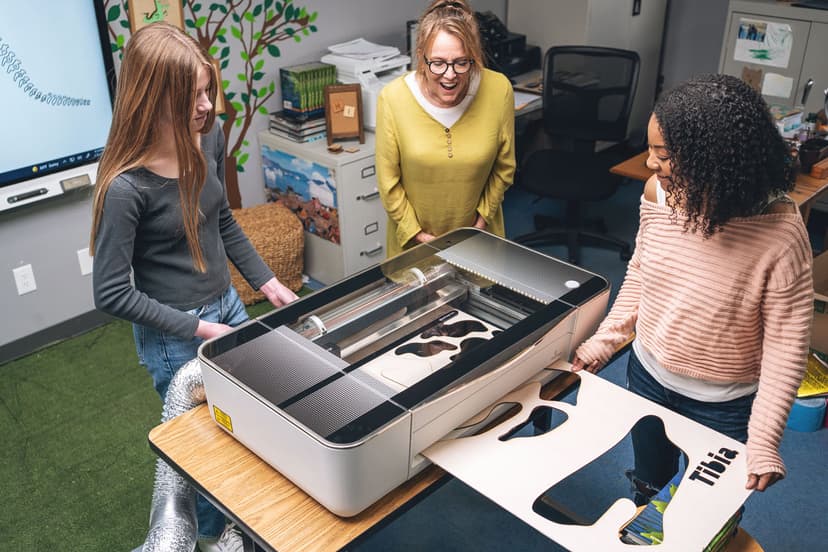
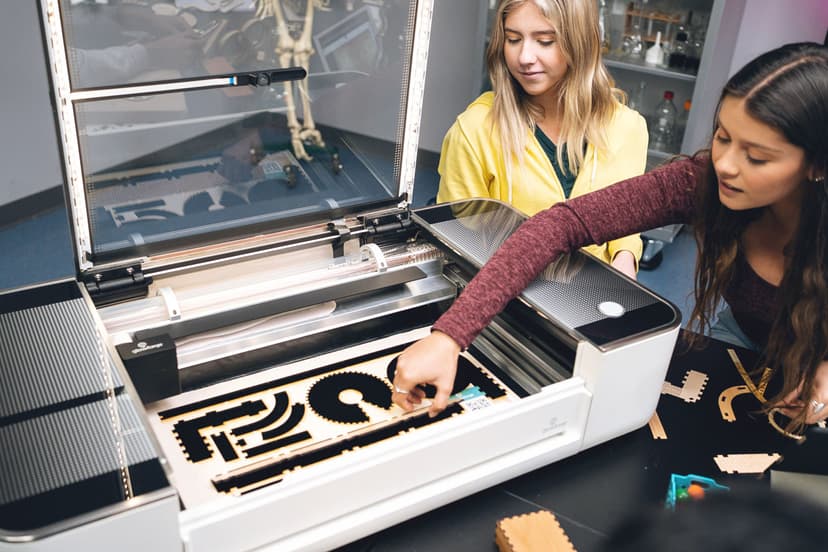
Glowforge relies on project-based and experiential learning frameworks, requiring students to design digital models that the hardware then physically creates. The ecosystem consists of a desktop laser cutter, proprietary consumable materials, and a cloud-based web application. Students begin by conceptualizing a project, often guided by cross-curricular lesson plans provided by Glowforge. They use the design software to map out cuts, scores, and engravings on materials like wood, leather, or acrylic. The software allows students to manipulate shapes, import external designs, and adjust dimensions, utilizing spatial reasoning and geometric planning. Once the digital file is prepared, the student sends the job to the physical printer. The machine uses a laser to subtractive-manufacture the design in minutes. This process provides concrete, physical feedback on digital work. If a student miscalculates a measurement in the software, the resulting physical piece will not fit together, naturally prompting them to re-evaluate their design, adjust their calculations, and try again through iterative problem-solving.
Strengths and tradeoffs of Glowforge 3D Laser Printer
The biggest strength of Glowforge is its ability to make abstract spatial reasoning concepts tangible, while its biggest weakness is its reliance on expensive consumable materials that discourage trial-and-error learning. Bridging the digital and physical is where this tool excels. By requiring students to design on a screen and manufacture in reality, Glowforge leverages experiential learning. When students hold a flawed physical prototype, the concrete feedback loop is much stronger than a digital error message, forcing them to re-evaluate their initial assumptions and apply corrective math or engineering principles. Cross-curricular application is another significant benefit, as projects naturally blend art, geometry, and physics. However, the requirement for physical materials heavily impacts learning design. Iterative practice is constrained by material costs. In a purely digital environment, a student can make one hundred mistakes for free, utilizing productive struggle to reach mastery. With physical hardware, schools must budget for wood, acrylic, and leather. This often leads educators to over-scaffold projects to prevent material waste, thereby removing the student's opportunity to fail safely and learn from independent troubleshooting.
Who Might Benefit From Glowforge 3D Laser Printer?
Glowforge is best for middle school, high school, and career-tech educators who want to integrate hands-on manufacturing into STEM and art curricula. While the manufacturer markets to kindergarten through higher education, the tool is most appropriate for students old enough to grasp complex spatial design software and respect the safety requirements of a physical laser. It serves as an excellent capstone tool for project-based learning units where students need to build physical prototypes, architectural models, or engineered parts. Because of the cost and setup, it is exclusively a school or makerspace tool.
Data Transparency
Does Not Meet Data Transparency Standard
Glowforge 3D Laser Printer does not meet our data transparency standard. Its privacy policy does not document basic protections, including a statement that it does not sell data, a commitment against targeted advertising and limits on sharing children's data.
10 of 35 checks passed
Evaluated September 2026
Privacy Policy →Level 1 · Basic protections
Does not sell data or target ads at students, limits sharing, and lets parents see and delete their child's data.
Not documented: a statement that it does not sell data, a commitment against targeted advertising, limits on sharing children's data, a COPPA or FERPA commitment, parents' right to see their child's data
Level 2 · Parent control (meets the standard)
Families can get their data out, know who processes it, and know how long it is kept.
Not documented: users' right to access their data, data export, a data retention timeline, self-service deletion
Level 3 · Direct data access
Families or schools can pull their own data through an API, in a stated format.
Not documented: an API for retrieving their own data, a named export format
View all 35 checks
Parent Access3/8
Does the policy mention parents specifically?
“If a parent or guardian becomes aware that his or her child has provided us with personal information without their consent, he or she should contact us at privacy@glowforge.com.”
Can parents view their child's data?
The policy does not give parents a right to view their child's data.
Can parents modify their child's data?
The policy does not give parents a right to change their child's data.
Can parents delete their child's account?
“If a parent or guardian becomes aware that his or her child has provided us with personal information without their consent, he or she should contact us at privacy@glowforge.com. If we become aware that a child under 13 has provided us with any personal information, we will take steps to delete such information.”
Is there a dedicated Children's Privacy section?
“NOT FOR CHILDREN UNDER 13”
Does it reference COPPA compliance?
The policy does not mention COPPA.
Does it reference FERPA compliance?
The policy does not mention FERPA.
Is parental consent required for child accounts?
The policy says the website is not directed at children under 13 and does not require parental consent for child accounts.
Data Portability0/5
Can users access their personal data?
The policy lets users update, correct or delete account information but does not give a clear right to access their personal data.
Can users download/export their data?
The policy does not address downloading or exporting data.
Is there a self-service data access tool?
The policy only offers data changes by contacting the company and does not describe a self-service access tool.
Is a specific data format mentioned for export?
The policy does not name any export format.
Is there an API for data access?
The policy does not mention an API for data access.
Data Minimization1/6
Is data collection itemized?
“In so doing, we may store information such as: your name; your email address; your username and password; the name of any referrer; the name of any people referred; your contact information, including any billing or shipping address/es; records of anything you order from us or request from us;”
Can the app be used without a real name?
The policy says it collects users' names.
Can the app be used without an email?
The policy says it collects email addresses.
Does it state collection is limited to what is necessary?
The policy does not say collection is limited to what is necessary.
Is IP address anonymized or truncated?
The policy says it collects IP addresses and does not say they are anonymized or truncated.
Is location tracking explicitly excluded?
The policy says it collects the general geographic location that an IP address identifies.
Third-Party Protection3/7
Does it explicitly state no selling of data?
The policy does not state that the company does not sell personal data.
Are third-party providers named?
“we use a third party payment processor such as Stripe or PayPal, and they keep that credit card information in their credit card vaults.”
Are providers contractually restricted?
“These vendors are not authorized to use or disclose the information, other than to perform their services for us.”
No-targeted-advertising commitment?
The policy says it uses data and pixel tags to target ads and works with advertising partners to show personalized ads.
Is AI/ML data sharing addressed?
The policy does not address AI or machine learning.
Child-specific sharing restriction?
The policy has no sharing restriction specific to children beyond saying it does not knowingly collect their data.
Cookies/tracking limited or opt-out?
“You may install a Google Analytics Opt-Out Browser Button provided by Google [here](https://tools.google.com/dlpage/gaoptout).”
Deletion & Retention2/5
Can users delete their account?
“You may update, correct, or delete your account information and preferences at any time by [contacting us](https://support.glowforge.com/hc/en-us/requests/new?ticket_form_id=4415891754267).”
Self-service deletion mechanism?
The policy says deletion is done by contacting the company, not through a self-service tool.
Specific data retention timeline?
The policy gives no specific retention period and says communications may be kept indefinitely.
Auto-deletion of inactive accounts?
The policy does not address deleting inactive accounts automatically.
Post-deletion handling described?
“We will make the changes within a reasonable period of time, we may keep any information for backups, archiving, prevention of fraud and abuse, analytics, satisfaction of legal obligations, or where we might have a legitimate need to do so.”
Advertising1/4
Advertising model explicitly disclosed?
“We work with third party advertising partners to show you ads that we think may interest you.”
Free from third-party advertisements?
The policy says it works with third-party advertising partners to show ads.
Children excluded from ad targeting?
The policy does not exclude children from ad targeting beyond saying the site is not directed at children under 13.
Ad-free option available?
The policy offers opting out of personalized ads but no option without ads.
What This Means
The policy review did not meet our data transparency standard. The checks above show the documented findings and unknowns. A missing statement does not establish how the app handles data in practice.
About this evaluation: Based on automated analysis of Privacy Policy against 35 policy-disclosure questions, including questions adapted from the Common Sense Privacy Program's published evaluation questions. TLS is not affiliated with Common Sense Media, and this is not a Common Sense rating. Quoted text is copied from the policy; unquoted notes are our summary. Results describe what the policy documents, not the company's actual practices. Privacy policies can change: this review reflects the version we analyzed and does not determine legal compliance.
Sources and review method
TLS combines product information and editorial analysis to explain how Glowforge 3D Laser Printer works, its tradeoffs, and the questions to ask before choosing it. Product features, an instructional rationale and evidence of learning outcomes are different kinds of information.
Formal Learning Standard assessment: not yet completed. Data Transparency findings are reported separately and do not establish learning effectiveness. Read our methodology.
Frequently Asked Questions About Glowforge 3D Laser Printer
Is Glowforge free?
No. The Glowforge system requires purchasing expensive physical hardware, either the Plus or Pro model. While the basic cloud-based design application is included with the machine for free, access to Premium software features requires an ongoing monthly subscription. Schools must also continually purchase consumable materials like wood, acrylic, and leather for students to use. Educators should budget carefully for these ongoing consumable costs to ensure students have enough supplies for iterative testing.
Is Glowforge good for elementary students?
Glowforge can be utilized in elementary settings, but its effectiveness is limited for young children. Due to the physical safety requirements of operating a high-powered laser cutter, kindergarten through third-grade students cannot use the machine independently. Their interaction is typically limited to drawing designs that a teacher then scans and prints for them, removing the technical design learning process. Older elementary students can begin learning the digital design software, but full autonomous operation remains inappropriate.
What does Glowforge teach?
Glowforge does not teach a specific subject directly; rather, it facilitates project-based learning across multiple disciplines. Educators use it to teach applied science, mathematical geometry, and engineering by having students design physical objects. The primary learning outcomes involve spatial reasoning, digital-to-physical translation, and iterative problem-solving when prototypes fail to function as intended.
What is the difference between Glowforge Plus and Glowforge Pro?
The Glowforge Plus is the standard educational model, offering fast cutting speeds and a sealed cutting area suitable for standard classroom projects. The Glowforge Pro is more expensive, features upgraded cooling for continuous all-day printing, and includes a passthrough slot that allows users to feed infinitely long materials through the machine for massive projects that extend beyond the physical footprint of the printer.
Has The Learning Standard evaluated Glowforge 3D Laser Printer?
TLS has not yet completed a Learning Standard evaluation of how well Glowforge 3D Laser Printer teaches. Its privacy policy has been reviewed for Data Transparency and does not yet document the basic protections (Level 1).
Is Glowforge 3D Laser Printer COPPA compliant?
A COPPA reference was not found in the reviewed privacy policy. This does not determine whether the app complies with COPPA. Policy review note: The policy does not mention COPPA.
Is Glowforge 3D Laser Printer FERPA compliant?
A FERPA reference was not found in the reviewed privacy policy. This does not determine whether the app complies with FERPA. Policy review note: The policy does not mention FERPA.
Does Glowforge 3D Laser Printer have a children's privacy policy?
The reviewed policy includes a dedicated children's privacy section. Policy review note: The policy has a section with its own heading about children under 13.
Does Glowforge 3D Laser Printer sell student data?
A statement ruling out data selling was not found in the reviewed policy. This does not establish that the app sells student data. Policy review note: The policy does not state that the company does not sell personal data.
Can you delete your data from Glowforge 3D Laser Printer?
The reviewed privacy policy describes account deletion. We have not tested the deletion process. Policy review note: Users can ask the company to delete their account information.
Follow TLS Research
Subscribe to future TLS research updates: app reviews, findings, and what the evidence shows.
Screenshots
Take Action
For Glowforge 3D Laser Printer
If you represent Glowforge and have a correction or new evidence, send the relevant source so we can review and update this page.
Submit a correctionDetails
- Pricing
- We have two Glowforge models available: the Glowforge Plus, and the Glowforge Pro with Passthrough. The pricing is based on each model’s capabilities, speed, and the size of the projects it can accommodate. Each model comes with lifetime, free access to our cloud-based web app with the option to upgrade to our Premium offering through a monthly subscription. Our materials and accessories are priced separately from our Glowforge models. However, you can work with a Glowforge Education Partner to figure out the right package of products for your school.
- Platforms
- Web Browser, iOS (Apple mobile), iPadOS (Apple tablet), Android (Google mobile), Tizen (Samsung mobile), Windows (Microsoft), macOS (Apple), Chrome OS (Google)
- Grade Levels
- Kindergarten, 1st Grade, 2nd Grade, 3rd Grade, 4th Grade, 5th Grade, 6th Grade, 7th Grade, 8th Grade, 9th Grade, 10th Grade, 11th Grade, 12th Grade, Associate's degree, Bachelor's degree, Post-baccalaureate certificate, Master's Degree, Post-master's certificate, Adult Education, Professional or Technical Credential
- Website
- Visit site