From Sounds to Spelling
Product by Learning at the Primary Pond
Facts checked: Not yet checked
Our take (not a Learning Standard rating). This label applies to learning-science judgments throughout this overview.
Our take (not a Learning Standard rating)
From Sounds to Spelling offers structured phonics instruction grounded in direct, mastery-based teaching. While it provides teachers with clear lesson plans and differentiated materials for early elementary students, The Learning Standard has not yet evaluated its long-term efficacy. It relies heavily on printables rather than interactive digital retrieval practice.
Pros
- Utilizes explicit, direct instruction to introduce new phonetic concepts to early readers.
- Incorporates differentiated, leveled materials to match individual student mastery levels.
- Provides structured lesson plans that reduce cognitive load for educators.
- Uses hands-on word sorts to reinforce target spelling patterns.
Cons
- Relies heavily on printable worksheets rather than adaptive digital assessments.
- Requires significant teacher mediation and preparation time to execute lessons.
- Lacks built-in, automated spaced repetition mechanics for individual students.
- Provides no automated error correction or immediate feedback without teacher intervention.
What Do We Know About From Sounds to Spelling?
From Sounds to Spelling provides effective, evidence-based phonics foundations when delivered consistently by an engaged educator. Your child will not use this as an independent digital app, but rather experience it as a structured curriculum guided by their teacher. The program excels at using direct instruction to build critical early literacy skills. Teachers use detailed lesson plans to introduce letter sounds, blending, and decoding. Because the materials are leveled, educators can differentiate instruction based on your child's current mastery level. This approach prevents cognitive overload by ensuring students only practice concepts they are ready to learn. However, parents should know this is a traditional, print-heavy curriculum rather than an adaptive digital tool. It does not utilize software-based algorithms for spaced repetition or immediate error correction. Instead, it relies on the teacher to monitor progress, provide immediate feedback, and decide when a student is ready to advance. While The Learning Standard has not yet formally evaluated its classroom impact, the program's reliance on explicit phonics instruction aligns with established reading science. It is best viewed as a robust teaching aid rather than an independent learning game.
How Does From Sounds to Spelling Work?
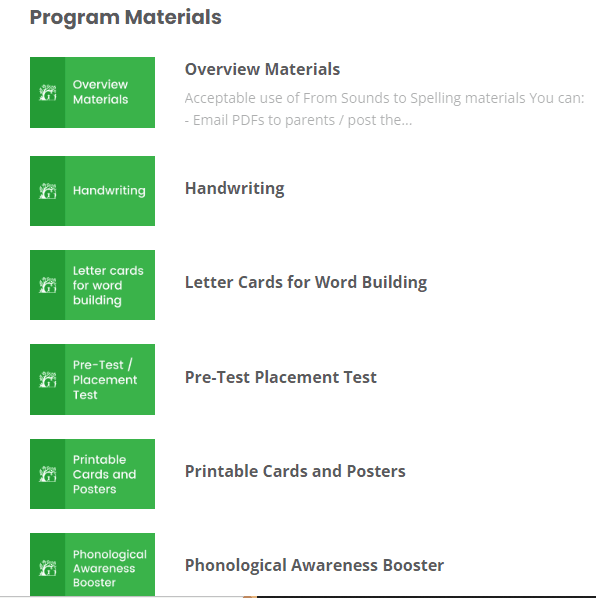
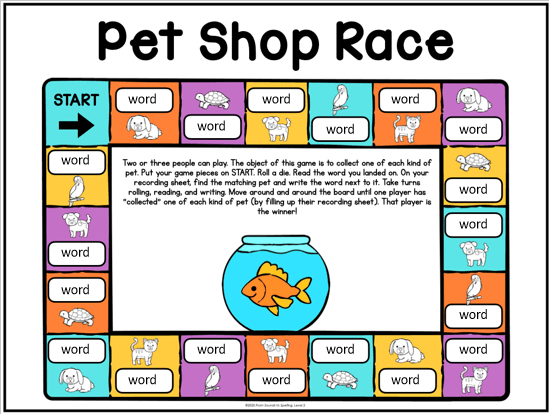
From Sounds to Spelling uses explicit, mastery-based direct instruction combined with play-based practice activities to teach phonics. Teachers begin by introducing a specific phonetic concept using visual aids and scripted lesson plans. This direct approach minimizes ambiguity and clearly models the target skill. Following the introduction, students engage in guided practice using leveled printable materials. The program incorporates decoding exercises, word sorts, and hands-on games to reinforce the day's lesson. Teachers assess student understanding through observation and completed practice activities, moving students to more advanced phonics patterns only after they demonstrate competency with the current skill. By blending structured teacher-led instruction with targeted student practice, the curriculum ensures that foundational literacy skills are systematically built over time. The absence of automated digital tracking means the educator must manually manage the spacing and retrieval of previous concepts.
Strengths and tradeoffs of From Sounds to Spelling
From Sounds to Spelling's biggest strength is its systematic, explicit approach to phonics instruction, while its biggest weakness is its reliance on manual teacher implementation rather than adaptive technology. The program aligns well with the science of reading by utilizing direct instruction to introduce phonemes and spelling patterns. This prevents the cognitive overload often seen in unstructured literacy approaches. By providing leveled materials, it allows teachers to differentiate practice, ensuring students work within their zone of proximal development. However, the curriculum lacks built-in spaced repetition algorithms or automated retrieval practice. Because it operates primarily offline through printables and teacher-led activities, the effectiveness of review and feedback depends entirely on the educator. Without digital assessments, students do not receive the immediate, objective error correction that software can provide. The program supports strong initial encoding of reading skills but requires diligent teacher oversight to ensure those skills are securely retained over time.
Who Might Benefit From From Sounds to Spelling?
From Sounds to Spelling is best for Kindergarten through second-grade teachers who need a structured, comprehensive phonics curriculum for classroom instruction. It is designed for educators seeking explicitly scripted lesson plans to guide early readers through foundational literacy skills. Parents looking for an independent, screen-based reading app for their child will not find it here. Instead, it serves as a robust resource for schools and homeschooling parents who are prepared to actively lead instruction, facilitate hands-on practice, and manually track student mastery across phonemic awareness and spelling concepts.
Data Transparency
Does Not Meet Data Transparency Standard
From Sounds to Spelling does not meet our data transparency standard. Its privacy policy does not document basic protections, including a statement that it does not sell data, a commitment against targeted advertising and limits on sharing children's data.
14 of 35 checks passed
Evaluated October 2026
Privacy Policy of learningattheprimarypond.com →Level 1 · Basic protections
Does not sell data or target ads at students, limits sharing, and lets parents see and delete their child's data.
Not documented: a statement that it does not sell data, a commitment against targeted advertising, limits on sharing children's data, contractual limits on service providers, a COPPA or FERPA commitment
Level 2 · Parent control (meets the standard)
Families can get their data out, know who processes it, and know how long it is kept.
Not documented: a data retention timeline, self-service deletion
Level 3 · Direct data access
Families or schools can pull their own data through an API, in a stated format.
Not documented: an API for retrieving their own data, a named export format
View all 35 checks
Parent Access4/8
Does the policy mention parents specifically?
“If you are an adult, you can make a request on behalf of a child under your parental authority.”
Can parents view their child's data?
“If you are an adult, you can make a request on behalf of a child under your parental authority.”
Can parents modify their child's data?
“If you are an adult, you can make a request on behalf of a child under your parental authority.”
Can parents delete their child's account?
“If you are an adult, you can make a request on behalf of a child under your parental authority.”
Is there a dedicated Children's Privacy section?
The policy has no section dedicated to children's privacy.
Does it reference COPPA compliance?
The policy does not mention COPPA.
Does it reference FERPA compliance?
The policy does not mention FERPA.
Is parental consent required for child accounts?
The policy does not require parental consent for child accounts.
Data Portability2/5
Can users access their personal data?
“You have the right to request that we confirm whether or not we are processing your Personal Information. You also have the right to access such Personal Information;”
Can users download/export their data?
“We will provide your Personal Information in a portable and usable format that allows you to transfer data easily to another entity – provided that this is technically feasible;”
Is there a self-service data access tool?
The policy says rights are exercised by contacting the Owner, not through a self-service tool.
Is a specific data format mentioned for export?
The policy only says data comes in a structured, machine-readable format and names no specific format.
Is there an API for data access?
The policy does not offer an API for users to retrieve their data.
Data Minimization3/6
Is data collection itemized?
“Among the types of Personal Data that this Website collects, by itself or through third parties, there are:”
Can the app be used without a real name?
The policy says it collects first and last names.
Can the app be used without an email?
The policy says it collects email addresses.
Does it state collection is limited to what is necessary?
“The Personal Data is collected and stored for registration or identification purposes only. The Data collected are only those necessary for the provision of the service requested by the Users.”
Is IP address anonymized or truncated?
“This integration of Google Analytics anonymizes your IP address. It works by shortening Users' IP addresses within member states of the European Union or in other contracting states to the Agreement on the European Economic Area.”
Is location tracking explicitly excluded?
The policy says it collects geolocation data such as city, ZIP code and latitude/longitude.
Third-Party Protection2/7
Does it explicitly state no selling of data?
The policy says many processing activities count as a Sale and marks personal information as Sold or Shared.
Are third-party providers named?
“Third-parties:** Facebook, Inc., ConvertKit LLC, Instapage, Inc., Google LLC, Mailgun Technologies, Inc., Cloudflare, Inc., Sectigo Limited, Pinterest, Inc.”
Are providers contractually restricted?
The policy mentions written service-provider contracts only in its definitions and makes no commitment that providers are contractually restricted.
No-targeted-advertising commitment?
The policy says data is used for targeted advertising, remarketing and behavioral targeting.
Is AI/ML data sharing addressed?
The policy does not address AI or machine-learning data sharing.
Child-specific sharing restriction?
The policy has no sharing restrictions specific to children.
Cookies/tracking limited or opt-out?
“In addition to any opt-out feature provided by any of the services below, Users may opt out by visiting the [Network Advertising Initiative opt-out page](http://optout.networkadvertising.org/?c=1).”
Deletion & Retention2/5
Can users delete their account?
“You have the right to request that we delete any of your Personal Information;”
Self-service deletion mechanism?
The policy only allows deletion by contacting the Owner and offers no self-service mechanism.
Specific data retention timeline?
The policy only says data is kept for as long as its purpose requires, with no specific timeline.
Auto-deletion of inactive accounts?
The policy does not address automatic deletion of inactive accounts.
Post-deletion handling described?
“Any rectification or erasure of Personal Data or restriction of processing will be communicated by the Owner to each recipient, if any, to whom the Personal Data has been disclosed unless this proves impossible or involves disproportionate effort.”
Advertising1/4
Advertising model explicitly disclosed?
“These communications are displayed in the form of banners and other advertisements on this Website, possibly based on User interests.”
Free from third-party advertisements?
The policy says the site shows third-party ads, including Google AdSense and affiliate ads.
Children excluded from ad targeting?
The policy does not exclude children from ad targeting.
Ad-free option available?
The policy offers no ad-free option.
What This Means
The policy review did not meet our data transparency standard. The checks above show the documented findings and unknowns. A missing statement does not establish how the app handles data in practice.
About this evaluation: Based on automated analysis of Privacy Policy of learningattheprimarypond.com against 35 policy-disclosure questions, including questions adapted from the Common Sense Privacy Program's published evaluation questions. TLS is not affiliated with Common Sense Media, and this is not a Common Sense rating. Quoted text is copied from the policy; unquoted notes are our summary. Results describe what the policy documents, not the company's actual practices. Privacy policies can change: this review reflects the version we analyzed and does not determine legal compliance.
Sources and review method
TLS combines product information and editorial analysis to explain how From Sounds to Spelling works, its tradeoffs, and the questions to ask before choosing it. Product features, an instructional rationale and evidence of learning outcomes are different kinds of information.
Formal Learning Standard assessment: not yet completed. Data Transparency findings are reported separately and do not establish learning effectiveness. Read our methodology.
Frequently Asked Questions About From Sounds to Spelling
Is From Sounds to Spelling free?
No, From Sounds to Spelling is a paid curriculum. Schools and educators must purchase licenses or materials directly from the developer's website. Professional development packages are also available for an additional fee.
Is From Sounds to Spelling good for Kindergarteners?
Yes, it is specifically designed for Kindergarten, first-grade, and second-grade students. The curriculum introduces foundational phonics concepts at a developmentally appropriate pace, using play-based activities and direct instruction suited for early elementary learners.
What does From Sounds to Spelling teach?
From Sounds to Spelling teaches early literacy, specifically focusing on phonics, phonemic awareness, and spelling. It helps students learn letter sounds, decoding strategies, and spelling patterns required for fluent reading and writing.
Has From Sounds to Spelling been evaluated by The Learning Standard?
Not yet. The Learning Standard has not yet formally rated this curriculum. When evaluated, it will be assessed against our rigorous learning science rubrics. You can read more about our evaluation process in our methodology section.
How does From Sounds to Spelling compare to digital phonics apps?
Unlike digital phonics apps that use algorithms to adapt difficulty, From Sounds to Spelling requires a teacher to deliver instruction and adjust levels manually. It excels in explicit, human-led teaching but lacks the automated retrieval practice found in software.
Has The Learning Standard evaluated From Sounds to Spelling?
TLS has not yet completed a Learning Standard evaluation of how well From Sounds to Spelling teaches. Its privacy policy has been reviewed for Data Transparency and does not yet document the basic protections (Level 1).
Is From Sounds to Spelling COPPA compliant?
A COPPA reference was not found in the reviewed privacy policy. This does not determine whether the app complies with COPPA. Policy review note: The policy does not mention COPPA.
Is From Sounds to Spelling FERPA compliant?
A FERPA reference was not found in the reviewed privacy policy. This does not determine whether the app complies with FERPA. Policy review note: The policy does not mention FERPA.
Does From Sounds to Spelling have a children's privacy policy?
No dedicated children's privacy section was found in the reviewed policy. Policy review note: The policy has no section dedicated to children's privacy.
Does From Sounds to Spelling sell student data?
A statement ruling out data selling was not found in the reviewed policy. This does not establish that the app sells student data. Policy review note: The policy says many processing activities count as a Sale and marks personal information as Sold or Shared.
Can you delete your data from From Sounds to Spelling?
The reviewed privacy policy describes account deletion. We have not tested the deletion process. Policy review note: Users can ask to have their personal information deleted.
Follow TLS Research
Subscribe to future TLS research updates: app reviews, findings, and what the evidence shows.
Screenshots
Take Action
For From Sounds to Spelling
If you represent Learning at the Primary Pond and have a correction or new evidence, send the relevant source so we can review and update this page.
Submit a correctionDetails
- Pricing
- See our site for prices: https://www.fromsoundstospelling.com/shop. Professional Development packages are available for an additional fee.
- Platforms
- Windows (Microsoft), macOS (Apple), Chrome OS (Google)
- Grade Levels
- Kindergarten, 1st Grade, 2nd Grade
- Website
- Visit site