
Digital Dynamics Studio
Product by Digital Rocket Science
Facts checked: Not yet checked
Our take (not a Learning Standard rating). This label applies to learning-science judgments throughout this overview.
Our take (not a Learning Standard rating)
Digital Dynamics Studio provides a robust sandbox for experiential learning through fluid dynamics simulations, allowing students to test hypotheses in real-time. However, because it lacks structured direct instruction and guided worked examples, it functions better as an applied practice tool alongside formal physics coursework rather than a standalone teacher.
Pros
- Supports experiential learning by letting students instantly visualize the effects of variable changes in computational fluid dynamics.
- Bridges abstract physics concepts with concrete visual feedback to reduce cognitive load during complex problem-solving.
- Encourages scientific iteration without the time and cost barriers associated with physical laboratory setups.
Cons
- Lacks built-in direct instruction or scaffolding for novices approaching fluid dynamics for the first time.
- Does not provide automated feedback on the accuracy of student-created models against known scientific benchmarks.
- Requires significant educator intervention to design meaningful project parameters and ensure learning goals are met.
What Do We Know About Digital Dynamics Studio?
Digital Dynamics Studio is highly effective as an advanced practice sandbox for older students applying physics and engineering concepts, but it does not independently teach the foundational math or science required to use it. This platform is a computational fluid dynamics simulator, meaning your teen or college-level student can build and test complex structural and fluid models in real-time. From a learning science perspective, this enables powerful experiential learning. When your student changes a variable, they immediately see the physical consequences, which helps correct misconceptions and solidifies abstract theories. However, parents and educators should understand that this is a professional-grade modeling tool repurposed for education, not a guided tutoring app. There are no step-by-step lessons, automated quizzes, or spaced repetition exercises to build foundational knowledge. If your student is struggling with introductory physics, this app will likely cause frustration due to a lack of scaffolding. It is best used when assigned by a teacher or professor as part of a project-based learning module. The Learning Standard has not yet formally evaluated this app's impact on test scores, but its design aligns well with active learning principles for advanced STEM students.
How Does Digital Dynamics Studio Work?
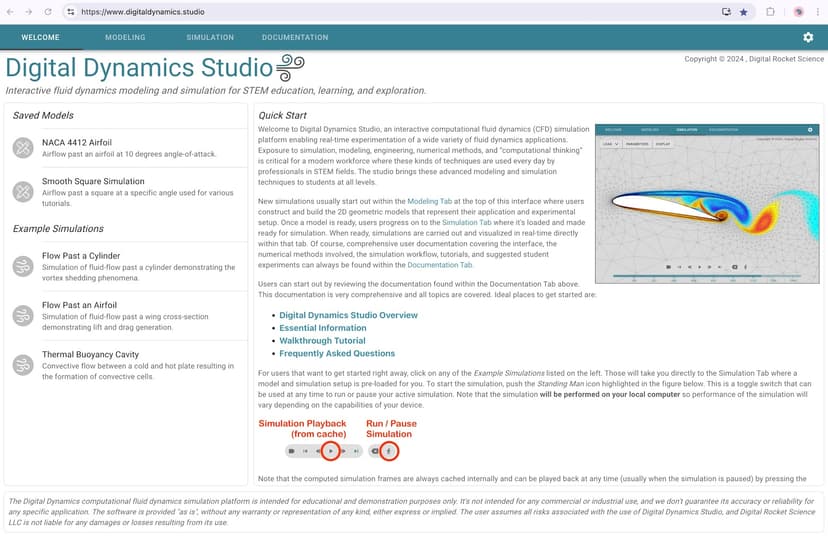
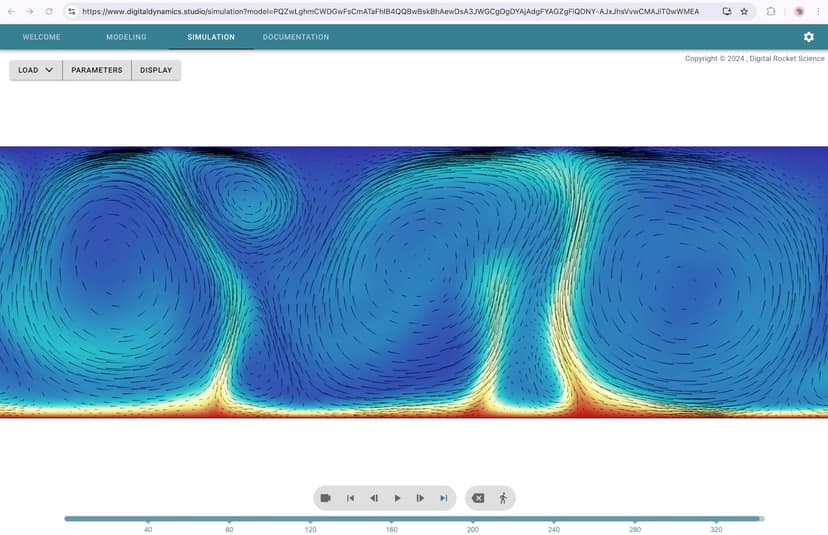
Digital Dynamics Studio uses an experiential, project-based learning approach by providing an open-ended digital sandbox for computational fluid dynamics. Students log into the platform and are presented with a workspace where they can manipulate variables such as fluid velocity, pressure, viscosity, and structural boundaries. By engaging in real-time simulation, learners test hypotheses and immediately observe the visual and numerical outcomes. This rapid feedback loop supports the scientific method, allowing students to iterate on their designs without the time and cost barriers of physical lab experiments. The platform heavily relies on problem-based learning mechanics. Rather than following a set path, users must define their own parameters or work from educator-provided prompts to model specific engineering scenarios. Because the app calculates the physics dynamically, it acts as an interactive visualization tool that shifts the cognitive burden from performing complex manual calculations to analyzing the systemic results of those calculations.
Strengths and tradeoffs of Digital Dynamics Studio
The biggest strength of Digital Dynamics Studio is its capacity for real-time visual feedback during complex simulations, while its biggest weakness is the complete absence of built-in instructional scaffolding. Immediate visual feedback is a powerful learning mechanic; when students adjust a variable in a fluid dynamic model, seeing the immediate consequence helps correct flawed mental models. This type of active manipulation is highly supported by learning science for advancing comprehension in upper-level STEM subjects. The platform excels at experiential learning, bridging the gap between theoretical textbook equations and applied engineering. However, the app relies entirely on discovery-based learning, which can overwhelm novices. Without worked examples or step-by-step tutorials, the cognitive load required to simply operate the software can impede actual physics learning. There is no spaced retrieval practice or structured mastery progression to ensure students understand the underlying math. Consequently, guided educator support is mandatory. Teachers must provide the instructional framing, define the learning objectives, and assess the final models, as the software will not automatically flag a poorly designed simulation or explain why an experiment failed.
Who Might Benefit From Digital Dynamics Studio?
Digital Dynamics Studio is best for high school upperclassmen, college students, and adult learners who are actively enrolled in advanced physics or engineering courses. The platform is designed specifically for individuals aged fifteen and older who already possess a baseline understanding of scientific variables and algebraic principles. It is an ideal tool for project-based learning environments where educators need a safe, cost-effective way for students to run fluid dynamics experiments. It is not suitable for middle schoolers or any student looking for foundational math and science instruction, as it operates strictly as an application layer for existing knowledge.
Data Transparency
Does Not Meet Data Transparency Standard
Digital Dynamics Studio does not meet our data transparency standard. Its privacy policy does not document basic protections, including a statement that it does not sell data, a commitment against targeted advertising and limits on sharing children's data.
10 of 35 checks passed
Evaluated September 2026
Digital Dynamics Studio →Level 1 · Basic protections
Does not sell data or target ads at students, limits sharing, and lets parents see and delete their child's data.
Not documented: a statement that it does not sell data, a commitment against targeted advertising, limits on sharing children's data, contractual limits on service providers, a COPPA or FERPA commitment, parents' right to see their child's data, parents' right to delete their child's data
Level 2 · Parent control (meets the standard)
Families can get their data out, know who processes it, and know how long it is kept.
Not documented: a data retention timeline, self-service deletion
Level 3 · Direct data access
Families or schools can pull their own data through an API, in a stated format.
Not documented: an API for retrieving their own data, a named export format
View all 35 checks
Parent Access3/8
Does the policy mention parents specifically?
“No one under age 18 (or age of majority in your jurisdiction) may provide any personal information to or on the Website without the express permission of a parent or legal guardian.”
Can parents view their child's data?
The policy does not give parents a right to view their child's data.
Can parents modify their child's data?
The policy does not give parents a right to modify their child's data.
Can parents delete their child's account?
The policy says the company will delete a minor's information it learns was collected without parental consent, but it does not give parents a right to request deletion.
Is there a dedicated Children's Privacy section?
“## Children Under the Age of 18”
Does it reference COPPA compliance?
The policy does not reference COPPA.
Does it reference FERPA compliance?
The policy does not reference FERPA.
Is parental consent required for child accounts?
“No one under age 18 (or age of majority in your jurisdiction) may provide any personal information to or on the Website without the express permission of a parent or legal guardian.”
Data Portability3/5
Can users access their personal data?
“You can review and change your personal information by logging into the Website and visiting your account profile page.”
Can users download/export their data?
“Right to Data Portability: You have the right to receive your personal data in a structured, commonly used, and machine-readable format and to transfer this data to another data controller.”
Is there a self-service data access tool?
“You can review and change your personal information by logging into the Website and visiting your account profile page.”
Is a specific data format mentioned for export?
The policy says only "structured, commonly used, and machine-readable format" and names no specific file format.
Is there an API for data access?
The policy does not mention an API for data access.
Data Minimization1/6
Is data collection itemized?
“By which you may be personally identified, such as name, postal address, email address, telephone number, or any other identifier by which you may be contacted online or offline”
Can the app be used without a real name?
The policy says it collects users' names.
Can the app be used without an email?
The policy says it collects email addresses.
Does it state collection is limited to what is necessary?
The policy limits how long data is kept to what is necessary, but it does not limit collection that way.
Is IP address anonymized or truncated?
The policy says it collects IP addresses and does not say they are anonymized or truncated.
Is location tracking explicitly excluded?
The policy says it collects location data automatically.
Third-Party Protection2/7
Does it explicitly state no selling of data?
The policy says only that the company does not currently sell data covered by Nevada's opt-out law; it makes no general no-sale commitment.
Are third-party providers named?
“Information you provide to us is stored on the secure servers of Amazon Web Services behind firewalls, except for payment transaction related information which encrypted by and stored on secure servers of our third-party payment service providers such as Stripe.”
Are providers contractually restricted?
The policy does not say service providers are contractually restricted.
No-targeted-advertising commitment?
The policy does not commit to avoiding targeted advertising.
Is AI/ML data sharing addressed?
The policy does not address sharing data for AI or machine learning.
Child-specific sharing restriction?
The policy restricts collecting children's data without consent but does not restrict sharing it.
Cookies/tracking limited or opt-out?
“You can set your browser to refuse all or some browser cookies, or to alert you when cookies are being sent.”
Deletion & Retention1/5
Can users delete their account?
“You may also send us an email at support@digitalrocket.com to request access to, correct, or delete any personal information that you have provided to us. We cannot delete your personal information except by also deleting your user account.”
Self-service deletion mechanism?
The policy says deletion is requested by email, with no self-service tool.
Specific data retention timeline?
The policy keeps data "as long as necessary" and gives no specific timeline.
Auto-deletion of inactive accounts?
The policy does not mention automatically deleting inactive accounts.
Post-deletion handling described?
The policy does not describe what happens to data after an account is deleted, such as backups.
Advertising0/4
Advertising model explicitly disclosed?
The policy does not disclose an advertising model.
Free from third-party advertisements?
The policy does not say whether the product has third-party ads.
Children excluded from ad targeting?
The policy does not exclude children from ad targeting.
Ad-free option available?
The policy does not say the product has no ads or offers an ad-free option.
What This Means
The policy review did not meet our data transparency standard. The checks above show the documented findings and unknowns. A missing statement does not establish how the app handles data in practice.
About this evaluation: Based on automated analysis of Digital Dynamics Studio against 35 policy-disclosure questions, including questions adapted from the Common Sense Privacy Program's published evaluation questions. TLS is not affiliated with Common Sense Media, and this is not a Common Sense rating. Quoted text is copied from the policy; unquoted notes are our summary. Results describe what the policy documents, not the company's actual practices. Privacy policies can change: this review reflects the version we analyzed and does not determine legal compliance.
Sources and review method
TLS combines product information and editorial analysis to explain how Digital Dynamics Studio works, its tradeoffs, and the questions to ask before choosing it. Product features, an instructional rationale and evidence of learning outcomes are different kinds of information.
Formal Learning Standard assessment: not yet completed. Data Transparency findings are reported separately and do not establish learning effectiveness. Read our methodology.
Frequently Asked Questions About Digital Dynamics Studio
Is Digital Dynamics Studio free?
Digital Dynamics Studio is currently free during its open beta period. The developer, Digital Rocket Science, has not yet announced what the final pricing structure will be once the beta testing phase concludes and the official version is released.
Is Digital Dynamics Studio good for high school students?
Yes, but only for advanced high school students taking upper-level STEM courses like AP Physics or engineering electives. The platform requires a solid foundation in math and science to effectively manipulate the computational fluid dynamics simulations. It will overwhelm younger or foundational learners due to a lack of instructional scaffolding.
What does Digital Dynamics Studio teach?
Digital Dynamics Studio does not directly teach concepts through structured lessons; rather, it facilitates the application of computational fluid dynamics, engineering principles, and applied mathematics. It allows students to test hypotheses and analyze real-time data, building systemic understanding through experiential learning and active problem-solving.
How does Digital Dynamics Studio compare to physical lab experiments?
Digital Dynamics Studio removes the physical barriers of cost, safety risks, and setup time, allowing for rapid iteration and testing of extreme variables that would be impossible in a standard school lab. However, it should supplement rather than entirely replace physical labs, as hands-on equipment manipulation remains a crucial skill in engineering education.
Has The Learning Standard evaluated Digital Dynamics Studio?
TLS has not yet completed a Learning Standard evaluation of how well Digital Dynamics Studio teaches. Its privacy policy has been reviewed for Data Transparency and does not yet document the basic protections (Level 1).
Is Digital Dynamics Studio COPPA compliant?
A COPPA reference was not found in the reviewed privacy policy. This does not determine whether the app complies with COPPA. Policy review note: The policy does not reference COPPA.
Is Digital Dynamics Studio FERPA compliant?
A FERPA reference was not found in the reviewed privacy policy. This does not determine whether the app complies with FERPA. Policy review note: The policy does not reference FERPA.
Does Digital Dynamics Studio have a children's privacy policy?
The reviewed policy includes a dedicated children's privacy section. Policy review note: The policy has a section with its own heading about children.
Does Digital Dynamics Studio sell student data?
A statement ruling out data selling was not found in the reviewed policy. This does not establish that the app sells student data. Policy review note: The policy says only that the company does not currently sell data covered by Nevada's opt-out law; it makes no general no-sale commitment.
Can you delete your data from Digital Dynamics Studio?
The reviewed privacy policy describes account deletion. We have not tested the deletion process. Policy review note: Users can ask by email to have their personal information and account deleted.
Follow TLS Research
Subscribe to future TLS research updates: app reviews, findings, and what the evidence shows.
Screenshots
Take Action
For Digital Dynamics Studio
If you represent Digital Rocket Science and have a correction or new evidence, send the relevant source so we can review and update this page.
Submit a correctionDetails
- Pricing
- Free during the open beta period.
- Platforms
- Web Browser
- Grade Levels
- 10th Grade, 11th Grade, 12th Grade, Associate's degree, Bachelor's degree, Post-baccalaureate certificate, Master's Degree, Post-master's certificate, Doctoral Degree, Post-doctoral certificate, Adult Education, Professional or Technical Credential
- Website
- Visit site