
CodeHS
Product by CodeHS
Facts checked: Not yet checked
Overview needs review: linked news reports a product change. Some facts may be out of date.
Our take (not a Learning Standard rating). This label applies to learning-science judgments throughout this overview.
Our take (not a Learning Standard rating)
CodeHS provides a robust environment for learning computer science through active practice and immediate feedback, but it is pending a formal evaluation by The Learning Standard. Its reliance on integrated worked examples and a self-contained coding environment strongly supports cognitive load reduction for novice programmers.
Keep the CodeHS decision brief
Save a debugging-conversation guide that helps parents support a coding student without taking over, plus a ready-to-send request for a conceptual hint. Subscribe to future TLS research updates and download the one-page PDF here immediately.
Pros
- Uses integrated worked examples to reduce cognitive load before asking students to write original code.
- Provides immediate, automated feedback on syntax errors to correct misconceptions during practice.
- Scaffolds problem-solving through a gradual release of responsibility model.
- Centralizes instruction and coding within a single browser window to minimize split-attention effects.
Cons
- Heavy reliance on text-based instruction can overwhelm students with lower reading comprehension.
- Automated grading sometimes fails to recognize functionally correct code that deviates from the expected solution path.
- Lacks built-in spaced repetition mechanics to ensure long-term retention of earlier syntax rules.
What Do We Know About CodeHS?
CodeHS is an effective, comprehensive platform for teaching middle and high school students how to code, though The Learning Standard has not yet formally evaluated its outcome data. Your child will learn computer science concepts by writing actual code in a web browser, eliminating the need to install complex software. The platform uses a structured progression, moving students from basic block-based programming in earlier grades to advanced text-based languages like Python, Java, and JavaScript. The learning model relies heavily on immediate feedback. When your child makes a mistake, the system immediately flags syntax errors, preventing them from practicing incorrect habits. However, parents should know that this is a highly structured curriculum designed primarily for classroom use. While individual learners can use it independently, the platform shines best when guided by a teacher who can step in when automated hints fail to clarify complex logic errors. The free tier offers substantial content, but advanced differentiation and detailed problem guides are locked behind a school-level Pro subscription.
How Does CodeHS Work?
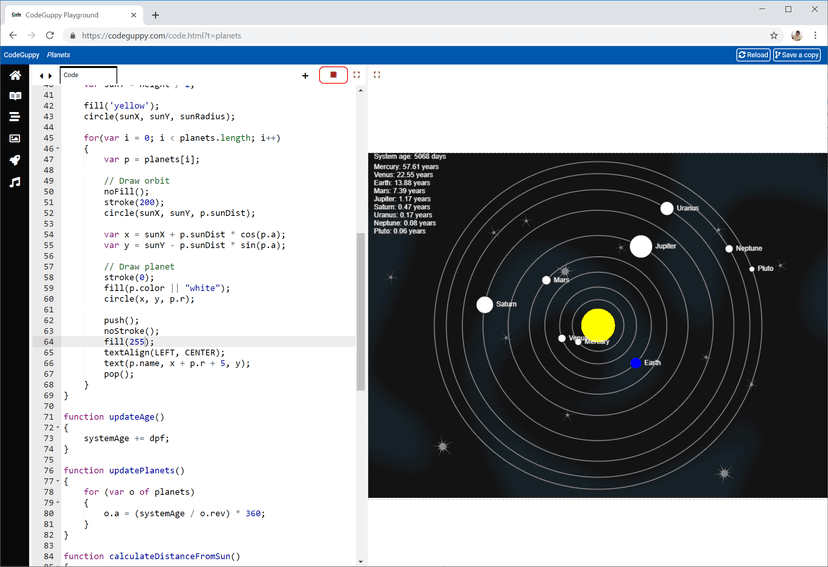
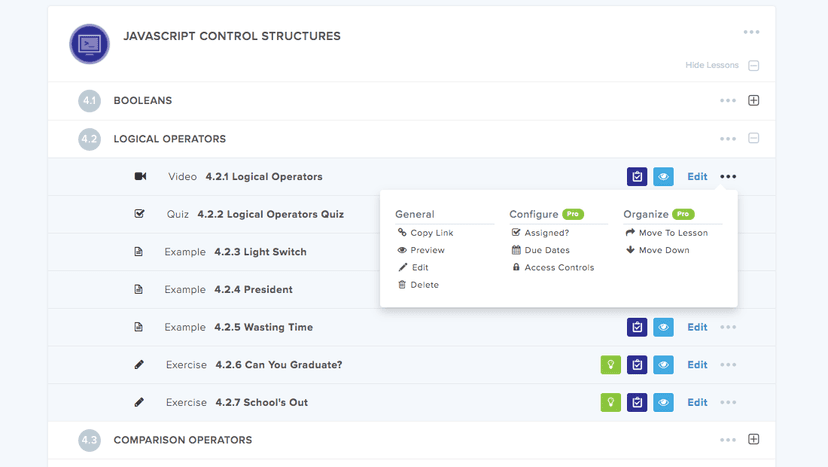
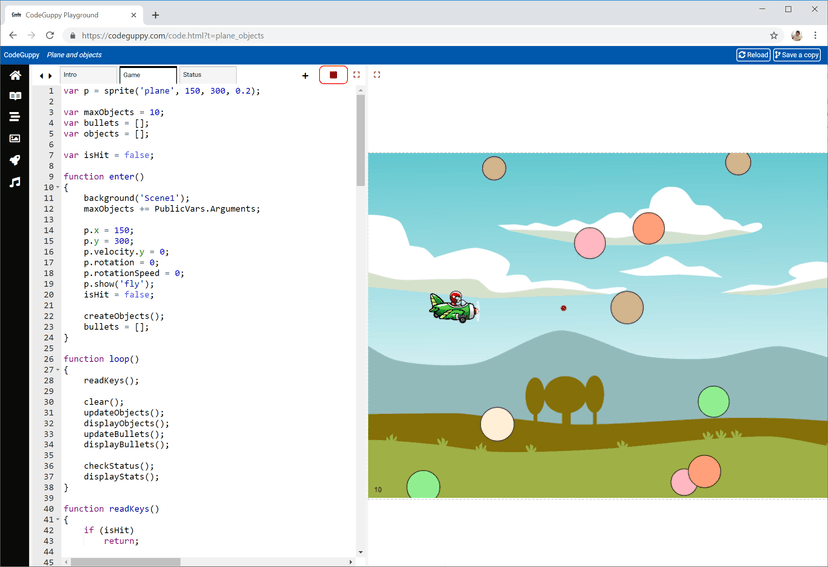
CodeHS uses a blended, problem-based progression where short instructional videos are immediately followed by low-stakes comprehension checks and applied coding exercises. Students begin each module by watching a brief video or reading a text-based lesson introducing a new concept, such as 'for loops' or 'variables.' Immediately after, they complete a quick retrieval practice quiz to solidify the concept before moving to the in-browser Integrated Development Environment. In this coding environment, students are presented with a specific problem and a partially completed code snippet acting as a worked example. They must write the remaining code to accomplish the task. They can run their code as often as they like, receiving automated, real-time feedback. If the code fails, the platform highlights the error, prompting the student to debug. The curriculum builds sequentially, requiring students to achieve mastery on foundational tasks before unlocking more complex, project-based assignments that require synthesizing multiple concepts.
Strengths and tradeoffs of CodeHS
The biggest strength of CodeHS is its all-in-one coding environment that minimizes split-attention effects, while its biggest weakness is the rigidity of its automated grading system. By keeping instructional materials, the code editor, and the output console in a single browser window, CodeHS effectively manages cognitive load. Students do not have to toggle between multiple applications to test their work. The platform also excels at providing worked examples; students rarely face a blank screen, which research shows is highly effective for novice learners. Furthermore, the immediate feedback loop during practice exercises ensures that syntax misconceptions are corrected immediately. However, there are notable limitations. The automated grader often expects a very specific solution. If a student writes functionally correct code using an alternative logic path, the system may mark it wrong, which can cause frustration and disrupt the learning process. Additionally, the platform lacks deliberate spaced repetition. Once a student passes a module on 'while loops', the system does not actively resurface that specific isolated skill in later modules to test long-term retention, relying instead on the student naturally encountering it in larger projects.
Who Might Benefit From CodeHS?
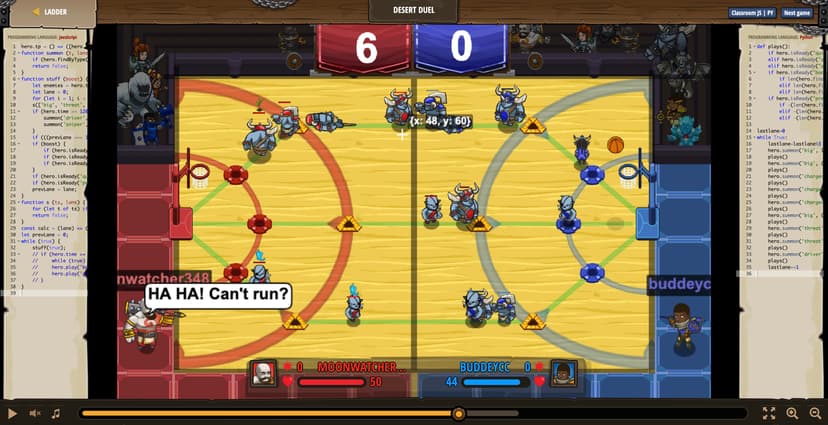
CodeHS is best for middle and high school students who need a highly structured, standards-aligned computer science curriculum. It is ideal for 5th through 11th graders transitioning from basic block-based coding to professional text-based languages like Python or Java. Because the platform includes built-in video instruction and an in-browser code editor, it is highly effective for schools implementing blended learning environments or lacking dedicated computer science teachers. It is also suitable for motivated, independent learners who want a step-by-step pathway to learn programming.
Data Transparency
Meets Data Transparency Standard
CodeHS meets our data transparency standard at Level 2 of 3 (Parent control). Level 3 needs the policy to document an API for retrieving their own data and a named export format.
28 of 35 checks passed
Evaluated September 2026
Privacy Policy →Level 1 · Basic protections
Does not sell data or target ads at students, limits sharing, and lets parents see and delete their child's data.
Level 2 · Parent control (meets the standard)
Families can get their data out, know who processes it, and know how long it is kept.
Level 3 · Direct data access
Families or schools can pull their own data through an API, in a stated format.
Not documented: an API for retrieving their own data, a named export format
View all 35 checks
Parent Access8/8
Does the policy mention parents specifically?
“In appropriate circumstances, teachers and parents may also request deletion of a student’s Personal Information.”
Can parents view their child's data?
“How can a parent or school access, correct, or delete student data?”
Can parents modify their child's data?
“How can a parent or school access, correct, or delete student data?”
Can parents delete their child's account?
“In appropriate circumstances, teachers and parents may also request deletion of a student’s Personal Information.”
Is there a dedicated Children's Privacy section?
“Children under the age of 13”
Does it reference COPPA compliance?
“Schools, acting as agents for parents, provide consent for school-provided accounts in accordance with COPPA.”
Does it reference FERPA compliance?
“All data shared with service providers remain under the control of the educational institution, and CodeHS acts as a school official under FERPA for these purposes.”
Is parental consent required for child accounts?
“Therefore, we only collect Personal Information through the Services from a child under 13 where that student’s school, district, and/or teacher has agreed (via the terms described in the Terms of Use) to obtain parental consent for that child to use the Services and disclose Personal Information to us.”
Data Portability3/5
Can users access their personal data?
“Authorized users can access and review their data at any time through their account.”
Can users download/export their data?
“Users may request an export of their data at any time by contacting [privacy@codehs.com](mailto:privacy@codehs.com).”
Is there a self-service data access tool?
“Website users may update, correct, or remove Personal Information in their CodeHS accounts at any time via the Account Settings page.”
Is a specific data format mentioned for export?
The policy only says exports come in a "commonly used, machine-readable format" and does not name a specific format.
Is there an API for data access?
The policy does not mention an API for data access.
Data Minimization2/6
Is data collection itemized?
“If you are a student, we collect information about your projects, including the responses you provide, how many attempts you made, and the time taken.”
Can the app be used without a real name?
The policy says typical student accounts require a name and that schools may share student names, although anonymous options exist.
Can the app be used without an email?
The policy says typical student accounts require an email address and that schools may share student emails, although anonymous options exist.
Does it state collection is limited to what is necessary?
“In all cases, CodeHS collects and processes only the minimum information necessary to support educational functionality and platform operations.”
Is IP address anonymized or truncated?
The policy says it collects IP addresses and does not mention anonymizing or truncating them.
Is location tracking explicitly excluded?
The policy says geolocation data is not collected but also lists location data among the technical data it collects automatically, so there is no clear exclusion.
Third-Party Protection6/7
Does it explicitly state no selling of data?
“CodeHS does **not** sell or rent personal information to third parties.”
Are third-party providers named?
“Any payment information is transmitted using HTTPS encryption and is processed through Stripe, a third party payment provider.”
Are providers contractually restricted?
“We restrict access to your information to CodeHS employees, contractors and agents who need to know that information in order to process it for us and who are subject to strict contractual security standards and confidentiality obligations.”
No-targeted-advertising commitment?
“We do not sell or rent your Personal Information to any third party for any purpose, including advertising or marketing. We do not allow any advertising on our services.”
Is AI/ML data sharing addressed?
The policy does not address sharing data with AI or machine-learning systems.
Child-specific sharing restriction?
“CodeHS does not allow third parties to use student data for advertising, profiling, or marketing purposes.”
Cookies/tracking limited or opt-out?
“You may choose to disable cookies in your browser settings. However, if you choose to do this, many of our Website’s features may not function properly.”
Deletion & Retention5/5
Can users delete their account?
“A teacher or a student may request deletion of your own Personal Information by sending us an email at privacy@codehs.com.”
Self-service deletion mechanism?
“Website users may update, correct, or remove Personal Information in their CodeHS accounts at any time via the Account Settings page.”
Specific data retention timeline?
“Generally, CodeHS will delete a user's Personal Information 4 years after the user's last login to the Services.”
Auto-deletion of inactive accounts?
“Data is deleted after 4 years of an account being inactive, or within 60 days if requested by an LEA.”
Post-deletion handling described?
“When we delete a user's Personal Information, it will be deleted from our active databases but we may retain an archived copy of such user's records as required by law or for legitimate business purposes.”
Advertising4/4
Advertising model explicitly disclosed?
“We do not allow any advertising on our services.”
Free from third-party advertisements?
“We do not allow any advertising on our services.”
Children excluded from ad targeting?
“No. Ads and cross-site tracking are disabled for student accounts.”
Ad-free option available?
“We do not allow any advertising on our services.”
Meets Data Transparency Standard
The reviewed policy met our data transparency standard. This result describes the policy disclosures we assessed. Actual practices and legal compliance were not verified.
About this evaluation: Based on automated analysis of Privacy Policy against 35 policy-disclosure questions, including questions adapted from the Common Sense Privacy Program's published evaluation questions. TLS is not affiliated with Common Sense Media, and this is not a Common Sense rating. Quoted text is copied from the policy; unquoted notes are our summary. Results describe what the policy documents, not the company's actual practices. Privacy policies can change: this review reflects the version we analyzed and does not determine legal compliance.
Sources and review method
TLS combines product information and editorial analysis to explain how CodeHS works, its tradeoffs, and the questions to ask before choosing it. Product features, an instructional rationale and evidence of learning outcomes are different kinds of information.
Formal Learning Standard assessment: not yet completed. Data Transparency findings are reported separately and do not establish learning effectiveness. Read our methodology.
Frequently Asked Questions About CodeHS
Is CodeHS free?
Yes, CodeHS offers a robust free tier that includes access to over 50 computer science courses and the online coding environment. However, premium teacher features like advanced grading tools, detailed lesson plans, and differentiation settings require a paid CodeHS Pro license, which is typically purchased at the school or district level.
Is CodeHS good for middle schoolers?
Yes, CodeHS provides specific introductory pathways designed for middle school students in grades 5-8. These courses often utilize block-based coding or simplified text-based environments to introduce fundamental logic before progressing to rigorous high school-level programming languages.
What does CodeHS teach?
CodeHS teaches comprehensive computer science and programming. The curriculum spans basic digital literacy and block coding up to Advanced Placement Computer Science in Java, Python, cybersecurity, web development with HTML and CSS, and data science.
How does CodeHS compare to Code.org?
Both platforms teach computer science effectively, but Code.org is generally better suited for younger learners and introductory hour-of-code activities. CodeHS offers a more rigorous, text-based progression tailored for middle and high school students preparing for AP exams or career and technical education pathways.
Has The Learning Standard evaluated CodeHS?
TLS has not yet completed a Learning Standard evaluation of how well CodeHS teaches. Its privacy policy has been reviewed for Data Transparency and reaches Level 2, Parent control.
Is CodeHS COPPA compliant?
The reviewed privacy policy references COPPA. A policy reference alone does not establish COPPA compliance. Policy review note: The policy references COPPA compliance.
Is CodeHS FERPA compliant?
The reviewed privacy policy references FERPA. A policy reference alone does not establish FERPA compliance. Policy review note: The policy references FERPA.
Does CodeHS have a children's privacy policy?
The reviewed policy includes a dedicated children's privacy section. Policy review note: The policy has a dedicated section titled "Children under the age of 13".
Does CodeHS sell student data?
The reviewed policy states that the app does not sell data. This is a policy statement; actual data practices were not verified. Policy review note: The policy explicitly says CodeHS does not sell personal information.
Can you delete your data from CodeHS?
The reviewed privacy policy describes account deletion. We have not tested the deletion process. Policy review note: Users can request deletion of their personal information.
Keep the CodeHS decision brief
Save a debugging-conversation guide that helps parents support a coding student without taking over, plus a ready-to-send request for a conceptual hint. Subscribe to future TLS research updates and download the one-page PDF here immediately.
Screenshots
Latest News
All CodeHS NewsHow State Funding and AI Tools Are Reshaping K-12 Coding Education
Learn how Texas TEFA funds, the CodeHS acquisition of Tynker, and new K-12 AI classroom tools are transforming how students learn computer science.
How Curriculum and Teacher Support Impact AP Computer Science Scores
Discover how curriculum choice and teacher experience impact AP Computer Science scores, based on new 2026 performance data and national research.
Free Roblox Computing Lessons Aim to Bridge the UK Digital Divide
Roblox and Digital Schoolhouse are launching free game-design lessons for UK schools, featuring offline versions to help bridge the digital divide.
Take Action
For CodeHS
If you represent CodeHS and have a correction or new evidence, send the relevant source so we can review and update this page.
Submit a correctionDetails
- Pricing
- CodeHS offers a variety of free resources including over 50 computer science courses, an online IDE with real-time collaboration, and basic LMS features to seamlessly manage students and assignments, all in one spot! CodeHS Pro provides a suite of additional classroom tools and resources including time-saving grading tools, differentiation settings, LMS integrations, detailed lesson plans and problem guides, and dedicated implementation support. CodeHS Pro can be purchased as a license based on the number of teachers and schools using the platform. Visit codehs.com/pro to learn more.
- Platforms
- Web Browser, iPadOS (Apple tablet), Windows (Microsoft), macOS (Apple), Chrome OS (Google)
- Grade Levels
- 5th Grade, 6th Grade, 7th Grade, 8th Grade, 9th Grade, 10th Grade, 11th Grade
- Website
- Visit site