
Alongside
Product by Alongside
Facts checked: Not yet checked
Our take (not a Learning Standard rating). This label applies to learning-science judgments throughout this overview.
Our take (not a Learning Standard rating)
Alongside offers structured scaffolding for social-emotional learning through journaling and AI-driven coaching, but its core function is behavioral tracking rather than direct academic instruction. While it utilizes personalized feedback to build self-regulation skills, effectiveness relies entirely on consistent student engagement and school oversight.
Pros
- Provides immediate, personalized feedback through an AI chatbot to guide student self-reflection and emotional regulation.
- Uses self-monitoring tools like daily habit tracking to build metacognitive awareness over time.
- Delivers multilingual support to reduce cognitive load for non-native English speakers during complex social-emotional exercises.
Cons
- Lacks spaced retrieval practice or objective mastery checks to ensure students actually internalize the taught coping strategies.
- Relies heavily on intrinsic student motivation to initiate journaling, limiting active engagement for reluctant or struggling users.
- Does not provide clear pedagogical pathways for targeted academic skill acquisition outside of general wellness maintenance.
What Do We Know About Alongside?
Alongside is effective for helping your child build self-regulation and emotional awareness, though it functions as a behavioral support tool rather than a traditional academic program. Your child will use this platform to log daily habits, write journal entries, and interact with an AI chatbot designed to mimic clinical coaching. The app aims to build metacognition, which is your child's ability to monitor and understand their own emotional and behavioral states. Because the system relies on self-reported data and voluntary chatbot engagement, its efficacy depends entirely on how consistently your child interacts with it. There are no built-in quizzes or spaced repetition mechanics to test their understanding of the wellness concepts presented in the platform's video resources. Instead, learning happens through problem-based reflection. If your child struggles with school attendance or emotional regulation, the immediate feedback from the AI coach provides a low-stakes environment to practice coping strategies. However, educators and parents must actively monitor these digital check-ins, as the app itself does not enforce knowledge retention or behavioral change without external accountability.
How Does Alongside Work?
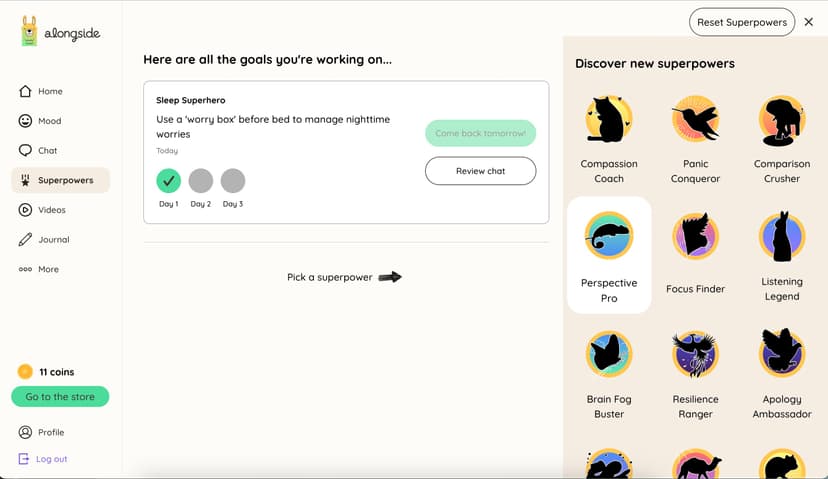
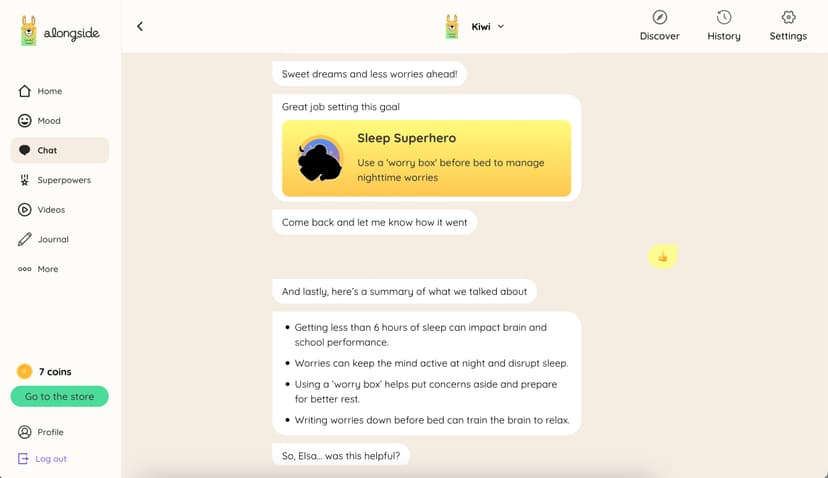
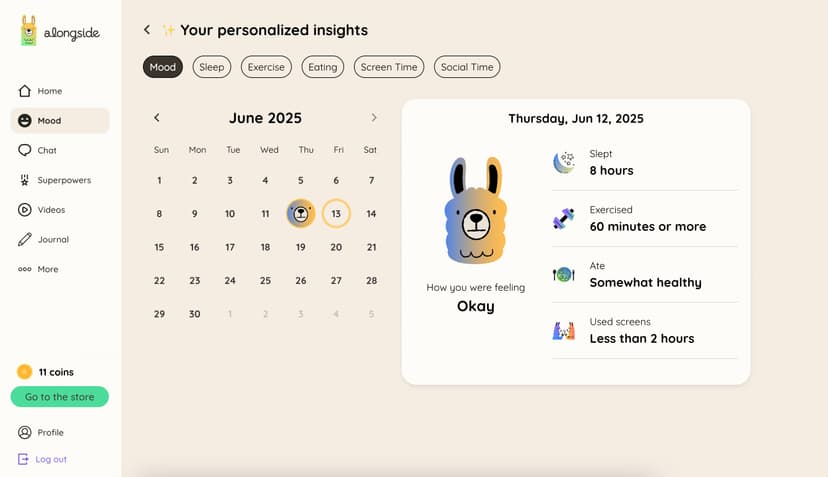
Alongside uses a problem-based, personalized coaching model where students engage with an AI chatbot and reflective tools to build social-emotional skills. Upon logging in, students access a dashboard to track daily habits like sleep, mood, and attendance. The core instructional mechanism is the AI chatbot, which acts as a scaffolded conversational agent. When a student reports stress or a behavioral challenge, the chatbot asks guiding questions to help them identify triggers and formulate actionable coping strategies. Alongside this interactive component, the app provides a library of instructional videos covering various wellness topics. Students consume direct instruction through these videos and then apply the concepts via digital journaling. For schools, the platform collects this self-reported data to generate school-climate assessments and flag students who may need multi-tiered system of supports interventions. The platform does not use traditional grading; instead, progression is tracked through the frequency of habit logging and the depth of reflective journaling.
Strengths and tradeoffs of Alongside
Alongside's biggest strength is its use of immediate, personalized feedback via the AI chatbot, while its biggest weakness is the absence of structured retrieval practice to ensure students internalize the wellness strategies they are taught. From a learning science perspective, immediate feedback is highly effective for correcting misconceptions and guiding emotional self-regulation in the moment. When a student expresses frustration, the AI coach intervenes instantly, utilizing problem-based learning to guide the student toward a solution. The platform also successfully encourages metacognition by requiring users to explicitly track and evaluate their own habits over time. However, the instructional design lacks rigorous reinforcement mechanics. Spaced repetition and retrieval practice are largely absent; once a student watches a wellness video or completes a journal entry, the system does not actively prompt them to recall that specific coping mechanism at a later date. This means that while the app excels at providing point-of-need emotional scaffolding, it struggles to guarantee long-term retention of social-emotional concepts. The heavy reliance on intrinsic motivation also means unengaged students may simply click through the habit trackers without experiencing meaningful cognitive processing.
Who Might Benefit From Alongside?
Alongside is best for middle and high school students who need structured behavioral support and self-regulation tools to complement established school wellness programs. Designed for 4th through 12th graders, the platform serves as an effective digital journal and habit tracker for students working on social-emotional goals. It functions primarily as an intervention tool within a school's support system. It is less suited for younger students who require explicit, teacher-led direct instruction to grasp foundational behavioral concepts.
Data Transparency
Meets Data Transparency Standard
Alongside meets our data transparency standard at Level 2 of 3 (Parent control). Level 3 needs the policy to document an API for retrieving their own data and a named export format.
24 of 35 checks passed
Evaluated September 2026
Alongside →Level 1 · Basic protections
Does not sell data or target ads at students, limits sharing, and lets parents see and delete their child's data.
Level 2 · Parent control (meets the standard)
Families can get their data out, know who processes it, and know how long it is kept.
Level 3 · Direct data access
Families or schools can pull their own data through an API, in a stated format.
Not documented: an API for retrieving their own data, a named export format
View all 35 checks
Parent Access7/8
Does the policy mention parents specifically?
“Where the user is an adult parent/legal guardian, the parent/legal guardian must first create a parent account and then provide access to their child to allow their child to register to create an account within the Services.”
Can parents view their child's data?
“Schools and parents/legal guardians have the right to access any information about their students/child.”
Can parents modify their child's data?
The policy lets parents access, review or delete a Child User's personal information but does not say they can modify it.
Can parents delete their child's account?
“You (or a parent/legal guardian) may request deletion of your data or your entire account at any time by contacting us at privacy@alongside.care.”
Is there a dedicated Children's Privacy section?
“CHILD ONLINE PRIVACY PROTECTION ACT COMPLIANCE ("COPPA")”
Does it reference COPPA compliance?
“We also comply with the Children Online Protection Privacy Act (“COPPA”) and the Federal Education Rights and Privacy Act (“FERPA”), which allows a school or parent/legal guardian to review Child Personal Information that we maintain and to request its deletion.”
Does it reference FERPA compliance?
“We also comply with the Children Online Protection Privacy Act (“COPPA”) and the Federal Education Rights and Privacy Act (“FERPA”), which allows a school or parent/legal guardian to review Child Personal Information that we maintain and to request its deletion.”
Is parental consent required for child accounts?
“Each child user account for children under the age of 13 must be authorized by a parent or legal guardian.”
Data Portability1/5
Can users access their personal data?
“If you wish to access, review, modify or delete any of the personal information that you have provided to us, such as your name or email address, or you are the parent or legal guardian of a Child User and wish to access, review, or delete such Child User’s personal information that has been collected by us, please contact us at privacy@alongside.care for assistance.”
Can users download/export their data?
The policy does not mention downloading or exporting data.
Is there a self-service data access tool?
The policy handles data access through email requests, not a self-service tool.
Is a specific data format mentioned for export?
The policy does not name any export format.
Is there an API for data access?
The policy mentions only integration services (such as Clever and SIS) and no API for users to get their own data.
Data Minimization1/6
Is data collection itemized?
“- First Name and Last Name - Cell Phone Number, Carrier and Device Information - Email address - Birth Date - Preferred Pronouns”
Can the app be used without a real name?
The policy says it collects first and last names, including names from school integrations such as Clever.
Can the app be used without an email?
The policy says it collects email addresses, including student emails from Clever, Google and Microsoft SSO.
Does it state collection is limited to what is necessary?
The policy limits how long data is kept to what is necessary but does not say collection itself is limited to what is necessary.
Is IP address anonymized or truncated?
The policy says it collects IP addresses and shares them with Sentry, with no anonymization or truncation described.
Is location tracking explicitly excluded?
The policy says it collects coarse geolocation.
Third-Party Protection7/7
Does it explicitly state no selling of data?
“We do not sell personal information, including Child Personal Information, to third parties.”
Are third-party providers named?
“User messages in chat are sent to Anthropic without user identification. These messages are not stored by Anthropic.”
Are providers contractually restricted?
“These providers have access to personal information (and, in some cases Student Personal Information) and are contractually bound to use it only for specified purposes.”
No-targeted-advertising commitment?
“We do not use cookies to serve third-party advertisements, nor to target children with behavioral advertising. We do use cookies to serve advertisements to schools and parents who may be interested in using our App.”
Is AI/ML data sharing addressed?
“Artificial Intelligence and Machine Learning Providers.** AI services that power chatbot functionality and generate dynamic content, but these providers receive anonymized user messages.”
Child-specific sharing restriction?
“We do not share Child Personal Information with third parties for their own marketing purposes.”
Cookies/tracking limited or opt-out?
“You can manage cookies through your browser settings. Most web browsers automatically accept cookies, but you can modify your browser settings to delete or refuse cookies.”
Deletion & Retention5/5
Can users delete their account?
“You (or a parent/legal guardian) may request deletion of your data or your entire account at any time by contacting us at privacy@alongside.care.”
Self-service deletion mechanism?
“You may delete your account within the Services at any time.”
Specific data retention timeline?
“We define “inactive” as no logins have occurred within the past 24 months. If the account is inactive, we will delete or deidentify all data, including all personal data, within 60 days of the date in which the account became inactive”
Auto-deletion of inactive accounts?
“We define “inactive” as no logins have occurred within the past 24 months. If the account is inactive, we will delete or deidentify all data, including all personal data, within 60 days of the date in which the account became inactive”
Post-deletion handling described?
“Please note that copies of information that you have updated, modified or deleted may remain viewable in cached and archived pages of the Services for a period of time not to exceed 90 days.”
Advertising3/4
Advertising model explicitly disclosed?
“We do not use cookies to serve third-party advertisements, nor to target children with behavioral advertising. We do use cookies to serve advertisements to schools and parents who may be interested in using our App.”
Free from third-party advertisements?
“We do not use cookies to serve third-party advertisements, nor to target children with behavioral advertising.”
Children excluded from ad targeting?
“We do not use cookies to serve third-party advertisements, nor to target children with behavioral advertising.”
Ad-free option available?
The policy does not say the product is ad-free; it says the company serves ads to schools and parents, and it offers no ad-free option.
Meets Data Transparency Standard
The reviewed policy met our data transparency standard. This result describes the policy disclosures we assessed. Actual practices and legal compliance were not verified.
About this evaluation: Based on automated analysis of Alongside against 35 policy-disclosure questions, including questions adapted from the Common Sense Privacy Program's published evaluation questions. TLS is not affiliated with Common Sense Media, and this is not a Common Sense rating. Quoted text is copied from the policy; unquoted notes are our summary. Results describe what the policy documents, not the company's actual practices. Privacy policies can change: this review reflects the version we analyzed and does not determine legal compliance.
Sources and review method
TLS combines product information and editorial analysis to explain how Alongside works, its tradeoffs, and the questions to ask before choosing it. Product features, an instructional rationale and evidence of learning outcomes are different kinds of information.
Formal Learning Standard assessment: not yet completed. Data Transparency findings are reported separately and do not establish learning effectiveness. Read our methodology.
Frequently Asked Questions About Alongside
Is Alongside free?
No, Alongside is not free. It is a business-to-school platform sold directly to educational institutions, with yearly student licenses starting at $15 per student. Volume discounts are available for larger district-wide implementations. Parents cannot typically purchase individual consumer licenses for home use.
Is Alongside good for middle schoolers?
Yes, Alongside is developmentally appropriate and effective for middle schoolers. The platform targets grades 4 through 12. Middle school students benefit significantly from the app's metacognitive habit tracking and low-stakes AI chatbot, which provides a private, scaffolded space to practice emotional regulation during early adolescence.
What does Alongside teach?
Alongside teaches self-regulation, metacognition, and social-emotional learning skills. It guides students through identifying emotions, understanding behavioral triggers, and developing healthy daily habits like consistent sleep and attendance. It does not teach traditional academic subjects, focusing instead on the cognitive frameworks needed to maintain overall student well-being.
How does Alongside compare to traditional social-emotional curricula?
Alongside replaces passive instruction with active self-monitoring. Traditional curricula often rely on direct instruction via worksheets or group discussion. Alongside uses a personalized, problem-based approach where an AI chatbot delivers point-of-need interventions, though it lacks the structured recall and quizzing exercises often found in traditional academic curricula.
Has The Learning Standard evaluated Alongside?
TLS has not yet completed a Learning Standard evaluation of how well Alongside teaches. Its privacy policy has been reviewed for Data Transparency and reaches Level 2, Parent control.
Is Alongside COPPA compliant?
The reviewed privacy policy references COPPA. A policy reference alone does not establish COPPA compliance. Policy review note: The policy states it complies with COPPA.
Is Alongside FERPA compliant?
The reviewed privacy policy references FERPA. A policy reference alone does not establish FERPA compliance. Policy review note: The policy states it complies with FERPA.
Does Alongside have a children's privacy policy?
The reviewed policy includes a dedicated children's privacy section. Policy review note: There is a dedicated COPPA section with its own heading.
Does Alongside sell student data?
The reviewed policy states that the app does not sell data. This is a policy statement; actual data practices were not verified. Policy review note: The policy states outright that it does not sell personal information.
Can you delete your data from Alongside?
The reviewed privacy policy describes account deletion. We have not tested the deletion process. Policy review note: Users can request deletion of their account.
Follow TLS Research
Subscribe to future TLS research updates: app reviews, findings, and what the evidence shows.
Screenshots
Latest News
All Alongside NewsTake Action
For Alongside
If you represent Alongside and have a correction or new evidence, send the relevant source so we can review and update this page.
Submit a correctionDetails
- Pricing
- Yearly student licenses start at $15 per student per year, with volume discounts available.
- Platforms
- Web Browser, iOS (Apple mobile), iPadOS (Apple tablet), Android (Google mobile), Tizen (Samsung mobile), Windows (Microsoft), macOS (Apple), Chrome OS (Google)
- Grade Levels
- 4th Grade, 5th Grade, 6th Grade, 7th Grade, 8th Grade, 9th Grade, 10th Grade, 11th Grade, 12th Grade
- Website
- Visit site