
Wriddle
Product by Tech4Learning, Inc
Facts checked: Not yet checked
Our take (not a Learning Standard rating). This label applies to learning-science judgments throughout this overview.
Our take (not a Learning Standard rating)
While Wriddle has not yet been fully evaluated by The Learning Standard, its open-ended multimedia tools support early expressive language development. However, because it lacks structured literacy instruction, phonics scaffolding, or corrective feedback, it serves better as a creative portfolio tool rather than a standalone reading curriculum.
Pros
- Integrates voice recording to help pre-writers connect spoken language to visual storytelling.
- Maintains a digital portfolio over time to allow parents and educators to track developmental milestones.
- Provides open-ended drawing tools that encourage fine motor skill development and creative expression.
Cons
- Lacks explicit phonics instruction or structured scaffolding for foundational reading skills.
- Offers no corrective feedback mechanism to help children identify and fix spelling or grammar errors.
- Relies entirely on intrinsic motivation without embedded prompts or worked examples to guide the learning process.
What Do We Know About Wriddle?
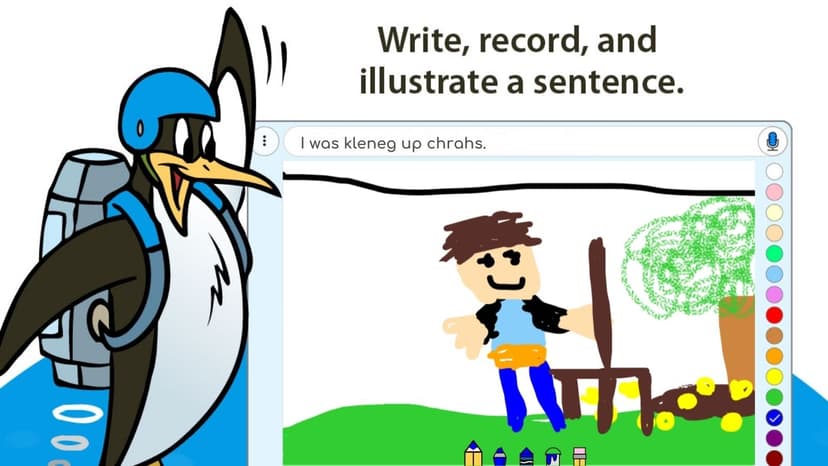
Wriddle functions effectively as a blank digital canvas for your child's creative expression, but it does not teach foundational literacy skills. Because the app relies entirely on open-ended creation, your child will not find explicit instruction in phonics, sight words, or spelling rules here. Instead, the platform offers a combination of drawing tools and voice recording capabilities that allow early learners to dictate stories before they can fluently write them. This multimodal approach aligns with cognitive theories of dual coding, where combining visual and verbal information strengthens memory and understanding. Parents should view Wriddle as a digital journal rather than a tutor. Your child can illustrate a scene and narrate what is happening, bridging the gap between oral storytelling and written composition. The app saves these creations in a portfolio, allowing you to observe developmental progress over time. You can also print or share these stories via a unique URL. However, since the app provides no adaptive difficulty, corrective feedback, or structured learning paths, you will need to actively participate to turn these creative sessions into concrete learning opportunities. It is a tool for practice and expression, requiring adult guidance to maximize its educational value.
How Does Wriddle Work?
Wriddle utilizes a constructivist, open-ended pedagogical approach where children create their own multimedia stories without predetermined learning paths. When your child opens the app, they are presented with a blank workspace and a set of basic digital art tools. They can draw pictures, add text, and use the device's microphone to record their voice narrating the story. The mechanics rely entirely on user generation rather than sequenced instruction. There are no levels to pass, no quizzes to take, and no algorithmic progression. The educational value stems from the act of creation itself. For early learners, the ability to record audio is the most critical mechanic, as it allows pre-readers and pre-writers to capture their complex thoughts before their fine motor skills can accommodate traditional writing. All completed projects are saved within a persistent digital portfolio. This tracking mechanic allows both parents and teachers to review previous work, monitor the evolution of a child's vocabulary, and assess improvements in narrative structure over the course of the school year.
Strengths and tradeoffs of Wriddle
Wriddle's biggest strength is its multimodal approach to storytelling, while its biggest weakness is the complete absence of structured instructional scaffolding. From a learning science perspective, the app excels at supporting expressive language through dual coding. By allowing children to draw a picture and immediately record their voice explaining it, Wriddle helps solidify the connection between visual symbols and spoken words. This is a critical precursor to traditional writing. The portfolio feature is another significant strength, providing a chronological record of a child's cognitive and linguistic development that educators can use for observational assessment. However, the lack of structured guidance severely limits its utility as a primary teaching tool. Because there is no explicit instruction or corrective feedback, children will not learn new phonics rules, grammar structures, or vocabulary words directly from the app. It relies heavily on a child's existing knowledge base. Without prompts, worked examples, or guided practice, a struggling student may stare at a blank screen without knowing how to begin. Wriddle is a strong supplementary tool for practicing existing skills, but it cannot replace explicit literacy instruction.
Who Might Benefit From Wriddle?
Wriddle is best for PreK to 1st-grade students who need a digital space to practice oral storytelling and creative expression alongside formal literacy instruction. The app is ideal for pre-writers who have complex ideas but lack the phonetic knowledge or fine motor skills to write them down. It serves well in early childhood classrooms as a center activity where teachers can capture student voices for digital portfolios. For parents, it is a useful tool to document a child's language development at home, provided an adult is available to prompt the child and discuss their creations.
Data Transparency
Does Not Meet Data Transparency Standard
Wriddle does not meet our data transparency standard. Its privacy policy does not document basic protections, including contractual limits on service providers and parents' right to see their child's data.
19 of 35 checks passed
Evaluated September 2026
Privacy Policy →Level 1 · Basic protections
Does not sell data or target ads at students, limits sharing, and lets parents see and delete their child's data.
Not documented: contractual limits on service providers, parents' right to see their child's data
Level 2 · Parent control (meets the standard)
Families can get their data out, know who processes it, and know how long it is kept.
Not documented: users' right to access their data, data export
Level 3 · Direct data access
Families or schools can pull their own data through an API, in a stated format.
Not documented: an API for retrieving their own data, a named export format
View all 35 checks
Parent Access5/8
Does the policy mention parents specifically?
“If you are a parent and want to correct, edit, update or delete information about a student, please work directly with your teacher or school.”
Can parents view their child's data?
The policy lets parents correct, edit, update or delete student information through the school, but it does not say parents can view or get access to that data.
Can parents modify their child's data?
“If you are a parent and want to correct, edit, update or delete information about a student, please work directly with your teacher or school. If needed, Tech4Learning will work with you to contact the appropriate people for updating and correcting student information.”
Can parents delete their child's account?
“If you are a parent and want to correct, edit, update or delete information about a student, please work directly with your teacher or school.”
Is there a dedicated Children's Privacy section?
“STUDENT PERSONAL INFORMATION Tech4Learning supports the efforts of COPPA to ensure the online safety of children.”
Does it reference COPPA compliance?
“Tech4Learning supports the efforts of COPPA to ensure the online safety of children.”
Does it reference FERPA compliance?
The policy does not mention FERPA.
Is parental consent required for child accounts?
The policy requires consent from either a parent or a school before collecting online contact information, but it does not require parental consent to create child accounts.
Data Portability0/5
Can users access their personal data?
The policy says the Account Owner can change and delete personal information, but it does not give users a right to access their personal data.
Can users download/export their data?
The policy does not address downloading or exporting data.
Is there a self-service data access tool?
The policy does not describe a self-service tool for accessing data.
Is a specific data format mentioned for export?
The policy does not mention any export format.
Is there an API for data access?
The policy mentions only single sign-on and LMS integrations, not an API for users or schools to retrieve their data.
Data Minimization1/6
Is data collection itemized?
“User accounts can contain the following Personal Information: The user's name, a unique username for the user which is usually an email address, and a password for the user.”
Can the app be used without a real name?
The policy allows pseudonyms, but it collects users' names, including first and last names received from rostering providers.
Can the app be used without an email?
The policy collects a student's email address when the Account Owner uses it as the username, and it receives email addresses from rostering providers.
Does it state collection is limited to what is necessary?
The policy limits how personal information is used, but it does not state that collection is limited to what is necessary.
Is IP address anonymized or truncated?
The policy does not address anonymizing or truncating IP addresses.
Is location tracking explicitly excluded?
The policy does not address location tracking.
Third-Party Protection5/7
Does it explicitly state no selling of data?
“Tech4Learning does not sell any data, including Personal Information, to third-parties.”
Are third-party providers named?
“These services include Google, Clever, and ClassLink.”
Are providers contractually restricted?
The policy says new providers will be held to the same data sharing terms as current ones, but it does not describe contractual restrictions on providers.
No-targeted-advertising commitment?
“The Application does not display any advertising to Users and does not create user profiles for the purpose of displaying advertising.”
Is AI/ML data sharing addressed?
The policy does not address AI or machine learning.
Child-specific sharing restriction?
“NOT give the ability to publicly post or otherwise distribute personally identifiable contact information without prior consent,”
Cookies/tracking limited or opt-out?
“Tech4Learning uses an in-house analytics tool to collect anonymous information about how Users interact with the Application.”
Deletion & Retention4/5
Can users delete their account?
“Of course, you can always opt-out by deleting your account before the changes take effect.”
Self-service deletion mechanism?
“Each account's administrator has the capability to delete any or all user accounts for their organization.”
Specific data retention timeline?
“Following a lapse in a subscription, we retain Personal Information for 60 days in order to provide for a seamless reactivation of accounts if the lapse was temporary due to organization budgeting or purchase processing restrictions.”
Auto-deletion of inactive accounts?
The policy purges data 60 days after a subscription lapses, but it does not address deleting accounts because users are inactive.
Post-deletion handling described?
“After this time, all Personal Information provided is purged from the system. We may maintain anonymized or aggregated data, including usage data, for analytics purposes.”
Advertising4/4
Advertising model explicitly disclosed?
“The Application does not display any advertising to Users and does not create user profiles for the purpose of displaying advertising.”
Free from third-party advertisements?
“The Application does not display any advertising to Users and does not create user profiles for the purpose of displaying advertising.”
Children excluded from ad targeting?
“The Application does not display any advertising to Users and does not create user profiles for the purpose of displaying advertising.”
Ad-free option available?
“The Application does not display any advertising to Users and does not create user profiles for the purpose of displaying advertising.”
What This Means
The policy review did not meet our data transparency standard. The checks above show the documented findings and unknowns. A missing statement does not establish how the app handles data in practice.
About this evaluation: Based on automated analysis of Privacy Policy against 35 policy-disclosure questions, including questions adapted from the Common Sense Privacy Program's published evaluation questions. TLS is not affiliated with Common Sense Media, and this is not a Common Sense rating. Quoted text is copied from the policy; unquoted notes are our summary. Results describe what the policy documents, not the company's actual practices. Privacy policies can change: this review reflects the version we analyzed and does not determine legal compliance.
Sources and review method
TLS combines product information and editorial analysis to explain how Wriddle works, its tradeoffs, and the questions to ask before choosing it. Product features, an instructional rationale and evidence of learning outcomes are different kinds of information.
Formal Learning Standard assessment: not yet completed. Data Transparency findings are reported separately and do not establish learning effectiveness. Read our methodology.
Frequently Asked Questions About Wriddle
Is Wriddle free?
Yes, Wriddle is entirely free for basic home and classroom use. The developer, Tech4Learning, offers the core drawing, recording, and portfolio features at no cost. Schools that require advanced administrative features, such as custom URLs, video export capabilities, and enhanced privacy restrictions, can upgrade for $1 per student.
Is Wriddle good for preschoolers and kindergarteners?
Yes, Wriddle is highly appropriate for children in Preschool through 1st Grade. Because the app includes voice recording features, children who cannot yet read or write can still successfully use the platform to tell stories. It effectively bridges the developmental gap between oral communication and formal written composition for early learners.
What does Wriddle teach?
Wriddle does not directly teach specific academic concepts like phonics or math. Instead, it provides an open-ended environment for your child to practice expressive language, storytelling, and digital art. By combining drawing and voice recording, it helps young learners understand narrative structure and connects spoken language to visual representation.
How does Wriddle compare to Seesaw?
While both apps allow young students to create digital portfolios using drawing and voice recording, Seesaw is a much larger, more comprehensive classroom management platform. Seesaw includes robust assignment delivery, parent communication tools, and massive libraries of teacher-created activities. Wriddle is a simpler, more focused tool dedicated strictly to individual story creation and portfolio tracking.
Has The Learning Standard evaluated Wriddle?
TLS has not yet completed a Learning Standard evaluation of how well Wriddle teaches. Its privacy policy has been reviewed for Data Transparency and does not yet document the basic protections (Level 1).
Is Wriddle COPPA compliant?
The reviewed privacy policy references COPPA. A policy reference alone does not establish COPPA compliance. Policy review note: The policy references COPPA and lists the guidelines the Application agrees to meet.
Is Wriddle FERPA compliant?
A FERPA reference was not found in the reviewed privacy policy. This does not determine whether the app complies with FERPA. Policy review note: The policy does not mention FERPA.
Does Wriddle have a children's privacy policy?
The reviewed policy includes a dedicated children's privacy section. Policy review note: A section with its own heading covers student and children's data under COPPA.
Does Wriddle sell student data?
The reviewed policy states that the app does not sell data. This is a policy statement; actual data practices were not verified. Policy review note: The policy explicitly says the company does not sell data.
Can you delete your data from Wriddle?
The reviewed privacy policy describes account deletion. We have not tested the deletion process. Policy review note: Users can delete their accounts.
Follow TLS Research
Subscribe to future TLS research updates: app reviews, findings, and what the evidence shows.
Screenshots

Take Action
For Wriddle
If you represent Tech4Learning, Inc and have a correction or new evidence, send the relevant source so we can review and update this page.
Submit a correctionDetails
- Pricing
- Wriddle is free for home or classroom use. Schools who want additional features such as a custom URL, the ability to export student work to formats like video, and additional privacy restrictions can upgrade for $1 per student.
- Platforms
- Web Browser, iOS (Apple mobile), iPadOS (Apple tablet), Android (Google mobile), Tizen (Samsung mobile), Windows (Microsoft), macOS (Apple), Chrome OS (Google)
- Grade Levels
- Preschool, Prekindergarten, Transitional Kindergarten, Kindergarten, 1st Grade
- Website
- Visit site