Via® Mini
Product by PRC-Saltillo
Facts checked: Not yet checked
Our take (not a Learning Standard rating). This label applies to learning-science judgments throughout this overview.
Our take (not a Learning Standard rating)
While The Learning Standard has not yet formally evaluated the Via Mini, it effectively supports language acquisition through established Augmentative and Alternative Communication apps. By utilizing motor planning and visual symbol hierarchies, the device reduces cognitive load, allowing users to focus on vocabulary retention rather than interface navigation.
Pros
- Incorporates motor planning principles through LAMP Words for Life to build automaticity in vocabulary retrieval.
- Reduces extraneous cognitive load by offering customizable grid sizes tailored to the user's current linguistic level.
- Supports multiple access methods like head tracking and switch scanning to accommodate diverse physical learning needs.
- Facilitates consistent vocabulary exposure across different environments due to its dedicated, portable hardware design.
Cons
- Requires significant adult scaffolding and modeling for the user to achieve communicative competence.
- Lacks built-in formative assessment tools to track a user's independent language growth over time natively.
- Presents a steep learning curve for caregivers who must program and customize the vocabulary arrays without in-app tutorials.
What Do We Know About Via® Mini?
The Via Mini is a highly effective platform for teaching language and communication skills to non-speaking or minimally speaking individuals, though it requires consistent adult involvement. This device functions as a dedicated Augmentative and Alternative Communication (AAC) tool, coming pre-loaded with industry-standard software like TouchChat or LAMP Words for Life. Your child will not use this as a passive learning game; instead, it serves as their primary voice and language-building interface. To succeed, you must commit to a teaching strategy called aided language stimulation. This means you must model language by pressing the buttons on the device while speaking to your child. Learning science dictates that children acquire language through massive exposure in context. Simply handing the device to your child will not work. When you model vocabulary consistently across different environments, your child learns the semantic meaning of symbols and the motor pathways required to select them. The hardware is durable and portable, ensuring your child always has access to their vocabulary. Because The Learning Standard has not yet completed a formal evaluation, you should consult closely with a speech-language pathologist to ensure the selected vocabulary file matches your child's cognitive and linguistic needs.
How Does Via® Mini Work?
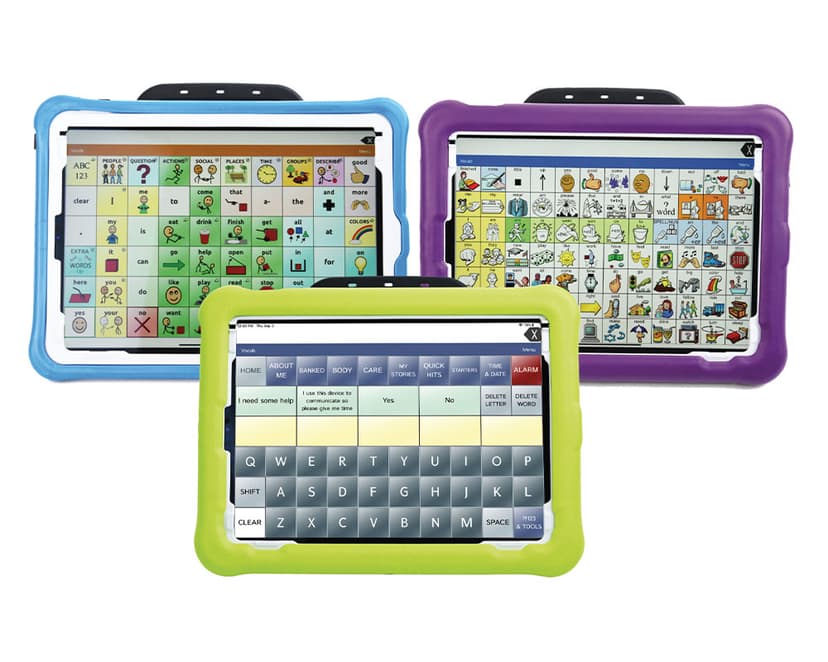
The Via Mini utilizes a robust Augmentative and Alternative Communication (AAC) framework relying heavily on motor planning and visual-spatial memory. The device operates essentially as a fortified iPad running specialized language software. Depending on the app chosen, the interface presents a grid of core vocabulary words. Core words make up 80 percent of everyday language. By keeping the location of these core words consistent, the software leverages motor learning principles. Just as a typist learns the QWERTY keyboard without looking, your child learns the physical pathway to say a word without needing to scan the screen visually every time. This automaticity frees up working memory, allowing the user to focus on sentence construction and social interaction rather than hunting for specific buttons. The device also supports alternative access methods like head tracking and switches, ensuring that physical limitations do not impede cognitive and linguistic output.
Strengths and tradeoffs of Via® Mini
The Via Mini's greatest strength is its reliance on consistent motor planning for vocabulary retrieval, while its biggest weakness is the heavy burden it places on caregivers for programming and modeling. Motor automaticity is critical for fluent communication. Because the included apps keep core vocabulary in fixed locations, users develop strong spatial memory. This reduces extraneous cognitive load, freeing up mental bandwidth for the actual task of language formulation. Customization is another strong point; educators can adjust grid sizes and mask certain buttons to manage intrinsic cognitive load, gradually revealing more vocabulary as the user's skills grow. However, the system lacks independent instructional scaffolding. The device does not teach the child how to use it through built-in lessons or prompts. It is purely an expressive tool. Therefore, effective learning relies entirely on the adults in the environment providing consistent worked examples through aided language input, pointing to symbols while speaking. Furthermore, tracking a user's language development requires an external subscription, meaning there is no immediate, localized feedback on vocabulary acquisition built directly into the base interface.
Who Might Benefit From Via® Mini?
The Via Mini is best for individuals with complex communication needs who require a durable, highly customizable, and portable AAC device for daily language use. This tool spans early childhood through adulthood, adapting to any age or cognitive level through varied vocabulary files. It is particularly effective for autistic learners, individuals with cerebral palsy, or those with Down syndrome who benefit from strong visual supports and consistent motor planning pathways. Because it supports switch access and head tracking, it is also ideal for users with significant fine or gross motor impairments who cannot use standard direct-touch tablets.
Data Transparency
Does Not Meet Data Transparency Standard
Via® Mini reaches Level 1 of 3 (Basic protections), below our data transparency standard. Reaching Level 2 needs the policy to document a data retention timeline and self-service deletion.
16 of 35 checks passed
Evaluated September 2026
PRC-Saltillo →Level 1 · Basic protections
Does not sell data or target ads at students, limits sharing, and lets parents see and delete their child's data.
Level 2 · Parent control (meets the standard)
Families can get their data out, know who processes it, and know how long it is kept.
Not documented: a data retention timeline, self-service deletion
Level 3 · Direct data access
Families or schools can pull their own data through an API, in a stated format.
Not documented: an API for retrieving their own data, a named export format
View all 35 checks
Parent Access5/8
Does the policy mention parents specifically?
“Parents or students who wish to access student personal information or delete student personal information should direct their request to their EA.”
Can parents view their child's data?
“Parents or students who wish to access student personal information or delete student personal information should direct their request to their EA.”
Can parents modify their child's data?
The policy lets schools request amendments to student information, but gives parents only access and deletion requests, not correction.
Can parents delete their child's account?
“To request deletion of your personal information or that of your minor child.”
Is there a dedicated Children's Privacy section?
The policy has a "Schools and Student Personal Information" section but no section headed for children's privacy or COPPA.
Does it reference COPPA compliance?
“As such, PRC-Saltillo complies with applicable laws and regulations such as the Family Educational Rights and Privacy Act (“FERPA”) at 20 U.S.C. § 1232g (34 CFR Part 99); the Children’s Online Privacy Protection Act (“COPPA”) at 15 U.S.C. § 6501-6506 (16 CFR Part 312), and other applicable state privacy laws and regulations.”
Does it reference FERPA compliance?
“If a school (Educational Agency) uses our Products or Services with students, we act as a school official under FERPA. We follow FERPA, COPPA, and state laws.”
Is parental consent required for child accounts?
The policy does not say parental consent is required for child accounts.
Data Portability3/5
Can users access their personal data?
“To access any of your personal information that we process.”
Can users download/export their data?
“To transfer your personal information to a third party by providing to you, or a third party you have chosen, your personal information in a structured, commonly used, machine-readable format.”
Is there a self-service data access tool?
“If you have an account with us, you can review, update, and change your personal information in your account settings whenever you want.”
Is a specific data format mentioned for export?
The policy says only "structured, commonly used, machine-readable format" and names no specific file format.
Is there an API for data access?
The policy does not describe an API that users or schools can use to retrieve their data.
Data Minimization1/6
Is data collection itemized?
“Identity Data, including first name, last name, username or similar identifier, professional title and license information, and date of birth.”
Can the app be used without a real name?
The policy says it collects names, including first and last name.
Can the app be used without an email?
The policy says it collects email addresses.
Does it state collection is limited to what is necessary?
The policy limits collection to what is needed only for medical data, not for collection in general.
Is IP address anonymized or truncated?
The policy says it collects IP addresses and does not mention anonymizing or truncating them.
Is location tracking explicitly excluded?
The policy says it collects time zone setting and location, and offers location-based customizations.
Third-Party Protection5/7
Does it explicitly state no selling of data?
“Right to Opt Out of the Sale of Personal Information and Targeted Advertising. We do not sell or share personal information for cross-context behavioral or targeted advertising purposes.”
Are third-party providers named?
“PRC-Saltillo Apps may use Apple Intelligence features provided by Apple Inc. to enhance user experience, including predictive text, personalized suggestions, and accessibility improvements.”
Are providers contractually restricted?
“We may share your personal information with trusted service providers who help us operate our business. They may only use your information as instructed by PRC-Saltillo.”
No-targeted-advertising commitment?
The policy lists targeted advertising as a use of personal information; the student commitment covers only "commercial purposes" and does not explicitly mention advertising.
Is AI/ML data sharing addressed?
“No data is collected by PRC-Saltillo from your use of the Apple Intelligence features in our Apps.”
Child-specific sharing restriction?
“PRC-Saltillo does not disclose any student information or school materials to vendors or business partners and does not use student personal information for commercial purposes.”
Cookies/tracking limited or opt-out?
The policy points to a separate Cookie Policy for cookie details and gives no cookie opt-out itself; its opt-out of targeted advertising is listed only as a right that may apply depending on state.
Deletion & Retention1/5
Can users delete their account?
“To request deletion of your personal information or that of your minor child.”
Self-service deletion mechanism?
The policy handles deletion only by request to privacy@prc-saltillo.com or through the school.
Specific data retention timeline?
The policy says data is kept only as long as necessary and gives no specific time period.
Auto-deletion of inactive accounts?
The policy does not mention automatic deletion of inactive accounts.
Post-deletion handling described?
The policy describes permanent disposal only for biometric data and does not explain what happens to other data after deletion.
Advertising1/4
Advertising model explicitly disclosed?
“market and advertise our Products and Services, including to send you news, updates, special offers and promotions, and targeted advertising;”
Free from third-party advertisements?
The policy does not say whether the product is free of third-party ads.
Children excluded from ad targeting?
The policy does not explicitly exclude children or students from ad targeting; it says only that student information is not used for commercial purposes.
Ad-free option available?
The policy does not describe an ad-free option or say the product has no advertising.
What This Means
The policy review did not meet our data transparency standard. The checks above show the documented findings and unknowns. A missing statement does not establish how the app handles data in practice.
About this evaluation: Based on automated analysis of PRC-Saltillo against 35 policy-disclosure questions, including questions adapted from the Common Sense Privacy Program's published evaluation questions. TLS is not affiliated with Common Sense Media, and this is not a Common Sense rating. Quoted text is copied from the policy; unquoted notes are our summary. Results describe what the policy documents, not the company's actual practices. Privacy policies can change: this review reflects the version we analyzed and does not determine legal compliance.
Sources and review method
TLS combines product information and editorial analysis to explain how Via® Mini works, its tradeoffs, and the questions to ask before choosing it. Product features, an instructional rationale and evidence of learning outcomes are different kinds of information.
Formal Learning Standard assessment: not yet completed. Data Transparency findings are reported separately and do not establish learning effectiveness. Read our methodology.
Frequently Asked Questions About Via® Mini
Is the Via Mini free?
No. The Via Mini is a dedicated medical device and represents a significant investment. However, it meets Medicare, Medicaid, and private insurance requirements for durable medical equipment. Pricing varies based on the specific configuration and included software, requiring you to contact a PRC-Saltillo consultant for exact costs.
Is the Via Mini good for preschool students?
Yes. The device features highly customizable grid sizes that can be simplified for young children. By masking certain buttons, educators can manage a preschooler's cognitive load, focusing on early core vocabulary before gradually introducing complex syntax as the child's working memory capacity increases.
What does the Via Mini teach?
The Via Mini teaches expressive language, vocabulary acquisition, and syntax. By using apps like TouchChat or LAMP Words for Life, it helps non-speaking users develop communicative competence through consistent motor planning and visual-spatial symbol association.
How does the Via Mini compare to a standard iPad with an AAC app?
The Via Mini uses an iOS foundation but is built specifically for durability and dedicated communication. It features enhanced amplification so the user can be heard in noisy environments, integrated switch ports for alternative access, and a rugged case designed to withstand daily physical wear that a standard iPad cannot survive.
Has The Learning Standard evaluated Via® Mini?
TLS has not yet completed a Learning Standard evaluation of how well Via® Mini teaches. Its privacy policy has been reviewed for Data Transparency and reaches Level 1, Basic protections.
Is Via® Mini COPPA compliant?
The reviewed privacy policy references COPPA. A policy reference alone does not establish COPPA compliance. Policy review note: The policy says it complies with COPPA.
Is Via® Mini FERPA compliant?
The reviewed privacy policy references FERPA. A policy reference alone does not establish FERPA compliance. Policy review note: The policy says it complies with FERPA.
Does Via® Mini have a children's privacy policy?
No dedicated children's privacy section was found in the reviewed policy. Policy review note: The policy has a "Schools and Student Personal Information" section but no section headed for children's privacy or COPPA.
Does Via® Mini sell student data?
The reviewed policy states that the app does not sell data. This is a policy statement; actual data practices were not verified. Policy review note: The policy states that PRC-Saltillo does not sell personal information.
Can you delete your data from Via® Mini?
The reviewed privacy policy describes account deletion. We have not tested the deletion process. Policy review note: Users can request deletion of their personal information.
Follow TLS Research
Subscribe to future TLS research updates: app reviews, findings, and what the evidence shows.
Screenshots



Take Action
For Via® Mini
If you represent PRC-Saltillo and have a correction or new evidence, send the relevant source so we can review and update this page.
Submit a correctionDetails
- Pricing
- Visit store.prc-saltillo.com or contact your PRC-Saltillo consultant for pricing. Meets Medicare/Medicaid/insurance requirements for durable medical equipment (E2510). One-year free subscription to Realize Language upon purchase; $9.95 annual fee if you choose to continue.
- Platforms
- iPadOS (Apple tablet)
- Grade Levels
- Preschool, Prekindergarten, Transitional Kindergarten, Kindergarten, 1st Grade, 2nd Grade, 3rd Grade, 4th Grade, 5th Grade, 6th Grade, 7th Grade, 8th Grade, 9th Grade, 10th Grade, 11th Grade, 12th Grade, Associate's degree, Bachelor's degree, Post-baccalaureate certificate, Master's Degree, Post-master's certificate, Doctoral Degree, Post-doctoral certificate, Adult Education, Professional or Technical Credential
- Website
- Visit site