
TETRIX® Virtual Robotics Simulation
Product by Pitsco Education, LLC.
Facts checked: Not yet checked
Our take (not a Learning Standard rating). This label applies to learning-science judgments throughout this overview.
Our take (not a Learning Standard rating)
While The Learning Standard has not yet formally evaluated TETRIX Virtual Robotics Simulation, its core mechanism of transferring virtual code to physical robots aligns with the learning science principle of authentic practice. It provides immediate feedback in the simulation, though its reliance on Arduino IDE may overwhelm novices.
Pros
- Facilitates near transfer of learning by allowing students to test virtual code on physical TETRIX robots.
- Provides immediate visual feedback on coding errors through the simulated 3D environment.
- Uses authentic programming languages rather than abstracted drag-and-drop blocks to prepare students for real-world applications.
Cons
- Requires a separate, costly physical robotics kit to unlock the platform's full educational value.
- Lacks built-in scaffolding for students with no prior text-based programming experience.
- Demands high executive functioning skills to troubleshoot code that fails in the real world despite working in the simulation.
What Do We Know About TETRIX® Virtual Robotics Simulation?
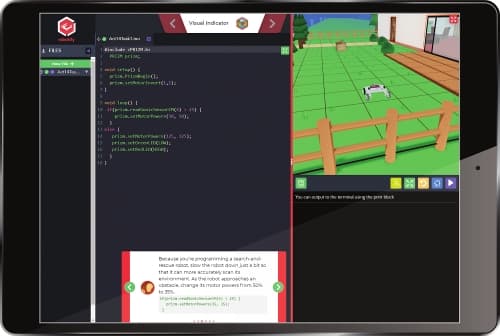
TETRIX Virtual Robotics Simulation is an effective tool for teaching applied computer science, provided your child already possesses basic coding literacy and has access to the companion physical robot. It bridges the gap between digital coding and physical engineering. Your child writes code in the Arduino Software environment and immediately tests it in a virtual 3D space. This dual approach leverages authentic practice, a concept in learning science where skills are applied in real-world contexts to improve retention. However, you should know that this is not a beginner-friendly platform. It relies on text-based programming rather than the drag-and-drop block coding found in introductory apps. If your child makes a syntax error, they must debug it manually. Furthermore, while the simulation works on its own, the true educational value emerges only when paired with the TETRIX MAX robotics building system. Without the physical robot, the software remains a standard coding simulator. The Learning Standard has not yet formally evaluated this app, but its design suggests it works best as an extension of a structured robotics curriculum rather than a standalone teaching tool.
How Does TETRIX® Virtual Robotics Simulation Work?
TETRIX Virtual Robotics Simulation uses a blended learning approach that combines virtual prototyping with physical computing. Your child begins by interacting with a web-based coding environment. They write scripts using the Arduino IDE programming language to command a virtual TETRIX robot through various digital courses and challenges. The platform provides immediate visual feedback. When your child executes their code, the virtual robot acts out the commands, allowing them to spot logic errors and iterate on their design instantly. Once the code functions correctly in the simulation, they can export the exact same script to a physical TETRIX MAX robot. This physical transfer requires students to account for real-world variables like friction and battery life, which forces deeper cognitive processing. The software includes built-in curriculum modules that guide students through progressively complex programming concepts, from basic motor controls to advanced sensor integration.
Strengths and tradeoffs of TETRIX® Virtual Robotics Simulation
The biggest strength of TETRIX Virtual Robotics Simulation is its seamless transition from digital simulation to physical hardware, while its biggest weakness is the steep learning curve associated with un-scaffolded text-based programming. Transfer of learning is exceptionally strong here. When your child writes code in the simulation and pushes it to a physical robot, they engage in authentic practice. They learn that a virtual environment is frictionless, but the real world is not. This forces them to troubleshoot and iterate, which deepens their understanding of applied physics and computational thinking. Immediate feedback in the virtual environment also helps students correct syntax errors before risking damage to physical hardware. Conversely, the app lacks the scaffolding necessary for novices. Because it uses the Arduino IDE, a single misplaced semicolon breaks the code. Without dynamic hints or worked examples to guide frustrated learners, students can easily experience cognitive overload. Furthermore, the platform's full utility depends entirely on possessing the expensive physical TETRIX MAX kits. Without the physical component, the software functions as a standard, somewhat rigid coding simulator that struggles to compete with dedicated, purely virtual platforms.
Who Might Benefit From TETRIX® Virtual Robotics Simulation?
This software is best for middle and high school students who are actively participating in a structured robotics team or classroom. It serves older students who have outgrown block-based coding and are ready for the rigors of text-based programming via the Arduino IDE. Your child will thrive here if they already possess the physical TETRIX MAX robotics kit and need a virtual space to prototype code before real-world testing. It is not suitable for elementary students or complete beginners looking for a casual introduction to computer science.
Data Transparency
Does Not Meet Data Transparency Standard
TETRIX® Virtual Robotics Simulation does not meet our data transparency standard. Its privacy policy does not document basic protections, including a statement that it does not sell data and contractual limits on service providers.
21 of 35 checks passed
Evaluated September 2026
Privacy policy →Level 1 · Basic protections
Does not sell data or target ads at students, limits sharing, and lets parents see and delete their child's data.
Not documented: a statement that it does not sell data, contractual limits on service providers
Level 2 · Parent control (meets the standard)
Families can get their data out, know who processes it, and know how long it is kept.
Not documented: data export
Level 3 · Direct data access
Families or schools can pull their own data through an API, in a stated format.
Not documented: an API for retrieving their own data, a named export format
View all 35 checks
Parent Access8/8
Does the policy mention parents specifically?
“This Notice is intended to help school officials, school users, and parents understand what data we collect, why we collect it, and what we do with it.”
Can parents view their child's data?
“The parents of students who use the services provided by our Education Sites may request access to or deletion of their child's personal information by contacting the sponsoring educational institution.”
Can parents modify their child's data?
“Access to information of students or children is provided and controlled by the sponsoring educational institution. If you have questions regarding reviewing, correcting, updating, or deleting personal information for a student, please contact the educational institution directly.”
Can parents delete their child's account?
“Parents may also request deletion of their child's account through the sponsoring educational institution to prevent the collection of any additional information about or from their child.”
Is there a dedicated Children's Privacy section?
“This Children's Privacy section applies to our Education Sites.”
Does it reference COPPA compliance?
“The sponsoring institution is also responsible for obtaining any required consent and/or authorization to collect information from children as permitted by the Children's Online Privacy Protection Act, alternatively known as COPPA.”
Does it reference FERPA compliance?
“In compliance with the Federal Education Rights and Privacy Act ("FERPA"), parents and/or guardians are entitled to access to their student's information.”
Is parental consent required for child accounts?
“All accounts for children under the age of 13 (or a higher age as might be required by local laws) must be authorized by a parent or other authorized school official.”
Data Portability2/5
Can users access their personal data?
“If you have any questions regarding your information or you would like to review and make corrections, updates, or deletions to your personal information stored by us, you may do so by logging into your account or by contacting us using the contact information in the How to Contact Us section.”
Can users download/export their data?
The policy does not address downloading or exporting data.
Is there a self-service data access tool?
“If you have any questions regarding your information or you would like to review and make corrections, updates, or deletions to your personal information stored by us, you may do so by logging into your account”
Is a specific data format mentioned for export?
The policy does not mention an export format.
Is there an API for data access?
The policy does not mention an API for getting data.
Data Minimization2/6
Is data collection itemized?
“When an account is created on one of our Education Sites, we may collect personal information about students including a first and last name, username, password, and class information (class name, period name, grade level, and so on) as provided by a teacher or school official.”
Can the app be used without a real name?
The policy says it collects students' first and last names.
Can the app be used without an email?
The policy does not say it never collects student email addresses, and it shares children's data with vendors for email delivery.
Does it state collection is limited to what is necessary?
“We collect only the information necessary for children to use the services provided by our Education Sites, such as a username, password, and any information submitted by the user.”
Is IP address anonymized or truncated?
The policy says IP addresses are collected and does not say they are anonymized or truncated.
Is location tracking explicitly excluded?
The policy says it automatically collects location and country information.
Third-Party Protection4/7
Does it explicitly state no selling of data?
The policy only says it does not sell children's data to third parties for their promotional purposes or targeted advertising, which is not a general no-sale commitment.
Are third-party providers named?
“All payment data is stored by our payment processors, CyberSource, CenPOS, and/or Shopify Payments.”
Are providers contractually restricted?
The policy does not say service providers are contractually restricted; the only required commitment it mentions is for affiliates.
No-targeted-advertising commitment?
“We do not share, sell, rent, or trade any personal information for children with third parties for their promotional purposes or for the use of targeted advertising.”
Is AI/ML data sharing addressed?
The policy does not address AI or machine learning.
Child-specific sharing restriction?
“Information collected from children is not shared with other companies, organizations, or individuals except in the following circumstances:”
Cookies/tracking limited or opt-out?
“Any data collected in this manner is anonymized and does not include personal data from your social profiles. We do not utilize this technology on our Education Sites.”
Deletion & Retention4/5
Can users delete their account?
“Parents may also request deletion of their child's account through the sponsoring educational institution to prevent the collection of any additional information about or from their child.”
Self-service deletion mechanism?
“If you have any questions regarding your information or you would like to review and make corrections, updates, or deletions to your personal information stored by us, you may do so by logging into your account”
Specific data retention timeline?
“No purpose in this policy will require us keeping your personal information longer than 90 days past the termination of the user's account.”
Auto-deletion of inactive accounts?
The policy does not address automatic deletion of inactive accounts.
Post-deletion handling described?
“Following termination or deletion of an account, we may keep information or content for a reasonable period for backup, archival, or audit purposes, but all data will be deleted from production systems as soon as possible.”
Advertising1/4
Advertising model explicitly disclosed?
The policy does not explicitly describe whether the Education Sites show advertising.
Free from third-party advertisements?
The policy does not state that the product is free of third-party ads.
Children excluded from ad targeting?
“We do not share, sell, rent, or trade any personal information for children with third parties for their promotional purposes or for the use of targeted advertising.”
Ad-free option available?
The policy does not state that the product has no ads or offers an ad-free option.
What This Means
The policy review did not meet our data transparency standard. The checks above show the documented findings and unknowns. A missing statement does not establish how the app handles data in practice.
About this evaluation: Based on automated analysis of Privacy policy against 35 policy-disclosure questions, including questions adapted from the Common Sense Privacy Program's published evaluation questions. TLS is not affiliated with Common Sense Media, and this is not a Common Sense rating. Quoted text is copied from the policy; unquoted notes are our summary. Results describe what the policy documents, not the company's actual practices. Privacy policies can change: this review reflects the version we analyzed and does not determine legal compliance.
Sources and review method
TLS combines product information and editorial analysis to explain how TETRIX® Virtual Robotics Simulation works, its tradeoffs, and the questions to ask before choosing it. Product features, an instructional rationale and evidence of learning outcomes are different kinds of information.
Formal Learning Standard assessment: not yet completed. Data Transparency findings are reported separately and do not establish learning effectiveness. Read our methodology.
Frequently Asked Questions About TETRIX® Virtual Robotics Simulation
Is TETRIX Virtual Robotics Simulation free?
No. TETRIX Virtual Robotics Simulation requires an annual license, which costs $24.94 per user. Additionally, to fully utilize the software's blended learning approach, you need the physical TETRIX MAX hardware, which is a significant separate investment.
Is TETRIX Virtual Robotics Simulation good for all ages?
No. Despite the developer's claim that it suits all ages, the reliance on text-based Arduino IDE programming makes it inappropriate for elementary students. It is best suited for middle and high school learners with prior coding exposure.
What does TETRIX Virtual Robotics Simulation teach?
It teaches applied computer science, specifically robotics programming, algorithmic logic, and real-world debugging. Students learn how to write code in the Arduino environment to control motors, read sensors, and navigate complex environments.
How does TETRIX Virtual Robotics Simulation compare vs VEXcode VR?
Both platforms offer virtual robotics simulations, but VEXcode VR relies heavily on block-based coding with options to transition to text, making it more accessible for beginners. TETRIX Virtual Robotics Simulation jumps straight into text-based Arduino IDE, catering to a more advanced, specific hardware ecosystem.
Has The Learning Standard evaluated TETRIX® Virtual Robotics Simulation?
TLS has not yet completed a Learning Standard evaluation of how well TETRIX® Virtual Robotics Simulation teaches. Its privacy policy has been reviewed for Data Transparency and does not yet document the basic protections (Level 1).
Is TETRIX® Virtual Robotics Simulation COPPA compliant?
The reviewed privacy policy references COPPA. A policy reference alone does not establish COPPA compliance. Policy review note: The policy names COPPA in the context of meeting its consent requirements.
Is TETRIX® Virtual Robotics Simulation FERPA compliant?
The reviewed privacy policy references FERPA. A policy reference alone does not establish FERPA compliance. Policy review note: The policy states it complies with FERPA.
Does TETRIX® Virtual Robotics Simulation have a children's privacy policy?
The reviewed policy includes a dedicated children's privacy section. Policy review note: There is a separate section headed Children's Privacy.
Does TETRIX® Virtual Robotics Simulation sell student data?
A statement ruling out data selling was not found in the reviewed policy. This does not establish that the app sells student data. Policy review note: The policy only says it does not sell children's data to third parties for their promotional purposes or targeted advertising, which is not a general no-sale commitment.
Can you delete your data from TETRIX® Virtual Robotics Simulation?
The reviewed privacy policy describes account deletion. We have not tested the deletion process. Policy review note: Account deletion can be requested, including through the school.
Follow TLS Research
Subscribe to future TLS research updates: app reviews, findings, and what the evidence shows.
Screenshots
Take Action
For TETRIX® Virtual Robotics Simulation
If you represent Pitsco Education, LLC. and have a correction or new evidence, send the relevant source so we can review and update this page.
Submit a correction