
TechnoKids Complete Collection
Product by TechnoKids
Facts checked: Not yet checked
Our take (not a Learning Standard rating). This label applies to learning-science judgments throughout this overview.
Our take (not a Learning Standard rating)
TechnoKids Complete Collection provides an extensive library of project-based assignments, but requires significant educator facilitation to be effective. It relies heavily on worked examples and scaffolding through PDF workbooks, yet lacks automated feedback mechanisms or adaptive pacing found in true digital learning platforms. The Learning Standard has not yet formally evaluated this product.
Pros
- Utilizes project-based learning to contextualize digital skills within real-world scenarios.
- Employs worked examples in student workbooks to reduce cognitive load during complex software tasks.
- Provides explicit scaffolding through step-by-step teacher guides and customizable rubrics.
- Supports cross-curricular integration by tying coding and word processing to math and humanities subjects.
Cons
- Lacks automated feedback loops, requiring teachers to manually grade all assessments and projects.
- Offers no adaptive learning pathways to adjust difficulty based on individual student performance.
- Relies heavily on static PDF workbooks rather than interactive digital practice environments.
- Imposes a high financial barrier with a $699 price tag that puts it out of reach for most individual families.
What Do We Know About TechnoKids Complete Collection?
TechnoKids Complete Collection is an effective instructional framework for digital literacy, provided your child has a dedicated educator to guide them through the material. It is not an independent learning app or a self-paced software program. Instead, it is a massive digital filing cabinet containing over 40 structured projects designed to teach coding, word processing, and spreadsheet skills using standard office software like Microsoft 365 and Google Workspace. Your child will learn by completing project-based tasks, such as designing a brochure or programming a basic game, which helps contextualize abstract technical skills into tangible outputs. Because the curriculum relies heavily on static PDF workbooks and teacher-led instruction, it lacks the spaced repetition and immediate automated feedback that drive retention in modern educational software. Parents should understand that purchasing this $699 collection means taking on the role of the primary teacher. You will need to print the workbooks, follow the teacher guides, and manually assess your child's progress using the provided rubrics. While the pedagogy is sound, utilizing worked examples and problem-based learning to build competence, it demands significant adult involvement to ensure learning actually occurs. Please note that The Learning Standard has not yet fully evaluated this curriculum.
How Does TechnoKids Complete Collection Work?
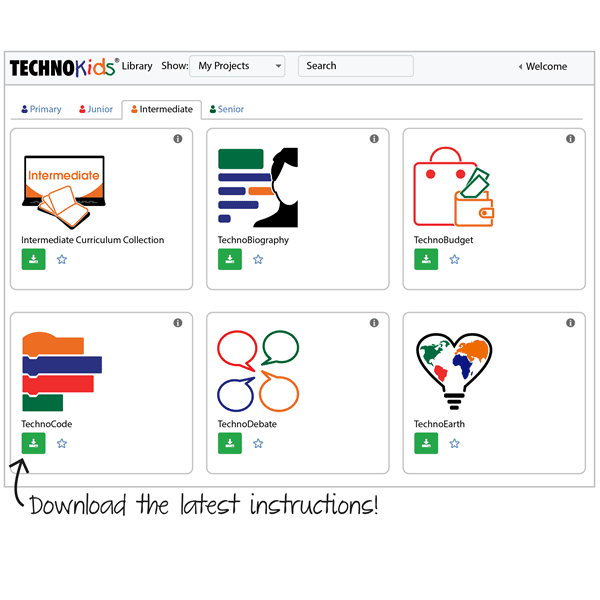
TechnoKids Complete Collection uses project-based learning and explicit instruction to teach software and coding skills across multiple grade levels. Students do not log into a proprietary learning platform; instead, they use standard applications like Google Workspace or Microsoft Office to complete specific, real-world projects. The learning mechanics center on guided practice and worked examples. A teacher introduces a concept using provided flashcards or sample files, and the student follows step-by-step instructions in a digital or printed PDF workbook to execute the task. As students progress from elementary to high school levels, the scaffolding gradually decreases, encouraging more independent problem-solving. Every project culminates in a concrete deliverable, such as a presentation, a spreadsheet model, or a coded animation. Assessment is entirely manual, relying on teacher observation and customizable rubrics rather than automated quizzes. This approach ensures students learn to navigate actual workplace software environments, but it relies entirely on the instructor to pace the lessons and verify comprehension.
Strengths and tradeoffs of TechnoKids Complete Collection
The biggest strength of TechnoKids Complete Collection is its robust use of project-based learning to build authentic digital literacy, while its biggest weakness is the complete absence of interactive, immediate feedback. Project-based learning is highly effective for teaching software skills because it anchors abstract commands, like formatting a spreadsheet or writing a line of code, to meaningful, real-world tasks. By structuring lessons around concrete deliverables, TechnoKids helps students build mental schemas that transfer directly to future academic and career environments. The curriculum effectively uses worked examples within its student workbooks, breaking down complex software operations into manageable steps that reduce extraneous cognitive load. However, the reliance on static PDFs means the program completely lacks automated feedback loops. Learning science shows that immediate, corrective feedback is crucial for mastering technical procedures. Without it, your child might practice a formatting error repeatedly until an adult reviews the final project. Furthermore, the program does not utilize spaced repetition or retrieval practice systematically; once a project is finished, the skills are rarely tested again unless explicitly required by a future assignment. The burden of ensuring mastery falls entirely on the educator or parent facilitating the course.
Who Might Benefit From TechnoKids Complete Collection?
TechnoKids Complete Collection is best for classroom educators and dedicated homeschool parents who want a comprehensive, ready-to-teach digital literacy curriculum. It serves students from grades 1 through 12 by providing age-appropriate projects that range from basic mouse skills to advanced spreadsheet logic and coding. This program is ideal for schools or co-ops seeking to standardize technology instruction across multiple grade levels using real-world software like Google Workspace or Microsoft 365. It is not suitable for parents seeking an independent, app-based learning experience, as the materials require active teaching, lesson planning, and manual grading to be effective.
Data Transparency
Does Not Meet Data Transparency Standard
TechnoKids Complete Collection does not meet our data transparency standard. Its privacy policy does not document basic protections, including a commitment against targeted advertising, limits on sharing children's data and a COPPA or FERPA commitment.
8 of 35 checks passed
Evaluated September 2026
Privacy Policy →Level 1 · Basic protections
Does not sell data or target ads at students, limits sharing, and lets parents see and delete their child's data.
Not documented: a commitment against targeted advertising, limits on sharing children's data, a COPPA or FERPA commitment, parents' right to see their child's data, parents' right to delete their child's data
Level 2 · Parent control (meets the standard)
Families can get their data out, know who processes it, and know how long it is kept.
Not documented: data export, a data retention timeline, self-service deletion
Level 3 · Direct data access
Families or schools can pull their own data through an API, in a stated format.
Not documented: an API for retrieving their own data, a named export format
View all 35 checks
Parent Access0/8
Does the policy mention parents specifically?
The policy does not mention parents.
Can parents view their child's data?
The policy does not address parents viewing their child's data.
Can parents modify their child's data?
The policy does not address parents modifying their child's data.
Can parents delete their child's account?
The policy does not address parents deleting their child's data or account.
Is there a dedicated Children's Privacy section?
The policy has no section dedicated to children's privacy.
Does it reference COPPA compliance?
The policy does not reference COPPA.
Does it reference FERPA compliance?
The policy does not reference FERPA.
Is parental consent required for child accounts?
The policy does not address parental consent for child accounts.
Data Portability1/5
Can users access their personal data?
“You have the right to access, correct, and delete your information. You can exercise these rights by contacting us at information@technokids.com.”
Can users download/export their data?
The policy does not mention downloading or exporting data.
Is there a self-service data access tool?
The policy only describes emailing requests, with no self-service access tool.
Is a specific data format mentioned for export?
The policy does not name any export format.
Is there an API for data access?
The policy does not mention an API for getting data.
Data Minimization2/6
Is data collection itemized?
“This includes personal details such as name, address, email address, phone number, and payment data. This also includes account information like username, password, and preferences.”
Can the app be used without a real name?
The policy says it collects users' names.
Can the app be used without an email?
The policy says it collects email addresses.
Does it state collection is limited to what is necessary?
“Restricting the collection, use, and disclosure of personal information to what is reasonably necessary for our business operations.”
Is IP address anonymized or truncated?
The policy says it collects IP addresses and does not mention anonymizing them.
Is location tracking explicitly excluded?
The policy does not explicitly rule out location tracking.
Third-Party Protection4/7
Does it explicitly state no selling of data?
“TechnoKids Inc. does not sell your personal information to any organization for any purpose.”
Are third-party providers named?
“We may use automated technologies like cookies, [Google Analytics](https://policies.google.com/technologies/partner-sites), and third-party sources to track your usage.”
Are providers contractually restricted?
“Safeguarding the confidentiality of personal information when collaborating with other organizations and mandating that they adhere to the same high standards in handling personal information as we do.”
No-targeted-advertising commitment?
The policy makes no promise against targeted advertising.
Is AI/ML data sharing addressed?
The policy does not address sharing data for AI/ML.
Child-specific sharing restriction?
The policy has no sharing limits specific to children.
Cookies/tracking limited or opt-out?
“Most web browsers accept cookies, but you can disable them to restrict access to certain sections of our site or services.”
Deletion & Retention1/5
Can users delete their account?
“You have the right to access, correct, and delete your information. You can exercise these rights by contacting us at information@technokids.com.”
Self-service deletion mechanism?
The policy only describes emailing deletion requests, with no self-service tool.
Specific data retention timeline?
The policy only says data is kept as long as necessary, with no specific timeline.
Auto-deletion of inactive accounts?
The policy does not address automatically deleting inactive accounts.
Post-deletion handling described?
The policy does not describe what happens to data after deletion.
Advertising0/4
Advertising model explicitly disclosed?
The policy does not disclose an advertising model beyond marketing sent with consent.
Free from third-party advertisements?
The policy does not say whether the product has third-party ads.
Children excluded from ad targeting?
The policy does not address excluding children from ad targeting.
Ad-free option available?
The policy does not mention an ad-free option or say the product has no ads.
What This Means
The policy review did not meet our data transparency standard. The checks above show the documented findings and unknowns. A missing statement does not establish how the app handles data in practice.
About this evaluation: Based on automated analysis of Privacy Policy against 35 policy-disclosure questions, including questions adapted from the Common Sense Privacy Program's published evaluation questions. TLS is not affiliated with Common Sense Media, and this is not a Common Sense rating. Quoted text is copied from the policy; unquoted notes are our summary. Results describe what the policy documents, not the company's actual practices. Privacy policies can change: this review reflects the version we analyzed and does not determine legal compliance.
Sources and review method
TLS combines product information and editorial analysis to explain how TechnoKids Complete Collection works, its tradeoffs, and the questions to ask before choosing it. Product features, an instructional rationale and evidence of learning outcomes are different kinds of information.
Formal Learning Standard assessment: not yet completed. Data Transparency findings are reported separately and do not establish learning effectiveness. Read our methodology.
Frequently Asked Questions About TechnoKids Complete Collection
Is TechnoKids Complete Collection free?
No, TechnoKids Complete Collection costs $699. This is a one-time purchase that provides a school or homeschool family with lifetime access to over 40 digital projects, teacher guides, and student workbooks.
Is TechnoKids Complete Collection good for elementary students?
Yes, provided an adult actively facilitates the lessons. The collection includes specific projects designed for grades 1-5 that focus on fundamental digital literacy, such as keyboarding, basic word processing, and introductory coding concepts using age-appropriate scaffolding.
What does TechnoKids Complete Collection teach?
TechnoKids Complete Collection teaches digital literacy, computer science, and practical software application. Students learn to use word processors, spreadsheets, presentation software, and coding environments to solve problems and create cross-curricular projects tied to math, science, and the humanities.
How does TechnoKids Complete Collection compare to code.org?
Code.org is an interactive, free platform that provides automated feedback and interactive coding environments directly in the browser. TechnoKids Complete Collection is a paid, static curriculum that requires students to use external software and relies on a teacher for instruction and assessment.
Has The Learning Standard evaluated TechnoKids Complete Collection?
TLS has not yet completed a Learning Standard evaluation of how well TechnoKids Complete Collection teaches. Its privacy policy has been reviewed for Data Transparency and does not yet document the basic protections (Level 1).
Is TechnoKids Complete Collection COPPA compliant?
A COPPA reference was not found in the reviewed privacy policy. This does not determine whether the app complies with COPPA. Policy review note: The policy does not reference COPPA.
Is TechnoKids Complete Collection FERPA compliant?
A FERPA reference was not found in the reviewed privacy policy. This does not determine whether the app complies with FERPA. Policy review note: The policy does not reference FERPA.
Does TechnoKids Complete Collection have a children's privacy policy?
No dedicated children's privacy section was found in the reviewed policy. Policy review note: The policy has no section dedicated to children's privacy.
Does TechnoKids Complete Collection sell student data?
The reviewed policy states that the app does not sell data. This is a policy statement; actual data practices were not verified. Policy review note: The policy explicitly says it does not sell personal information.
Can you delete your data from TechnoKids Complete Collection?
The reviewed privacy policy describes account deletion. We have not tested the deletion process. Policy review note: Users can request deletion of their information.
Follow TLS Research
Subscribe to future TLS research updates: app reviews, findings, and what the evidence shows.
Screenshots
Take Action
For TechnoKids Complete Collection
If you represent TechnoKids and have a correction or new evidence, send the relevant source so we can review and update this page.
Submit a correctionDetails
- Pricing
- $699
- Platforms
- Web Browser, iOS (Apple mobile), iPadOS (Apple tablet), Android (Google mobile), Tizen (Samsung mobile), Windows (Microsoft), macOS (Apple), Chrome OS (Google)
- Grade Levels
- 1st Grade, 2nd Grade, 3rd Grade, 4th Grade, 5th Grade, 6th Grade, 7th Grade, 8th Grade, 9th Grade, 10th Grade, 11th Grade, 12th Grade
- Website
- Visit site