Stride ELibrary
Product by Stride, Inc.
Facts checked: Not yet checked
Our take (not a Learning Standard rating). This label applies to learning-science judgments throughout this overview.
Our take (not a Learning Standard rating)
Stride ELibrary provides extensive reading materials necessary for literacy development through exposure, but it functions as a content repository rather than an active instructional tool. While high-volume reading supports vocabulary acquisition, the app relies entirely on external educators or parents to guide comprehension.
Pros
- Offers a massive volume of texts, enabling the varied reading practice necessary for building reading fluency and stamina.
- Includes Hi-Lo (high interest, low readability) titles that help older struggling readers build skills without feeling patronized.
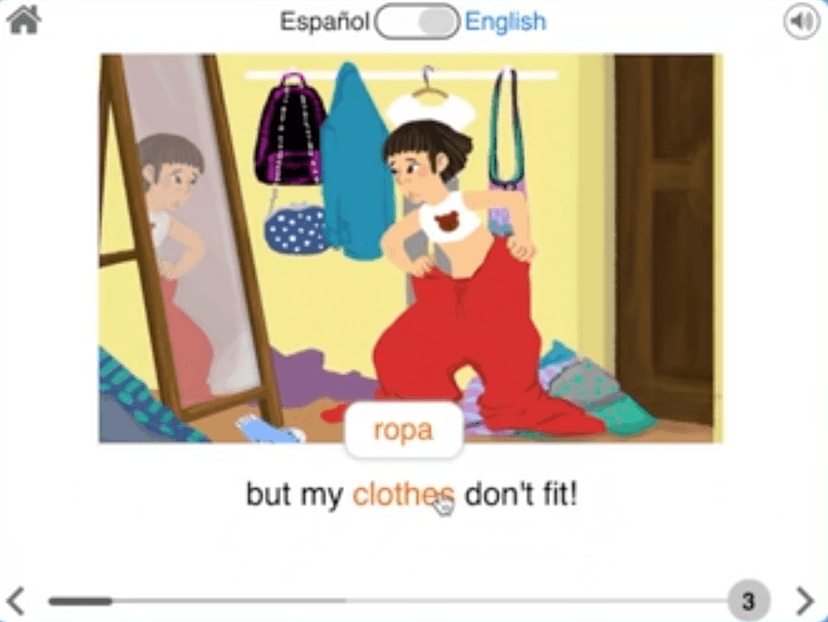
- Provides Spanish-language options to support bilingual learners and dual-language classroom environments.
- Covers a wide span of grades (K-12), allowing your child to progress through increasingly complex texts over time.
Cons
- Lacks built-in instructional scaffolds like explicit phonics instruction or active reading comprehension checks.
- Relies entirely on intrinsic motivation or external adult enforcement to ensure consistent reading practice.
- Does not utilize spaced repetition or adaptive testing to verify long-term vocabulary retention.
- Requires contacting the vendor for access, making it difficult for individual parents to utilize outside of a school district subscription.
What Do We Know About Stride ELibrary?
Stride ELibrary is effective for providing the volume of reading material necessary to build fluency, but it does not actively teach reading skills. Your child will not find adaptive phonics lessons or interactive reading comprehension quizzes here. Instead, this platform acts as a vast digital bookshelf. Learning science demonstrates that reading volume is directly correlated with vocabulary growth and background knowledge acquisition. By offering over 17,000 titles, the app gives your child the opportunity to practice reading across various genres. However, because The Learning Standard has not yet formally evaluated this app, we cannot verify the quality of its engagement features or accessibility tools. You must provide the accountability. If your child struggles with decoding words or understanding complex sentences, simply handing them this library will not solve the problem. You need to read alongside them, ask questions about the text, and ensure they are selecting books at the appropriate challenge level. It is a resource to support literacy practice, not an instructor to teach fundamental mechanics.
How Does Stride ELibrary Work?
Stride ELibrary utilizes a self-directed, extensive reading approach where students select texts from a vast digital repository. The mechanics are straightforward: users log in, browse or search for books based on their grade level or interests, and read the digital text on their device. The platform categorizes books into fiction, nonfiction, Spanish-language, and Hi-Lo segments. This categorization allows educators and parents to point students toward texts that match their current reading level and cognitive maturity. Unlike interactive reading platforms that interrupt the text with comprehension checks or vocabulary drills, Stride ELibrary focuses on uninterrupted reading. The primary mechanism for learning relies on the cognitive benefits of continuous text exposure. Students encounter new vocabulary in varied contexts, which naturally strengthens word recognition and background knowledge over time. However, the app itself does not track mastery or employ active retrieval practice, leaving the assessment of learning entirely up to the supervising adult.
Strengths and tradeoffs of Stride ELibrary
Stride ELibrary's biggest strength is its sheer volume of accessible texts, while its biggest weakness is the complete lack of active instructional scaffolding. Extensive reading practice is strongly supported by learning science as a method for improving reading fluency and expanding vocabulary. By providing over 17,000 titles, Stride ELibrary ensures that students never run out of material to practice their decoding and comprehension skills. The inclusion of Hi-Lo texts is particularly grounded in effective pedagogy, as it allows older students with lower reading levels to engage with age-appropriate topics, maintaining motivation while practicing fundamental skills. Conversely, the platform lacks retrieval practice and formative assessment. When a student finishes a book, the app does not test their comprehension or require them to recall key information. Without these checks, students may read passively without truly understanding the material. Furthermore, the absence of embedded vocabulary instruction means that students must rely entirely on context clues to infer the meaning of unknown words. Ultimately, it is a robust library, but a weak standalone teacher.
Who Might Benefit From Stride ELibrary?
Stride ELibrary is best for K-12 students who already possess basic decoding skills and need a vast selection of books to build reading stamina. It is an excellent fit for school districts or homeschooling parents who want to provide a diverse digital library to supplement their core literacy curriculum. Because it includes Spanish-language and Hi-Lo titles, it is particularly useful for bilingual students and older struggling readers who need high-interest material. It is not ideal for early readers who still require explicit, systematic phonics instruction.
Data Transparency
Does Not Meet Data Transparency Standard
Stride ELibrary reaches Level 1 of 3 (Basic protections), below our data transparency standard. Reaching Level 2 needs the policy to document a data retention timeline and self-service deletion.
21 of 35 checks passed
Evaluated September 2026
Privacy Policy →Level 1 · Basic protections
Does not sell data or target ads at students, limits sharing, and lets parents see and delete their child's data.
Level 2 · Parent control (meets the standard)
Families can get their data out, know who processes it, and know how long it is kept.
Not documented: a data retention timeline, self-service deletion
Level 3 · Direct data access
Families or schools can pull their own data through an API, in a stated format.
Not documented: an API for retrieving their own data, a named export format
View all 35 checks
Parent Access8/8
Does the policy mention parents specifically?
“For a child under the age of 13 years old, we require consent from the child’s parent or legal guardian to register for or access services outside the Local School educational setting, including participation in the national K12 Zone.”
Can parents view their child's data?
“Also, if you are the parent or guardian of a child under 13 years of age who has provided us with their Personal Information, you can email us to review that Personal Information or request that it be deleted.”
Can parents modify their child's data?
“Please direct all requests related to FERPA-covered education records and course data directly to the public school in which the student is enrolled. As a service provider to those schools, Stride cannot delete or modify education records or other records collected or processed for, or on behalf of, a school, unless directed to do so by the school.”
Can parents delete their child's account?
“Also, if you are the parent or guardian of a child under 13 years of age who has provided us with their Personal Information, you can email us to review that Personal Information or request that it be deleted.”
Is there a dedicated Children's Privacy section?
“How does Stride treat Personal Information about children under 13 years old?”
Does it reference COPPA compliance?
“For information on our compliance with COPPA and our use of Personal Information of children under the age of 13, please contact us at:”
Does it reference FERPA compliance?
“Stride is subject to laws that protect education records. This includes the Family Educational Rights and Privacy Act (“FERPA”) and state laws about student records”
Is parental consent required for child accounts?
“For a child under the age of 13 years old, we require consent from the child’s parent or legal guardian to register for or access services outside the Local School educational setting, including participation in the national K12 Zone.”
Data Portability2/5
Can users access their personal data?
“Right to Access. You may have a right to request that we confirm whether we process information about you and give you access to that information in a portable and, to the extent technically feasible, readily usable format”
Can users download/export their data?
“Right to Access. You may have a right to request that we confirm whether we process information about you and give you access to that information in a portable and, to the extent technically feasible, readily usable format that allows you to transmit the information to another business without impediment.”
Is there a self-service data access tool?
The policy says access requests are made by email or mail and describes no self-service tool for accessing data.
Is a specific data format mentioned for export?
The policy promises only a "portable" and "readily usable" format and names no specific file format.
Is there an API for data access?
The policy does not mention an API for data access.
Data Minimization1/6
Is data collection itemized?
“The information you provide may include first and last name; postal address; telephone number; the name and age of you and/or your child; information about the services you request; registration and enrollment information about your child; an e-mail address where we can contact you”
Can the app be used without a real name?
The policy says it collects names, including children's names and names supplied by schools.
Can the app be used without an email?
The policy says it collects email addresses, including ones supplied by schools and the child's email tied to the account.
Does it state collection is limited to what is necessary?
The policy does not say collection is limited to what is necessary; it only says data is kept for as long as reasonably necessary.
Is IP address anonymized or truncated?
The policy says it collects IP addresses and does not say they are anonymized or truncated.
Is location tracking explicitly excluded?
The policy says it collects geolocation data through cookies.
Third-Party Protection7/7
Does it explicitly state no selling of data?
“Stride does not sell a student’s Personal Information or create profiles about a student without authorization.”
Are third-party providers named?
“To opt out of tracking by Google Analytics, click here.”
Are providers contractually restricted?
“Other entities (e.g., curriculum vendors and third-party special education or individual education plan vendors) can access those records only as permitted under those laws, and they agree to keep them confidential as required by those same laws.”
No-targeted-advertising commitment?
“Stride does not use student Personal Information to target the student for advertising.”
Is AI/ML data sharing addressed?
“We may use third party AI technologies, including but not limited to, large language models, machine learning models, generative artificial intelligence models, or any other artificial intelligence enabled models (“AI Technologies”) for the purpose of content moderation”
Child-specific sharing restriction?
“As permitted by law, Stride may disclose your Personal Information (such as name, and email address) for commercial and/or marketing purposes, including product and service offerings, and with companies that are not connected to Stride but may want to send you information about their products or services. This does not include the Personal Information of students or users under 13 years of age.”
Cookies/tracking limited or opt-out?
“Our Sites recognize the Global Privacy Control (GPC) signal, which enables you to opt-out of certain uses or disclosures of your information.”
Deletion & Retention1/5
Can users delete their account?
“**Right to Delete** _._ You have a right to request that we delete Personal Information we maintain about you.”
Self-service deletion mechanism?
The policy says deletion requests go by email or mail and describes no self-service deletion.
Specific data retention timeline?
The policy says data is kept as long as reasonably necessary and gives no specific timeline.
Auto-deletion of inactive accounts?
The policy does not address automatic deletion of inactive accounts.
Post-deletion handling described?
The policy does not describe what happens to data after an account or data is deleted, beyond limits on removing minors' public posts.
Advertising2/4
Advertising model explicitly disclosed?
“Information we receive from consumer marketing databases or other data enrichment companies, which we use to better customize advertising and marketing to you.”
Free from third-party advertisements?
The policy does not say the product is free of third-party ads, and it describes sharing data with third parties for targeted advertising.
Children excluded from ad targeting?
“Stride does not use student Personal Information to target the student for advertising.”
Ad-free option available?
The policy does not describe an ad-free option or say the product has no ads.
What This Means
The policy review did not meet our data transparency standard. The checks above show the documented findings and unknowns. A missing statement does not establish how the app handles data in practice.
About this evaluation: Based on automated analysis of Privacy Policy against 35 policy-disclosure questions, including questions adapted from the Common Sense Privacy Program's published evaluation questions. TLS is not affiliated with Common Sense Media, and this is not a Common Sense rating. Quoted text is copied from the policy; unquoted notes are our summary. Results describe what the policy documents, not the company's actual practices. Privacy policies can change: this review reflects the version we analyzed and does not determine legal compliance.
Sources and review method
TLS combines product information and editorial analysis to explain how Stride ELibrary works, its tradeoffs, and the questions to ask before choosing it. Product features, an instructional rationale and evidence of learning outcomes are different kinds of information.
Formal Learning Standard assessment: not yet completed. Data Transparency findings are reported separately and do not establish learning effectiveness. Read our methodology.
Frequently Asked Questions About Stride ELibrary
Is Stride ELibrary free?
No, Stride ELibrary is not free for individual use. The pricing model is designed for school districts and educational institutions, requiring administrators to contact the vendor directly for a quote. If your child's school subscribes to the service, they will provide your child with a login at no additional cost to you. Individual parents cannot currently purchase a standalone subscription through consumer app stores.
Is Stride ELibrary good for elementary through high school students?
Yes, Stride ELibrary provides reading materials suitable for grades K-12. The platform offers a wide variety of texts, ranging from simple picture books for early readers to complex nonfiction and fiction for high schoolers. It also includes Hi-Lo books, which are specifically designed for older students reading below their grade level. However, younger students will need adult supervision to help select appropriate books and guide reading comprehension.
What does Stride ELibrary teach?
Stride ELibrary does not explicitly teach discrete skills, but rather facilitates literacy development through reading practice. By offering exposure to over 17,000 texts, it helps students build reading fluency, expand their vocabulary, and acquire general background knowledge across various subjects. It relies on the learning science principle that extensive reading volume correlates with higher literacy rates, though it lacks direct instruction in phonics, grammar, or reading strategies.
How does Stride ELibrary compare to Epic!?
Stride ELibrary and Epic! both offer massive digital libraries, but they target slightly different demographics. Epic! is highly gamified, extremely popular in elementary classrooms, and offers direct consumer subscriptions for parents. Stride ELibrary spans a wider age range (K-12), making it more suitable for high school students, and focuses heavily on institutional sales. Epic! also includes more interactive elements like read-to-me features and quizzes, which Stride ELibrary generally lacks.
Has The Learning Standard evaluated Stride ELibrary?
TLS has not yet completed a Learning Standard evaluation of how well Stride ELibrary teaches. Its privacy policy has been reviewed for Data Transparency and reaches Level 1, Basic protections.
Is Stride ELibrary COPPA compliant?
The reviewed privacy policy references COPPA. A policy reference alone does not establish COPPA compliance. Policy review note: The policy mentions its COPPA compliance.
Is Stride ELibrary FERPA compliant?
The reviewed privacy policy references FERPA. A policy reference alone does not establish FERPA compliance. Policy review note: The policy says Stride is subject to FERPA.
Does Stride ELibrary have a children's privacy policy?
The reviewed policy includes a dedicated children's privacy section. Policy review note: The policy has its own section heading on children under 13.
Does Stride ELibrary sell student data?
The reviewed policy states that the app does not sell data. This is a policy statement; actual data practices were not verified. Policy review note: Stride says it does not sell students' information, though it admits selling other users' identifiers.
Can you delete your data from Stride ELibrary?
The reviewed privacy policy describes account deletion. We have not tested the deletion process. Policy review note: Users can request deletion of their data.
Follow TLS Research
Subscribe to future TLS research updates: app reviews, findings, and what the evidence shows.
Screenshots
Take Action
For Stride ELibrary
If you represent Stride, Inc. and have a correction or new evidence, send the relevant source so we can review and update this page.
Submit a correctionDetails
- Pricing
- Contact vendor for pricing.
- Grade Levels
- Kindergarten, 1st Grade, 2nd Grade, 3rd Grade, 4th Grade, 5th Grade, 6th Grade, 7th Grade, 8th Grade, 9th Grade, 10th Grade, 11th Grade, 12th Grade
- Website
- Visit site