Snap! Classroom
Product by 2Sigma School
Facts checked: Not yet checked
Our take (not a Learning Standard rating). This label applies to learning-science judgments throughout this overview.
Our take (not a Learning Standard rating)
Snap! Classroom functions as a learning management system rather than a direct instructional tool, meaning its effectiveness depends entirely on the teacher's curriculum. It excels at structuring project-based computer science learning through starter code and clear rubrics, but it does not independently teach coding concepts.
Pros
- Reduces cognitive load by providing starter code so students can focus on the specific logic problem at hand.
- Utilizes explicit rubric-based grading to provide students with clear learning targets before they begin a project.
- Streamlines teacher workflows, allowing educators to dedicate more time to active student feedback rather than administrative tasks.
Cons
- Lacks built-in automated feedback mechanisms to guide students when their code fails.
- Does not provide standalone instructional modules or adaptive practice for core programming concepts.
- Relies entirely on external teacher instruction to introduce new computer science principles before project application.
What Do We Know About Snap! Classroom?
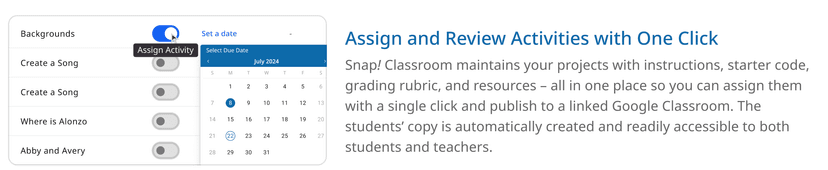
Snap! Classroom does not teach your child how to code on its own, but rather serves as a structural tool for a teacher's existing computer science curriculum. Because this app is a learning management system specifically designed for the Snap! programming language, its educational value hinges entirely on how your child's teacher uses it. The platform organizes coding assignments, provides starter code, and attaches grading rubrics so your child knows exactly what is expected of them. By providing starter code, the platform leverages the worked-example effect, reducing unnecessary cognitive load and allowing your child to focus solely on the new logic concept they are practicing. However, you should not expect this tool to provide step-by-step tutorials, adaptive learning paths, or independent instruction. It is not a self-paced coding app like Codecademy or Scratch's tutorial library. If your child is struggling with an assignment in Snap! Classroom, they will need to seek help directly from their teacher, as the platform lacks automated feedback or hint systems to guide them through coding errors. The Learning Standard has not yet formally evaluated this app, but from a learning science perspective, it is a capable facilitator of project-based learning when paired with strong classroom instruction.
How Does Snap! Classroom Work?
Snap! Classroom relies on project-based learning by structuring coding assignments around specific tasks, starter code, and clear evaluation rubrics. When your child logs in, they are presented with a programming assignment that includes instructions and partially completed code. This method scaffolds the learning process, allowing students to engage in problem-solving without having to build a program entirely from scratch. Once the student completes the required logic in the Snap! block-based environment, they submit their project directly through the platform. The teacher then evaluates the code against an attached rubric. This workflow ensures that students understand the grading criteria before they begin, which helps focus their attention on the specific learning objectives of that assignment. The platform integrates directly with Google Classroom, meaning assignment delivery and grade syncing happen automatically in the background.
Strengths and tradeoffs of Snap! Classroom
The biggest strength of Snap! Classroom is its ability to organize project-based learning with clear rubrics, while its biggest weakness is the complete lack of automated, formative feedback during the coding process. Strong scaffolding is evident in the platform's use of starter code, which prevents students from feeling overwhelmed by a blank screen and focuses their working memory on the specific programming concept being assessed. Rubric transparency also supports metacognition, as students can reference exactly how their project will be evaluated before submission. On the downside, the platform lacks immediate corrective feedback. Learning science shows that timely feedback is critical for novice programmers, but Snap! Classroom relies solely on the teacher to identify and correct coding errors after submission. Additionally, there is no adaptive practice or spaced repetition to help students memorize syntax or core computer science logic. It is strictly a project submission and grading tool. Because The Learning Standard has not yet rated this app, educators should be aware that they must supply all direct instruction and intervention strategies themselves.
Who Might Benefit From Snap! Classroom?
Best for middle and high school computer science teachers who need a dedicated assignment management system for the Snap! programming language. It is strictly designed for structured classroom environments where an educator provides the foundational instruction and uses the platform to assign, collect, and grade block-based coding projects. Because it lacks independent tutorials or automated feedback, it is not suitable for self-directed learners, homeschoolers seeking a standalone computer science curriculum, or students looking for casual coding practice outside of school.
Data Transparency
Does Not Meet Data Transparency Standard
Snap! Classroom does not meet our data transparency standard. Its privacy policy does not document basic protections, including a commitment against targeted advertising and contractual limits on service providers.
17 of 35 checks passed
Evaluated September 2026
2sigma.school →Level 1 · Basic protections
Does not sell data or target ads at students, limits sharing, and lets parents see and delete their child's data.
Not documented: a commitment against targeted advertising, contractual limits on service providers
Level 2 · Parent control (meets the standard)
Families can get their data out, know who processes it, and know how long it is kept.
Not documented: a data retention timeline, named service providers, self-service deletion
Level 3 · Direct data access
Families or schools can pull their own data through an API, in a stated format.
Not documented: an API for retrieving their own data, a named export format
View all 35 checks
Parent Access7/8
Does the policy mention parents specifically?
“Parents or guardians enrolling their minor students must give their consent at the time of enrollment to allow us to collect Personal Information from their students.”
Can parents view their child's data?
“You can contact 2Sigma School to request access to, change, or delete your Child's personal information by sending an email to us at privacy@2sigma.school.”
Can parents modify their child's data?
“You may update your Child's information by logging onto your account. You can contact 2Sigma School to request access to, change, or delete your Child's personal information by sending an email to us at privacy@2sigma.school.”
Can parents delete their child's account?
“You can contact 2Sigma School to request access to, change, or delete your Child's personal information by sending an email to us at privacy@2sigma.school. A valid request to delete personal information will be accommodated within a reasonable time.”
Is there a dedicated Children's Privacy section?
“This section explains our information collection, disclosure, parental consent practices and parental choice procedures with respect to information provided by children under the age of 13 (“Child” or “Children”).”
Does it reference COPPA compliance?
“This policy is in accordance with the U.S. Children's Online Privacy Protection Act (“COPPA”), and outlines our practices in the United States regarding Children's personal information.”
Does it reference FERPA compliance?
The policy names FERPA only to say some content may count as education records and in a California definition; it does not claim FERPA compliance.
Is parental consent required for child accounts?
“Parental Consent: We obtain verifiable parental consent before collecting Personal Data from your Child.”
Data Portability2/5
Can users access their personal data?
“Upon receipt of your written request, we will provide you with a copy of your Personal Data, although in certain limited circumstances we may not be able to make all relevant information available to you, such as where that information also pertains to another user.”
Can users download/export their data?
“You have the right to data portability for the information you provide to us. You can request to obtain a copy of your Personal Data in a commonly used electronic format so that you can manage and move it.”
Is there a self-service data access tool?
The policy handles data access through email requests and describes no self-service access tool.
Is a specific data format mentioned for export?
The policy only says "a commonly used electronic format" and names no specific format.
Is there an API for data access?
The policy does not describe an API that users can use to get their own data.
Data Minimization1/6
Is data collection itemized?
“We may collect the following Personal Information from you in order to provide our Services:”
Can the app be used without a real name?
The policy says it collects the child's name.
Can the app be used without an email?
The policy says it collects the child's email address.
Does it state collection is limited to what is necessary?
The policy does not say collection is limited to what is necessary.
Is IP address anonymized or truncated?
The policy does not say IP addresses are anonymized or truncated.
Is location tracking explicitly excluded?
The policy says it collects geolocation data such as IP address.
Third-Party Protection4/7
Does it explicitly state no selling of data?
“We do not offer a right to opt out because we have not sold any Personal Information described in this Privacy Policy to third parties within the previous twelve months and will not sell Personal Information within the meaning of the CCPA.”
Are third-party providers named?
The policy describes vendors and service providers in general terms without naming them.
Are providers contractually restricted?
The policy does not say service providers are bound by contract to limit how they use data.
No-targeted-advertising commitment?
The policy says it uses targeting cookies and remarketing advertising and makes no promise against targeted ads.
Is AI/ML data sharing addressed?
“We do not use Google Workspace APIs to develop, improve, or train generalized AI/ML models.”
Child-specific sharing restriction?
“No information is collected directly from Children until they are in the course session. Children cannot post personal data publicly on our Services.”
Cookies/tracking limited or opt-out?
“You can disable cookies, limit the types of cookies you allow, or set your browser to notify you when cookies are used.”
Deletion & Retention2/5
Can users delete their account?
“can request that we delete from our records the Personal Data we have collected in connection with that account. Please keep in mind that a request to delete records may lead to a termination of an account, membership, or other service.”
Self-service deletion mechanism?
The policy handles deletion through email requests and describes no self-service deletion tool.
Specific data retention timeline?
The policy says children's data is deleted when no longer needed but gives no specific retention period.
Auto-deletion of inactive accounts?
The policy does not describe automatic deletion of inactive accounts.
Post-deletion handling described?
“Once we confirm your verifiable request, we will delete (and direct our service providers to delete) your Personal Information from our records, unless an exception applies.”
Advertising1/4
Advertising model explicitly disclosed?
“We use third-party analytics tools to track visitor behavior on our site in order to execute and monitor performance of display advertising campaigns, including remarketing advertising on other websites.”
Free from third-party advertisements?
The policy says advertising partners may use targeting cookies to deliver advertising and does not say the product is ad-free.
Children excluded from ad targeting?
The policy does not say children are excluded from ad targeting.
Ad-free option available?
The policy mentions a cookie that remembers if a user chose to stop seeing ads but does not describe an ad-free option.
What This Means
The policy review did not meet our data transparency standard. The checks above show the documented findings and unknowns. A missing statement does not establish how the app handles data in practice.
About this evaluation: Based on automated analysis of 2sigma.school against 35 policy-disclosure questions, including questions adapted from the Common Sense Privacy Program's published evaluation questions. TLS is not affiliated with Common Sense Media, and this is not a Common Sense rating. Quoted text is copied from the policy; unquoted notes are our summary. Results describe what the policy documents, not the company's actual practices. Privacy policies can change: this review reflects the version we analyzed and does not determine legal compliance.
Sources and review method
TLS combines product information and editorial analysis to explain how Snap! Classroom works, its tradeoffs, and the questions to ask before choosing it. Product features, an instructional rationale and evidence of learning outcomes are different kinds of information.
Formal Learning Standard assessment: not yet completed. Data Transparency findings are reported separately and do not establish learning effectiveness. Read our methodology.
Frequently Asked Questions About Snap! Classroom
Is Snap! Classroom free?
Yes, Snap! Classroom is free for basic features. However, 2Sigma School charges custom pricing for advanced features and premium support services depending on the school district's specific needs.
Is Snap! Classroom good for middle schoolers?
Yes, it is highly appropriate for 6th through 8th graders, as well as high schoolers. The platform uses block-based programming, which is visually intuitive and reduces the cognitive load associated with typing complex text-based syntax, making it ideal for younger adolescents learning logic.
What does Snap! Classroom teach?
Snap! Classroom does not teach standalone concepts. Instead, it facilitates the application of computer science principles, computational thinking, and applied sciences through project-based learning assignments designed by a teacher.
How does Snap! Classroom vs Scratch compare?
While both utilize block-based programming, Scratch is a standalone creative community and learning platform with built-in tutorials. Snap! Classroom is strictly a learning management system designed for teachers to grade and distribute assignments using the Snap! language.
Has The Learning Standard evaluated Snap! Classroom?
TLS has not yet completed a Learning Standard evaluation of how well Snap! Classroom teaches. Its privacy policy has been reviewed for Data Transparency and does not yet document the basic protections (Level 1).
Is Snap! Classroom COPPA compliant?
The reviewed privacy policy references COPPA. A policy reference alone does not establish COPPA compliance. Policy review note: The policy says it follows COPPA.
Is Snap! Classroom FERPA compliant?
A FERPA reference was not found in the reviewed privacy policy. This does not determine whether the app complies with FERPA. Policy review note: The policy names FERPA only to say some content may count as education records and in a California definition; it does not claim FERPA compliance.
Does Snap! Classroom have a children's privacy policy?
The reviewed policy includes a dedicated children's privacy section. Policy review note: A separate CHILDREN section covers children under 13.
Does Snap! Classroom sell student data?
The reviewed policy states that the app does not sell data. This is a policy statement; actual data practices were not verified. Policy review note: The policy says the company will not sell personal information.
Can you delete your data from Snap! Classroom?
The reviewed privacy policy describes account deletion. We have not tested the deletion process. Policy review note: Users can ask for deletion of the data tied to their account.
Follow TLS Research
Subscribe to future TLS research updates: app reviews, findings, and what the evidence shows.
Screenshots


Take Action
For Snap! Classroom
If you represent 2Sigma School and have a correction or new evidence, send the relevant source so we can review and update this page.
Submit a correctionDetails
- Pricing
- Free for basic features. Services and advanced features have custom pricing plans.
- Platforms
- Web Browser, iPadOS (Apple tablet), Windows (Microsoft), macOS (Apple), Chrome OS (Google)
- Grade Levels
- 6th Grade, 7th Grade, 8th Grade, 9th Grade, 10th Grade, 11th Grade, 12th Grade, Associate's degree
- Website
- Visit site