
Schoolbox
Product by Schoolbox
Facts checked: Not yet checked
Our take (not a Learning Standard rating). This label applies to learning-science judgments throughout this overview.
Our take (not a Learning Standard rating)
Schoolbox does not deliver direct instruction itself, but rather provides an infrastructure for teachers to organize materials and track progress. Its effectiveness relies entirely on your school's implementation of evidence-based practices like formative assessment and clear rubrics. The Learning Standard has not yet formally evaluated this platform.
Pros
- Centralizes assignments and communication to reduce extraneous cognitive load for students.
- Provides teachers with tools to deliver timely, actionable feedback on formative assessments.
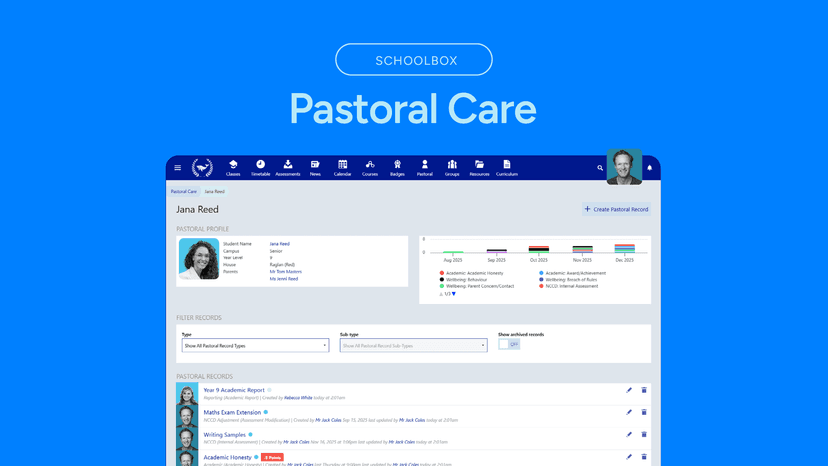
- Integrates student wellbeing tracking alongside academic performance data.
- Supports continuous reporting so parents can monitor mastery without waiting for end-of-term grades.
Cons
- Relies entirely on teacher-generated content rather than providing built-in, scientifically backed curriculum.
- Navigation complexity can overwhelm younger students if the school does not simplify the interface.
- Does not natively employ adaptive learning algorithms or spaced repetition without third-party integrations.
What Do We Know About Schoolbox?
Schoolbox functions as a digital classroom manager rather than a direct instructional tool, meaning its educational value depends completely on your child's teachers. As an all-in-one Learning Management System (LMS), it hosts coursework, tracks grades, and facilitates school communication from kindergarten through high school. Your child will not log into Schoolbox to play educational games or complete adaptive math drills generated by the software. Instead, they will use it to access teacher-uploaded resources, submit assignments, and review feedback. From a learning science perspective, a centralized portal can significantly reduce extraneous cognitive load. When students do not have to search across multiple apps for their homework, they can focus their working memory on the actual academic tasks. Furthermore, Schoolbox allows teachers to provide continuous feedback through rubrics. Timely feedback is a proven mechanism for correcting misconceptions before they become entrenched. However, because Schoolbox is merely a vessel, you will need to monitor how your school utilizes it. If teachers simply use it as a digital filing cabinet, your child will miss out on the platform's capacity for interactive formative assessment and collaborative learning. The Learning Standard has not yet rated this app.
How Does Schoolbox Work?
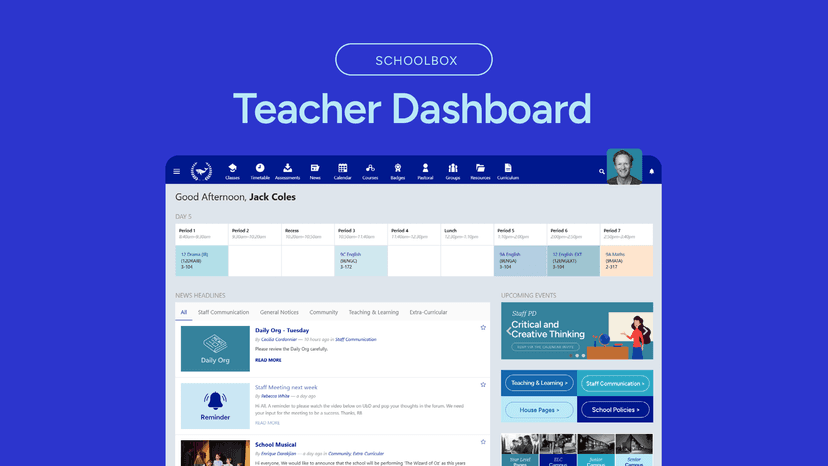
Schoolbox uses a centralized Learning Management System approach to organize teacher-led instruction, assessment, and schoolwide communication. When your child logs in, they see a dashboard customized by their school, typically displaying a calendar of upcoming deadlines, current assignments, and recent grades. Teachers build course pages within the platform by uploading reading materials, embedding videos, and creating submission portals for homework. The platform includes a continuous reporting feature, which shifts focus away from high-stakes summative exams toward ongoing formative assessment. Teachers can attach grading rubrics to assignments, allowing students to see exactly what is required for mastery before they begin a task. Schoolbox also incorporates a pastoral care or wellbeing module. This allows school staff to log behavioral observations, attendance, and emotional check-ins. By combining academic data with wellbeing metrics, educators can identify patterns that might impede learning and intervene early. Because Schoolbox is highly customizable, the exact mechanics will look different at every school.
Strengths and tradeoffs of Schoolbox
Schoolbox's biggest strength is its ability to centralize continuous reporting and feedback, while its biggest weakness is its complete reliance on individual teachers to design effective instructional experiences. On the positive side, the platform excels at facilitating formative assessment. By allowing teachers to grade work against specific, visible rubrics, Schoolbox helps clarify learning intentions. When your child understands exactly what success looks like, they can better regulate their own learning efforts. The system also supports multimodal feedback, enabling teachers to leave audio or video comments rather than just text. This personalization can improve a student's receptivity to correction. Additionally, unifying coursework and wellbeing tracking gives educators a holistic view of student progress. Conversely, Schoolbox does not supply any curriculum or built-in practice mechanics. It lacks native spaced repetition or adaptive difficulty features found in dedicated instructional software. If a teacher uploads ineffective worksheets, Schoolbox simply delivers those ineffective materials efficiently. Furthermore, highly complex dashboards can increase extraneous cognitive load for younger students. If a school does not carefully tailor the interface for early childhood or primary grades, children may struggle to navigate the platform independently.
Who Might Benefit From Schoolbox?
Schoolbox is best for K-12 school districts seeking a single, unified digital hub to connect classroom instruction, student wellbeing tracking, and parent communication. It is not designed for individual parents looking for supplementary tutoring or homeschooling curriculum. The platform scales across all grade levels, but its robust academic tracking and assignment submission features are particularly beneficial for middle and high school students who must manage complex schedules and multiple teachers. Because it requires enterprise-level implementation, it serves school administrators and teaching teams who want to consolidate multiple disparate software tools into one cohesive environment.
Sources and review method
TLS combines product information and editorial analysis to explain how Schoolbox works, its tradeoffs, and the questions to ask before choosing it. Product features, an instructional rationale and evidence of learning outcomes are different kinds of information.
Formal Learning Standard assessment: not yet completed. Data Transparency findings are reported separately and do not establish learning effectiveness. Read our methodology.
Frequently Asked Questions About Schoolbox
Is Schoolbox free?
No, Schoolbox is not free for individuals or independent users. It is an enterprise-level software platform purchased directly by school districts, private schools, or educational networks. Parents and students do not pay for the application out of pocket, as the licensing costs and implementation fees are entirely covered by the educational institution. If your school uses it, your child will receive a secure login at no additional charge.
Is Schoolbox good for elementary students?
Schoolbox can serve early childhood and elementary students effectively, but only if the school carefully customizes the platform. Young children generally lack the advanced executive functioning skills required to navigate complex digital environments. Schools must intentionally simplify the interface, using clear icons and limiting text, to prevent overwhelming a young student's working memory. When streamlined properly, it helps young learners begin building basic digital organization skills.
What does Schoolbox teach?
Schoolbox does not directly teach any educational content, meaning it lacks native lessons in math, reading, or science. Instead, it functions as a digital structural framework that hosts the specific curriculum designed by your child's teachers. Educators utilize the platform to upload reading materials, assign project work, and grade formative assessments across all subjects. Its educational value is entirely dependent on the quality of the teacher's instruction.
Schoolbox vs Canvas: Which is better?
Both platforms serve as comprehensive digital learning environments, but they prioritize different architectural goals. Canvas originated in higher education and focuses heavily on academic course delivery, advanced grading analytics, and seamless third-party app integrations. Schoolbox was engineered specifically for the K-12 sector, meaning it places a much stronger, native emphasis on combining student wellbeing tracking, pastoral care, and holistic parent communication alongside traditional academic coursework.
Has The Learning Standard evaluated Schoolbox?
TLS has not yet completed a Learning Standard evaluation of how well Schoolbox teaches. TLS has not published a Data Transparency result for its privacy policy.
Follow TLS Research
Subscribe to future TLS research updates: app reviews, findings, and what the evidence shows.
Screenshots

Take Action
For Schoolbox
If you represent Schoolbox and have a correction or new evidence, send the relevant source so we can review and update this page.
Submit a correctionDetails
- Pricing
- https://schoolbox.education/pricing/
- Platforms
- Web Browser, iOS (Apple mobile), iPadOS (Apple tablet), Android (Google mobile), Tizen (Samsung mobile), Windows (Microsoft), macOS (Apple), Chrome OS (Google)
- Grade Levels
- Kindergarten, 1st Grade, 2nd Grade, 3rd Grade, 4th Grade, 5th Grade, 6th Grade, 7th Grade, 8th Grade, 9th Grade, 10th Grade, 11th Grade, 12th Grade
- Website
- Visit site