
Rubin Propel
Product by Rubin
Facts checked: Not yet checked
Our take (not a Learning Standard rating). This label applies to learning-science judgments throughout this overview.
Our take (not a Learning Standard rating)
Rubin Propel provides useful real-time feedback on email etiquette through immediate corrective guidance rather than generative AI. It effectively uses in-context scaffolding to teach structural rules like subject line length. However, because The Learning Standard has not yet evaluated its long-term retention data, its full effectiveness remains unverified.
Pros
- Employs immediate feedback during the writing process to correct formatting and tone errors before they become habits.
- Avoids generative AI entirely, forcing students to engage in productive struggle to construct their own sentences.
- Integrates directly into existing learning management systems to provide situated learning in authentic contexts.
- Provides explicit scaffolding for complex communication rules like professional greetings and subject line clarity.
Cons
- Lacks built-in spaced repetition to ensure students retain etiquette rules across long periods without the tool.
- Does not currently offer detailed instructional modules to explain the underlying concepts behind its corrections.
- Focuses heavily on procedural compliance rather than adaptive communication strategies for diverse audiences.
What Do We Know About Rubin Propel?
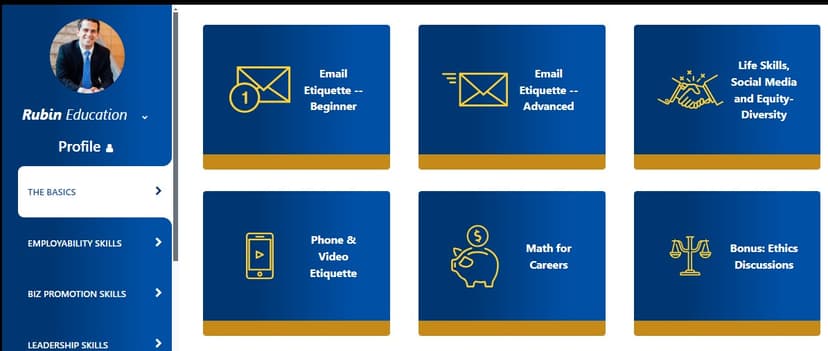
Rubin Propel functions as a digital coach that is likely effective for teaching basic email etiquette, though it has not yet been formally evaluated by The Learning Standard. Your child will use this tool to practice writing professional messages without relying on artificial intelligence to do the work for them. By forcing your child to type the words themselves, the app requires active retrieval and productive struggle. These are essential components for cementing new skills in long-term memory. Instead of automatically fixing errors, the tool flags issues like slang usage, missing capitalization, and inappropriate subject lines as your child types. This immediate, in-context feedback helps correct mistakes in real time before they become habits. Because it works as an extension within platforms your child already uses for school, the practice happens in authentic, real-world scenarios. Parents should know that while it excels at teaching structural rules, it is a specialized tool solely focused on email and messaging formats rather than broad academic writing.
How Does Rubin Propel Work?
Rubin Propel uses in-context scaffolding and immediate corrective feedback to guide students through the process of writing professional emails. The tool functions as an overlay within standard educational platforms like Google Classroom, Canvas, or Schoology. When a student begins drafting a message, Propel monitors the text against established etiquette rules. If the student uses casual slang, forgets to capitalize the first word of a sentence, or leaves the subject line blank, the app triggers a real-time prompt. This requires the student to manually correct the error before sending. By withholding the exact answer and refusing to generate text, the software forces the student to apply the rule independently. This approach mirrors guided practice models in learning science, where initial heavy support is provided during a specific task. The system tracks these corrections, allowing educators to monitor compliance.
Strengths and tradeoffs of Rubin Propel
Rubin Propel's biggest strength is its reliance on active student generation rather than AI completion, while its biggest weakness is the narrow scope of its corrective feedback. The tool shines by creating productive struggle. Learning science shows that students remember concepts better when they construct answers themselves rather than passively reading them. By refusing to auto-complete sentences, Propel ensures students actually practice the mechanics of writing. Furthermore, its use of immediate feedback prevents students from internalizing incorrect habits. As soon as a student types inappropriate slang, the system flags it, strengthening the association between the context and the correct professional tone. On the weakness side, the tool relies on surface-level rule enforcement. While it tells a student to fix a capitalization error or shorten a subject line, it does not provide deep instructional modules or worked examples explaining why these conventions matter in different contexts. Additionally, it lacks a mechanism for spaced retrieval practice, meaning students are not systematically tested on these rules over time to guarantee retention.
Who Might Benefit From Rubin Propel?
Best for middle school through adult education students who need explicit instruction in professional communication and email etiquette. Because it integrates directly into learning management systems, it serves educators looking to enforce basic digital citizenship rules during everyday assignments. It is an ideal fit for Career and Technical Education programs where students are actively preparing for workplace communication. Your child will benefit most if they struggle with code-switching between casual text messaging and formal academic writing, as the real-time prompts provide necessary boundaries without doing the work for them.
Data Transparency
Does Not Meet Data Transparency Standard
Rubin Propel reaches Level 1 of 3 (Basic protections), below our data transparency standard. Reaching Level 2 needs the policy to document a data retention timeline and self-service deletion.
16 of 35 checks passed
Evaluated September 2026
Privacy Policy →Level 1 · Basic protections
Does not sell data or target ads at students, limits sharing, and lets parents see and delete their child's data.
Level 2 · Parent control (meets the standard)
Families can get their data out, know who processes it, and know how long it is kept.
Not documented: a data retention timeline, self-service deletion
Level 3 · Direct data access
Families or schools can pull their own data through an API, in a stated format.
Not documented: an API for retrieving their own data, a named export format
View all 35 checks
Parent Access5/8
Does the policy mention parents specifically?
“Parents/guardians can request copies of their child’s data”
Can parents view their child's data?
“Parents/guardians can request copies of their child’s data”
Can parents modify their child's data?
The policy lets parents request only copies of their child's data; the right to update records is given to schools, not parents.
Can parents delete their child's account?
The policy gives the right to delete student records to schools and does not give parents a right to delete their child's data or account.
Is there a dedicated Children's Privacy section?
“**Children’s Privacy** We are committed to protecting children’s privacy and comply with:”
Does it reference COPPA compliance?
“**COPPA (Children’s Online Privacy Protection Act)**: For users under 13”
Does it reference FERPA compliance?
“**FERPA (Family Educational Rights and Privacy Act)**: For educational records”
Is parental consent required for child accounts?
The policy says only that it strives to get consent from schools, districts, parents or guardians where the law requires it, and relies on school authorization, so it does not require parental consent.
Data Portability2/5
Can users access their personal data?
“Eligible students (18+ or as defined by local law) can request access to their own records”
Can users download/export their data?
“Upon reasonable request, we can provide data in standard formats for transfer to other educational platforms.”
Is there a self-service data access tool?
The policy describes only request-based access and does not describe a self-service access tool.
Is a specific data format mentioned for export?
The policy mentions only "standard formats" and does not name a specific export format.
Is there an API for data access?
The policy does not describe an API for users, parents or schools to retrieve their data.
Data Minimization1/6
Is data collection itemized?
“1. First name and last name 2. Email address (for account creation and login) 3. Usage data: login times, page views, time spent on activities, assignment submissions, and grades received”
Can the app be used without a real name?
The policy states that it collects students' first and last names.
Can the app be used without an email?
The policy states that it collects students' email addresses for account creation and login.
Does it state collection is limited to what is necessary?
The policy limits how data is used and how long it is kept, but does not state that collection is limited to what is necessary.
Is IP address anonymized or truncated?
The policy says it collects IP addresses and does not say they are anonymized or truncated.
Is location tracking explicitly excluded?
The policy states that it automatically collects IP addresses and location data.
Third-Party Protection6/7
Does it explicitly state no selling of data?
“We do not sell, rent, trade, or otherwise monetize student or educator personal information.”
Are third-party providers named?
“Learning Management Systems (Canvas, Schoology, Moodle, Brightspace, Blackboard) 2. Single Sign-On providers (Google, Microsoft) 3. Educational access tools (Clever, ClassLink)”
Are providers contractually restricted?
“**Service Providers**: With vetted third-party service providers who assist in delivering our Services, bound by strict confidentiality agreements”
No-targeted-advertising commitment?
“We do NOT use student data for: 1. Commercial advertising or marketing”
Is AI/ML data sharing addressed?
The policy describes how its AI tools are used but does not say whether data is shared with AI providers or used to train models.
Child-specific sharing restriction?
“We do not knowingly sell or share personal information of children for cross-context behavioral advertising or other prohibited commercial purposes.”
Cookies/tracking limited or opt-out?
“**Cookie Management:** You can control cookies through your browser settings, though disabling cookies may limit platform functionality.”
Deletion & Retention1/5
Can users delete their account?
“Schools can request access to, update, or delete student records at any time”
Self-service deletion mechanism?
The policy describes only request-based deletion and does not describe a self-service deletion tool.
Specific data retention timeline?
The policy says data is kept only as long as reasonably necessary and that retention periods vary, without giving a specific timeline.
Auto-deletion of inactive accounts?
The policy does not address automatic deletion of inactive accounts.
Post-deletion handling described?
The policy does not describe how data is handled after deletion.
Advertising1/4
Advertising model explicitly disclosed?
The policy says student data is not used for advertising but does not explicitly describe the product's advertising model or state that it has no ads.
Free from third-party advertisements?
The policy does not explicitly state that the product has no third-party advertisements.
Children excluded from ad targeting?
“We do not knowingly sell or share personal information of children for cross-context behavioral advertising or other prohibited commercial purposes.”
Ad-free option available?
The policy does not state that the product is ad-free or that an ad-free option exists.
What This Means
The policy review did not meet our data transparency standard. The checks above show the documented findings and unknowns. A missing statement does not establish how the app handles data in practice.
About this evaluation: Based on automated analysis of Privacy Policy against 35 policy-disclosure questions, including questions adapted from the Common Sense Privacy Program's published evaluation questions. TLS is not affiliated with Common Sense Media, and this is not a Common Sense rating. Quoted text is copied from the policy; unquoted notes are our summary. Results describe what the policy documents, not the company's actual practices. Privacy policies can change: this review reflects the version we analyzed and does not determine legal compliance.
Sources and review method
TLS combines product information and editorial analysis to explain how Rubin Propel works, its tradeoffs, and the questions to ask before choosing it. Product features, an instructional rationale and evidence of learning outcomes are different kinds of information.
Formal Learning Standard assessment: not yet completed. Data Transparency findings are reported separately and do not establish learning effectiveness. Read our methodology.
Frequently Asked Questions About Rubin Propel
Is Rubin Propel free?
No, Rubin Propel is not free. It costs $7.00 per student for one academic year. Schools and districts can also negotiate site-wide pricing for broader classroom implementations. Because it requires integration into learning management systems like Canvas or Google Classroom, it is primarily purchased by educational institutions rather than individual parents looking for a standalone home application. Check with your child's school to see if they hold an active license.
Is Rubin Propel good for middle schoolers?
Yes, Rubin Propel is highly appropriate for students in fifth grade and above. Middle school is an ideal time to introduce foundational communication rules before bad habits solidify. The interface operates quietly in the background, making it unobtrusive for younger learners who are just beginning to email teachers or peers. It acts as a set of training wheels for digital communication.
What does Rubin Propel teach?
Rubin Propel teaches professional communication and basic email etiquette. It focuses on structural formatting rules rather than complex rhetorical strategies. Specifically, it guides students to write appropriate subject lines, eliminate casual slang, and use proper capitalization. By flagging these specific errors during the drafting process, it teaches students how to transition from informal texting habits to formal, workplace-ready writing styles.
Does Rubin Propel use AI to write for students?
No, Rubin Propel intentionally avoids generative artificial intelligence. It explicitly requires students to type their own messages from scratch. The tool only provides feedback and corrective prompts on the text the student has already written. By utilizing active retrieval and productive struggle, it helps build actual writing skills rather than bypassing the cognitive learning process to simply produce a finished product.
Has The Learning Standard evaluated Rubin Propel?
TLS has not yet completed a Learning Standard evaluation of how well Rubin Propel teaches. Its privacy policy has been reviewed for Data Transparency and reaches Level 1, Basic protections.
Is Rubin Propel COPPA compliant?
The reviewed privacy policy references COPPA. A policy reference alone does not establish COPPA compliance. Policy review note: The policy states that it complies with COPPA.
Is Rubin Propel FERPA compliant?
The reviewed privacy policy references FERPA. A policy reference alone does not establish FERPA compliance. Policy review note: The policy states that it complies with FERPA.
Does Rubin Propel have a children's privacy policy?
The reviewed policy includes a dedicated children's privacy section. Policy review note: The policy has a section headed Children's Privacy.
Does Rubin Propel sell student data?
The reviewed policy states that the app does not sell data. This is a policy statement; actual data practices were not verified. Policy review note: The policy explicitly states that it does not sell personal information.
Can you delete your data from Rubin Propel?
The reviewed privacy policy describes account deletion. We have not tested the deletion process. Policy review note: Student records can be deleted through a school request.
Follow TLS Research
Subscribe to future TLS research updates: app reviews, findings, and what the evidence shows.
Screenshots



Take Action
For Rubin Propel
If you represent Rubin and have a correction or new evidence, send the relevant source so we can review and update this page.
Submit a correctionDetails
- Pricing
- Propel is $7.00 for one student for one academic year. We also offer site and district-wide pricing.
- Platforms
- Web Browser, Windows (Microsoft), Chrome OS (Google), Other
- Grade Levels
- 5th Grade, 6th Grade, 7th Grade, 8th Grade, 9th Grade, 10th Grade, 11th Grade, 12th Grade, Associate's degree, Bachelor's degree, Adult Education
- Website
- Visit site