Rubin Emerge
Product by Rubin
Facts checked: Not yet checked
Our take (not a Learning Standard rating). This label applies to learning-science judgments throughout this overview.
Our take (not a Learning Standard rating)
Rubin Emerge teaches practical employability skills through direct video instruction and practice activities, but its reliance on standardized formats limits deep personalized feedback. It effectively uses worked examples to model professional communication like email etiquette and resume writing, though skill retention depends heavily on teacher-facilitated classroom integration rather than standalone use.
Pros
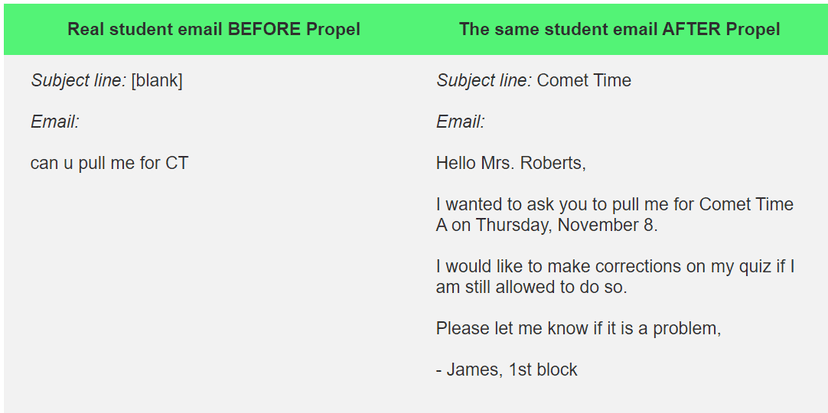
- Utilizes worked examples by showing students contrasting models of poor and excellent professional communication.
- Offers a high volume of modular video and text activities that support blended learning models.
- Integrates directly into existing learning management systems to reduce cognitive load during platform switching.
- Provides immediate retrieval practice opportunities through integrated formative assessments.
Cons
- Relies heavily on passive video consumption if not strictly monitored by an active instructor.
- Lacks sophisticated adaptive learning algorithms to adjust difficulty based on individual student mastery.
- Automated assessments primarily test surface-level recall rather than complex interpersonal skill application.
- Requires significant teacher orchestration to provide the nuanced feedback necessary for improving open-ended writing.
What Do We Know About Rubin Emerge?
Rubin Emerge is an effective curriculum tool for teaching your child practical career and communication skills when guided by an active teacher. It does not replace human instruction, but it provides a massive structured library of lessons on email etiquette, interview preparation, and resume building. Your child will watch instructional videos and complete formative assessments designed to model professional behavior. Because the program heavily uses worked examples, showing the difference between a poorly written email and a professional one, it reduces the cognitive load required to understand workplace expectations. However, parents should know that this is primarily a school-based platform intended for classroom integration rather than independent home use. The program relies on multiple-choice quizzes and basic short-answer activities for retrieval practice, which means your child will still need a teacher or mentor to provide detailed, qualitative feedback on their actual writing and speaking skills. While it successfully introduces essential employability concepts, true mastery of these interpersonal skills requires real-world application and role-playing beyond the software's digital boundaries.
How Does Rubin Emerge Work?
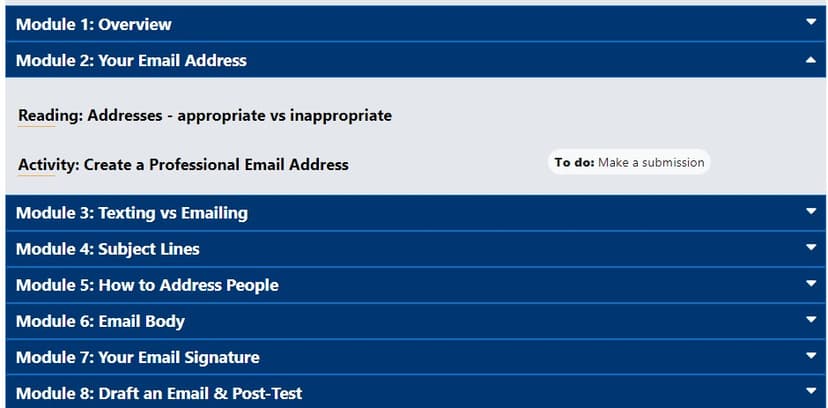
Rubin Emerge uses a blended learning approach combining direct video instruction with immediate formative practice sets. The platform functions as an extensive digital library containing over 600 modules that teachers embed directly into systems like Canvas or Google Classroom. Students begin by watching short, focused videos that break down complex communication tasks, such as making a phone call or writing a cover letter, into manageable steps. Following the direct instruction, students engage in retrieval practice through quizzes and interactive activities built on platforms like Nearpod or Kahoot. The curriculum relies heavily on scaffolding, moving students from observing worked examples to identifying errors in sample texts, and finally drafting their own professional responses. Because the content is modular, teachers can assign specific skill tracks based on project-based learning needs. The software automatically grades standardized questions to provide instant knowledge checks, while open-ended writing assignments are routed to the instructor for manual review and personalized feedback.
Strengths and tradeoffs of Rubin Emerge
The biggest strength of Rubin Emerge is its extensive use of worked examples to model professional communication, while its biggest weakness is the lack of automated, nuanced feedback for open-ended writing tasks. Modeling Professional Behavior: The platform excels at demonstrating concrete examples of abstract concepts like professionalism or etiquette. By presenting side-by-side comparisons of effective and ineffective communication, the curriculum reduces cognitive load and allows students to clearly identify target behaviors. Formative Assessment Integration: Incorporating quizzes directly after video instruction utilizes the testing effect, ensuring students immediately engage in retrieval practice rather than passively consuming content. Limitations in Feedback: While the platform handles basic knowledge checks well, learning science dictates that mastering complex writing and interpersonal skills requires highly specific, timely feedback. Emerge cannot automatically evaluate the tone, nuance, or persuasive quality of a student's cover letter or interview response. Dependency on Implementation: The effectiveness of this curriculum hinges entirely on the teacher's ability to facilitate discussions and provide the personalized learning support that the software's automated systems cannot deliver. Without active instructor involvement, the program risks becoming a superficial exercise in video watching.
Who Might Benefit From Rubin Emerge?
Rubin Emerge is best for middle school through college students who need structured, explicit instruction in professional communication and career readiness skills. The platform is ideal for career and technical education teachers, guidance counselors, or humanities instructors looking to integrate practical employability modules into their existing curriculum. Because it focuses on pragmatic skills like email etiquette, phone manners, and resume construction, it serves as an excellent resource for older students preparing for internships, college admissions, or entering the workforce. It is strictly a school-based enterprise solution, making it suitable for district-wide adoption rather than individual consumer purchase.
Data Transparency
Does Not Meet Data Transparency Standard
Rubin Emerge reaches Level 1 of 3 (Basic protections), below our data transparency standard. Reaching Level 2 needs the policy to document a data retention timeline and self-service deletion.
16 of 35 checks passed
Evaluated September 2026
Privacy Policy →Level 1 · Basic protections
Does not sell data or target ads at students, limits sharing, and lets parents see and delete their child's data.
Level 2 · Parent control (meets the standard)
Families can get their data out, know who processes it, and know how long it is kept.
Not documented: a data retention timeline, self-service deletion
Level 3 · Direct data access
Families or schools can pull their own data through an API, in a stated format.
Not documented: an API for retrieving their own data, a named export format
View all 35 checks
Parent Access5/8
Does the policy mention parents specifically?
“Parents/guardians can request copies of their child’s data”
Can parents view their child's data?
“Parents/guardians can request copies of their child’s data”
Can parents modify their child's data?
The policy lets schools request updates to student records, but it gives parents only a right to request copies.
Can parents delete their child's account?
The policy lets schools request deletion of student records, but it gives parents no deletion right.
Is there a dedicated Children's Privacy section?
“**Children’s Privacy** We are committed to protecting children’s privacy and comply with:”
Does it reference COPPA compliance?
“**COPPA (Children’s Online Privacy Protection Act)**: For users under 13”
Does it reference FERPA compliance?
“**FERPA (Family Educational Rights and Privacy Act)**: For educational records”
Is parental consent required for child accounts?
The policy only says it strives to get consent from schools, parents or guardians where the law requires it, and it relies on school authorization; it does not require parental consent.
Data Portability2/5
Can users access their personal data?
“Eligible students (18+ or as defined by local law) can request access to their own records”
Can users download/export their data?
“Upon reasonable request, we can provide data in standard formats for transfer to other educational platforms.”
Is there a self-service data access tool?
The policy describes access only by request, not through a self-service tool.
Is a specific data format mentioned for export?
The policy says only "standard formats" and does not name a specific format.
Is there an API for data access?
The policy does not mention an API for data access.
Data Minimization1/6
Is data collection itemized?
“First name and last name 2. Email address (for account creation and login) 3. Usage data: login times, page views, time spent on activities, assignment submissions, and grades received”
Can the app be used without a real name?
The policy says it collects students' first and last names.
Can the app be used without an email?
The policy says it collects student email addresses for account creation and login.
Does it state collection is limited to what is necessary?
The policy limits how data is used and how long it is kept, but it does not say collection is limited to what is necessary.
Is IP address anonymized or truncated?
The policy says it collects IP addresses and does not say they are anonymized or truncated.
Is location tracking explicitly excluded?
The policy says it automatically collects location data.
Third-Party Protection6/7
Does it explicitly state no selling of data?
“We do not sell, rent, trade, or otherwise monetize student or educator personal information.”
Are third-party providers named?
“Learning Management Systems (Canvas, Schoology, Moodle, Brightspace, Blackboard) 2. Single Sign-On providers (Google, Microsoft) 3. Educational access tools (Clever, ClassLink)”
Are providers contractually restricted?
“**Service Providers**: With vetted third-party service providers who assist in delivering our Services, bound by strict confidentiality agreements”
No-targeted-advertising commitment?
“We do NOT use student data for: 1. Commercial advertising or marketing”
Is AI/ML data sharing addressed?
The policy explains how its AI tools use data, but it does not say whether data is shared with AI or model providers.
Child-specific sharing restriction?
“We do not knowingly sell or share personal information of children for cross-context behavioral advertising or other prohibited commercial purposes.”
Cookies/tracking limited or opt-out?
“**Cookie Management:** You can control cookies through your browser settings, though disabling cookies may limit platform functionality.”
Deletion & Retention1/5
Can users delete their account?
“Schools can request access to, update, or delete student records at any time”
Self-service deletion mechanism?
The policy describes deletion only by request, not through a self-service tool.
Specific data retention timeline?
The policy says data is kept as long as reasonably necessary and gives no specific timeline.
Auto-deletion of inactive accounts?
The policy does not address automatic deletion of inactive accounts.
Post-deletion handling described?
The policy does not describe how data is handled after deletion.
Advertising1/4
Advertising model explicitly disclosed?
The policy says student data is not used for advertising, but it does not say whether the product shows ads.
Free from third-party advertisements?
The policy does not say whether the product is free of third-party ads.
Children excluded from ad targeting?
“We do not knowingly sell or share personal information of children for cross-context behavioral advertising or other prohibited commercial purposes.”
Ad-free option available?
The policy does not say the product has no ads or offer an ad-free option.
What This Means
The policy review did not meet our data transparency standard. The checks above show the documented findings and unknowns. A missing statement does not establish how the app handles data in practice.
About this evaluation: Based on automated analysis of Privacy Policy against 35 policy-disclosure questions, including questions adapted from the Common Sense Privacy Program's published evaluation questions. TLS is not affiliated with Common Sense Media, and this is not a Common Sense rating. Quoted text is copied from the policy; unquoted notes are our summary. Results describe what the policy documents, not the company's actual practices. Privacy policies can change: this review reflects the version we analyzed and does not determine legal compliance.
Sources and review method
TLS combines product information and editorial analysis to explain how Rubin Emerge works, its tradeoffs, and the questions to ask before choosing it. Product features, an instructional rationale and evidence of learning outcomes are different kinds of information.
Formal Learning Standard assessment: not yet completed. Data Transparency findings are reported separately and do not establish learning effectiveness. Read our methodology.
Frequently Asked Questions About Rubin Emerge
Is Rubin Emerge free?
No, Rubin Emerge is not free. The platform costs $26.00 per student for a single academic year of access. The developer also offers custom site license and district-wide pricing tiers designed to accommodate larger educational budgets and deployment scales. It is sold primarily as an enterprise solution for schools and districts rather than a direct-to-consumer app for individual families, meaning parents cannot simply purchase a single license online.
Is Rubin Emerge good for high school students?
Yes, Rubin Emerge is highly appropriate for high school students. The curriculum specifically targets the employability and communication skills necessary for teenagers preparing for college applications or entering the workforce. By focusing on concrete, practical tasks like interview preparation, cover letter writing, and professional email etiquette, it successfully bridges the gap between traditional academic learning and real-world career readiness expectations that older adolescents face.
What does Rubin Emerge teach?
Rubin Emerge teaches employability, career readiness, and professional communication skills explicitly. The comprehensive curriculum covers practical topics including proper email etiquette, phone communication, workplace networking, resume building, and interview preparation. It approaches these critical subjects through a mix of direct video instruction, modeled examples, and formative assessments, specifically aiming to improve how students write, speak, and present themselves in professional, academic, and modern workplace environments.
Has The Learning Standard evaluated Rubin Emerge?
TLS has not yet completed a Learning Standard evaluation of how well Rubin Emerge teaches. Its privacy policy has been reviewed for Data Transparency and reaches Level 1, Basic protections.
Is Rubin Emerge COPPA compliant?
The reviewed privacy policy references COPPA. A policy reference alone does not establish COPPA compliance. Policy review note: The policy says it complies with COPPA.
Is Rubin Emerge FERPA compliant?
The reviewed privacy policy references FERPA. A policy reference alone does not establish FERPA compliance. Policy review note: The policy says it complies with FERPA.
Does Rubin Emerge have a children's privacy policy?
The reviewed policy includes a dedicated children's privacy section. Policy review note: The policy has its own Children's Privacy section.
Does Rubin Emerge sell student data?
The reviewed policy states that the app does not sell data. This is a policy statement; actual data practices were not verified. Policy review note: The policy says the company does not sell personal information.
Can you delete your data from Rubin Emerge?
The reviewed privacy policy describes account deletion. We have not tested the deletion process. Policy review note: Deletion can be requested through the school.
Follow TLS Research
Subscribe to future TLS research updates: app reviews, findings, and what the evidence shows.
Screenshots

Take Action
For Rubin Emerge
If you represent Rubin and have a correction or new evidence, send the relevant source so we can review and update this page.
Submit a correctionDetails
- Pricing
- Emerge is $26.00 per student for one academic year. We also offer site and district-wide pricing and work hard to accommodate a school's budget.
- Platforms
- Web Browser, iOS (Apple mobile), iPadOS (Apple tablet), Android (Google mobile), Tizen (Samsung mobile), Windows (Microsoft), macOS (Apple), Chrome OS (Google)
- Grade Levels
- 5th Grade, 6th Grade, 7th Grade, 8th Grade, 9th Grade, 10th Grade, 11th Grade, 12th Grade, Associate's degree, Bachelor's degree, Post-baccalaureate certificate
- Website
- Visit site