
Robolink CoDrone EDU
Product by Robolink
Facts checked: Not yet checked
Our take (not a Learning Standard rating). This label applies to learning-science judgments throughout this overview.
Our take (not a Learning Standard rating)
Robolink CoDrone EDU offers hands-on coding and robotics practice, translating abstract concepts into observable physical behaviors. While we have not formally evaluated its curriculum, operating physical hardware effectively promotes experiential learning and immediate feedback. However, high costs and reliance on educator scaffolding limit its accessibility as a standalone teaching tool.
Pros
- Translates abstract coding logic into immediate physical drone movements, leveraging experiential learning.
- Provides instant visual feedback on coding errors when the drone fails to execute intended paths.
- Scaffolds programming syntax by allowing learners to transition from block-based visual coding to text-based Python.
- Encourages spatial reasoning and computational thinking through physical obstacle navigation.
Cons
- High upfront hardware costs restrict access for individual learners or underfunded classrooms.
- Requires significant educator scaffolding to connect free-flight activities to formal math and science standards.
- Hardware maintenance and battery management introduce logistical friction and distract from core learning objectives.
- Lacks standalone efficacy without a dedicated instructor to facilitate the lesson plans.
What Do We Know About Robolink CoDrone EDU?
Robolink CoDrone EDU is a physical learning tool that effectively teaches coding and spatial reasoning when paired with structured guidance. Your child will not just write code on a screen; they will send commands to a physical drone and immediately see the results of their logic. This immediate feedback loop is highly effective for debugging and building computational thinking skills. Because the drone operates in three-dimensional space, it forces learners to apply practical geometry and physics concepts rather than just memorizing them. However, you should know that this is not a self-contained software app that your child can master independently. It requires significant setup, battery management, and adult facilitation to ensure the learning goes beyond mere remote-control play. If you are purchasing this for home use, expect to act as the instructor to connect the hardware flights to real coding lessons. The Learning Standard has not yet formally evaluated the specific lesson plans, but the integration of physical hardware with block-based and Python coding provides a strong foundation for experiential learning in middle and high schoolers.
How Does Robolink CoDrone EDU Work?
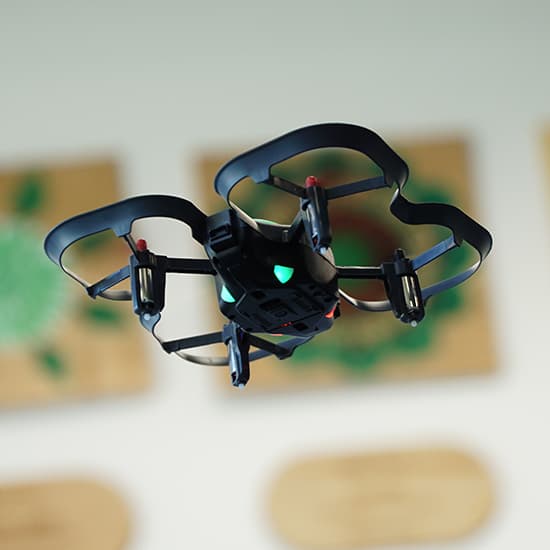
Robolink CoDrone EDU uses experiential learning and project-based challenges to teach block-based and Python programming. Students write code scripts on a connected device and upload them to the drone to execute specific flight paths, maneuvers, and sensor readings. The drone utilizes color sensors, a gyroscope, and obstacle detection, allowing learners to program conditional statements and loops based on environmental data. For example, a student might write a script that commands the drone to fly forward until it detects a red object, requiring them to use logic structures and variable definitions. This physical manifestation of code provides instant visual feedback. If the code is wrong, the drone crashes or flies off course, forcing the student to engage in active retrieval and debugging. By moving from block-based visual coding to text-based Python, the system scaffolds the complexity of syntax while maintaining the same physical problem-solving environment.
Strengths and tradeoffs of Robolink CoDrone EDU
The biggest strength of Robolink CoDrone EDU is its immediate, physical feedback loop, while its biggest weakness is the high logistical barrier to entry for standard classroom implementation. Experiential learning thrives when students can test hypotheses and observe results in real-time. When a student programs the CoDrone to navigate an obstacle course, the physical flight serves as a worked example of their code's efficacy. This grounds abstract computational concepts in the physical world, enhancing retention and spatial reasoning. However, the reliance on hardware introduces significant friction. Cognitive load can easily shift away from learning syntax and logic toward troubleshooting Bluetooth connections, replacing depleted batteries, or calibrating sensors. Furthermore, without rigid instructional scaffolding, the educational value degrades into unstructured play. Students may focus on the novelty of flight rather than the underlying math or science standards. While we have not formally evaluated the provided curriculum, the hardware itself demands a highly structured learning environment to ensure the focus remains on problem-solving and computational thinking rather than hardware management.
Who Might Benefit From Robolink CoDrone EDU?
Robolink CoDrone EDU is best for middle and high school students engaging in structured robotics clubs, STEM classrooms, or coding competitions. The hardware targets 5th through 12th graders who are transitioning from basic visual programming to text-based Python and need physical engagement to maintain motivation. It is highly suitable for career and technical education environments where educators can dedicate full class periods to project-based learning. It is less ideal for casual home use or unstructured independent study, as the physical hardware requires adult supervision, dedicated space, and a deliberate curriculum to extract meaningful learning outcomes.
Data Transparency
Does Not Meet Data Transparency Standard
Robolink CoDrone EDU reaches Level 1 of 3 (Basic protections), below our data transparency standard. Reaching Level 2 needs the policy to document data export and a data retention timeline.
22 of 35 checks passed
Level 1 · Basic protections
Does not sell data or target ads at students, limits sharing, and lets parents see and delete their child's data.
Level 2 · Parent control (meets the standard)
Families can get their data out, know who processes it, and know how long it is kept.
Not documented: data export, a data retention timeline
Level 3 · Direct data access
Families or schools can pull their own data through an API, in a stated format.
Not documented: an API for retrieving their own data, a named export format
View all 35 checks
Parent Access8/8
Does the policy mention parents specifically?
“If you are a Child User, we provide your parent or legal guardians (“Parent”) control over the data that we collect.”
Can parents view their child's data?
“As a Parent, you have the ability to access and control information about your Child User. You can log into your Parent account, and review , delete or update the information associated with your account, including a Child User’s information.”
Can parents modify their child's data?
“As a Parent, you have the ability to access and control information about your Child User. You can log into your Parent account, and review , delete or update the information associated with your account, including a Child User’s information.”
Can parents delete their child's account?
“Parents can revoke a Child User’s permissions to use the Education Portals at any time by deleting the account. To do so, Parents can log into their account and delete any Child User account associated with theirs.”
Is there a dedicated Children's Privacy section?
“8\. Additional Information about Children’s Privacy”
Does it reference COPPA compliance?
“We work with Schools to protect Student Personal Information in compliance with FERPA and, for School Users who are under 13, COPPA,”
Does it reference FERPA compliance?
“We work with Schools to protect Student Personal Information in compliance with FERPA and, for School Users who are under 13, COPPA,”
Is parental consent required for child accounts?
“Robolink does not knowingly permit Child Users to create an account without the consent of a Parent (or School).”
Data Portability2/5
Can users access their personal data?
“You can log into your Parent account, and review , delete or update the information associated with your account, including a Child User’s information.”
Can users download/export their data?
The policy does not address downloading or exporting data.
Is there a self-service data access tool?
“You can log into your Parent account, and review , delete or update the information associated with your account, including a Child User’s information.”
Is a specific data format mentioned for export?
The policy does not mention any export format.
Is there an API for data access?
The policy does not mention an API for data access.
Data Minimization2/6
Is data collection itemized?
“If you create an account, we collect the following information from you: - **Educators or Students over the age of 13:** username, email address and password; - **Parents:** first and last name, username, email address and password.”
Can the app be used without a real name?
The policy does not rule out collecting student real names; it receives unspecified student information from schools and only recommends that usernames not reflect real names.
Can the app be used without an email?
The policy states it collects email addresses from students over 13.
Does it state collection is limited to what is necessary?
“In order to provide the Education Portals and our Services, we collect limited personal information.”
Is IP address anonymized or truncated?
The policy says it collects IP addresses and does not mention anonymizing or truncating them.
Is location tracking explicitly excluded?
The policy states it may infer general location from IP address, excluding only precise geolocation.
Third-Party Protection5/7
Does it explicitly state no selling of data?
“We do not use that information to target children with ads and we do not share, sell, or transfer your information.”
Are third-party providers named?
“We use Google Analytics to analyze traffic to the Education Portals.”
Are providers contractually restricted?
The policy does not say service providers are contractually restricted; it mentions such a requirement only for affiliates in a change of control.
No-targeted-advertising commitment?
“We do not use any tracking technologies for behavioral advertising on our Education Portals. Robolink does not serve behavioral advertising to or retarget ads to Child Users or any users who visit the Education Portals.”
Is AI/ML data sharing addressed?
The policy does not address AI or machine learning.
Child-specific sharing restriction?
“We do not disclose personal information of Child Users for direct marketing purposes or for targeted advertising purposes.”
Cookies/tracking limited or opt-out?
“To learn more about Google Analytics’ data practices, please visit Google’s [support page](https://support.google.com/analytics/topic/2919631?hl=en&ref_topic=1008008). You may also opt-out by clicking [here](https://tools.google.com/dlpage/gaoptout).”
Deletion & Retention2/5
Can users delete their account?
“Parents can revoke a Child User’s permissions to use the Education Portals at any time by deleting the account. To do so, Parents can log into their account and delete any Child User account associated with theirs.”
Self-service deletion mechanism?
“To do so, Parents can log into their account and delete any Child User account associated with theirs.”
Specific data retention timeline?
The policy says data is kept only as long as reasonably necessary, with no specific timeline.
Auto-deletion of inactive accounts?
The policy does not address deleting inactive accounts.
Post-deletion handling described?
The policy does not describe how data is handled after deletion.
Advertising3/4
Advertising model explicitly disclosed?
“Robolink does not use advertising cookies or tracking technologies on the Education Portals, and specifically does not serve any targeted advertising to Child Users. We do not disclose personal information of Child Users for direct marketing purposes or for targeted advertising purposes. In addition, we have taken steps to ensure that there is no Ad Partner technology on the Education Portals.”
Free from third-party advertisements?
“In addition, we have taken steps to ensure that there is no Ad Partner technology on the Education Portals.”
Children excluded from ad targeting?
“Robolink does not use advertising cookies or tracking technologies on the Education Portals, and specifically does not serve any targeted advertising to Child Users.”
Ad-free option available?
The policy rules out targeted advertising and ad partner technology but does not say outright that the product has no advertising or offers an ad-free option.
What This Means
The policy review did not meet our data transparency standard. The checks above show the documented findings and unknowns. A missing statement does not establish how the app handles data in practice.
About this evaluation: Based on automated analysis of Privacy Policy and Robolink Learn against 35 policy-disclosure questions, including questions adapted from the Common Sense Privacy Program's published evaluation questions. TLS is not affiliated with Common Sense Media, and this is not a Common Sense rating. Quoted text is copied from the policy; unquoted notes are our summary. Results describe what the policy documents, not the company's actual practices. Privacy policies can change: this review reflects the version we analyzed and does not determine legal compliance.
Sources and review method
TLS combines product information and editorial analysis to explain how Robolink CoDrone EDU works, its tradeoffs, and the questions to ask before choosing it. Product features, an instructional rationale and evidence of learning outcomes are different kinds of information.
Formal Learning Standard assessment: not yet completed. Data Transparency findings are reported separately and do not establish learning effectiveness. Read our methodology.
Frequently Asked Questions About Robolink CoDrone EDU
Is Robolink CoDrone EDU free?
No, the hardware requires a significant upfront investment. A single CoDrone EDU costs $214.99, while classroom packages range from $2,999.99 to $8,999.99 depending on the number of drones and spare parts included.
Is Robolink CoDrone EDU good for middle schoolers?
Yes, it is specifically designed for students in 5th through 12th grades. The ability to switch between block-based coding and text-based Python makes it an excellent scaffolding tool for middle schoolers transitioning to more complex computer science concepts.
What does Robolink CoDrone EDU teach?
It teaches computational thinking, spatial reasoning, and programming syntax. Students learn to write block-based code and Python scripts that control flight patterns, utilize sensor data, and execute conditional logic based on real-world environmental inputs.
How does Robolink CoDrone EDU compare to DJI Tello EDU?
Both offer programmable educational drones, but the CoDrone EDU includes specialized color and obstacle sensors tailored specifically for classroom coding challenges. The DJI Tello EDU often features a better camera for computer vision tasks, but Robolink provides more dedicated competition-based curriculum support.
Has The Learning Standard evaluated Robolink CoDrone EDU?
TLS has not yet completed a Learning Standard evaluation of how well Robolink CoDrone EDU teaches. Its privacy policy has been reviewed for Data Transparency and reaches Level 1, Basic protections.
Is Robolink CoDrone EDU COPPA compliant?
The reviewed privacy policy references COPPA. A policy reference alone does not establish COPPA compliance. Policy review note: The policy states COPPA compliance.
Is Robolink CoDrone EDU FERPA compliant?
The reviewed privacy policy references FERPA. A policy reference alone does not establish FERPA compliance. Policy review note: The policy states FERPA compliance.
Does Robolink CoDrone EDU have a children's privacy policy?
The reviewed policy includes a dedicated children's privacy section. Policy review note: The policy has a dedicated, separately headed children's privacy section.
Does Robolink CoDrone EDU sell student data?
The reviewed policy states that the app does not sell data. This is a policy statement; actual data practices were not verified. Policy review note: The policy states Robolink does not sell user information.
Can you delete your data from Robolink CoDrone EDU?
The reviewed privacy policy describes account deletion. We have not tested the deletion process. Policy review note: Accounts can be deleted.
Follow TLS Research
Subscribe to future TLS research updates: app reviews, findings, and what the evidence shows.
Screenshots
Take Action
For Robolink CoDrone EDU
If you represent Robolink and have a correction or new evidence, send the relevant source so we can review and update this page.
Submit a correctionDetails
- Pricing
- CoDrone EDU- $214.99 Classroom Packages Range from $2,999.99 to $8,999.99 based on quantity
- Platforms
- Windows (Microsoft), macOS (Apple), Chrome OS (Google)
- Grade Levels
- 5th Grade, 6th Grade, 7th Grade, 8th Grade, 9th Grade, 10th Grade, 11th Grade, 12th Grade
- Website
- Visit site