PhET Interactive Simulations
Product by PhET Interactive Simulations
Facts checked: Not yet checked
Our take (not a Learning Standard rating). This label applies to learning-science judgments throughout this overview.
Our take (not a Learning Standard rating)
PhET Interactive Simulations effectively teaches complex math and science concepts through inquiry-based learning. By allowing students to manipulate variables in real-time, the platform builds deep conceptual models rather than relying on rote memorization. However, because it lacks built-in instruction, it requires external guidance from a teacher or parent to maximize learning outcomes.
Pros
- Provides immediate visual feedback when variables change to support accurate conceptual understanding.
- Uses inquiry-based learning mechanics that allow students to test hypotheses and observe cause-and-effect safely.
- Strips away unnecessary visual clutter to focus cognitive load strictly on the target learning objectives.
- Offers extensive accessibility features including keyboard navigation and audio description for diverse learners.
Cons
- Lacks direct instruction or built-in tutorials to guide novice learners through new concepts.
- Offers no automated assessment or mastery tracking to verify if a student actually retained the material.
- Requires high self-regulation, as students can easily play with the simulation without engaging in deliberate practice.
What Do We Know About PhET Interactive Simulations?
PhET Interactive Simulations is a highly effective tool for learning math and science, provided your child uses it alongside formal instruction. The platform functions as a virtual laboratory rather than a standalone curriculum. Your child will not find video lectures, multiple-choice quizzes, or a personalized learning path here. Instead, they get an open sandbox designed around inquiry-based learning. When your child struggles to visualize how electrons move in a circuit or how gravity affects planetary orbits, PhET provides an interactive model where they can change variables and instantly see the results. This immediate feedback loop is excellent for correcting misconceptions. However, because there is no built-in guidance, a student acting alone may just click around aimlessly. To get the most out of PhET, you must provide specific goals or use the platform to answer concrete questions from your child's homework. The website version is completely free and requires no login, making it incredibly accessible for immediate homework help. Note that while The Learning Standard has not yet formally evaluated PhET against our full rubric, the underlying design strongly aligns with established cognitive science principles regarding multimedia learning.
How Does PhET Interactive Simulations Work?
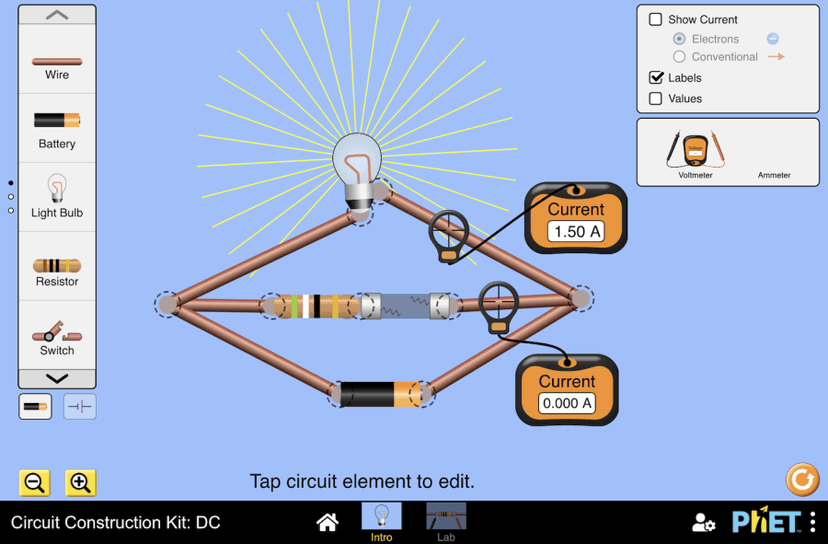
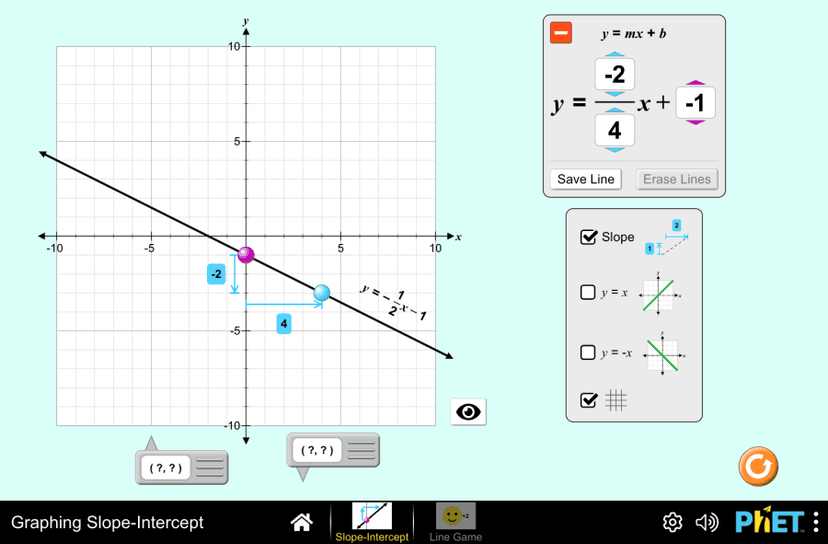
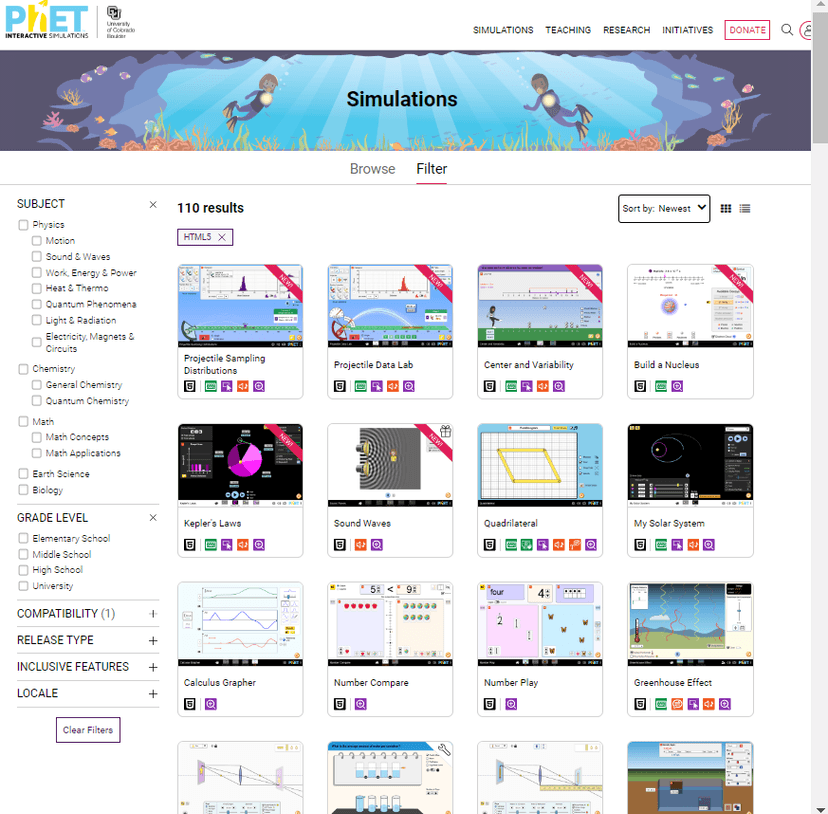
PhET uses an inquiry-based learning approach where students manipulate interactive virtual models to discover scientific and mathematical principles. When your child opens a simulation, they are presented with a simplified visual representation of a concept, such as a skateboarder on a ramp to learn about energy conservation. They can adjust variables like mass, friction, or gravity using sliders and instantly observe how these changes impact the entire system. This relies heavily on the modality principle of multimedia learning, presenting information visually and dynamically to reduce cognitive load. The mechanics encourage active hypothesis testing. A student might ask what happens if they double the weight, and they can immediately test that exact idea. Many simulations include optional visual aids, such as energy bar graphs or force vectors, which help bridge the gap between abstract math and concrete physics. There is no linear progression or forced sequence, meaning your child controls the exact pace and direction of the exploration.
Strengths and tradeoffs of PhET Interactive Simulations
PhET's biggest strength is its ability to make invisible abstract concepts visible, while its biggest weakness is the complete lack of built-in instructional scaffolding. Strengths: The platform excels at reducing cognitive load by eliminating irrelevant details from complex scientific phenomena. By isolating specific variables, PhET directs the learner's attention exactly where it needs to be. The simulations also provide immediate, dynamic feedback. When a student changes the concentration of a virtual solution, the color changes instantly, cementing the cause-and-effect relationship in their mental model. This aligns perfectly with the principles of active learning. Weaknesses: Because PhET operates purely as an exploratory sandbox, it relies entirely on the student's intrinsic motivation and prior knowledge. There is no retrieval practice built into the system to cement long-term memory. If a student misunderstands a concept, the simulation itself will not correct them or provide a worked example to explain the error. Without external guidance from a teacher or parent setting specific parameters for the exploration, students frequently engage in unstructured play rather than rigorous scientific inquiry.
Who Might Benefit From PhET Interactive Simulations?
PhET is best for middle school, high school, and college students who need visual, interactive models to understand abstract math and science concepts. While there are a few elementary-level simulations, the platform shines in complex subjects like physics, chemistry, and calculus. It is an ideal supplementary tool for visual learners who struggle with textbook explanations. Parents and educators should use it specifically for homework help or laboratory replacements when physical equipment is unavailable. It is not designed for students who need a complete, self-paced curriculum.
Data Transparency
Does Not Meet Data Transparency Standard
PhET Interactive Simulations does not meet our data transparency standard. Its privacy policy does not document basic protections, including a statement that it does not sell data and parents' right to see their child's data.
25 of 35 checks passed
Evaluated September 2026
PhET Privacy Policy →Level 1 · Basic protections
Does not sell data or target ads at students, limits sharing, and lets parents see and delete their child's data.
Not documented: a statement that it does not sell data, parents' right to see their child's data
Level 2 · Parent control (meets the standard)
Families can get their data out, know who processes it, and know how long it is kept.
Not documented: data export
Level 3 · Direct data access
Families or schools can pull their own data through an API, in a stated format.
Not documented: an API for retrieving their own data, a named export format
View all 35 checks
Parent Access4/8
Does the policy mention parents specifically?
“Requests for account deletions by other authorized parties, such as school administrators or parents, should be sent to [phethelp@colorado.edu](mailto:phethelp@colorado.edu).”
Can parents view their child's data?
The policy lets parents request account deletion but does not say parents can view a child's data.
Can parents modify their child's data?
The policy does not give parents a right to modify a child's data.
Can parents delete their child's account?
“Requests for account deletions by other authorized parties, such as school administrators or parents, should be sent to [phethelp@colorado.edu](mailto:phethelp@colorado.edu).”
Is there a dedicated Children's Privacy section?
“PhET simulations are used by students of all ages, but they are primarily used and designed for K-12 and university students. Although PhET designs the simulations to be used by children, we do not knowingly collect personal data from children.”
Does it reference COPPA compliance?
“we maintain our compliance with COPPA since children under 13 are ineligible to create a user account and therefore no PII is requested or collected from child users.”
Does it reference FERPA compliance?
The policy does not mention FERPA.
Is parental consent required for child accounts?
The policy says PhET gives parents no way to consent because children under 13 cannot create accounts.
Data Portability2/5
Can users access their personal data?
“Users have the ability to view, modify, or delete their own information.”
Can users download/export their data?
The policy does not offer data download or export.
Is there a self-service data access tool?
“Users have the ability to view, modify, or delete their own information. Requests for account deletions by other authorized parties, such as school administrators or parents, should be sent to”
Is a specific data format mentioned for export?
The policy does not name any export format.
Is there an API for data access?
The policy does not describe an API for getting data.
Data Minimization5/6
Is data collection itemized?
“In addition to the non-personally identifiable information described above, for users who create an account, or communicate with us, the following PII is collected: name and email address.”
Can the app be used without a real name?
“No PII is collected from non-registered users. Similarly, no PII is ever collected when a user runs a PhET simulation, whether directly from our website, through our PhET iOS or Android apps, embedded in other websites or products, or downloaded on a device.”
Can the app be used without an email?
“No PII is collected from non-registered users. Similarly, no PII is ever collected when a user runs a PhET simulation, whether directly from our website, through our PhET iOS or Android apps, embedded in other websites or products, or downloaded on a device.”
Does it state collection is limited to what is necessary?
“During the registration process we attempt to only collect the minimum information necessary to best serve our mission of providing free educational content to a global user base.”
Is IP address anonymized or truncated?
“Our Google Analytics is configured for “ [IP masking](https://support.google.com/analytics/answer/2763052?hl=en)” in Universal Analytics (UA) and no IP addresses are logged or stored in Google Analytics 4 (GA4).”
Is location tracking explicitly excluded?
The policy says PhET collects general location, such as country and city, and does not rule out location tracking.
Third-Party Protection5/7
Does it explicitly state no selling of data?
The policy only says PhET does not sell PII to third parties "for advertising or marketing purposes," which is not a general promise not to sell data.
Are third-party providers named?
“Additionally, the PhET website and PhET simulations collect non-personally identifying information through the use of Google Analytics tracking services to help us measure traffic and to understand more about the demographics and usage patterns of our users”
Are providers contractually restricted?
“We tightly restrict access to user information to PhET employees, agents, and contractors for which this access is essential; these parties are subject to confidentiality obligations.”
No-targeted-advertising commitment?
“Specifically, we do not use traditional advertisements, behavioral advertisements, nor ad tracking on the PhET website, in the PhET simulations, or with third-party websites and services.”
Is AI/ML data sharing addressed?
The policy does not address AI or machine learning.
Child-specific sharing restriction?
“We do not allow any third parties to use any user’s data to create an automated profile, engage in data enhancement, conduct social advertising, or target advertising to students, parents, teachers, or the school.”
Cookies/tracking limited or opt-out?
“PhET utilizes NO advertising or marketing tracking cookies.”
Deletion & Retention5/5
Can users delete their account?
“Users have the ability to view, modify, or delete their own information.”
Self-service deletion mechanism?
“Users have the ability to view, modify, or delete their own information.”
Specific data retention timeline?
“PhET may email users after 5 years of inactivity. If the user does not sign into their account within 30 days of that email, the account may be deleted and all personal information removed from our databases.”
Auto-deletion of inactive accounts?
“PhET may email users after 5 years of inactivity. If the user does not sign into their account within 30 days of that email, the account may be deleted and all personal information removed from our databases.”
Post-deletion handling described?
“Upon user account deletion, user PII is removed from all active databases.”
Advertising4/4
Advertising model explicitly disclosed?
“No advertisements or ad tracking technologies are utilized by PhET in our simulations or on our website.”
Free from third-party advertisements?
“No advertisements or ad tracking technologies are utilized by PhET in our simulations or on our website.”
Children excluded from ad targeting?
“We do not allow any third parties to use any user’s data to create an automated profile, engage in data enhancement, conduct social advertising, or target advertising to students, parents, teachers, or the school.”
Ad-free option available?
“No advertisements or ad tracking technologies are utilized by PhET in our simulations or on our website.”
What This Means
The policy review did not meet our data transparency standard. The checks above show the documented findings and unknowns. A missing statement does not establish how the app handles data in practice.
About this evaluation: Based on automated analysis of PhET Privacy Policy against 35 policy-disclosure questions, including questions adapted from the Common Sense Privacy Program's published evaluation questions. TLS is not affiliated with Common Sense Media, and this is not a Common Sense rating. Quoted text is copied from the policy; unquoted notes are our summary. Results describe what the policy documents, not the company's actual practices. Privacy policies can change: this review reflects the version we analyzed and does not determine legal compliance.
Sources and review method
TLS combines product information and editorial analysis to explain how PhET Interactive Simulations works, its tradeoffs, and the questions to ask before choosing it. Product features, an instructional rationale and evidence of learning outcomes are different kinds of information.
Formal Learning Standard assessment: not yet completed. Data Transparency findings are reported separately and do not establish learning effectiveness. Read our methodology.
Frequently Asked Questions About PhET Interactive Simulations
Is PhET Interactive Simulations free?
Yes, the web-based version of PhET Interactive Simulations is entirely free to use. There are no paywalls, subscriptions, or login requirements to access the simulations through a browser. The developer does offer native apps for iOS and Android that allow for offline use, which cost $0.99. The revenues from these app sales help fund the ongoing development of the free web platform.
What does PhET Interactive Simulations teach?
PhET teaches core concepts in physics, chemistry, math, earth science, and biology. The simulations focus heavily on conceptual understanding rather than procedural calculation. For example, instead of just memorizing the formula for Ohm's Law, your child will manipulate virtual batteries and resistors to see how voltage and current relate in real-time. It covers topics ranging from basic fractions to quantum mechanics.
Is PhET Interactive Simulations good for elementary students?
Partially. While PhET offers some excellent simulations for elementary math and basic science, the vast majority of its content targets middle school, high school, and college levels. Younger children often lack the self-regulation required to benefit from open-ended inquiry learning without heavy, direct supervision from an adult setting specific tasks.
PhET Interactive Simulations vs. Khan Academy: Which is better?
Neither is universally better; they serve entirely different purposes. Khan Academy provides direct instruction through video lectures and spaced retrieval practice through quizzes, making it a comprehensive curriculum tool. PhET provides virtual laboratories for conceptual exploration but lacks direct instruction and assessment. The most effective approach combines both: using Khan Academy to learn the procedural steps and PhET to visualize the underlying concepts.
Has The Learning Standard evaluated PhET Interactive Simulations?
TLS has not yet completed a Learning Standard evaluation of how well PhET Interactive Simulations teaches. Its privacy policy has been reviewed for Data Transparency and does not yet document the basic protections (Level 1).
Is PhET Interactive Simulations COPPA compliant?
The reviewed privacy policy references COPPA. A policy reference alone does not establish COPPA compliance. Policy review note: The policy states that PhET complies with COPPA.
Is PhET Interactive Simulations FERPA compliant?
A FERPA reference was not found in the reviewed privacy policy. This does not determine whether the app complies with FERPA. Policy review note: The policy does not mention FERPA.
Does PhET Interactive Simulations have a children's privacy policy?
The reviewed policy includes a dedicated children's privacy section. Policy review note: The policy has its own section headed "Collection of Data from Children."
Does PhET Interactive Simulations sell student data?
A statement ruling out data selling was not found in the reviewed policy. This does not establish that the app sells student data. Policy review note: The policy only says PhET does not sell PII to third parties "for advertising or marketing purposes," which is not a general promise not to sell data.
Can you delete your data from PhET Interactive Simulations?
The reviewed privacy policy describes account deletion. We have not tested the deletion process. Policy review note: Users can delete their information.
Follow TLS Research
Subscribe to future TLS research updates: app reviews, findings, and what the evidence shows.
Screenshots
Latest News
All PhET Interactive Simulations NewsTake Action
For PhET Interactive Simulations
If you represent PhET Interactive Simulations and have a correction or new evidence, send the relevant source so we can review and update this page.
Submit a correctionDetails
- Pricing
- FREE access to all PhET simulations for students and teachers from the PhET website. iPad and Chromebook PhET App - which enables offline use - available for purchase ($0.99). No student or teacher login required.
- Platforms
- Web Browser, iOS (Apple mobile), iPadOS (Apple tablet), Android (Google mobile), Windows (Microsoft), macOS (Apple), Chrome OS (Google)
- Grade Levels
- Transitional Kindergarten, Kindergarten, 1st Grade, 2nd Grade, 3rd Grade, 4th Grade, 5th Grade, 6th Grade, 7th Grade, 8th Grade, 9th Grade, 10th Grade, 11th Grade, 12th Grade, Associate's degree, Bachelor's degree, Adult Education
- Website
- Visit site