
MYdys EDU
Product by FACIL'iti MYdys
Facts checked: Not yet checked
Our take (not a Learning Standard rating). This label applies to learning-science judgments throughout this overview.
Our take (not a Learning Standard rating)
MYdys EDU does not teach new concepts directly, but it effectively lowers cognitive load by adapting text presentation to your child's reading profile. By customizing visual inputs, the app removes working memory bottlenecks for dyslexic readers, allowing them to focus on reading comprehension rather than decoding struggles. Pending formal evaluation.
Pros
- Reduces extrinsic cognitive load by allowing users to customize text spacing, font, and color.
- Integrates directly into existing school platforms, preventing the need for secondary reading apps.
- Applies reading accommodations uniformly across subjects, from humanities to math.
- Provides real-time adaptation of digital content without requiring manual reformatting by teachers.
Cons
- Lacks direct instruction in foundational reading skills like phonemic awareness or phonics.
- Does not assess reading comprehension or track learning progress over time.
- Fails to provide corrective feedback or scaffolding when a student misreads a word.
- Requires an ongoing monthly subscription per license, which can be cost-prohibitive for some families.
What Do We Know About MYdys EDU?
MYdys EDU is an effective accessibility tool that facilitates learning by making digital text readable, but it does not actually teach reading skills. Your child will not learn how to decode words or understand grammar through this app. Instead, the application functions as an assistive technology layer that sits on top of your child's regular schoolwork. If your child has dyslexia or another specific learning disability affecting reading, visual crowding and poor text formatting can overwhelm their working memory. MYdys EDU intervenes by altering the visual presentation of text on personal devices and school platforms. By adjusting font types, letter spacing, and background colors, it reduces the cognitive effort required to simply identify letters. This frees up mental bandwidth so your child can focus on understanding the material, whether they are reading a history chapter or a word problem in math. However, parents must understand the distinction between accommodation and intervention. MYdys EDU accommodates existing reading struggles. It lacks the active retrieval practice, spaced repetition, or explicit phonics instruction required to remediate reading deficits. You should use this alongside evidence-based reading instruction, rather than as a replacement for it. The Learning Standard has not yet formally evaluated this app's learning outcomes.
How Does MYdys EDU Work?
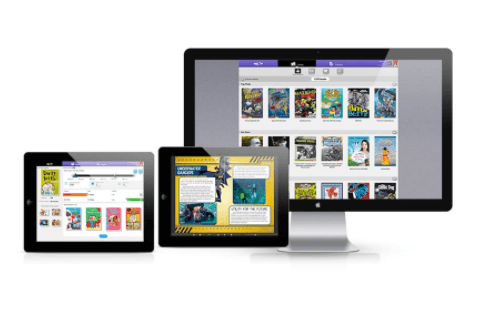
MYdys EDU uses a universal design for learning (UDL) approach by providing customizable visual accommodations for digital text. The app acts as an overlay or integration within existing digital platforms. When a student encounters text on their device, the AI engine instantly reformats the content based on their pre-selected preferences. Students configure their reading profile by selecting specific fonts designed for dyslexia, adjusting the spacing between letters and lines, and altering contrast colors. The software processes the text on the screen and changes its appearance in real time. This mechanism directly addresses visual crowding, a common barrier for dyslexic readers. It strips away formatting that causes visual confusion and presents the words in a highly structured, personalized format. Because it integrates with school systems, the student experiences this consistent text presentation across all their digital assignments, from science articles to math assessments. It does not generate practice quizzes or offer instructional videos; it strictly manipulates the visual environment to optimize reading fluency.
Strengths and tradeoffs of MYdys EDU
The biggest strength of MYdys EDU is its ability to universally reduce cognitive load across all digital platforms, while its biggest weakness is the complete absence of instructional mechanics to build independent reading skills. By applying visual accommodations like increased letter spacing and specialized typography, the app effectively eliminates structural barriers to reading. Cognitive science shows that when students expend all their working memory on decoding letters, comprehension fails. MYdys EDU solves this by optimizing the text, allowing the brain to allocate resources to understanding the meaning of the text instead. Seamless integration across all school subjects ensures that a student receives this cognitive relief consistently, whether reading a science journal or a literature assignment. However, the app is strictly an assistive tool. It offers zero retrieval practice or spaced repetition to help a student master new vocabulary or phonics rules. Without explicit instruction or corrective feedback, the underlying reading deficit remains unaddressed. It removes the barrier but does not teach the skill. Educators and parents must pair this tool with targeted reading interventions to ensure long-term academic growth.
Who Might Benefit From MYdys EDU?
MYdys EDU is best for students in grades K-12 with dyslexia or specific reading disabilities who need visual text accommodations to access grade-level curriculum. It is ideal for learners who already receive targeted reading instruction but struggle to independently navigate standard digital text in their daily homework. Because it spans early childhood through 12th grade, it works well as a long-term accessibility tool. It is perfectly suited for school districts or parents looking for a unified solution that applies customized reading profiles across multiple subjects and learning management systems.
Sources and review method
TLS combines product information and editorial analysis to explain how MYdys EDU works, its tradeoffs, and the questions to ask before choosing it. Product features, an instructional rationale and evidence of learning outcomes are different kinds of information.
Formal Learning Standard assessment: not yet completed. Data Transparency findings are reported separately and do not establish learning effectiveness. Read our methodology.
Frequently Asked Questions About MYdys EDU
Is MYdys EDU free?
No, MYdys EDU is not free. The application requires a subscription of $5.00 per month for each user license. Schools and districts generally purchase these licenses in bulk to integrate the software into their educational platforms, though parents can also purchase individual access. There is currently no free tier available, meaning families must budget for an ongoing monthly expense to maintain access to the text accommodations.
What does MYdys EDU teach?
MYdys EDU does not actually teach any specific subjects or academic skills. It is an assistive technology tool designed to make existing digital text easier to read. While it supports learning in subjects ranging from humanities to math by making the text accessible, it does not provide instruction, lessons, practice problems, or assessments. It facilitates learning by removing visual barriers, but it relies on external curriculum for the actual educational content.
Is MYdys EDU good for elementary and high school students?
Yes, the app is effective for students across all grade levels, from transitional kindergarten through 12th grade. Because it acts as an overlay that alters how text is displayed, its utility grows with the student. Early elementary students benefit from it as they encounter their first digital reading assignments, while high school students rely on it to manage the dense text found in advanced science, history, and literature coursework.
How does MYdys EDU compare to specialized reading instruction programs like Lexia?
MYdys EDU accommodates reading difficulties, whereas programs like Lexia actively teach reading skills. If your child struggles with phonics, Lexia uses explicit instruction and spaced repetition to build foundational decoding skills. MYdys EDU will not improve a child's inherent ability to read. Instead, it provides immediate visual relief so a dyslexic student can comprehend a history assignment today, while they receive structural reading remediation separately.
Has The Learning Standard evaluated MYdys EDU?
TLS has not yet completed a Learning Standard evaluation of how well MYdys EDU teaches. TLS has not published a Data Transparency result for its privacy policy.
Follow TLS Research
Subscribe to future TLS research updates: app reviews, findings, and what the evidence shows.
Screenshots


Take Action
For MYdys EDU
If you represent FACIL'iti MYdys and have a correction or new evidence, send the relevant source so we can review and update this page.
Submit a correctionDetails
- Pricing
- $5.00 / month / licence
- Platforms
- iOS (Apple mobile), iPadOS (Apple tablet), Android (Google mobile), Tizen (Samsung mobile), Windows (Microsoft), macOS (Apple), Chrome OS (Google)
- Grade Levels
- Transitional Kindergarten, 1st Grade, 2nd Grade, 3rd Grade, 4th Grade, 5th Grade, 6th Grade, 7th Grade, 8th Grade, 9th Grade, 10th Grade, 11th Grade, 12th Grade
- Website
- Visit site