
MLC Partial Product Finder
Product by The Math Learning Center
Facts checked: Not yet checked
Our take (not a Learning Standard rating). This label applies to learning-science judgments throughout this overview.
Our take (not a Learning Standard rating)
The MLC Partial Product Finder effectively uses visual area models to teach multiplication, grounding abstract math in concrete spatial representations. However, it functions as a digital manipulative rather than a standalone curriculum. Without built-in feedback loops, guided practice, or spaced repetition, it requires active adult facilitation to ensure learning actually occurs.
Pros
- Uses visual area models to support dual coding of multiplication concepts.
- Allows open-ended exploration of number decomposition strategies.
- Transitions students from concrete representations to abstract algorithms.
- Free from distracting gamification and superficial reward systems.
Cons
- Lacks automated feedback to correct student misconceptions in real time.
- Provides no structured progression or mastery-based sequencing.
- Omits built-in retrieval practice or spaced repetition features.
- Requires constant adult facilitation to guide learning objectives.
What Do We Know About MLC Partial Product Finder?
This app is effective for visualizing math concepts, but it will not teach your child multiplication independently. The MLC Partial Product Finder operates purely as an open-ended digital whiteboard designed to illustrate the area model of multiplication. Your child cannot just open this app and learn math without your guidance. Instead, it serves as a powerful instructional aid for adults to demonstrate how large numbers break down into smaller, manageable parts. The app relies on the learning science principle of dual coding, combining spatial representations with numerical values to build deeper conceptual understanding. Because it is completely open-ended, it lacks the explicit instruction, guided practice sets, and automated feedback loops necessary for independent learning. If your child makes a mistake, the app will not correct them or explain why. Therefore, parents must actively construct the problems, ask probing questions, and check for understanding. It is an excellent supplement to formal instruction, particularly when your child struggles with traditional rote memorization and needs to see the mechanics behind the math. Note that this app is currently pending evaluation by The Learning Standard.
How Does MLC Partial Product Finder Work?
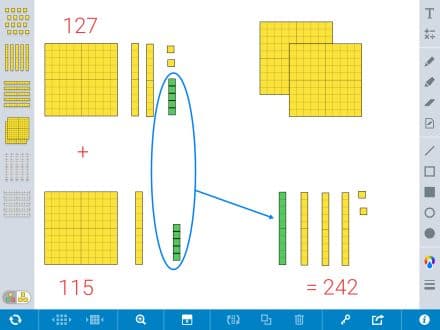
The MLC Partial Product Finder functions as a virtual manipulative, utilizing the constructivist approach of spatial representation to teach complex multiplication. Users start by defining the dimensions of a rectangular grid, representing a multiplication problem like 14 times 12. The app then allows your child to draw lines that split the large rectangle into smaller, easier-to-multiply sections, such as 10 times 10, 10 times 2, 4 times 10, and 4 times 2. By calculating the area of each smaller section and adding them together, the student arrives at the total product. This visual decomposition bridges the gap between basic arithmetic and algebraic thinking. The interface contains no structured lessons, assessments, or adaptive algorithms. Instead, the user manually inputs the equations and manipulates the sliders to break apart the numbers. It is entirely sandbox-based, meaning all learning mechanics rely on the tasks assigned by a teacher or parent rather than software-driven progression.
Strengths and tradeoffs of MLC Partial Product Finder
The biggest strength of the MLC Partial Product Finder is its ability to make abstract mathematical operations visually concrete, while its biggest weakness is the complete lack of independent learning structures. Strengths: By visualizing multiplication as physical area, the app successfully leverages dual coding theory, helping students map spatial relationships to numerical values. This is crucial for students who struggle with rote memorization of the standard algorithm. The interface is clean, stripping away extraneous cognitive load like gamified rewards or distracting animations. Weaknesses: Because it is designed as an open-ended tool, it entirely ignores essential cognitive science principles required for independent mastery. There is no spaced repetition to ensure long-term retention. There is no retrieval practice to test recall. Most critically, there is no corrective feedback. If a student incorrectly calculates a partial product, the app does not intervene. Without worked examples or adaptive scaffolding, a struggling student will simply practice their own misconceptions unless an educator is actively monitoring their screen.
Who Might Benefit From MLC Partial Product Finder?
This app is best for elementary students who are currently learning multi-digit multiplication and need visual scaffolding alongside direct adult instruction. It is primarily designed for third through fifth graders who are transitioning from basic times tables to complex calculations. Because it relies entirely on the area model of multiplication, it is highly effective for students enrolled in constructivist math curricula. It is not suitable for independent learners, preschoolers, or older students looking for automated drill-and-practice routines to build rapid fact fluency.
Data Transparency
Does Not Meet Data Transparency Standard
MLC Partial Product Finder does not meet our data transparency standard. Its privacy policy does not document basic protections, including limits on sharing children's data, a COPPA or FERPA commitment and parents' right to see their child's data.
14 of 35 checks passed
Evaluated September 2026
Apps Privacy Statement →Level 1 · Basic protections
Does not sell data or target ads at students, limits sharing, and lets parents see and delete their child's data.
Not documented: limits on sharing children's data, a COPPA or FERPA commitment, parents' right to see their child's data, parents' right to delete their child's data
Level 2 · Parent control (meets the standard)
Families can get their data out, know who processes it, and know how long it is kept.
Not documented: self-service deletion
Level 3 · Direct data access
Families or schools can pull their own data through an API, in a stated format.
Not documented: an API for retrieving their own data, a named export format
View all 35 checks
Parent Access0/8
Does the policy mention parents specifically?
The policy does not mention parents.
Can parents view their child's data?
The policy does not address parents viewing their child's data.
Can parents modify their child's data?
The policy does not address parents modifying their child's data.
Can parents delete their child's account?
The policy does not address parents deleting their child's data or account.
Is there a dedicated Children's Privacy section?
The policy has no dedicated children's privacy or COPPA section.
Does it reference COPPA compliance?
The policy does not reference COPPA.
Does it reference FERPA compliance?
The policy does not reference FERPA.
Is parental consent required for child accounts?
The policy does not address parental consent for child accounts.
Data Portability2/5
Can users access their personal data?
“If you wish to access, correct, update, or request deletion of your personal information, you can do so at any time as described in the “Updating & Correcting Personal Information” heading below.”
Can users download/export their data?
“In addition, you can object to processing of your personal information, ask us to restrict processing of your personal information, or request portability of your personal information. You can exercise these rights by contacting us at MLCinfo@mathlearningcenter.org.”
Is there a self-service data access tool?
The policy directs access requests to email and describes no self-service access tool.
Is a specific data format mentioned for export?
The policy does not mention any export format.
Is there an API for data access?
The policy does not describe an API for data access.
Data Minimization3/6
Is data collection itemized?
“some of the specific information we may collect automatically when you visit the Website includes usage data, such as the date and time of visit, duration of visit, type of web browser used, operating system/platform used, your IP address or mobile device ID, the websites from which you linked to the Website, and your CPU speed.”
Can the app be used without a real name?
“We will never ask you to provide us with your or someone else’s personal information in order to access, or while you are using, the Apps.”
Can the app be used without an email?
“We will never ask you to provide us with your or someone else’s personal information in order to access, or while you are using, the Apps.”
Does it state collection is limited to what is necessary?
The policy explains why it collects data and when it retains it, but never commits to collecting only what is necessary.
Is IP address anonymized or truncated?
The policy says IP addresses are collected and does not say they are anonymized or truncated.
Is location tracking explicitly excluded?
The policy says aggregated regional location data is collected and does not rule out location tracking.
Third-Party Protection5/7
Does it explicitly state no selling of data?
“Except in the limited circumstances stated in this Privacy Statement, we do not share, sell, or otherwise transfer or disclose your personal information to any third party.”
Are third-party providers named?
“Google Analytics™ and Apple® Analytics automatically collect certain usage and performance data from our Website and App users.”
Are providers contractually restricted?
“These third parties are required to keep the information confidential and are not authorized to process your personal information or Automatically Collected Information for any other purpose other than as instructed by us.”
No-targeted-advertising commitment?
“We do not use any advertising, targeting, or marketing cookies on our Website or Apps.”
Is AI/ML data sharing addressed?
The policy does not address AI or machine learning data sharing.
Child-specific sharing restriction?
The policy has no sharing restrictions specific to children.
Cookies/tracking limited or opt-out?
“Most browsers allow you to refuse to accept cookies and to delete cookies, though the methods for doing so may vary from browser to browser.”
Deletion & Retention3/5
Can users delete their account?
“If you request that your personal information be changed or deleted from our databases, we will use commercially reasonable efforts to remove your personal information from our databases”
Self-service deletion mechanism?
The policy handles deletion only through email requests, not a self-service tool.
Specific data retention timeline?
“Currently, Save States are set to automatically delete after two years from their last date of access.”
Auto-deletion of inactive accounts?
The policy auto-deletes unaccessed Save States but does not describe auto-deleting inactive accounts.
Post-deletion handling described?
“When we have no ongoing legitimate business need to process your personal information, we will either delete it or anonymize it, or, if this is not possible (for example, because your personal information has been stored in backup archives), then we will securely store your personal information and isolate it from any further processing until deletion is possible.”
Advertising1/4
Advertising model explicitly disclosed?
The policy only says advertising cookies are not used and never explicitly says the product has no advertising.
Free from third-party advertisements?
The policy only says advertising cookies are not used and never explicitly says there are no third-party ads.
Children excluded from ad targeting?
“We do not use any advertising, targeting, or marketing cookies on our Website or Apps.”
Ad-free option available?
The policy does not explicitly say the product has no advertising or offers an ad-free option.
What This Means
The policy review did not meet our data transparency standard. The checks above show the documented findings and unknowns. A missing statement does not establish how the app handles data in practice.
About this evaluation: Based on automated analysis of Apps Privacy Statement against 35 policy-disclosure questions, including questions adapted from the Common Sense Privacy Program's published evaluation questions. TLS is not affiliated with Common Sense Media, and this is not a Common Sense rating. Quoted text is copied from the policy; unquoted notes are our summary. Results describe what the policy documents, not the company's actual practices. Privacy policies can change: this review reflects the version we analyzed and does not determine legal compliance.
Sources and review method
TLS combines product information and editorial analysis to explain how MLC Partial Product Finder works, its tradeoffs, and the questions to ask before choosing it. Product features, an instructional rationale and evidence of learning outcomes are different kinds of information.
Formal Learning Standard assessment: not yet completed. Data Transparency findings are reported separately and do not establish learning effectiveness. Read our methodology.
Frequently Asked Questions About MLC Partial Product Finder
Is MLC Partial Product Finder free?
Yes, the app is completely free. The Math Learning Center provides it as a non-profit educational resource with no hidden paywalls, subscriptions, or advertisements.
Is MLC Partial Product Finder good for elementary students?
Yes, provided an adult guides the session. It helps children visualize multi-digit multiplication, but lacks the structured lessons required for independent study.
What does MLC Partial Product Finder teach?
It teaches the area model of multiplication. Students learn to decompose large numbers into smaller partial products, building the conceptual foundation required for advanced math.
Does MLC Partial Product Finder correct my child's mistakes?
No. The app functions as a digital whiteboard. It does not provide automated feedback, meaning parents or teachers must monitor the child to correct misconceptions.
How does MLC Partial Product Finder compare to Khan Academy?
Khan Academy provides structured, mastery-based progression with explicit video instruction and corrective feedback. The MLC Partial Product Finder is strictly an open-ended manipulative tool meant to supplement external instruction.
Has The Learning Standard evaluated MLC Partial Product Finder?
TLS has not yet completed a Learning Standard evaluation of how well MLC Partial Product Finder teaches. Its privacy policy has been reviewed for Data Transparency and does not yet document the basic protections (Level 1).
Is MLC Partial Product Finder COPPA compliant?
A COPPA reference was not found in the reviewed privacy policy. This does not determine whether the app complies with COPPA. Policy review note: The policy does not reference COPPA.
Is MLC Partial Product Finder FERPA compliant?
A FERPA reference was not found in the reviewed privacy policy. This does not determine whether the app complies with FERPA. Policy review note: The policy does not reference FERPA.
Does MLC Partial Product Finder have a children's privacy policy?
No dedicated children's privacy section was found in the reviewed policy. Policy review note: The policy has no dedicated children's privacy or COPPA section.
Does MLC Partial Product Finder sell student data?
The reviewed policy states that the app does not sell data. This is a policy statement; actual data practices were not verified. Policy review note: The policy states MLC does not sell personal information.
Can you delete your data from MLC Partial Product Finder?
The reviewed privacy policy describes account deletion. We have not tested the deletion process. Policy review note: Users can request that their personal information be deleted.
Follow TLS Research
Subscribe to future TLS research updates: app reviews, findings, and what the evidence shows.
Screenshots
Take Action
For MLC Partial Product Finder
If you represent The Math Learning Center and have a correction or new evidence, send the relevant source so we can review and update this page.
Submit a correction