
KiwiWrite Math
Product by KiwiWrite Software, LLC
Facts checked: Not yet checked
Our take (not a Learning Standard rating). This label applies to learning-science judgments throughout this overview.
Our take (not a Learning Standard rating)
KiwiWrite Math does not provide direct instruction or feedback, acting primarily as a digital workspace. However, by eliminating the physical barriers of handwriting and spatially aligning equations, it effectively reduces extraneous cognitive load. This allows students with dysgraphia or motor challenges to dedicate their working memory entirely to mathematical problem-solving.
Pros
- Reduces extraneous cognitive load by eliminating the need for manual handwriting during math practice.
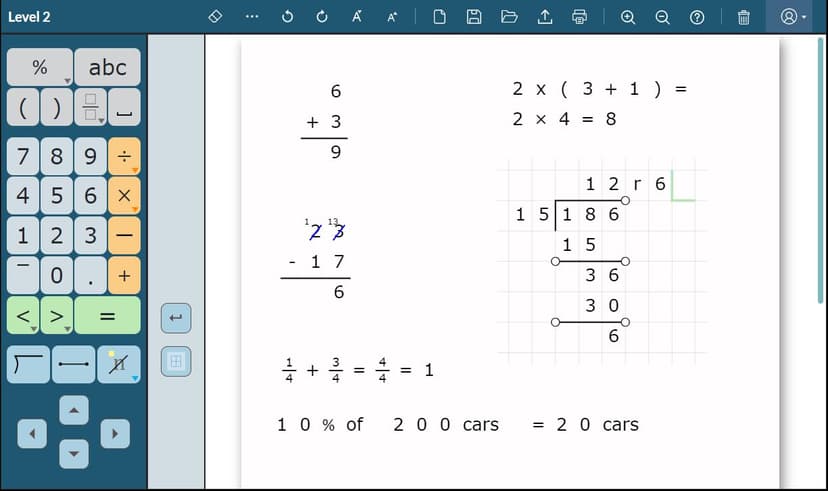
- Enforces spatial organization through grid-aligned interfaces, which is critical for solving multi-digit arithmetic accurately.
- Accommodates a wide range of learning stages by offering specific interfaces from basic arithmetic through early calculus.
- Allows integration with existing curriculum by enabling users to import classroom worksheets directly into the digital workspace.
Cons
- Lacks automated feedback or error correction, meaning students can practice incorrectly without immediate intervention.
- Provides no explicit instruction, worked examples, or scaffolding to teach new mathematical concepts.
- Requires educators or parents to manually review all student work to assess mastery.
- Does not utilize spaced repetition or adaptive algorithms to reinforce long-term retention of math facts.
What Do We Know About KiwiWrite Math?
KiwiWrite Math is effective as an accessibility tool that facilitates mathematical output, but it does not independently teach math concepts to your child. It functions entirely as a digital whiteboard tailored for mathematical notation. If your child struggles with dysgraphia, fine motor delays, or spatial organization, handwriting complex equations demands immense cognitive resources. By shifting this work to a click-and-type interface, the app removes extraneous cognitive load. This means your child can apply their working memory directly to problem-solving rather than the mechanics of writing a perfectly shaped number. However, parents must understand that this platform does not include instructional lessons, spaced repetition, or automated error checking. Your child can still calculate an answer incorrectly, and the app will not flag the mistake. Therefore, it must be paired with active parental involvement, classroom instruction, or a dedicated math tutor who can provide the necessary feedback and conceptual guidance. The Learning Standard has not yet evaluated this app formally, but its utility lies in removing physical barriers to output rather than delivering novel instruction.
How Does KiwiWrite Math Work?
KiwiWrite Math operates as a digital alternative pathway for expressive output rather than an instructional platform. Students log into a browser-based dashboard and either open a blank digital workspace or import a PDF worksheet provided by their teacher. They use on-screen keyboards, mice, or touchscreens to input mathematical symbols and numbers. The interface forces numbers into neat, grid-aligned rows and columns, which physically structures problems like long division or algebraic equations. Users select from four complexity levels to access different symbol sets, ensuring first graders see only basic operations while high schoolers can access advanced calculus notations. Because it lacks a proprietary curriculum, students simply complete their assigned math problems within the interface and export the finished document for grading. There are no adaptive algorithms, gamified rewards, or mastery checks built into the system.
Strengths and tradeoffs of KiwiWrite Math
The biggest strength of KiwiWrite Math is its ability to reduce cognitive overload for students with writing difficulties, while its biggest weakness is the complete absence of immediate feedback. From a learning science perspective, managing cognitive load is essential for acquiring complex skills. When students struggle to line up decimals or write legibly, their working memory becomes saturated, leaving no mental bandwidth for actual calculation. KiwiWrite Math excels at providing a structured, grid-based environment that handles the spatial organization automatically. This allows learners to focus entirely on the mathematical procedure. Furthermore, the ability to import existing worksheets means it integrates seamlessly with evidence-based curricula already used in schools. Conversely, the lack of automated feedback presents a significant instructional hurdle. Decades of educational research show that delayed feedback can allow misconceptions to solidify into long-term memory. Because the app does not correct wrong answers or provide worked examples when a student gets stuck, it cannot function as a standalone learning tool. It is strictly a physical accommodation that relies entirely on a teacher or parent to close the learning loop.
Who Might Benefit From KiwiWrite Math?
KiwiWrite Math is best for students with dysgraphia, motor skill deficits, or severe spatial organization challenges who need a digital alternative to pencil-and-paper math. It supports learners from first through twelfth grade, adapting its on-screen symbol sets from basic addition grids up to advanced calculus notation. This platform is not for students seeking a primary math tutor or adaptive practice program. It is exclusively for children who already receive math instruction but experience high frustration or physical barriers when attempting to physically write out their work on traditional worksheets.
Data Transparency
Does Not Meet Data Transparency Standard
KiwiWrite Math does not meet our data transparency standard. Its privacy policy does not document basic protections, including a commitment against targeted advertising and parents' right to see their child's data.
14 of 35 checks passed
Evaluated September 2026
Privacy →Level 1 · Basic protections
Does not sell data or target ads at students, limits sharing, and lets parents see and delete their child's data.
Not documented: a commitment against targeted advertising, parents' right to see their child's data
Level 2 · Parent control (meets the standard)
Families can get their data out, know who processes it, and know how long it is kept.
Not documented: data export, a data retention timeline, self-service deletion
Level 3 · Direct data access
Families or schools can pull their own data through an API, in a stated format.
Not documented: an API for retrieving their own data, a named export format
View all 35 checks
Parent Access6/8
Does the policy mention parents specifically?
“Children should always get permission from their parents before sending any information about themselves (such as their names, email addresses, and phone numbers) over the Internet, to us or to anyone else.”
Can parents view their child's data?
The policy does not say parents can view their child's data; it only lets users access their own Contact Information.
Can parents modify their child's data?
The policy does not say parents can change their child's data.
Can parents delete their child's account?
“A parent or guardian can revoke consent anytime. Please email us at support@kiwiwrite.com if you want to request that you or your child's account be deleted, and we will completely remove all your data from our system.”
Is there a dedicated Children's Privacy section?
“**PROTECTING THE PRIVACY OF CHILDREN**”
Does it reference COPPA compliance?
“These policies are in accordance with the U.S. Children's Online Privacy Protection Act (COPPA), and the Family Educational Rights and Privacy Act (FERPA).”
Does it reference FERPA compliance?
“These policies are in accordance with the U.S. Children's Online Privacy Protection Act (COPPA), and the Family Educational Rights and Privacy Act (FERPA).”
Is parental consent required for child accounts?
“Students will be asked their age, and may only create their own account if they are 13 or older. Accounts for students under the age of 13 need to be created by parents or guardians or educational professionals who are providing permission in lieu of a parent for the student to use the software.”
Data Portability1/5
Can users access their personal data?
“You can access, update and delete your Contact Information and you can update Financial Account Information with Stripe.”
Can users download/export their data?
The policy does not address downloading or exporting data.
Is there a self-service data access tool?
The policy says users can access their Contact Information but does not describe a self-service tool for doing so.
Is a specific data format mentioned for export?
The policy does not name any export format.
Is there an API for data access?
The policy does not mention an API for data access.
Data Minimization1/6
Is data collection itemized?
“Contact Information that allows us to communicate with you, such as your name, username and/or email address, or other addresses at which you receive communications from or on behalf of Company.”
Can the app be used without a real name?
The policy says it collects users' names as Contact Information.
Can the app be used without an email?
The policy says it collects email addresses, including through Google or Microsoft sign-in.
Does it state collection is limited to what is necessary?
The policy does not say collection is limited to what is necessary.
Is IP address anonymized or truncated?
The policy says it records IP addresses and does not say they are anonymized or truncated.
Is location tracking explicitly excluded?
The policy does not explicitly rule out location tracking.
Third-Party Protection4/7
Does it explicitly state no selling of data?
“Company does not sell information to third parties.”
Are third-party providers named?
“When completing an in-app subscription purchase, company discloses your Personal Information to Stripe to enable you to pay for your subscription.”
Are providers contractually restricted?
“Our service providers are bound by law or contract to protect the Personal Information and are only allowed to use the Personal Information in accordance with the terms of our service agreements with them.”
No-targeted-advertising commitment?
The policy does not address targeted advertising.
Is AI/ML data sharing addressed?
The policy does not address AI or machine learning data sharing.
Child-specific sharing restriction?
“Company does not disclose information to third parties, except as set forth in Section 4.”
Cookies/tracking limited or opt-out?
The policy says the software cannot be used without cookies and offers no opt-out beyond general browser settings.
Deletion & Retention2/5
Can users delete their account?
“If you would like to have a profile deleted, then please contact us at support@;kiwiwrite.com.”
Self-service deletion mechanism?
The policy says account deletion is done by emailing support, not through a self-service tool.
Specific data retention timeline?
The policy keeps data as long as the account is active or as needed, with no specific time limit.
Auto-deletion of inactive accounts?
The policy does not mention automatically deleting inactive accounts.
Post-deletion handling described?
“While we are ready to assist you in managing your subscriptions, closing your account, and removing your active profile, we cannot always delete records of past interactions and transactions. For example, we are required to retain records relating to previous purchases on the Website for financial reporting and compliance reasons.”
Advertising0/4
Advertising model explicitly disclosed?
The policy does not describe any advertising model.
Free from third-party advertisements?
The policy does not say whether the product shows third-party ads.
Children excluded from ad targeting?
The policy does not address ad targeting of children.
Ad-free option available?
The policy does not address advertising or an ad-free option.
What This Means
The policy review did not meet our data transparency standard. The checks above show the documented findings and unknowns. A missing statement does not establish how the app handles data in practice.
About this evaluation: Based on automated analysis of Privacy against 35 policy-disclosure questions, including questions adapted from the Common Sense Privacy Program's published evaluation questions. TLS is not affiliated with Common Sense Media, and this is not a Common Sense rating. Quoted text is copied from the policy; unquoted notes are our summary. Results describe what the policy documents, not the company's actual practices. Privacy policies can change: this review reflects the version we analyzed and does not determine legal compliance.
Sources and review method
TLS combines product information and editorial analysis to explain how KiwiWrite Math works, its tradeoffs, and the questions to ask before choosing it. Product features, an instructional rationale and evidence of learning outcomes are different kinds of information.
Formal Learning Standard assessment: not yet completed. Data Transparency findings are reported separately and do not establish learning effectiveness. Read our methodology.
Frequently Asked Questions About KiwiWrite Math
Is KiwiWrite Math free?
KiwiWrite Math is a paid subscription service, though it typically offers a free trial period. It utilizes individual and school-based pricing models, meaning parents can purchase standalone access for their child at home, or districts can buy bulk licenses to deploy across multiple classrooms.
Is KiwiWrite Math good for elementary students?
Yes, KiwiWrite Math is highly appropriate for elementary students, specifically those who struggle with fine motor skills. The platform includes a beginner level that focuses heavily on grid-aligned arithmetic, helping young learners visually organize their addition, subtraction, and long division problems without the frustration of handwriting.
What does KiwiWrite Math teach?
KiwiWrite Math does not actually teach any mathematical concepts or provide independent curriculum. It is a digital workspace that allows students to input and organize math problems using a keyboard or touchscreen. It facilitates the completion of math work but relies entirely on external instruction from a teacher or parent.
Does KiwiWrite Math provide feedback on wrong answers?
No, KiwiWrite Math does not offer automated feedback or error correction. If your child makes a calculation error, the app will not flag it. All completed work must be reviewed and graded by a parent or teacher to ensure the student is accurately applying mathematical concepts.
KiwiWrite Math vs Equatio: Which is better?
Both apps serve as digital math workspaces, but they target slightly different needs. KiwiWrite Math excels in providing strict, grid-aligned spatial organization for younger students and those with severe motor delays. Equatio offers broader accessibility features, including speech-to-math dictation and predictive math typing, making it generally more robust for older, independent learners.
Has The Learning Standard evaluated KiwiWrite Math?
TLS has not yet completed a Learning Standard evaluation of how well KiwiWrite Math teaches. Its privacy policy has been reviewed for Data Transparency and does not yet document the basic protections (Level 1).
Is KiwiWrite Math COPPA compliant?
The reviewed privacy policy references COPPA. A policy reference alone does not establish COPPA compliance. Policy review note: The policy says it follows COPPA.
Is KiwiWrite Math FERPA compliant?
The reviewed privacy policy references FERPA. A policy reference alone does not establish FERPA compliance. Policy review note: The policy says it follows FERPA.
Does KiwiWrite Math have a children's privacy policy?
The reviewed policy includes a dedicated children's privacy section. Policy review note: The policy has a section with its own heading on children's privacy.
Does KiwiWrite Math sell student data?
The reviewed policy states that the app does not sell data. This is a policy statement; actual data practices were not verified. Policy review note: The policy says the company does not sell information.
Can you delete your data from KiwiWrite Math?
The reviewed privacy policy describes account deletion. We have not tested the deletion process. Policy review note: Users can ask by email to have their profile deleted.
Follow TLS Research
Subscribe to future TLS research updates: app reviews, findings, and what the evidence shows.
Screenshots


Take Action
For KiwiWrite Math
If you represent KiwiWrite Software, LLC and have a correction or new evidence, send the relevant source so we can review and update this page.
Submit a correctionDetails
- Pricing
- Individual and school-based pricing models
- Platforms
- Web Browser, iPadOS (Apple tablet), Windows (Microsoft), macOS (Apple), Chrome OS (Google)
- Grade Levels
- 1st Grade, 2nd Grade, 3rd Grade, 4th Grade, 5th Grade, 6th Grade, 7th Grade, 8th Grade, 9th Grade, 10th Grade, 11th Grade, 12th Grade
- Website
- Visit site