
Inq-ITS
Product by Inq-ITS
Facts checked: Not yet checked
Our take (not a Learning Standard rating). This label applies to learning-science judgments throughout this overview.
Our take (not a Learning Standard rating)
While The Learning Standard has not yet formally evaluated Inq-ITS, its inquiry-based virtual labs show promise for teaching middle and high school science. The app effectively uses interactive simulations to build hypothesis-testing skills, though the effectiveness of its AI tutor requires independent verification to confirm true learning gains over mere completion.
Pros
- Scaffolds the scientific method by requiring students to form hypotheses before running virtual experiments.
- Provides immediate, auto-scored feedback on Claim-Evidence-Reasoning writing prompts to reduce cognitive load.
- Uses an AI tutor to deliver just-in-time hints when students struggle with experimental design.
- Allows teachers to monitor real-time performance to intervene exactly when students demonstrate misconceptions.
Cons
- Lacks formal independent evaluation data to verify the long-term retention of science concepts taught in the virtual labs.
- The free tier severely restricts access to the full curriculum, limiting its utility for comprehensive semester-long practice.
- Virtual inquiry tasks cannot fully replace the tactile learning and motor skills developed during physical laboratory experiments.
What Do We Know About Inq-ITS?
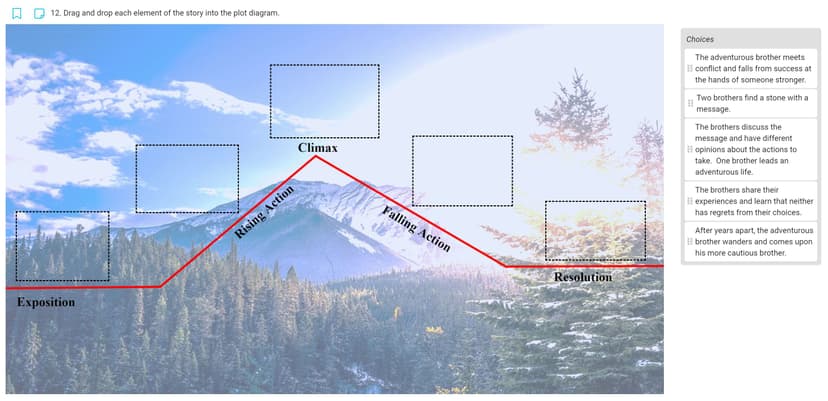
Inq-ITS appears effective for teaching middle and high school science concepts through structured inquiry, though it currently remains pending formal evaluation by The Learning Standard. Your child will use this platform to conduct virtual science experiments that mirror real-world laboratory processes. The system emphasizes the Claim-Evidence-Reasoning framework, a proven pedagogical model for developing scientific literacy and critical thinking. Instead of passively reading textbooks, your child actively generates hypotheses, manipulates variables within simulations, collects digital data, and writes conclusions. This active learning approach aligns well with modern science standards and helps encode knowledge more deeply than rote memorization. The platform includes an AI tutor named Rex that provides immediate, formative feedback when your child gets stuck. This type of just-in-time support prevents frustration and keeps students in their zone of proximal development. However, parents should understand that virtual simulations, while excellent for conceptual understanding, do not replace the physical motor skills learned in traditional hands-on labs. Additionally, the most robust features and complete lab suites are locked behind paid subscriptions. Because we have not yet rated this app, we cannot definitively guarantee its efficacy, but its reliance on active hypothesis testing and immediate feedback reflects strong foundational learning science principles.
How Does Inq-ITS Work?
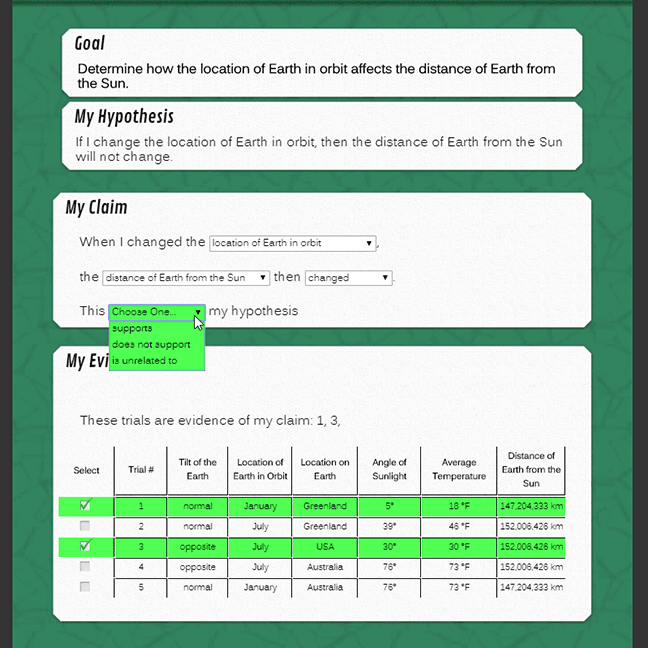
Inq-ITS uses inquiry-based learning paired with interactive virtual simulations to teach the scientific method. Students begin a module by encountering a specific scientific phenomenon or question. They are then required to formulate a testable hypothesis before interacting with the virtual lab environment. Once inside the simulation, students manipulate independent variables and observe the effects on dependent variables while the system tracks their actions. As they collect data, an integrated AI tutor monitors their progress and intervenes with targeted hints if they design flawed experiments or misinterpret data. After the experiment, students must synthesize their findings using a structured Claim-Evidence-Reasoning writing prompt. The software uses natural language processing to automatically score these written responses, providing immediate feedback on their scientific argumentation. Teachers simultaneously receive real-time dashboard alerts detailing exactly which students are struggling with specific inquiry practices, allowing for highly targeted classroom interventions.
Strengths and tradeoffs of Inq-ITS
Inq-ITS's biggest strength is its automated scaffolding of the Claim-Evidence-Reasoning framework, while its biggest weakness is the inherent limitation of virtual environments to replicate physical laboratory complexities. The platform excels at active learning. By forcing students to articulate a hypothesis before running a simulation, the app utilizes the generation effect, which improves memory retention better than simply reading about an experiment. The inclusion of the AI tutor Rex provides immediate, formative feedback, a crucial component of learning science that corrects misconceptions before they become encoded into long-term memory. Furthermore, the auto-scoring of written scientific arguments allows students to engage in frequent retrieval practice without overwhelming the teacher's grading capacity. On the downside, the platform relies entirely on simulated environments. While excellent for isolating variables and understanding concepts, simulations remove the friction, physical measurement errors, and tactile engagement of real-world science, which are vital for holistic scientific training. Additionally, the restricted free tier means educators and parents must pay to access enough content for spaced repetition across a full academic year. Because Inq-ITS is pending evaluation, we cannot yet confirm if these simulated exercises translate to higher scores on standardized science assessments.
Who Might Benefit From Inq-ITS?
Inq-ITS is best for middle and early high school students who need structured practice developing scientific arguments and experimental design skills. It targets 5th through 10th-grade learners focusing on core science disciplines like physics, chemistry, and biology. The platform is an ideal supplementary tool for classrooms implementing Next Generation Science Standards, as it directly drills the specific inquiry skills those standards require. It also serves as a strong resource for remote learning environments or underfunded schools that lack the physical equipment necessary for comprehensive hands-on laboratory experiments.
Data Transparency
Does Not Meet Data Transparency Standard
Inq-ITS does not meet our data transparency standard. Its privacy policy does not document basic protections, including a commitment against targeted advertising, limits on sharing children's data and contractual limits on service providers.
7 of 35 checks passed
Evaluated October 2026
content.inqits.com →Level 1 · Basic protections
Does not sell data or target ads at students, limits sharing, and lets parents see and delete their child's data.
Not documented: a commitment against targeted advertising, limits on sharing children's data, contractual limits on service providers, a COPPA or FERPA commitment, parents' right to delete their child's data, account deletion
Level 2 · Parent control (meets the standard)
Families can get their data out, know who processes it, and know how long it is kept.
Not documented: users' right to access their data, data export, a data retention timeline, self-service deletion
Level 3 · Direct data access
Families or schools can pull their own data through an API, in a stated format.
Not documented: an API for retrieving their own data, a named export format
View all 35 checks
Parent Access2/8
Does the policy mention parents specifically?
“Parents are encouraged to login with their student to view their performance within our services.”
Can parents view their child's data?
“Parents are encouraged to login with their student to view their performance within our services.”
Can parents modify their child's data?
The policy lets educators change student information but does not give parents a way to modify their child's data.
Can parents delete their child's account?
The policy does not give parents a way to delete their child's data or account.
Is there a dedicated Children's Privacy section?
The policy has no section with its own heading about children's privacy or COPPA.
Does it reference COPPA compliance?
The policy does not reference COPPA.
Does it reference FERPA compliance?
The policy does not reference FERPA.
Is parental consent required for child accounts?
The policy requires users under 18 to have parental approval and/or school authorization, so school authorization alone can stand in for parental consent.
Data Portability0/5
Can users access their personal data?
The policy does not give users a right to access their personal data.
Can users download/export their data?
The policy does not address downloading or exporting data.
Is there a self-service data access tool?
The policy does not describe a self-service data access tool.
Is a specific data format mentioned for export?
The policy does not name any export format.
Is there an API for data access?
The policy mentions only Google and Clever sign-in and roster integrations, not an API for users to retrieve their own data.
Data Minimization1/6
Is data collection itemized?
“Registered Students: First name, last name, and (optional) email address. This information is acquired either through manual entry when creating/updating account information, or when a student authorizes creating/updating accounts using one of our supported third party authentication platforms: Google (Google Classroom) and/or Clever.”
Can the app be used without a real name?
The policy says it collects students' first and last names.
Can the app be used without an email?
The policy says it collects an optional email address from students.
Does it state collection is limited to what is necessary?
The policy does not say collection is limited to what is necessary.
Is IP address anonymized or truncated?
The policy says it may collect IP addresses but does not say they are anonymized or truncated.
Is location tracking explicitly excluded?
The policy does not explicitly rule out location tracking.
Third-Party Protection2/7
Does it explicitly state no selling of data?
“Apprendis also does not freely distribute, or sell your personally identifiableinformation as defined in this Policy below.”
Are third-party providers named?
“The platform utilizes cloud technology, namely Amazon Web Services (AWS), to host the service and securely store information.”
Are providers contractually restricted?
The policy says PII may be shared with providers solely to provide their services but does not mention contractual restrictions.
No-targeted-advertising commitment?
The policy limits ads on the site to Apprendis-related ones but makes no commitment that user data is not used for targeted advertising.
Is AI/ML data sharing addressed?
The policy does not address sharing data for AI or machine learning.
Child-specific sharing restriction?
The policy has no sharing restrictions specific to children.
Cookies/tracking limited or opt-out?
The policy says turning off cookies prevents use of the services and offers no tracking opt-out.
Deletion & Retention0/5
Can users delete their account?
The policy does not give users a way to delete their account and says user data may stay in records after they stop using the service.
Self-service deletion mechanism?
The policy does not describe a self-service deletion mechanism.
Specific data retention timeline?
The policy gives no specific retention timeline.
Auto-deletion of inactive accounts?
The policy does not address automatic deletion of inactive accounts.
Post-deletion handling described?
The policy says only that data may stay in records after a user stops using the service and does not describe what happens after deletion.
Advertising2/4
Advertising model explicitly disclosed?
“No advertisements (ads) unrelated to Apprendis, Inq-ITS and Inq-Blotter appear on The Site, even for free tier usage.”
Free from third-party advertisements?
“No advertisements (ads) unrelated to Apprendis, Inq-ITS and Inq-Blotter appear on The Site, even for free tier usage.”
Children excluded from ad targeting?
The policy does not specifically exclude children from ad targeting.
Ad-free option available?
The policy excludes only ads unrelated to Apprendis, so Apprendis's own ads may still appear and the product is not stated to be ad-free.
What This Means
The policy review did not meet our data transparency standard. The checks above show the documented findings and unknowns. A missing statement does not establish how the app handles data in practice.
About this evaluation: Based on automated analysis of content.inqits.com against 35 policy-disclosure questions, including questions adapted from the Common Sense Privacy Program's published evaluation questions. TLS is not affiliated with Common Sense Media, and this is not a Common Sense rating. Quoted text is copied from the policy; unquoted notes are our summary. Results describe what the policy documents, not the company's actual practices. Privacy policies can change: this review reflects the version we analyzed and does not determine legal compliance.
Sources and review method
TLS combines product information and editorial analysis to explain how Inq-ITS works, its tradeoffs, and the questions to ask before choosing it. Product features, an instructional rationale and evidence of learning outcomes are different kinds of information.
Formal Learning Standard assessment: not yet completed. Data Transparency findings are reported separately and do not establish learning effectiveness. Read our methodology.
Frequently Asked Questions About Inq-ITS
Is Inq-ITS free?
Inq-ITS is not entirely free, operating instead on a freemium model. The developer offers a basic free teacher account that includes six tutorial labs, access to the AI tutor, basic performance reporting, and one complete lab suite. However, full access to the comprehensive curriculum requires purchasing a paid Bronze, Silver, Gold, or Unlimited subscription package, which can be costly for individual parents.
Is Inq-ITS good for 5th graders?
Inq-ITS is highly appropriate for 5th graders who are just beginning formal science education and need structured guidance. The interface provides enough automated scaffolding through its AI tutor to help younger students grasp complex concepts like hypothesis generation and data analysis. It ensures they learn the fundamentals of the scientific method without becoming overwhelmed by the technical writing requirements expected of older students.
What does Inq-ITS teach?
Inq-ITS teaches foundational scientific inquiry skills alongside core content across middle and high school physical, life, and earth sciences. It explicitly trains students in the rigorous application of the scientific method. The platform focuses heavily on active experimental design, variable manipulation, accurate data collection, and formulating robust scientific arguments using the proven Claim-Evidence-Reasoning educational model. This ensures students learn how to think like scientists rather than just memorizing facts.
How does Inq-ITS compare to Gizmos?
Inq-ITS and ExploreLearning Gizmos both offer virtual science simulations, but they differ significantly in their pedagogical focus. Gizmos provides a massive library of open-ended interactive math and science simulations primarily designed for visual conceptualization. In contrast, Inq-ITS heavily emphasizes structured, auto-graded assessment of a student's ability to execute the scientific method and write formal Claim-Evidence-Reasoning conclusions based on their simulated data.
Has The Learning Standard evaluated Inq-ITS?
TLS has not yet completed a Learning Standard evaluation of how well Inq-ITS teaches. Its privacy policy has been reviewed for Data Transparency and does not yet document the basic protections (Level 1).
Is Inq-ITS COPPA compliant?
A COPPA reference was not found in the reviewed privacy policy. This does not determine whether the app complies with COPPA. Policy review note: The policy does not reference COPPA.
Is Inq-ITS FERPA compliant?
A FERPA reference was not found in the reviewed privacy policy. This does not determine whether the app complies with FERPA. Policy review note: The policy does not reference FERPA.
Does Inq-ITS have a children's privacy policy?
No dedicated children's privacy section was found in the reviewed policy. Policy review note: The policy has no section with its own heading about children's privacy or COPPA.
Does Inq-ITS sell student data?
The reviewed policy states that the app does not sell data. This is a policy statement; actual data practices were not verified. Policy review note: The policy states Apprendis does not sell personally identifiable information.
Can you delete your data from Inq-ITS?
Account deletion was not documented in the reviewed privacy policy. This does not establish whether deletion is available. Policy review note: The policy does not give users a way to delete their account and says user data may stay in records after they stop using the service.
Follow TLS Research
Subscribe to future TLS research updates: app reviews, findings, and what the evidence shows.
Screenshots

Take Action
For Inq-ITS
If you represent Inq-ITS and have a correction or new evidence, send the relevant source so we can review and update this page.
Submit a correctionDetails
- Pricing
- We offer free teacher accounts where all educators can access 6 tutorial labs, Rex: the AI tutor, real-time alerts, performance reports, auto-scored CER, and any 1 lab suite! To obtain access to additional lab suites, we offer Bronze, Silver, Gold and Unlimited subscription packages.
- Platforms
- Web Browser, iOS (Apple mobile), iPadOS (Apple tablet), Android (Google mobile), Tizen (Samsung mobile), Windows (Microsoft), macOS (Apple), Chrome OS (Google)
- Grade Levels
- 5th Grade, 6th Grade, 7th Grade, 8th Grade, 9th Grade, 10th Grade
- Website
- Visit site