
Flat for Education
Product by Tutteo, Inc.
Facts checked: Not yet checked
Our take (not a Learning Standard rating). This label applies to learning-science judgments throughout this overview.
Our take (not a Learning Standard rating)
Flat for Education provides an excellent digital sandbox for applying music theory, but it is a creation tool rather than an explicit instructional platform. It requires educators to structure the pedagogy. When paired with active classroom instruction, it effectively supports knowledge application through project-based learning and immediate auditory feedback.
Pros
- Delivers immediate auditory feedback when students input notes, helping them instantly identify harmony and notation errors.
- Supports collaborative project-based learning by allowing multiple students to edit a single score simultaneously.
- Removes software installation barriers through a fully cloud-based interface accessible on any device.
- Integrates seamlessly with existing learning management systems to streamline assignments and grading for educators.
Cons
- Lacks explicit instructional modules or structured lessons to teach music theory from scratch.
- Does not use spaced repetition or adaptive drill practice for memorizing notes or key signatures.
- Requires a teacher to design the curriculum and build the assignments independently.
- Lacks independent evaluation data from The Learning Standard to verify long-term efficacy.
What Do We Know About Flat for Education?
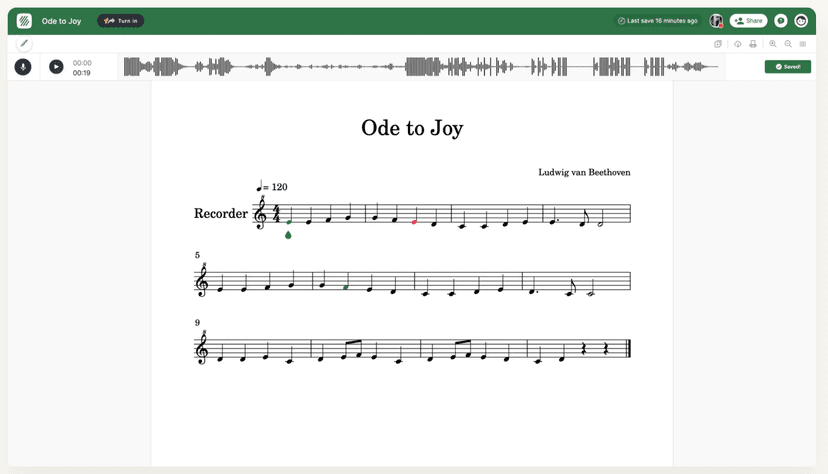
Flat for Education is highly effective for practicing music notation when guided by a teacher, but it will not independently teach your child how to read music. This platform functions as a digital composer's notebook. Instead of feeding your child lessons or multiple-choice questions, it gives them a blank staff to create, arrange, and edit music. Your child will benefit from the immediate auditory feedback. Whenever they place a note on the staff, the program plays that pitch. This instant feedback loop is grounded in learning science, allowing students to self-correct dissonant chords or incorrect rhythms immediately. However, you should not expect this tool to replace a music tutor. It lacks direct instruction, worked examples, and adaptive practice for basic theory skills like identifying key signatures. It is best viewed as an application environment where your child can practice what they have already learned in band, choir, or music class. Since The Learning Standard has not yet fully evaluated this app, we recommend checking with your child's music teacher to ensure the assignments align with their current skill level.
How Does Flat for Education Work?
Flat for Education relies on project-based learning and immediate sensory feedback within a digital notation environment. Students log into a web-based dashboard where teachers assign specific composition or arranging tasks. The core mechanic is the notation editor. Students drag and drop notes, rests, and dynamic markings onto a digital staff. As they interact with the interface, the software provides real-time MIDI playback of their composition. This immediate auditory response acts as a self-correction mechanism, allowing students to hear transcription errors rather than waiting for teacher grading. Teachers can create templates or partially completed scores, functioning as worked examples that students must finish. The platform also supports real-time collaboration, meaning multiple students can co-edit a score simultaneously, much like a shared document. Teachers review the completed scores through integrated learning management dashboards and provide targeted feedback. Because it lacks automated instructional sequencing, the pedagogical effectiveness relies entirely on how the educator structures the project constraints and scaffolding.
Strengths and tradeoffs of Flat for Education
The biggest strength of Flat for Education is its use of immediate multisensory feedback, while its biggest weakness is the complete absence of explicit instructional sequencing. Multisensory Feedback is applied expertly here. When a student places a note on the digital staff, hearing the pitch immediately reinforces the connection between visual symbols and auditory results. This tight feedback loop dramatically reduces the time it takes to correct cognitive errors in music reading. Collaborative Construction is another strong point, as the cloud-based nature allows for peer-to-peer learning and joint problem-solving during arranging tasks. However, the platform falls short in foundational skill acquisition. Lack of Direct Instruction means students cannot learn music theory solely from this tool. There are no built-in tutorials, no spaced retrieval practice for memorizing key signatures, and no adaptive pathways to challenge struggling learners. The platform assumes the student already possesses basic declarative knowledge of music theory. Worked Examples must be manually created by the teacher. Without an educator providing structured constraints, novice students may suffer from cognitive overload when faced with a blank musical staff.
Who Might Benefit From Flat for Education?
Best for middle school through college students who are actively enrolled in a music class and need a reliable tool to complete composition assignments. It works exceptionally well for educators looking to transition from paper-and-pencil music theory assignments to a cloud-based workflow. Because it requires foundational knowledge to use effectively, it is not recommended for young elementary students or independent learners trying to teach themselves how to read music. The ideal use case is a school environment where an instructor provides the theoretical framework and uses the platform purely for knowledge application and project submission.
Data Transparency
Does Not Meet Data Transparency Standard
Flat for Education does not meet our data transparency standard. Its privacy policy does not document basic protections, including a statement that it does not sell data, a commitment against targeted advertising and parents' right to see their child's data.
12 of 35 checks passed
Evaluated September 2026
Flat for Education →Level 1 · Basic protections
Does not sell data or target ads at students, limits sharing, and lets parents see and delete their child's data.
Not documented: a statement that it does not sell data, a commitment against targeted advertising, parents' right to see their child's data, parents' right to delete their child's data
Level 2 · Parent control (meets the standard)
Families can get their data out, know who processes it, and know how long it is kept.
Not documented: a data retention timeline, self-service deletion
Level 3 · Direct data access
Families or schools can pull their own data through an API, in a stated format.
Not documented: an API for retrieving their own data, a named export format
View all 35 checks
Parent Access4/8
Does the policy mention parents specifically?
“Our Flat Education Service may be used by children under 13, but only with the prior consent of their parent or school, as permitted by the Children's Online Privacy Protection Act (COPPA).”
Can parents view their child's data?
The policy gives access rights only to the user ("you") and does not give parents a right to view their child's data.
Can parents modify their child's data?
The policy does not give parents a right to change their child's data.
Can parents delete their child's account?
The policy does not give parents a right to delete their child's data or account.
Is there a dedicated Children's Privacy section?
“Our Flat Education Service may be used by children under 13, but only with the prior consent of their parent or school, as permitted by the Children's Online Privacy Protection Act (COPPA).”
Does it reference COPPA compliance?
“Our Flat Education Service may be used by children under 13, but only with the prior consent of their parent or school, as permitted by the Children's Online Privacy Protection Act (COPPA).”
Does it reference FERPA compliance?
The policy does not mention FERPA.
Is parental consent required for child accounts?
“Our Flat Education Service may be used by children under 13, but only with the prior consent of their parent or school, as permitted by the Children's Online Privacy Protection Act (COPPA).”
Data Portability3/5
Can users access their personal data?
“(iv) a copy of the personal information we hold about you.”
Can users download/export their data?
“You have the right, in certain circumstances, to receive a copy of the personal information you have provided to us in a structured, commonly used, machine-readable format that supports re-use, or to request the transfer of your personal data to another person.”
Is there a self-service data access tool?
“You may also review and edit the personal information you have submitted to us by logging into your account on our website.”
Is a specific data format mentioned for export?
The policy only says "structured, commonly used, machine-readable format" and does not name a specific format.
Is there an API for data access?
The policy says the service is offered through APIs but does not say users can get their own data through an API.
Data Minimization0/6
Is data collection itemized?
The policy points to annex tables that were not provided, and its own text lists only when data is collected, not the specific data items.
Can the app be used without a real name?
The policy does not say that students' real names are not collected.
Can the app be used without an email?
The policy does not say that students' email addresses are not collected.
Does it state collection is limited to what is necessary?
The policy limits how long data is kept to what is necessary, but does not say collection is limited to what is necessary.
Is IP address anonymized or truncated?
The policy does not address anonymizing or truncating IP addresses.
Is location tracking explicitly excluded?
The policy does not rule out location tracking.
Third-Party Protection4/7
Does it explicitly state no selling of data?
The policy does not state that the company does not sell personal information.
Are third-party providers named?
“We may use third-party analytics tools such as Google Analytics, to help us measure traffic and usage trends for the Online Services and to understand more about the demographics of our users.”
Are providers contractually restricted?
“These third parties will only be allowed to use your personal information in accordance with our instructions and will be required to keep your information secure.”
No-targeted-advertising commitment?
The policy makes no commitment against targeted or behavioral advertising.
Is AI/ML data sharing addressed?
The policy does not address sharing data for AI or machine learning.
Child-specific sharing restriction?
“If we collect information from children under 13 through the Flat Education Service, we will collect, use, share and store such data only for the purposes of providing services to the student contemplated in our agreement with the school.”
Cookies/tracking limited or opt-out?
“The cookies we use are designed to help you get the most from the website but if you do not wish to receive cookies, most browsers allow you to change your cookie settings.”
Deletion & Retention1/5
Can users delete their account?
“You have the right, in some circumstances, to require us to erase your personal information without undue delay if the continued processing of that personal information is not justified.”
Self-service deletion mechanism?
The policy handles deletion only by contacting the company and describes no self-service deletion tool.
Specific data retention timeline?
The policy says data is kept "no longer than necessary" without giving a specific time period.
Auto-deletion of inactive accounts?
The policy does not address automatic deletion of inactive accounts.
Post-deletion handling described?
The policy does not describe what happens to data after deletion.
Advertising0/4
Advertising model explicitly disclosed?
The policy covers only marketing messages and mentions links to advertisers' sites, but does not explicitly disclose an advertising model or state that there is no advertising.
Free from third-party advertisements?
The policy does not state that the product has no third-party advertising.
Children excluded from ad targeting?
The policy says students will not receive marketing messages but does not address excluding children from ad targeting.
Ad-free option available?
The policy does not mention an ad-free option or state that the product has no advertising.
What This Means
The policy review did not meet our data transparency standard. The checks above show the documented findings and unknowns. A missing statement does not establish how the app handles data in practice.
About this evaluation: Based on automated analysis of Flat for Education against 35 policy-disclosure questions, including questions adapted from the Common Sense Privacy Program's published evaluation questions. TLS is not affiliated with Common Sense Media, and this is not a Common Sense rating. Quoted text is copied from the policy; unquoted notes are our summary. Results describe what the policy documents, not the company's actual practices. Privacy policies can change: this review reflects the version we analyzed and does not determine legal compliance.
Sources and review method
TLS combines product information and editorial analysis to explain how Flat for Education works, its tradeoffs, and the questions to ask before choosing it. Product features, an instructional rationale and evidence of learning outcomes are different kinds of information.
Formal Learning Standard assessment: not yet completed. Data Transparency findings are reported separately and do not establish learning effectiveness. Read our methodology.
Frequently Asked Questions About Flat for Education
Is Flat for Education free?
Flat for Education costs $2 per user per year. Schools and educators can access a 3-month free trial to test the platform before committing to a paid license.
Is Flat for Education good for elementary students?
It is only appropriate for older elementary students, typically 4th grade and up, who are receiving direct music instruction. The interface requires basic computer literacy and foundational music knowledge, making it less ideal for early learners.
What does Flat for Education teach?
It does not explicitly teach anything on its own. Instead, it provides a workspace for students to apply music theory, practice notation, arrange existing pieces, and compose original music under a teacher's guidance.
How does Flat for Education compare to Noteflight Learn?
Both are cloud-based notation tools for schools. Flat for Education is often praised for its highly intuitive, modern interface and seamless real-time collaboration features, while Noteflight provides a larger library of pre-existing educational content and scores.
Has The Learning Standard evaluated Flat for Education?
TLS has not yet completed a Learning Standard evaluation of how well Flat for Education teaches. Its privacy policy has been reviewed for Data Transparency and does not yet document the basic protections (Level 1).
Is Flat for Education COPPA compliant?
The reviewed privacy policy references COPPA. A policy reference alone does not establish COPPA compliance. Policy review note: The policy names COPPA as the basis for letting children under 13 use the service.
Is Flat for Education FERPA compliant?
A FERPA reference was not found in the reviewed privacy policy. This does not determine whether the app complies with FERPA. Policy review note: The policy does not mention FERPA.
Does Flat for Education have a children's privacy policy?
The reviewed policy includes a dedicated children's privacy section. Policy review note: Section 6 is a separate section with its own heading about children.
Does Flat for Education sell student data?
A statement ruling out data selling was not found in the reviewed policy. This does not establish that the app sells student data. Policy review note: The policy does not state that the company does not sell personal information.
Can you delete your data from Flat for Education?
The reviewed privacy policy describes account deletion. We have not tested the deletion process. Policy review note: Users can ask the company to erase their personal information.
Follow TLS Research
Subscribe to future TLS research updates: app reviews, findings, and what the evidence shows.
Screenshots
Take Action
For Flat for Education
If you represent Tutteo, Inc. and have a correction or new evidence, send the relevant source so we can review and update this page.
Submit a correctionDetails
- Pricing
- $2/user/year and a 3-month free trial. Learn more at https://flat.io/edu/pricing
- Platforms
- Web Browser, iOS (Apple mobile), iPadOS (Apple tablet), Android (Google mobile), macOS (Apple), Chrome OS (Google)
- Grade Levels
- 3rd Grade, 4th Grade, 5th Grade, 6th Grade, 7th Grade, 8th Grade, 9th Grade, 10th Grade, 11th Grade, 12th Grade, Associate's degree, Bachelor's degree, Post-baccalaureate certificate, Master's Degree, Post-master's certificate, Doctoral Degree, Post-doctoral certificate, Adult Education
- Website
- Visit site