
CodeGuppy
Product by CodeGuppy
Facts checked: Not yet checked
Our take (not a Learning Standard rating). This label applies to learning-science judgments throughout this overview.
Our take (not a Learning Standard rating)
CodeGuppy provides a robust sandbox for middle and high school students to practice JavaScript using project-based learning. While it offers extensive tutorials and immediate visual feedback through the p5.js library, it lacks built-in spaced repetition and automated error correction, making it better suited for guided classroom use than independent, unassisted learning.
Pros
- Utilizes worked examples to guide students through complex JavaScript concepts step-by-step.
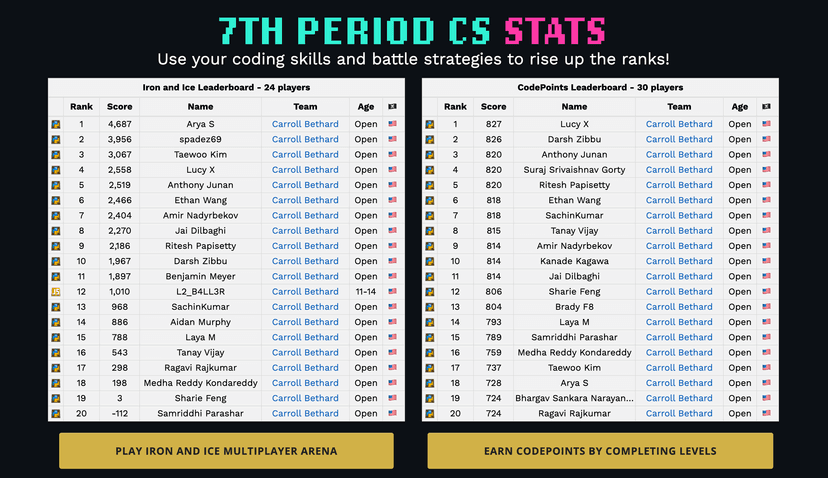
- Provides immediate visual feedback through the p5.js library, strengthening the connection between code syntax and visual output.
- Emphasizes project-based learning to increase relevance and application of programming skills.
- Removes setup friction by offering a fully browser-based coding environment.
Cons
- Lacks automated error correction to guide students when syntax errors occur.
- Does not employ spaced repetition to ensure long-term retention of JavaScript syntax.
- Requires significant self-regulation, as progression is self-directed rather than strictly mastery-based.
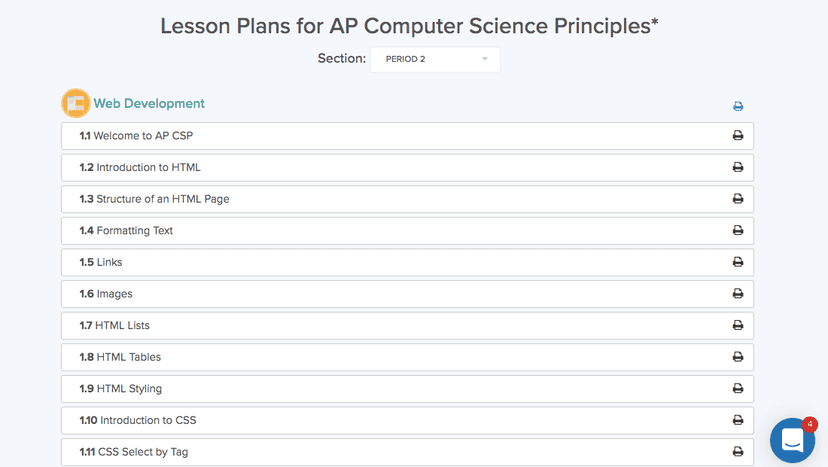
- Keeps supplementary learning materials necessary for complete instruction behind a paywall.
What Do We Know About CodeGuppy?
CodeGuppy is an effective practice tool for middle and high schoolers learning JavaScript, but it requires external guidance to teach foundational concepts fully. The platform relies heavily on project-based learning, allowing your child to build games and visual applications right in the browser. This approach is excellent for motivation and applying concepts in context. However, because the platform lacks strict mastery-based progression and automated instructional scaffolding, novice coders may struggle if they encounter syntax errors they cannot debug on their own. The Learning Standard's research shows that novices benefit significantly from explicit instruction and immediate, corrective feedback. CodeGuppy provides visual feedback, as students immediately see if their code draws the correct shape or game mechanic, but it does not diagnose why the code failed. Parents should view this platform as a highly capable sandbox and tutorial library rather than a standalone teacher. It shines when paired with a formal computer science curriculum or a knowledgeable mentor who can explain the underlying logic of arrays, loops, and functions. If your child is highly self-directed or already has basic coding knowledge, the worked examples and tutorials will provide excellent authentic practice.
How Does CodeGuppy Work?
CodeGuppy uses project-based learning supported by a modified p5.js browser environment to teach JavaScript. Students log into a web-based coding interface where the screen is split between a text editor and a visual output canvas. They select tutorials or projects ranging from simple drawing tasks to complex games. The platform provides worked examples, which are fully functional code snippets that students are encouraged to read, modify, and execute. By altering variables or changing function parameters, learners observe immediate changes in the graphical output. This immediate visual feedback helps solidify the relationship between code and execution. Users progress through different coding challenges at their own pace, building a portfolio of digital creations. Because the environment is entirely cloud-based, there is no software to install or configure, which eliminates a common barrier to entry for computer science education. However, students must actively self-monitor their understanding, as the system does not automatically test their code against specific learning objectives or adapt the difficulty based on their performance.
Strengths and tradeoffs of CodeGuppy
CodeGuppy's biggest strength is its use of immediate visual feedback for authentic coding projects, while its biggest weakness is the lack of automated, diagnostic feedback for syntax and logic errors. Authentic application is highly effective for student motivation; by using the p5.js library, CodeGuppy allows learners to instantly see the graphical results of their JavaScript code. This rapid iteration cycle reinforces learning by directly connecting the abstract text manipulation to concrete visual outcomes. Furthermore, the platform utilizes worked examples, which cognitive load theory identifies as highly effective for novice learners. Students can study and manipulate existing code rather than staring at a blank screen. However, CodeGuppy falls short in explicit instructional scaffolding. When a student makes a mistake, the platform does not offer corrective feedback to explain why the program crashed or how to fix it. This missing layer of scaffolding can lead to frustration for beginners who have not yet developed mental models for debugging. Additionally, the platform does not incorporate retrieval practice or spaced repetition to ensure students memorize core JavaScript syntax, meaning learners must rely on external resources or sheer repetition to internalize the language rules.
Who Might Benefit From CodeGuppy?
Best for middle and high school students who need an accessible, browser-based environment to practice JavaScript alongside formal instruction. The platform is designed for learners in 6th through 12th grade who are interested in applied computer science, specifically game design and interactive visuals. Because it lacks built-in diagnostic feedback and adaptive learning pathways, it is most effective when used in a classroom setting, a coding club, or by highly motivated independent learners who have access to a knowledgeable adult. It is an excellent choice for educators seeking a zero-setup sandbox to implement project-based coding lessons.
Data Transparency
Does Not Meet Data Transparency Standard
CodeGuppy does not meet our data transparency standard. Its privacy policy does not document basic protections, including limits on sharing children's data, contractual limits on service providers and a COPPA or FERPA commitment.
11 of 35 checks passed
Evaluated September 2026
CodeGuppy →Level 1 · Basic protections
Does not sell data or target ads at students, limits sharing, and lets parents see and delete their child's data.
Not documented: limits on sharing children's data, contractual limits on service providers, a COPPA or FERPA commitment, parents' right to see their child's data, parents' right to delete their child's data
Level 2 · Parent control (meets the standard)
Families can get their data out, know who processes it, and know how long it is kept.
Not documented: a data retention timeline, self-service deletion
Level 3 · Direct data access
Families or schools can pull their own data through an API, in a stated format.
Not documented: an API for retrieving their own data, a named export format
View all 35 checks
Parent Access0/8
Does the policy mention parents specifically?
The policy refers only to "family members" and does not mention parents specifically.
Can parents view their child's data?
The policy does not address parents viewing their child's data.
Can parents modify their child's data?
The policy does not address parents modifying their child's data.
Can parents delete their child's account?
The policy does not address parents deleting their child's account or data.
Is there a dedicated Children's Privacy section?
The policy has no dedicated children's privacy section; it only states the service is designed for users 13+.
Does it reference COPPA compliance?
The policy does not reference COPPA.
Does it reference FERPA compliance?
The policy does not reference FERPA.
Is parental consent required for child accounts?
The policy does not require parental consent; it states the service is designed for users 13 or older.
Data Portability2/5
Can users access their personal data?
“Please extract from codeguppy.com all programs that you want to keep before initiating the account close request.”
Can users download/export their data?
“Please extract from codeguppy.com all programs that you want to keep before initiating the account close request.”
Is there a self-service data access tool?
The policy does not describe a self-service data access tool.
Is a specific data format mentioned for export?
The policy does not mention any export format.
Is there an API for data access?
The policy does not mention an API for data access.
Data Minimization2/6
Is data collection itemized?
“If you do create an account, we collect the following information: email address and usage data (e.g. code projects / programs).”
Can the app be used without a real name?
“We do not ask or collect information that directly identifies a person (such as real name, age, gender, address, phone number).”
Can the app be used without an email?
The policy requires an email address for accounts, with only an experimental class-code option.
Does it state collection is limited to what is necessary?
The policy does not state that collection is limited to what is necessary.
Is IP address anonymized or truncated?
The policy does not address IP address anonymization.
Is location tracking explicitly excluded?
The policy says it does not collect addresses but does not explicitly exclude location tracking.
Third-Party Protection4/7
Does it explicitly state no selling of data?
“We will not sell or share your email address or programs with external parties unless it is a lawful request or the entire codeguppy.com website is sold or transferred as part of a business transaction such as an acquisition.”
Are third-party providers named?
“The traffic and usage data is collected using Google Analytics and Microsoft Clarity.”
Are providers contractually restricted?
The policy does not describe contractual restrictions on providers.
No-targeted-advertising commitment?
“We are not engaging with any third-party ad network, and we do not display any advertisements on codeguppy.com that collect information about our site users.”
Is AI/ML data sharing addressed?
The policy does not address AI/ML data sharing.
Child-specific sharing restriction?
The policy has no child-specific sharing restriction.
Cookies/tracking limited or opt-out?
“You can opt-out of having made your activity on the Service available to Google Analytics by installing the Google Analytics [opt-out browser add-on](https://tools.google.com/dlpage/gaoptout).”
Deletion & Retention1/5
Can users delete their account?
“You have the right to terminate your account and have your email address removed from our database at any time by [contacting us.](https://codeguppy.com/contact.html)”
Self-service deletion mechanism?
The policy requires contacting the company to close an account; no self-service deletion is described.
Specific data retention timeline?
The policy does not state a data retention timeline.
Auto-deletion of inactive accounts?
The policy does not address auto-deletion of inactive accounts.
Post-deletion handling described?
The policy does not describe how data is handled after deletion beyond removing the email address.
Advertising2/4
Advertising model explicitly disclosed?
“We are not engaging with any third-party ad network, and we do not display any advertisements on codeguppy.com that collect information about our site users. We may however display messages, images and links from our sponsors.”
Free from third-party advertisements?
The policy says it may display messages, images and links from sponsors, so it is not stated to be free of third-party promotional content.
Children excluded from ad targeting?
“We are not engaging with any third-party ad network, and we do not display any advertisements on codeguppy.com that collect information about our site users.”
Ad-free option available?
The policy says sponsor messages may be displayed and offers no ad-free option.
What This Means
The policy review did not meet our data transparency standard. The checks above show the documented findings and unknowns. A missing statement does not establish how the app handles data in practice.
About this evaluation: Based on automated analysis of CodeGuppy against 35 policy-disclosure questions, including questions adapted from the Common Sense Privacy Program's published evaluation questions. TLS is not affiliated with Common Sense Media, and this is not a Common Sense rating. Quoted text is copied from the policy; unquoted notes are our summary. Results describe what the policy documents, not the company's actual practices. Privacy policies can change: this review reflects the version we analyzed and does not determine legal compliance.
Sources and review method
TLS combines product information and editorial analysis to explain how CodeGuppy works, its tradeoffs, and the questions to ask before choosing it. Product features, an instructional rationale and evidence of learning outcomes are different kinds of information.
Formal Learning Standard assessment: not yet completed. Data Transparency findings are reported separately and do not establish learning effectiveness. Read our methodology.
Frequently Asked Questions About CodeGuppy
Is CodeGuppy free?
Yes, the core CodeGuppy coding platform is 100% free for all users. Students and educators can access the entire browser-based JavaScript editor, along with its extensive library of projects and coding tutorials, without purchasing a subscription. This makes it a highly accessible tool for schools and coding clubs operating on tight budgets. However, parents and educators should note that access to certain supplementary educational materials and advanced lesson plans may require a separate payment to fully unlock.
Is CodeGuppy good for middle schoolers?
Yes, CodeGuppy is highly appropriate for students in 6th through 8th grade who are ready to transition to text-based coding. The visual nature of the built-in p5.js library makes abstract computer science concepts significantly more concrete, which aligns well with the cognitive development of middle school students. Your child can immediately see the results of their code as graphical shapes and game mechanics on the screen, maintaining their motivation and attention much better than text-only programming environments typically do.
What does CodeGuppy teach?
CodeGuppy teaches standard JavaScript programming alongside foundational computer science concepts. Through extensive project-based learning exercises, students learn to manipulate variables, implement loops, utilize arrays, define functions, and explore object-oriented programming. Rather than practicing these concepts in isolation, your child applies them by creating interactive digital art, animations, and fully playable games. This applied approach helps students understand not just the syntax of the JavaScript language, but the underlying logic required to structure complex software applications.
How does CodeGuppy compare to block-based coding like Scratch?
CodeGuppy serves as an excellent bridge between beginner platforms and professional software engineering. While Scratch uses visual code blocks that snap together to prevent syntax errors, CodeGuppy requires users to type authentic, text-based JavaScript. CodeGuppy is a natural next step for your child once they have mastered Scratch and understand basic programming logic. It forces them to practice exact syntax, spelling, and formatting, preparing them for industry-standard programming languages while still providing the engaging visual project outputs they enjoyed in Scratch.
Has The Learning Standard evaluated CodeGuppy?
TLS has not yet completed a Learning Standard evaluation of how well CodeGuppy teaches. Its privacy policy has been reviewed for Data Transparency and does not yet document the basic protections (Level 1).
Is CodeGuppy COPPA compliant?
A COPPA reference was not found in the reviewed privacy policy. This does not determine whether the app complies with COPPA. Policy review note: The policy does not reference COPPA.
Is CodeGuppy FERPA compliant?
A FERPA reference was not found in the reviewed privacy policy. This does not determine whether the app complies with FERPA. Policy review note: The policy does not reference FERPA.
Does CodeGuppy have a children's privacy policy?
No dedicated children's privacy section was found in the reviewed policy. Policy review note: The policy has no dedicated children's privacy section; it only states the service is designed for users 13+.
Does CodeGuppy sell student data?
The reviewed policy states that the app does not sell data. This is a policy statement; actual data practices were not verified. Policy review note: The vendor states it will not sell user email addresses or programs.
Can you delete your data from CodeGuppy?
The reviewed privacy policy describes account deletion. We have not tested the deletion process. Policy review note: Users can request account termination.
Follow TLS Research
Subscribe to future TLS research updates: app reviews, findings, and what the evidence shows.
Screenshots


Take Action
For CodeGuppy
If you represent CodeGuppy and have a correction or new evidence, send the relevant source so we can review and update this page.
Submit a correctionDetails
- Pricing
- The coding platform is 100% free. Access to supplementary materials may require payment.
- Platforms
- Web Browser, Windows (Microsoft), macOS (Apple), Chrome OS (Google)
- Grade Levels
- 6th Grade, 7th Grade, 8th Grade, 9th Grade, 10th Grade, 11th Grade, 12th Grade
- Website
- Visit site