
ClickView
Product by ClickView
Facts checked: Not yet checked
Our take (not a Learning Standard rating). This label applies to learning-science judgments throughout this overview.
Our take (not a Learning Standard rating)
ClickView effectively delivers standards-aligned video content with embedded retrieval practice to check comprehension in real-time. However, because it relies primarily on passive video consumption supplemented by basic quizzing, it lacks the deep, adaptive problem-solving required for mastery. It works best as a classroom supplement rather than a standalone curriculum.
Pros
- Embeds interactive quizzes directly within videos to promote active retrieval practice during viewing.
- Provides educators with actionable analytics to identify knowledge gaps immediately after video assignments.
- Organizes a vast library of K-12 content by specific academic standards to ensure curriculum alignment.
Cons
- Relies heavily on passive video observation, which limits deep cognitive engagement compared to interactive problem-solving.
- Offers basic comprehension checks rather than complex, multi-step application of concepts.
- Fails to utilize spaced repetition algorithms to ensure long-term retention of the material covered in the videos.
What Do We Know About ClickView?
ClickView is an effective supplemental tool for introducing new concepts, but it will not teach your child complex skills on its own. The platform relies heavily on short, educational videos covering K-12 subjects from math to social studies. To prevent your child from zoning out during screen time, the app uses embedded interactive quizzes. These pop up while the video plays, forcing students to recall what they just watched. This technique, known in learning science as retrieval practice, is proven to increase short-term retention. However, parents should understand that video-based learning has inherent limits. Watching a video about algebraic equations is fundamentally different from actively solving them. ClickView handles the exposure phase of learning exceptionally well by curating high-quality, age-appropriate content. Yet, your child will still need dedicated practice outside the app to achieve true mastery. The analytics dashboard is a strong feature for educators, but parents using this at home should pair it with active problem-solving exercises rather than treating it as a comprehensive tutoring solution.
How Does ClickView Work?
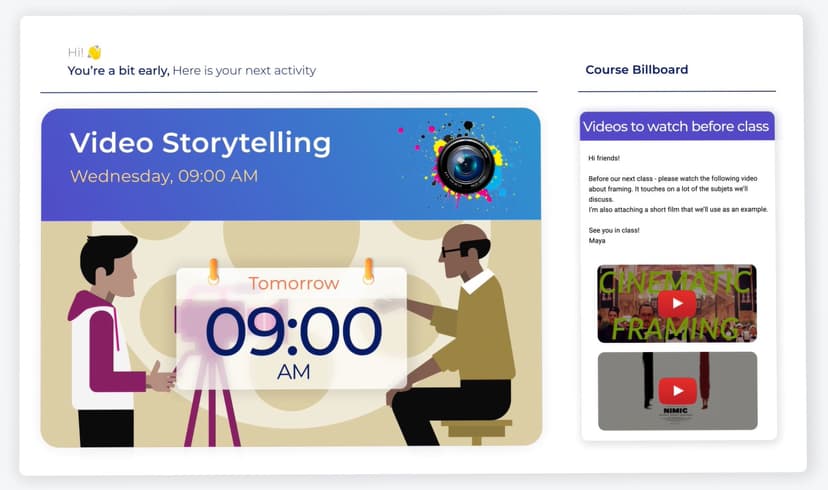
ClickView uses a blended learning approach by pairing direct video instruction with intermittent formative assessments. The platform functions as a highly organized educational streaming service tailored for K-12 schools. Teachers or parents select a video aligned with a specific grade-level standard and assign it to the student. As the student watches the video, playback pauses at critical junctures. An interactive quiz question appears on the screen, requiring the student to demonstrate understanding of the immediately preceding content before moving forward. This mechanic interrupts the passive viewing experience and forces active cognitive engagement. Once the video and embedded quiz are complete, the platform generates a performance report. Educators use these analytics to see exactly where a student struggled, allowing them to tailor subsequent offline instruction or interventions to target those specific misunderstandings.
Strengths and tradeoffs of ClickView
ClickView’s biggest strength is its seamless integration of retrieval practice into multimedia instruction, while its biggest weakness is the absence of adaptive, deep-level problem solving. By embedding quizzes directly into the video timeline, ClickView solves the primary flaw of educational video: passive consumption. When students know they will be tested during the video, their attention and cognitive load management improve. This immediate testing effect strengthens neural pathways for basic factual recall and concept identification. Formative assessment data is instantly available, allowing educators to catch misconceptions early. However, the platform falls short in driving higher-order thinking. The embedded questions are typically low-level comprehension checks. ClickView lacks spaced repetition, meaning a student might watch a video on fractions in October and never be prompted by the system to review it again in December. Furthermore, there are no worked examples that guide a student step-by-step through complex problem-solving. Ultimately, the platform is excellent for delivering baseline knowledge but lacks the rigorous practice mechanics necessary to build robust, long-term academic mastery.
Who Might Benefit From ClickView?
ClickView is best for K-12 educators who need a reliable, standards-aligned video library to supplement classroom instruction and flip their classrooms. Because it covers such a wide range of subjects, from kindergarten math to high school career and technical education, it serves as a versatile district-wide tool. It is ideal for teachers looking to introduce new topics or provide visual context for complex ideas. Parents can also use it to provide safe, educational screen time, provided they recognize it is a tool for building foundational exposure rather than a complete personalized learning system.
Data Transparency
Does Not Meet Data Transparency Standard
ClickView does not meet our data transparency standard. Its privacy policy does not document basic protections, including parents' right to see their child's data and parents' right to delete their child's data.
18 of 35 checks passed
Evaluated September 2026
ClickView Privacy Policy →Level 1 · Basic protections
Does not sell data or target ads at students, limits sharing, and lets parents see and delete their child's data.
Not documented: parents' right to see their child's data, parents' right to delete their child's data
Level 2 · Parent control (meets the standard)
Families can get their data out, know who processes it, and know how long it is kept.
Not documented: a data retention timeline, self-service deletion
Level 3 · Direct data access
Families or schools can pull their own data through an API, in a stated format.
Not documented: an API for retrieving their own data, a named export format
View all 35 checks
Parent Access5/8
Does the policy mention parents specifically?
“Educational Institutions are responsible for ensuring that they have obtained all necessary consents from Students, including the parents or guardians of Students, to enable disclosure to ClickView and use by ClickView in accordance with this Privacy Policy prior to those Students using the Platforms.”
Can parents view their child's data?
The policy lets 'a person' request access and sends FERPA requests to the school, but it never says parents can view their child's data.
Can parents modify their child's data?
The policy lets 'a person' request corrections, but it never says parents can change their child's data.
Can parents delete their child's account?
The policy lets users or schools request deletion, but it never says parents can delete their child's data or account.
Is there a dedicated Children's Privacy section?
“No collection of personal information of children without consent”
Does it reference COPPA compliance?
“applicable US data protection laws (including the Children's Online Privacy Protection Act (COPPA), the California Consumer Privacy Act (CCPA) and the United States Family Educational Rights and Privacy Act (FERPA)”
Does it reference FERPA compliance?
“If we have access to student education records that are subject to the FERPA as a service provider to Educational Institutions, subject to the terms of our agreement with an Educational Institution we access such records as a ‘school official’.”
Is parental consent required for child accounts?
“Educational Institutions are responsible for ensuring that they have obtained all necessary consents from the parents or guardians of Students prior to those Students using the Platforms.”
Data Portability2/5
Can users access their personal data?
“A person may request access to, review of, corrections of, or erasure of personal information held by us, or complain or object to the use of personal information by us.”
Can users download/export their data?
“The right to data portability, the right to withdraw consent at any time (where processing is based on consent), and the right to object to processing, including processing for direct marketing purposes.”
Is there a self-service data access tool?
The policy only offers access by contacting the company and describes no self-service tool.
Is a specific data format mentioned for export?
The policy does not name any export format.
Is there an API for data access?
The policy does not mention an API for data access.
Data Minimization2/6
Is data collection itemized?
“Student user information such as a user’s name, school email address, username, school ID and school year.”
Can the app be used without a real name?
The policy says it collects students' names.
Can the app be used without an email?
The policy says it collects students' school email addresses.
Does it state collection is limited to what is necessary?
“We will not require Students to provide us with more information than is reasonably necessary to use our Platforms.”
Is IP address anonymized or truncated?
The policy says it collects IP addresses and does not mention anonymizing or truncating them.
Is location tracking explicitly excluded?
The policy does not explicitly rule out location tracking.
Third-Party Protection6/7
Does it explicitly state no selling of data?
“ClickView does not sell, trade or exchange the personal information of Students, Teachers or Administrators to third parties for monetary or other consideration or for any commercial purpose.”
Are third-party providers named?
“We use the Amazon Web Services (AWS) and Microsoft Azure to securely store personal information.”
Are providers contractually restricted?
“These providers are only granted access to personal information to the extent required to provide their services for us, strictly in accordance with our instructions, this Privacy Policy and applicable Data Protection Laws.”
No-targeted-advertising commitment?
“We do not engage in targeted advertising or direct marketing to students or children, and we do not create or build personal profiles of Students other than for the purpose of supporting authorised educational purposes”
Is AI/ML data sharing addressed?
The policy does not address AI or machine learning.
Child-specific sharing restriction?
“Student personal information is used for educational purposes only. We do not sell Student personal information to advertisers (whether personal, anonymous or aggregated).”
Cookies/tracking limited or opt-out?
“We don’t use cross-site cookies on the Platforms, or any other tracking technologies which monitor browsing activity outside of our Services or Platforms across the internet.”
Deletion & Retention2/5
Can users delete their account?
“You can request that personal information is deleted by contacting us in the manner specified below.”
Self-service deletion mechanism?
The policy only offers deletion by request and describes no self-service tool.
Specific data retention timeline?
The policy keeps data as long as it is needed and gives no specific timeline.
Auto-deletion of inactive accounts?
The policy does not describe automatic deletion of inactive accounts.
Post-deletion handling described?
“We may however retain and use personal information as necessary to comply with our legal and regulatory obligations, to resolve disputes and to comply with and/or enforce our agreements. We may also retain and use anonymous and aggregated information for performance reporting, analytic purposes and for product and service improvement.”
Advertising1/4
Advertising model explicitly disclosed?
The policy rules out targeted advertising to students but never says whether the product shows ads.
Free from third-party advertisements?
The policy does not explicitly say the product has no third-party ads.
Children excluded from ad targeting?
“We do not engage in targeted advertising or direct marketing to students or children”
Ad-free option available?
The policy does not explicitly say the product has no ads or offer an ad-free option.
What This Means
The policy review did not meet our data transparency standard. The checks above show the documented findings and unknowns. A missing statement does not establish how the app handles data in practice.
About this evaluation: Based on automated analysis of ClickView Privacy Policy against 35 policy-disclosure questions, including questions adapted from the Common Sense Privacy Program's published evaluation questions. TLS is not affiliated with Common Sense Media, and this is not a Common Sense rating. Quoted text is copied from the policy; unquoted notes are our summary. Results describe what the policy documents, not the company's actual practices. Privacy policies can change: this review reflects the version we analyzed and does not determine legal compliance.
Sources and review method
TLS combines product information and editorial analysis to explain how ClickView works, its tradeoffs, and the questions to ask before choosing it. Product features, an instructional rationale and evidence of learning outcomes are different kinds of information.
Formal Learning Standard assessment: not yet completed. Data Transparency findings are reported separately and do not establish learning effectiveness. Read our methodology.
Frequently Asked Questions About ClickView
Is ClickView free?
No, ClickView is not free, though it does offer a limited free trial for new users to test the platform. The system operates on a paid subscription model that is primarily targeted at schools, entire school districts, and educational institutions rather than individual parents for at-home use. You will need to contact their sales team directly to get a custom quote based on your specific school size and student population.
Is ClickView good for elementary students?
Yes, ClickView provides high-quality, age-appropriate video content designed specifically for elementary students. The short video format aligns perfectly with younger attention spans, preventing cognitive overload. More importantly, the embedded quizzes keep young learners actively participating in the lesson rather than just passively staring at a screen. This active participation helps cement foundational concepts in early math, reading, and science before they move on to more complex topics.
What does ClickView teach?
ClickView covers nearly all core K-12 academic subjects required by standard curricula. The video library includes comprehensive lessons for humanities, social science, foundational science, and mathematics. In addition to the core academic subjects, it also features specialized content for applied sciences and career and technical education. This massive breadth of content makes it a highly versatile, cross-curricular resource for teachers looking to supplement instruction across multiple different disciplines.
Has ClickView been evaluated by The Learning Standard?
ClickView is currently pending evaluation by The Learning Standard. The Learning Standard has not yet assigned this application a formal rating regarding its overall educational efficacy. Our team is actively reviewing the platform's pedagogical claims, video content quality, and interactive quiz mechanics. You can read more about how The Learning Standard rates educational applications and reviews learning science alignment in our methodology section.
ClickView vs YouTube: Which is better for education?
ClickView is vastly superior to YouTube for structured academic learning. While YouTube contains thousands of educational videos, it completely lacks strict curriculum alignment. Furthermore, YouTube features distracting advertisements and relies on engagement algorithms designed to lead children off-topic and maximize screen time. ClickView guarantees that your child is watching standards-aligned content in a safe environment, complete with built-in comprehension checks that actively measure their learning progress.
Has The Learning Standard evaluated ClickView?
TLS has not yet completed a Learning Standard evaluation of how well ClickView teaches. Its privacy policy has been reviewed for Data Transparency and does not yet document the basic protections (Level 1).
Is ClickView COPPA compliant?
The reviewed privacy policy references COPPA. A policy reference alone does not establish COPPA compliance. Policy review note: The policy says it was written in line with COPPA.
Is ClickView FERPA compliant?
The reviewed privacy policy references FERPA. A policy reference alone does not establish FERPA compliance. Policy review note: The policy describes how it handles FERPA records as a school official.
Does ClickView have a children's privacy policy?
The reviewed policy includes a dedicated children's privacy section. Policy review note: The US section has its own heading about collecting children's data.
Does ClickView sell student data?
The reviewed policy states that the app does not sell data. This is a policy statement; actual data practices were not verified. Policy review note: The policy says ClickView does not sell personal information.
Can you delete your data from ClickView?
The reviewed privacy policy describes account deletion. We have not tested the deletion process. Policy review note: Users can ask for their personal information to be deleted.
Follow TLS Research
Subscribe to future TLS research updates: app reviews, findings, and what the evidence shows.
Screenshots

Take Action
For ClickView
If you represent ClickView and have a correction or new evidence, send the relevant source so we can review and update this page.
Submit a correctionDetails
- Pricing
- Free Trial
- Platforms
- Web Browser, iOS (Apple mobile), Android (Google mobile), Windows (Microsoft)
- Grade Levels
- Kindergarten, 1st Grade, 2nd Grade, 3rd Grade, 4th Grade, 5th Grade, 6th Grade, 7th Grade, 8th Grade, 9th Grade, 10th Grade, 11th Grade, 12th Grade
- Website
- Visit site