
Classorium
Product by Reciptix LLP
Facts checked: Not yet checked
Our take (not a Learning Standard rating). This label applies to learning-science judgments throughout this overview.
Our take (not a Learning Standard rating)
Classorium is a teacher-facing content generator rather than a direct instructional tool for your child, pending full evaluation by The Learning Standard. Its effectiveness depends entirely on how educators deploy the AI-generated reading passages and vocabulary drills, though its alignment to CEFR standards supports established language acquisition frameworks.
Pros
- Aligns generated content with standardized CEFR proficiency levels from A1 to C2.
- Produces targeted micro-activities that facilitate retrieval practice for vocabulary and grammar.
- Generates discussion prompts that encourage active elaboration and language production.
Cons
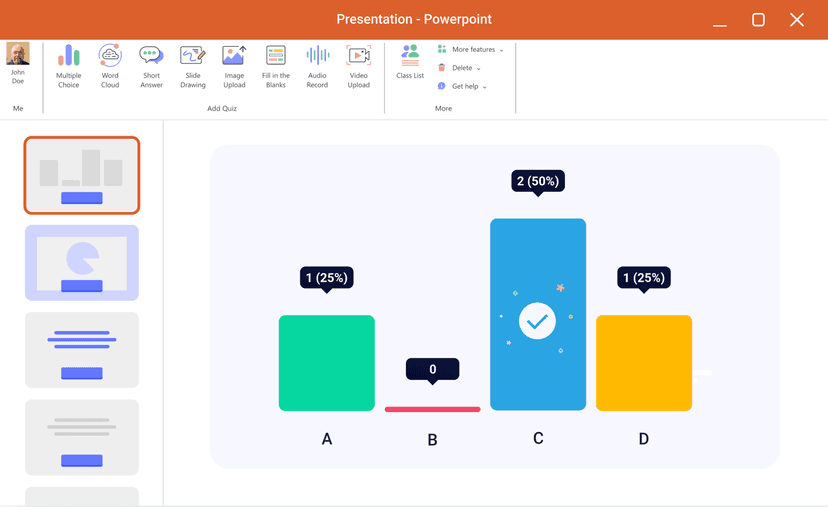
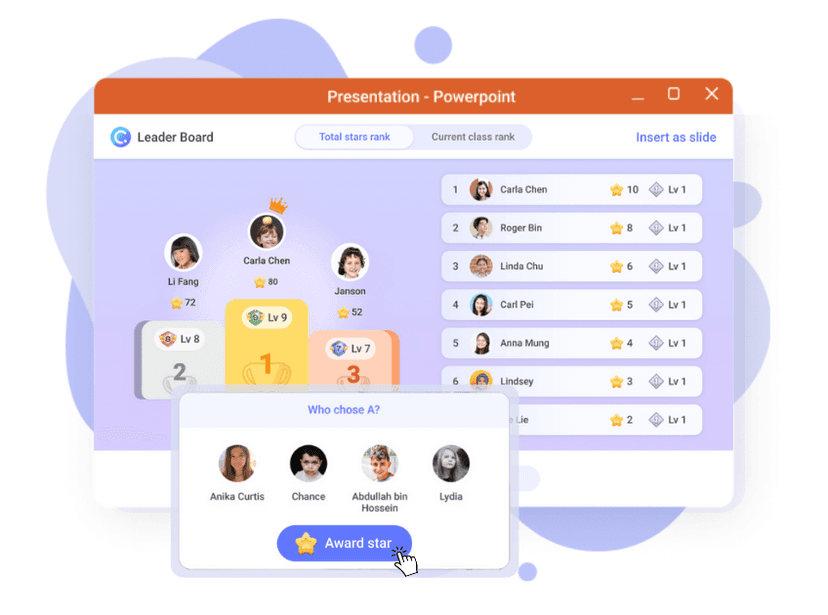
- Lacks direct student interface for immediate feedback on incorrect answers.
- Relies entirely on the educator to sequence materials for effective spaced repetition.
- AI-generated reading passages may lack authentic cultural context found in native texts.
What Do We Know About Classorium?
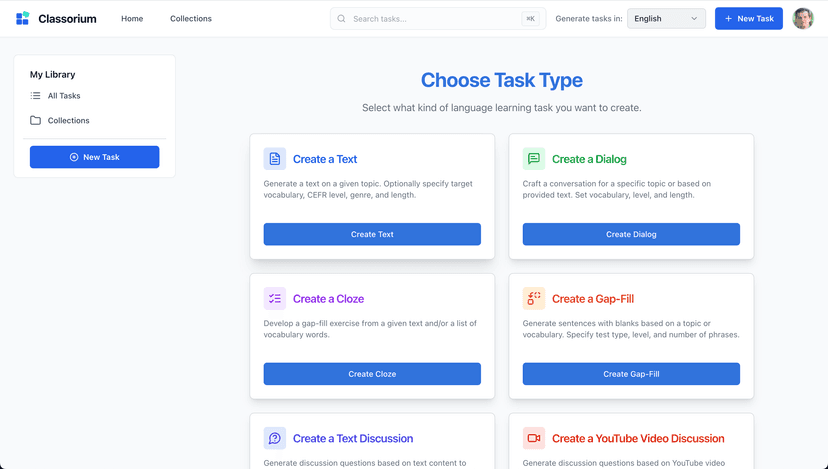
Classorium is an educator tool that generates language learning materials rather than a standalone app your child can use independently. Because The Learning Standard has not yet fully evaluated this platform, we cannot definitively rate its instructional effectiveness. However, it functions as an AI assistant for teachers, creating reading passages, grammar exercises, and vocabulary drills across multiple languages. Your child will not interact with the Classorium software directly. Instead, they will complete the worksheets, discussion prompts, and micro-activities their teacher generates using the platform. From a learning science perspective, the value of these materials depends heavily on how the teacher implements them in the classroom. If the educator uses the generated drills for regular retrieval practice and sequences the reading passages to build cumulative background knowledge, the materials can effectively support language acquisition. The platform relies on the Common European Framework of Reference for Languages (CEFR) to scale the difficulty of its generated text, ensuring that the vocabulary and grammar rules match your child's current proficiency level. Parents should view this not as a substitute for active teaching, but as a supplementary utility that frees up instructor time for more direct student engagement.
How Does Classorium Work?
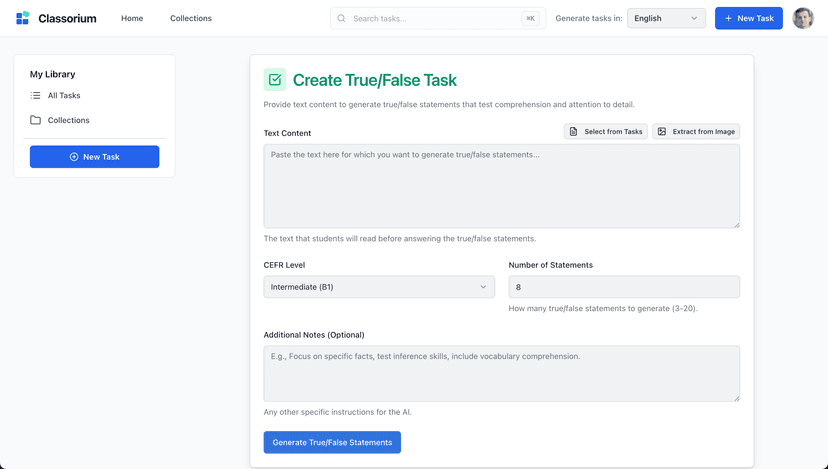
Classorium relies on a teacher-mediated, communicative language teaching approach through AI-generated micro-activities. Educators input their target language, desired proficiency level, and learning objectives into the platform. The AI engine then acts as a co-author, instantly generating a suite of instructional materials tailored to those exact parameters. These materials typically include leveled reading passages for comprehensible input, targeted grammar exercises for explicit instruction, vocabulary drills for structured retrieval practice, and discussion prompts for expressive verbal output. The software aligns these outputs with standard CEFR guidelines, ranging from beginner (A1) to mastery (C2) levels. Because it is a preparation tool rather than a student-facing application, there is no built-in adaptive algorithm tracking student performance or adjusting difficulty in real-time based on learner interactions. The teacher must manually review the generated content, select the most appropriate exercises, distribute them to the class, and manually provide the necessary immediate feedback or instructional scaffolding during the actual lesson.
Strengths and tradeoffs of Classorium
Classorium's biggest strength is its ability to instantly generate CEFR-aligned micro-activities for targeted practice, while its biggest weakness is the inherent lack of authentic cultural nuance and direct student feedback mechanisms found in premium instructional apps. Strengths: By automating the creation of vocabulary drills and grammar exercises, the platform enables teachers to easily implement frequent, low-stakes retrieval practice, which learning science confirms is highly effective for language retention. The inclusion of leveled reading passages allows educators to provide comprehensible input matched exactly to a student's current proficiency, a cornerstone of effective language acquisition. Weaknesses: The platform does not directly interact with students, meaning it cannot provide the immediate, corrective feedback that is essential for addressing misconceptions during initial practice. Furthermore, while AI can generate grammatically correct reading passages, these texts often lack the pragmatic authenticity and cultural richness of real-world materials authored by native speakers. The system also places the cognitive load of curriculum sequencing entirely on the human teacher, offering no automated spaced repetition schedules to ensure long-term retention of the newly generated vocabulary.
Who Might Benefit From Classorium?
Best for language educators and tutors who need to rapidly generate supplemental reading passages and grammar drills tailored to specific proficiency levels. It serves teachers handling diverse classrooms who require differentiated materials for students ranging from A1 to C2 proficiency. While it covers multiple languages and all age groups, it is strictly a back-end preparation tool for professionals. Parents looking for an independent language learning app for their children should look elsewhere, as Classorium requires a qualified instructor to curate, assign, and assess the generated activities in order for them to be instructionally effective.
Data Transparency
Does Not Meet Data Transparency Standard
Classorium does not meet our data transparency standard. Its privacy policy does not document basic protections, including a commitment against targeted advertising, limits on sharing children's data and contractual limits on service providers.
10 of 35 checks passed
Evaluated September 2026
Privacy Policy →Level 1 · Basic protections
Does not sell data or target ads at students, limits sharing, and lets parents see and delete their child's data.
Not documented: a commitment against targeted advertising, limits on sharing children's data, contractual limits on service providers, a COPPA or FERPA commitment, parents' right to see their child's data, parents' right to delete their child's data
Level 2 · Parent control (meets the standard)
Families can get their data out, know who processes it, and know how long it is kept.
Not documented: self-service deletion
Level 3 · Direct data access
Families or schools can pull their own data through an API, in a stated format.
Not documented: an API for retrieving their own data, a named export format
View all 35 checks
Parent Access1/8
Does the policy mention parents specifically?
The policy does not mention parents.
Can parents view their child's data?
The policy does not give parents any right to view a child's data.
Can parents modify their child's data?
The policy does not give parents any right to modify a child's data.
Can parents delete their child's account?
The policy does not give parents any right to delete a child's account or data.
Is there a dedicated Children's Privacy section?
“## 11\. Children's Privacy Our services are not intended for children under 16. We do not knowingly collect personal information from children under 16.”
Does it reference COPPA compliance?
The policy does not mention COPPA.
Does it reference FERPA compliance?
The policy does not mention FERPA.
Is parental consent required for child accounts?
The policy says the services are not intended for children under 16 and does not mention parental consent.
Data Portability2/5
Can users access their personal data?
“**Access:** Request a copy of your personal data”
Can users download/export their data?
“**Portability:** Receive your data in a portable format”
Is there a self-service data access tool?
The policy says rights are exercised by emailing legal@classorium.com and describes no self-service tool.
Is a specific data format mentioned for export?
The policy mentions only a "portable format" and names no specific format.
Is there an API for data access?
The policy does not mention an API for data access.
Data Minimization1/6
Is data collection itemized?
“- Name and email address - Professional information (school, teaching subjects, experience level) - Payment information (processed securely through third-party providers) - Communication preferences”
Can the app be used without a real name?
The policy says it collects users' names.
Can the app be used without an email?
The policy says it collects users' email addresses.
Does it state collection is limited to what is necessary?
The policy limits retention to what is necessary but does not say collection is limited to what is necessary.
Is IP address anonymized or truncated?
The policy says it collects IP addresses and does not mention anonymizing or truncating them.
Is location tracking explicitly excluded?
The policy does not explicitly rule out location tracking.
Third-Party Protection4/7
Does it explicitly state no selling of data?
“We do not sell your personal information.”
Are third-party providers named?
“**AI Services:** Google AI and other providers for content generation”
Are providers contractually restricted?
The policy mentions standard contractual clauses only for international transfers and does not state contractual limits on how providers use data.
No-targeted-advertising commitment?
The policy does not commit to avoiding targeted advertising.
Is AI/ML data sharing addressed?
“**AI Services:** Google AI and other providers for content generation”
Child-specific sharing restriction?
The policy has no sharing restriction specific to children beyond saying it does not knowingly collect their data.
Cookies/tracking limited or opt-out?
“You can control cookie preferences through your browser settings.”
Deletion & Retention2/5
Can users delete their account?
“**Erasure:** Request deletion of your personal data”
Self-service deletion mechanism?
The policy says deletion is requested by email and describes no self-service deletion.
Specific data retention timeline?
“Account data is typically retained for 3 years after account closure, unless you request earlier deletion.”
Auto-deletion of inactive accounts?
The policy does not mention automatically deleting inactive accounts.
Post-deletion handling described?
The policy says how long data is kept after account closure but does not describe how data is handled once deleted.
Advertising0/4
Advertising model explicitly disclosed?
The policy does not disclose an advertising model; it mentions only marketing communications sent with consent.
Free from third-party advertisements?
The policy does not say the product is free of third-party advertising.
Children excluded from ad targeting?
The policy does not address excluding children from ad targeting.
Ad-free option available?
The policy does not address advertising or an ad-free option.
What This Means
The policy review did not meet our data transparency standard. The checks above show the documented findings and unknowns. A missing statement does not establish how the app handles data in practice.
About this evaluation: Based on automated analysis of Privacy Policy against 35 policy-disclosure questions, including questions adapted from the Common Sense Privacy Program's published evaluation questions. TLS is not affiliated with Common Sense Media, and this is not a Common Sense rating. Quoted text is copied from the policy; unquoted notes are our summary. Results describe what the policy documents, not the company's actual practices. Privacy policies can change: this review reflects the version we analyzed and does not determine legal compliance.
Sources and review method
TLS combines product information and editorial analysis to explain how Classorium works, its tradeoffs, and the questions to ask before choosing it. Product features, an instructional rationale and evidence of learning outcomes are different kinds of information.
Formal Learning Standard assessment: not yet completed. Data Transparency findings are reported separately and do not establish learning effectiveness. Read our methodology.
Frequently Asked Questions About Classorium
Is Classorium free?
No, Classorium is a paid platform for educators. It currently costs 17 USD for a monthly plan or 170 USD for an annual subscription.
Is Classorium good for elementary students?
Yes, provided a teacher mediates the content. The platform allows educators to generate materials for all age groups and can tailor reading passages and drills to beginner A1 proficiency levels suitable for younger learners.
What does Classorium teach?
Classorium does not teach directly, but it generates instructional materials for teaching over four different languages. It produces reading passages, vocabulary drills, grammar exercises, and discussion prompts for language acquisition.
Has Classorium been rated by The Learning Standard?
Not yet. The Learning Standard currently has Classorium pending evaluation. Our independent ratings rely on rigorous pedagogical rubrics to ensure apps actually teach. You can read more about our assessment criteria on our methodology page.
How does Classorium compare to direct student apps like Duolingo?
Classorium is a lesson preparation tool for teachers, whereas Duolingo is a direct-to-student instructional app. Classorium provides customizable materials for classroom use, while apps like Duolingo provide automated, gamified practice with built-in spaced repetition algorithms.
Has The Learning Standard evaluated Classorium?
TLS has not yet completed a Learning Standard evaluation of how well Classorium teaches. Its privacy policy has been reviewed for Data Transparency and does not yet document the basic protections (Level 1).
Is Classorium COPPA compliant?
A COPPA reference was not found in the reviewed privacy policy. This does not determine whether the app complies with COPPA. Policy review note: The policy does not mention COPPA.
Is Classorium FERPA compliant?
A FERPA reference was not found in the reviewed privacy policy. This does not determine whether the app complies with FERPA. Policy review note: The policy does not mention FERPA.
Does Classorium have a children's privacy policy?
The reviewed policy includes a dedicated children's privacy section. Policy review note: The policy has a section headed Children's Privacy.
Does Classorium sell student data?
The reviewed policy states that the app does not sell data. This is a policy statement; actual data practices were not verified. Policy review note: The policy states the company does not sell personal information.
Can you delete your data from Classorium?
The reviewed privacy policy describes account deletion. We have not tested the deletion process. Policy review note: Users can request deletion of their personal data.
Follow TLS Research
Subscribe to future TLS research updates: app reviews, findings, and what the evidence shows.
Screenshots
Take Action
For Classorium
If you represent Reciptix LLP and have a correction or new evidence, send the relevant source so we can review and update this page.
Submit a correctionDetails
- Pricing
- 17 USD - Monthly Plan 170 USD - Annual Plan
- Platforms
- Web Browser, iOS (Apple mobile), iPadOS (Apple tablet), Android (Google mobile), Windows (Microsoft), macOS (Apple), Chrome OS (Google)
- Website
- Visit site