
Class Companion
Product by Class Companion
Facts checked: Not yet checked
Our take (not a Learning Standard rating). This label applies to learning-science judgments throughout this overview.
Our take (not a Learning Standard rating)
Class Companion accelerates the feedback loop by using AI to grade written assignments instantly, which aligns with learning science principles of timely correction. However, because it relies on teacher-provided rubrics and prompts, its effectiveness depends entirely on the quality of the classroom instruction. The Learning Standard has not yet evaluated this tool.
Pros
- Delivers immediate feedback to students, which reduces the time gap between retrieval practice and error correction.
- Allows teachers to customize the AI grading criteria to align directly with specific classroom learning objectives.
- Reduces the fear of failure by letting students iteratively revise their work based on private AI suggestions.
- Supports a wide range of subjects and grade levels by remaining agnostic to the specific content being evaluated.
Cons
- Relies heavily on the teacher's ability to write effective prompts and rubrics to generate accurate AI feedback.
- Produces occasional AI hallucinations or misinterprets nuanced student arguments in complex humanities subjects.
- Lacks built-in direct instruction or spaced repetition, serving only as an assessment and feedback mechanism.
What Do We Know About Class Companion?
Class Companion is effective for accelerating feedback on your child's written assignments, provided their teacher inputs strong grading criteria. Instead of waiting weeks for a graded essay, your child receives immediate, AI-generated critiques on their work. This instant turnaround supports the learning science principle of timely feedback, allowing students to correct misconceptions while the material is still fresh in their working memory. The platform does not teach new concepts independently; it is strictly a feedback engine used to augment classroom instruction. Teachers assign the writing prompts, define the rubrics, and monitor the AI's responses to ensure accuracy. Because your child can submit drafts, receive notes, and revise their work before final grading, the tool promotes mastery-based learning and reduces the anxiety associated with high-stakes testing. However, parents should know that the AI is not infallible. It evaluates based on the constraints set by the teacher, meaning its effectiveness is entirely dependent on how the educator integrates it into their curriculum. The Learning Standard has not yet completed a formal evaluation of this platform's long-term impact on student outcomes.
How Does Class Companion Work?
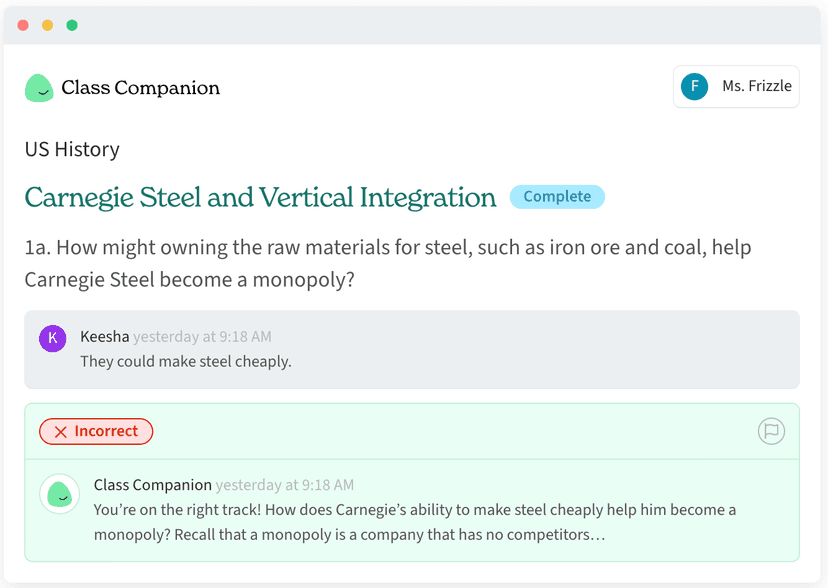
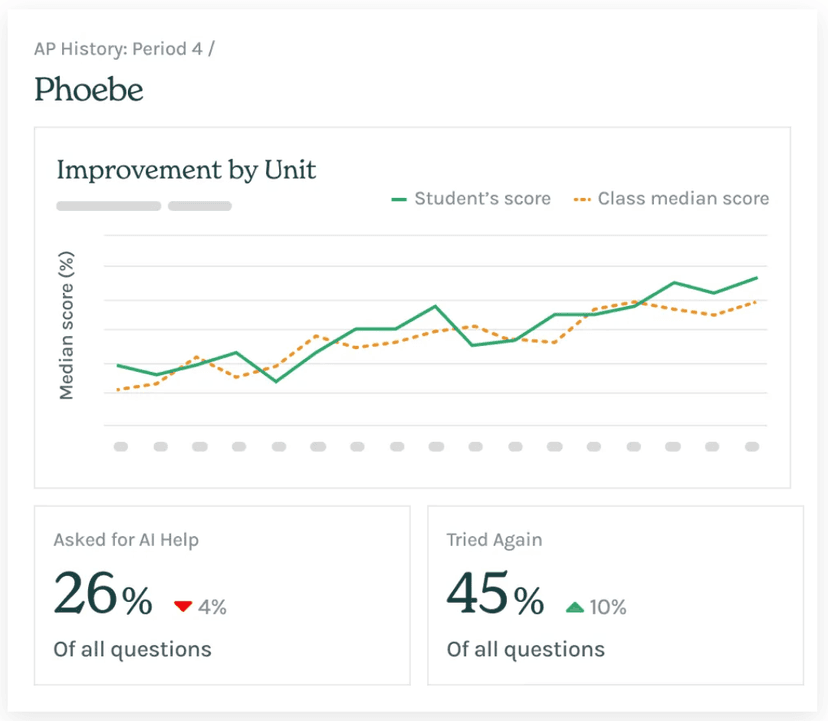
Class Companion uses mastery-based progression by allowing students to submit written work, receive instant AI feedback, and revise their answers until they meet the teacher's rubric. Teachers begin by creating an assignment and defining the specific criteria the AI should use to evaluate student submissions. When a student completes the task, the platform uses natural language processing to analyze their writing against the teacher's parameters. The AI immediately provides a score and personalized qualitative feedback, pointing out areas for improvement or missing arguments. Students can then act on this feedback immediately, engaging in an iterative drafting process that strengthens their understanding through active application. Teachers maintain full oversight of the platform. They can review the AI's feedback, override scores, and monitor which students are struggling with specific concepts. This blended learning model keeps the teacher in control of the curriculum while offloading the time-consuming task of initial draft grading to the software.
Strengths and tradeoffs of Class Companion
The biggest strength of Class Companion is its ability to provide instantaneous formative feedback, while its biggest weakness is its reliance on the teacher's prompt engineering to prevent inaccurate AI grading. From a learning science perspective, reducing the delay in feedback is crucial for correcting errors before they encode into long-term memory. Strengths: By automating the initial review of written assignments, the platform enables iterative practice. Students can engage in retrieval practice by drafting essays or short answers, receive immediate corrections, and try again. This cycle builds confidence and reinforces mastery. Weaknesses: Because the platform uses generative AI, it is susceptible to misinterpreting student work if the teacher's rubric lacks strict parameters. It does not provide spaced repetition or interleaved practice independently; it only reacts to what the teacher assigns. Additionally, complex or highly creative assignments may challenge the AI's ability to provide nuanced, accurate critiques. Currently pending a formal rating from The Learning Standard, the app serves best as a classroom utility rather than a standalone curriculum.
Who Might Benefit From Class Companion?
Class Companion is best for middle and high school teachers who assign frequent writing tasks and want to provide faster formative feedback. Because it supports subjects ranging from humanities to applied sciences, it fits well into blended learning environments where educators want students to revise their work iteratively. It is ideal for classrooms focusing on competency-based learning, as the instant grading allows students to keep trying until they meet the standard. It is not designed for independent learners or young children who require direct instruction, as the tool requires a teacher to manage assignments and monitor the AI's accuracy.
Data Transparency
Does Not Meet Data Transparency Standard
Class Companion reaches Level 1 of 3 (Basic protections), below our data transparency standard. Reaching Level 2 needs the policy to document data export, a data retention timeline and self-service deletion.
19 of 35 checks passed
Evaluated September 2026
Privacy Policy →Level 1 · Basic protections
Does not sell data or target ads at students, limits sharing, and lets parents see and delete their child's data.
Level 2 · Parent control (meets the standard)
Families can get their data out, know who processes it, and know how long it is kept.
Not documented: data export, a data retention timeline, self-service deletion
Level 3 · Direct data access
Families or schools can pull their own data through an API, in a stated format.
Not documented: an API for retrieving their own data, a named export format
View all 35 checks
Parent Access5/8
Does the policy mention parents specifically?
“Parents may inspect and correct information for students.”
Can parents view their child's data?
“Parents may inspect and correct information for students.”
Can parents modify their child's data?
“Parents may inspect and correct information for students.”
Can parents delete their child's account?
The policy gives parents inspection and correction rights only; deletion of student data is described as a school or district right, and parents are not given a way to request it.
Is there a dedicated Children's Privacy section?
The policy has a Student information section but no dedicated section about children's privacy or COPPA.
Does it reference COPPA compliance?
“we support schools in complying with the Family Education Rights and Privacy Act (FERPA), and we comply with the Children's Online Privacy Protection Act (COPPA).”
Does it reference FERPA compliance?
“we support schools in complying with the Family Education Rights and Privacy Act (FERPA), and we comply with the Children's Online Privacy Protection Act (COPPA).”
Is parental consent required for child accounts?
The policy does not say parental consent is required for child accounts; it only mentions use of data as authorized by the parent/student.
Data Portability2/5
Can users access their personal data?
“You may access or update your personal information in your account by logging in and editing your information.”
Can users download/export their data?
The policy does not address downloading or exporting data.
Is there a self-service data access tool?
“You may access or update your personal information in your account by logging in and editing your information.”
Is a specific data format mentioned for export?
The policy does not mention any export format.
Is there an API for data access?
The policy does not describe an API for users or schools to retrieve their data.
Data Minimization2/6
Is data collection itemized?
“We collect the minimal amount of student information needed to deliver our Services. This typically includes:”
Can the app be used without a real name?
The policy states it collects the student's first name so the teacher can identify submissions.
Can the app be used without an email?
The policy states it collects the student's email address so the student can log in.
Does it state collection is limited to what is necessary?
“Collect only the minimum personal information necessary to provide our Services”
Is IP address anonymized or truncated?
The policy states IP addresses are collected and does not say they are anonymized or truncated.
Is location tracking explicitly excluded?
The policy says it does not collect exact geolocation but does collect general location such as city, state or geographic area.
Third-Party Protection7/7
Does it explicitly state no selling of data?
“We do not rent, sell, or exchange teacher or student personal information to any third party.”
Are third-party providers named?
“**Integrated technologies,** such as Google Login or Clever. Only if you choose to use these integrated technologies will we receive information such as your name and email address.”
Are providers contractually restricted?
“We only share data with third parties that adhere to our policies, our contractural obligations, and applicable law and pledge to protect student privacy.”
No-targeted-advertising commitment?
“We do not use your information for targeted ads, and we do not sell your data.”
Is AI/ML data sharing addressed?
“We do not share teacher or student personally identifiable information with AI service providers. Google Workspace APIs are not used to develop, improve, or train generalized AI and/or ML models.”
Child-specific sharing restriction?
“We do not share teacher or student personally identifiable information with AI service providers.”
Cookies/tracking limited or opt-out?
“**Online tracking opt out.** There are a number of ways to limit online tracking, which we have summarized below:”
Deletion & Retention2/5
Can users delete their account?
“You can request that we delete your account by emailing us at [privacy@classcompanion.com](mailto:privacy@classcompanion.com).”
Self-service deletion mechanism?
The policy offers self-service deactivation that can be reversed, but permanent deletion requires emailing a request.
Specific data retention timeline?
The policy says data is kept no longer than necessary but gives no specific timeline.
Auto-deletion of inactive accounts?
The policy does not address automatic deletion of inactive accounts.
Post-deletion handling described?
“We may retain de-identified data after you delete your account, in order to improve the operation of our Services; this data will not contain your personal information.”
Advertising1/4
Advertising model explicitly disclosed?
The policy says personal information is not used for advertising but does not explicitly state whether the product displays advertising.
Free from third-party advertisements?
The policy does not explicitly state that the product is free of third-party advertisements.
Children excluded from ad targeting?
“We do not advertise using teacher or student personal information.”
Ad-free option available?
The policy does not state that the product has no advertising or offer an ad-free option.
What This Means
The policy review did not meet our data transparency standard. The checks above show the documented findings and unknowns. A missing statement does not establish how the app handles data in practice.
About this evaluation: Based on automated analysis of Privacy Policy against 35 policy-disclosure questions, including questions adapted from the Common Sense Privacy Program's published evaluation questions. TLS is not affiliated with Common Sense Media, and this is not a Common Sense rating. Quoted text is copied from the policy; unquoted notes are our summary. Results describe what the policy documents, not the company's actual practices. Privacy policies can change: this review reflects the version we analyzed and does not determine legal compliance.
Sources and review method
TLS combines product information and editorial analysis to explain how Class Companion works, its tradeoffs, and the questions to ask before choosing it. Product features, an instructional rationale and evidence of learning outcomes are different kinds of information.
Formal Learning Standard assessment: not yet completed. Data Transparency findings are reported separately and do not establish learning effectiveness. Read our methodology.
Frequently Asked Questions About Class Companion
Is Class Companion free?
Class Companion is completely free for individual teachers to use in their classrooms. Schools and districts must pay for premium enterprise features, which include advanced analytics, administrative controls, and broader integration capabilities.
Is Class Companion good for elementary students?
Class Companion is generally better suited for middle school, high school, and higher education students. While it supports grades as low as 3rd grade, the text-heavy interface and reliance on typed written assignments make it less effective for early elementary learners who are still mastering basic literacy and keyboarding skills.
What does Class Companion teach?
Class Companion does not independently teach any specific subject matter. It is a feedback and assessment tool that teachers use to grade written assignments across multiple disciplines, including humanities, social sciences, and career technical education. The actual instruction comes from the classroom teacher.
Class Companion vs. ChatGPT: Which is better for classrooms?
Class Companion is strictly better for classroom environments than raw ChatGPT. While both use generative AI, Class Companion is built specifically for educators. It restricts the AI to the teacher's rubric, prevents students from simply asking the AI to write the essay for them, and gives the teacher full visibility into the feedback process.
Has The Learning Standard evaluated Class Companion?
TLS has not yet completed a Learning Standard evaluation of how well Class Companion teaches. Its privacy policy has been reviewed for Data Transparency and reaches Level 1, Basic protections.
Is Class Companion COPPA compliant?
The reviewed privacy policy references COPPA. A policy reference alone does not establish COPPA compliance. Policy review note: The policy states it complies with COPPA.
Is Class Companion FERPA compliant?
The reviewed privacy policy references FERPA. A policy reference alone does not establish FERPA compliance. Policy review note: The policy states it supports schools in complying with FERPA.
Does Class Companion have a children's privacy policy?
No dedicated children's privacy section was found in the reviewed policy. Policy review note: The policy has a Student information section but no dedicated section about children's privacy or COPPA.
Does Class Companion sell student data?
The reviewed policy states that the app does not sell data. This is a policy statement; actual data practices were not verified. Policy review note: The policy states the vendor does not sell personal information.
Can you delete your data from Class Companion?
The reviewed privacy policy describes account deletion. We have not tested the deletion process. Policy review note: Users can request account deletion by email.
Follow TLS Research
Subscribe to future TLS research updates: app reviews, findings, and what the evidence shows.
Screenshots
Take Action
For Class Companion
If you represent Class Companion and have a correction or new evidence, send the relevant source so we can review and update this page.
Submit a correctionDetails
- Pricing
- Class Companion is free for individual teachers. Schools and districts may pay for additional features.
- Platforms
- Web Browser, iOS (Apple mobile), iPadOS (Apple tablet), Android (Google mobile), Tizen (Samsung mobile), Windows (Microsoft), macOS (Apple), Chrome OS (Google), Other
- Grade Levels
- 3rd Grade, 4th Grade, 5th Grade, 6th Grade, 7th Grade, 8th Grade, 9th Grade, 10th Grade, 11th Grade, 12th Grade, Associate's degree, Bachelor's degree, Post-baccalaureate certificate, Master's Degree
- Website
- Visit site