Brilliant for Educators
Product by Brilliant
Facts checked: Not yet checked
Our take (not a Learning Standard rating). This label applies to learning-science judgments throughout this overview.
Our take (not a Learning Standard rating)
While The Learning Standard has not yet fully evaluated Brilliant for Educators, its core design relies on active problem-solving rather than passive video consumption. This approach forces cognitive engagement and inquiry-based learning, which drives STEM mastery. However, the high cognitive load may frustrate students without strong foundational knowledge.
Pros
- Forces active retrieval practice by making students solve problems immediately rather than watching lengthy lectures.
- Uses visual, interactive models to reduce the abstraction of complex math and computer science concepts.
- Scaffolds difficulty incrementally, breaking down advanced STEM topics into manageable cognitive steps.
- Provides educators with free access to high-quality supplemental material for blended classroom environments.
Cons
- Lacks explicit direct instruction, which can leave novices stranded without sufficient worked examples.
- Requires a high level of reading comprehension and self-regulation to navigate the text-heavy interactive modules.
- Does not offer robust built-in remediation if a student fundamentally fails to grasp the underlying concept.
- The Learning Standard has not yet formally evaluated this app to confirm its long-term efficacy.
What Do We Know About Brilliant for Educators?
Brilliant for Educators offers an effective, active-learning approach to STEM, though it works best as a supplement rather than a standalone curriculum. Your child will not spend time passively watching videos here. Instead, they must interact with visual models and solve problems to progress. This forces immediate engagement and relies on inquiry-based learning, a method proven to deepen conceptual understanding in mathematics and science. Because the platform spans from fifth grade through college-level topics like quantum computing, it scales alongside your child's growing mastery. However, because The Learning Standard has not yet completed a formal evaluation of this specific educator tier, parents and teachers should monitor how well students handle the productive struggle. The app relies heavily on discovery learning. If your child lacks foundational knowledge in a subject, the lack of explicit, step-by-step direct instruction can cause frustration. The platform assumes a high degree of self-regulation. You will need to ensure your child actually reads the explanations rather than just guessing until the interactive modules let them pass. Overall, it is a powerful tool for building STEM intuition when paired with traditional classroom guidance.
How Does Brilliant for Educators Work?
Brilliant for Educators uses an interactive, problem-based learning approach that replaces passive lectures with active, guided discovery. When a student opens a lesson, they are immediately presented with a scenario, a visual model, or a puzzle. They must manipulate variables, predict outcomes, or solve a mini-problem to unlock the underlying concept. This mechanic is rooted in active learning and immediate feedback. Instead of providing the formula upfront, the platform guides the student to derive the formula themselves through a sequence of scaffolded interactive questions. As students progress, the difficulty adapts, requiring them to synthesize previous concepts to solve more complex challenges. The educator version allows teachers to integrate these modules into their existing curriculum, serving as either a classroom activity or a homework assignment. It relies heavily on visual representation, turning abstract algebra or physics equations into tangible, manipulable objects on the screen.
Strengths and tradeoffs of Brilliant for Educators
Brilliant for Educators' biggest strength is its use of interactive visualization to build conceptual intuition, while its biggest weakness is the potential for cognitive overload in novices due to a lack of direct instruction. Active problem-solving is central to the platform's design. By forcing students to interact with material immediately, the app leverages retrieval practice and active engagement, preventing the illusion of competence that often occurs when students merely watch a teacher solve a problem on a whiteboard. The use of visual scaffolding helps translate highly abstract STEM concepts into concrete, observable mechanisms. Conversely, the reliance on inquiry-based learning can be a double-edged sword. Cognitive load theory suggests that novices learn best through explicit instruction and fully worked examples before attempting independent problem-solving. Because Brilliant often asks students to discover the rule rather than telling them the rule first, students with weaker working memory or lower foundational knowledge may become stuck or resort to guessing. Additionally, while the content is rigorous, The Learning Standard's formal evaluation is pending, meaning definitive data on its long-term retention metrics remains unverified.
Who Might Benefit From Brilliant for Educators?
Brilliant for Educators is best for middle school through adult learners who already possess foundational STEM knowledge and thrive on interactive, inquiry-based problem solving. The platform is ideal for self-motivated students from fifth grade up through college who want to deepen their conceptual understanding of math, computer science, and physics. It serves as an excellent supplemental tool for teachers employing a blended learning model, allowing them to assign rigorous interactive modules alongside traditional direct instruction. It is not recommended as a primary curriculum for struggling learners who require extensive, step-by-step remediation.
Sources and review method
TLS combines product information and editorial analysis to explain how Brilliant for Educators works, its tradeoffs, and the questions to ask before choosing it. Product features, an instructional rationale and evidence of learning outcomes are different kinds of information.
Formal Learning Standard assessment: not yet completed. Data Transparency findings are reported separately and do not establish learning effectiveness. Read our methodology.
Frequently Asked Questions About Brilliant for Educators
Is Brilliant for Educators free?
Yes, the "Brilliant for Educators" program is completely free for verified teachers and educators. This provides full access to the platform's interactive catalog for use in in-person or remote classrooms. However, individual learners outside of this verified school context must pay a subscription fee for the standard Brilliant app after a brief trial period.
Is Brilliant for Educators good for middle and high school students?
Yes, it is highly effective for students in fifth grade and above who are ready for abstract problem-solving. The platform challenges students to actively engage with STEM concepts rather than passively consuming content. However, because The Learning Standard has not yet formally rated this app against our methodology, educators should monitor whether their specific students require more direct instruction before tackling the app's discovery-based modules.
What does Brilliant for Educators teach?
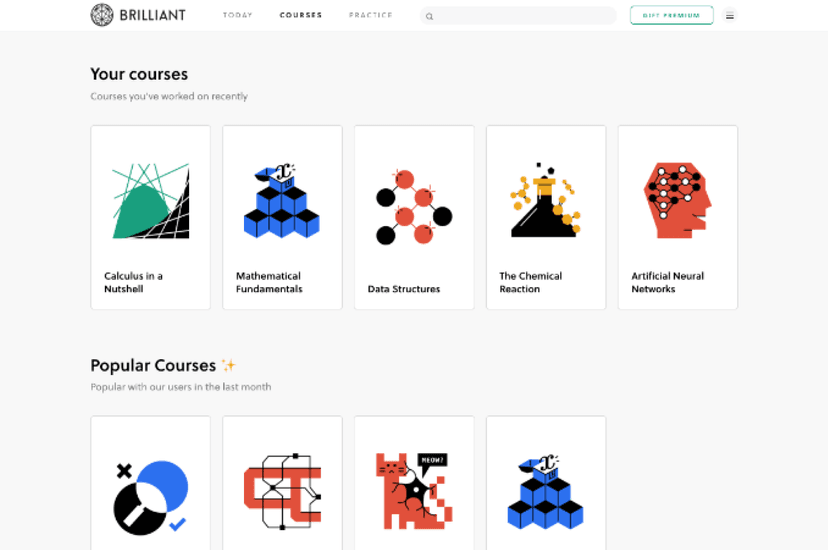
Brilliant teaches mathematics, science, and computer science. The curriculum ranges from foundational middle school math and logic puzzles to advanced college-level topics like artificial neural networks, quantum computing, and multivariable calculus. Rather than focusing on rote memorization, the content targets conceptual mastery and applied problem-solving in STEM fields.
Brilliant for Educators vs. Khan Academy: Which is better?
Khan Academy is better for explicit, step-by-step direct instruction, while Brilliant is better for building conceptual intuition through interactive problem-solving. Khan Academy relies on video lectures and traditional practice sets, which lowers cognitive load for novices. Brilliant forces students to discover concepts by manipulating visual models. The ideal classroom uses Khan Academy for foundational skills and Brilliant for deep conceptual enrichment.
Has The Learning Standard evaluated Brilliant for Educators?
TLS has not yet completed a Learning Standard evaluation of how well Brilliant for Educators teaches. TLS has not published a Data Transparency result for its privacy policy.
Follow TLS Research
Subscribe to future TLS research updates: app reviews, findings, and what the evidence shows.
Screenshots

Take Action
For Brilliant for Educators
If you represent Brilliant and have a correction or new evidence, send the relevant source so we can review and update this page.
Submit a correctionDetails
- Pricing
- Free for individual educators
- Platforms
- Web Browser
- Grade Levels
- 5th Grade, 6th Grade, 7th Grade, 8th Grade, 9th Grade, 10th Grade, 11th Grade, 12th Grade, Associate's degree, Bachelor's degree, Post-baccalaureate certificate, Master's Degree, Adult Education
- Website
- Visit site