
Crelata
Product by Crelata
Facts checked: Not yet checked
Our take (not a Learning Standard rating). This label applies to learning-science judgments throughout this overview.
Our take (not a Learning Standard rating)
Crelata utilizes direct video instruction and visual modeling to teach dance and movement, but its ultimate effectiveness remains pending evaluation by The Learning Standard. While experiential learning through structured observation is effective for introducing physical skills, the absence of real-time corrective feedback limits deep motor skill mastery.
Pros
- Employs visual modeling through expert demonstration to clearly communicate sequential motor skills.
- Breaks down complex physical routines into manageable, chunked steps to reduce cognitive and physical overload.
- Provides ad-free, direct instruction that keeps students focused entirely on the movement task without distraction.
Cons
- Lacks asynchronous or real-time feedback mechanisms to correct student posture or timing errors.
- Relies heavily on one-way video consumption, which cannot assess a student's actual physical mastery.
- Offers no differentiated pacing built into the software to accommodate students who struggle with specific physical coordinations.
What Do We Know About Crelata?
Crelata is pending evaluation by The Learning Standard, but its reliance on video-based direct instruction suggests it serves better as an introduction to dance rather than a tool for mastery. Your child will watch on-demand videos featuring professional dance instructors demonstrating specific movements. They are expected to physically follow along, engaging in experiential learning. Because the platform operates as a one-way broadcasting tool, your child will not receive any personalized feedback on their form, rhythm, or execution. Motor skill acquisition requires both visual modeling and corrective feedback. Crelata successfully delivers the visual modeling component by breaking down complex choreography into sequential chunks. This chunking prevents cognitive overload and allows your child to process one step at a time. However, without a teacher present to correct mistakes, your child may practice and reinforce incorrect movements. The platform is entirely ad-free, ensuring that your child remains focused on the physical task without digital distractions. While it provides equitable access to high-quality arts instruction, parents should view Crelata as a supplemental resource that requires active adult supervision to maximize learning outcomes and prevent physical injury.
How Does Crelata Work?
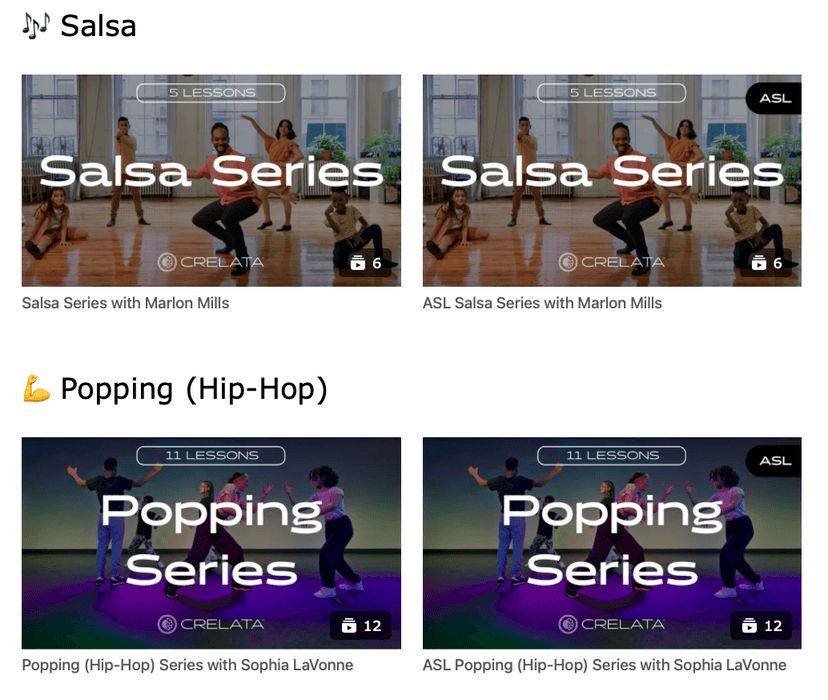
Crelata uses direct instruction and experiential learning through sequential, on-demand video lessons to teach dance fundamentals. Your child selects a class and follows along physically as an instructor models movements on screen. The pedagogical core relies on observational learning, where students mirror the physical actions of an expert. Lessons are structured sequentially, requiring students to practice foundational movements before progressing to complex combinations. Instructors use verbal cues alongside physical demonstration, engaging both auditory and visual processing channels simultaneously. The platform does not track physical performance or utilize adaptive software mechanics. Instead, it places the burden of pacing and repetition entirely on the user or the classroom teacher facilitating the lesson. Students must self-monitor their own mastery and manually replay video segments if they fail to grasp a specific movement. The interface is intentionally streamlined to function well on classroom smartboards or individual devices, focusing purely on content delivery rather than gamified engagement.
Strengths and tradeoffs of Crelata
Crelata's biggest strength is its use of expert visual modeling to chunk complex motor skills, while its biggest weakness is the complete lack of corrective feedback. Visual Modeling: The platform excels at demonstrating physical movements clearly. By breaking dance routines into smaller, sequential steps, it minimizes cognitive load and allows students to focus on isolating specific body parts. Cognitive Apprenticeship: Instructors verbalize their physical thinking, explaining the reasoning behind a movement, which helps students connect physical actions to artistic concepts. Corrective Feedback: The most significant flaw in Crelata's design is the absence of real-time correction. Learning science dictates that motor skill acquisition requires immediate feedback to prevent the fossilization of incorrect techniques. Because the app cannot see the student, it cannot correct them. Self-Regulated Learning: The platform demands high levels of self-regulation. Students must possess the meta-cognitive awareness to realize they are performing a step incorrectly and take the initiative to rewind the video. Accessibility: The ad-free, straightforward design ensures that instructional time is not wasted on navigating complex menus or dodging advertisements.
Who Might Benefit From Crelata?
Crelata is best for pre-K through 12th-grade educators who need structured, expert-led video content to supplement physical education or arts integration in the classroom. It is particularly useful for schools lacking dedicated dance teachers, as it provides standardized, high-quality direct instruction. The platform is less suited for independent student use at home without adult supervision, given the need for external feedback on physical form. It serves well as a cross-curricular tool for teachers wanting to introduce experiential learning and physical movement into traditional humanities blocks.
Data Transparency
Does Not Meet Data Transparency Standard
Crelata does not meet our data transparency standard. Its privacy policy does not document basic protections, including a commitment against targeted advertising, limits on sharing children's data and contractual limits on service providers.
13 of 35 checks passed
Evaluated September 2026
Privacy Policy →Level 1 · Basic protections
Does not sell data or target ads at students, limits sharing, and lets parents see and delete their child's data.
Not documented: a commitment against targeted advertising, limits on sharing children's data, contractual limits on service providers, parents' right to see their child's data, parents' right to delete their child's data
Level 2 · Parent control (meets the standard)
Families can get their data out, know who processes it, and know how long it is kept.
Not documented: a data retention timeline, self-service deletion
Level 3 · Direct data access
Families or schools can pull their own data through an API, in a stated format.
Not documented: an API for retrieving their own data, a named export format
View all 35 checks
Parent Access4/8
Does the policy mention parents specifically?
“we do not knowingly collect information from anyone under 13 years of age without the consent of a parent or guardian.”
Can parents view their child's data?
The policy does not give parents a right to view their child's data.
Can parents modify their child's data?
The policy does not give parents a right to modify their child's data.
Can parents delete their child's account?
The policy does not give parents a right to delete their child's data or account.
Is there a dedicated Children's Privacy section?
“7\. Children’s Online Privacy Protection Act”
Does it reference COPPA compliance?
“We comply with the Children’s Online Privacy Protection Act (COPPA).”
Does it reference FERPA compliance?
The policy does not mention FERPA.
Is parental consent required for child accounts?
“Therefore, the website is not intended for use by anyone under the age of 13 years, and we do not knowingly collect information from anyone under 13 years of age without the consent of a parent or guardian.”
Data Portability2/5
Can users access their personal data?
“Right of access. You may obtain confirmation about whether Personal Data concerning you is processed, and request access to Personal Data, including the purposes of the processing, the categories of Personal Data concerned, a copy of the Personal data, and the recipients or categories of recipients to whom the Personal Data have been or will be disclosed.”
Can users download/export their data?
“Right to data portability. Under certain circumstances, you may receive the Personal Data concerning you in a structured, commonly-used, machine-readable format, and you may have the right to transmit that data to another entity without hindrance from us.”
Is there a self-service data access tool?
The policy only describes access requests by email, not a self-service tool.
Is a specific data format mentioned for export?
The policy only says "structured, commonly-used, machine-readable format" and names no specific format.
Is there an API for data access?
The policy does not mention an API for data access.
Data Minimization2/6
Is data collection itemized?
“Contact information. When you register for our email list, you will be asked to provide your first name, last name, and email address.”
Can the app be used without a real name?
The policy says it collects users' first and last names.
Can the app be used without an email?
The policy says it collects users' email addresses.
Does it state collection is limited to what is necessary?
“We will only collect the minimum amount of information necessary for us to fulfill our obligation to you.”
Is IP address anonymized or truncated?
The policy says it uses IP addresses and links them to location, and does not say they are anonymized or truncated.
Is location tracking explicitly excluded?
The policy says it links IP addresses to users' zip or postal code.
Third-Party Protection3/7
Does it explicitly state no selling of data?
“We do not sell personal information in the ordinary sense of that term, that is, we do not provide your personally identifiable information to third parties in exchange for money.”
Are third-party providers named?
“We may collect analytics data or use third-party analytics tools, such as Google Analytics, to help us measure traffic and usage trends and the demographics of our users in order to improve our website and services.”
Are providers contractually restricted?
The policy does not describe any contractual limits on third-party providers.
No-targeted-advertising commitment?
The policy says it uses personal data for targeted offers and ads.
Is AI/ML data sharing addressed?
The policy does not address AI or machine learning.
Child-specific sharing restriction?
The policy has no sharing restriction specific to children.
Cookies/tracking limited or opt-out?
“In general, we do not use cookies to track the navigational habits of identified users without the user ‘s consent.”
Deletion & Retention1/5
Can users delete their account?
“You may opt out or request for Crelata to delete your Personal Data at any point by emailing [support@crelata.com](mailto:support@crelata.com).”
Self-service deletion mechanism?
The policy only describes deletion requests by email, not a self-service tool.
Specific data retention timeline?
The policy says data is kept for the "minimum amount of time necessary" and gives no specific timeline.
Auto-deletion of inactive accounts?
The policy does not address automatic deletion of inactive accounts.
Post-deletion handling described?
The policy does not describe what happens to data after deletion.
Advertising1/4
Advertising model explicitly disclosed?
“To personalize your experience with the services and to deliver content and service offerings relevant to your interests and/or geographic location, including targeted offers and ads through our services, third-party sites, and via email (with your consent), in accordance with applicable law.”
Free from third-party advertisements?
The policy says it delivers targeted ads and shares data with advertisers, and never says the product has no ads.
Children excluded from ad targeting?
The policy does not exclude children from ad targeting.
Ad-free option available?
The policy does not mention an ad-free option and says ads are served.
What This Means
The policy review did not meet our data transparency standard. The checks above show the documented findings and unknowns. A missing statement does not establish how the app handles data in practice.
About this evaluation: Based on automated analysis of Privacy Policy against 35 policy-disclosure questions, including questions adapted from the Common Sense Privacy Program's published evaluation questions. TLS is not affiliated with Common Sense Media, and this is not a Common Sense rating. Quoted text is copied from the policy; unquoted notes are our summary. Results describe what the policy documents, not the company's actual practices. Privacy policies can change: this review reflects the version we analyzed and does not determine legal compliance.
Sources and review method
TLS combines product information and editorial analysis to explain how Crelata works, its tradeoffs, and the questions to ask before choosing it. Product features, an instructional rationale and evidence of learning outcomes are different kinds of information.
Formal Learning Standard assessment: not yet completed. Data Transparency findings are reported separately and do not establish learning effectiveness. Read our methodology.
Frequently Asked Questions About Crelata
Is Crelata free?
No, Crelata is not free. The platform charges for access, offering specific pricing plans tailored for individual teachers, entire schools, and large districts. You must request a quote or purchase a license directly through their website to access the video library.
Is Crelata good for preschool students?
Yes, Crelata offers content specifically designed for preschool and prekindergarten students. The videos chunk basic physical movements into developmentally appropriate sequences, helping young children build gross motor skills, spatial awareness, and rhythm through guided experiential learning.
What does Crelata teach?
Crelata teaches dance and performing arts through on-demand video lessons. The curriculum covers foundational physical movements, choreography, and cross-curricular humanities concepts tied to various dance styles. Students learn through physical imitation and direct instruction from expert educators.
How does Crelata compare to GoNoodle?
Crelata focuses on formal, sequential dance education and arts integration, whereas GoNoodle is primarily designed for quick brain breaks and general physical activity. Crelata offers a more rigorous pedagogical structure for teaching actual dance techniques, while GoNoodle prioritizes high-energy engagement.
Has The Learning Standard evaluated Crelata?
TLS has not yet completed a Learning Standard evaluation of how well Crelata teaches. Its privacy policy has been reviewed for Data Transparency and does not yet document the basic protections (Level 1).
Is Crelata COPPA compliant?
The reviewed privacy policy references COPPA. A policy reference alone does not establish COPPA compliance. Policy review note: The policy states COPPA compliance.
Is Crelata FERPA compliant?
A FERPA reference was not found in the reviewed privacy policy. This does not determine whether the app complies with FERPA. Policy review note: The policy does not mention FERPA.
Does Crelata have a children's privacy policy?
The reviewed policy includes a dedicated children's privacy section. Policy review note: The policy has a dedicated COPPA section.
Does Crelata sell student data?
The reviewed policy states that the app does not sell data. This is a policy statement; actual data practices were not verified. Policy review note: The policy says Crelata does not sell personal information for money.
Can you delete your data from Crelata?
The reviewed privacy policy describes account deletion. We have not tested the deletion process. Policy review note: Users can ask by email for their data to be deleted.
Follow TLS Research
Subscribe to future TLS research updates: app reviews, findings, and what the evidence shows.
Screenshots

Take Action
For Crelata
If you represent Crelata and have a correction or new evidence, send the relevant source so we can review and update this page.
Submit a correctionDetails
- Pricing
- Plans are available for teachers, schools, and districts. More info can be found on our website: https://crelata.com
- Platforms
- Web Browser, Windows (Microsoft), macOS (Apple), Chrome OS (Google), Other
- Grade Levels
- Preschool, Prekindergarten, Transitional Kindergarten, Kindergarten, 1st Grade, 2nd Grade, 3rd Grade, 4th Grade, 5th Grade, 6th Grade, 7th Grade, 8th Grade, 9th Grade, 10th Grade, 11th Grade, 12th Grade
- Website
- Visit site