Tynker for Schools Premium | Middle School Plan
Product by Byju's
Facts checked: Not yet checked
Our take (not a Learning Standard rating). This label applies to learning-science judgments throughout this overview.
Our take (not a Learning Standard rating)
While Tynker for Schools Premium offers robust project-based learning for middle schoolers, its effectiveness relies heavily on teacher implementation. The platform utilizes experiential learning and worked examples to build coding skills. However, because it lacks an independent effectiveness evaluation from The Learning Standard, we cannot definitively verify its long-term impact on knowledge retention.
Pros
- Utilizes project-based learning to contextualize abstract programming concepts within subjects like math and science.
- Employs worked examples in coding tutorials to reduce cognitive load for novice programmers.
- Supports mastery-based progression by requiring students to demonstrate competency before advancing to complex tasks.
- Integrates cross-curricular applications allowing students to apply coding logic to humanities and social science projects.
Cons
- Effectiveness heavily depends on the classroom teacher's ability to facilitate self-directed, game-based learning.
- High student-to-teacher ratios may limit the individualized feedback necessary for complex debugging tasks.
- The high initial cost barrier for schools restricts access for smaller educational co-ops or individual classrooms.
- Independent efficacy data demonstrating long-term skill transfer to non-block-based programming languages is currently lacking.
What Do We Know About Tynker for Schools Premium | Middle School Plan?
Tynker for Schools Premium is a partially effective tool for teaching coding when integrated deeply into middle school classroom instruction. Your child will not simply learn programming in isolation; instead, this curriculum forces students to apply computational thinking to existing subjects like math, science, and the humanities. Learning science supports this cross-curricular approach, as students are more likely to transfer problem-solving skills when they practice them in varied contexts. The platform relies heavily on project-based learning, asking your child to build games, animate stories, or manipulate Minecraft environments. While this game-based structure boosts initial engagement, parents and educators should know that engagement does not automatically equal learning. The cognitive load of navigating complex game environments can sometimes distract from the core programming logic. Furthermore, because The Learning Standard has not yet independently evaluated this specific middle school tier, its claims of building long-term mastery remain unverified by our methodology. The platform uses worked examples effectively to introduce new syntax, but true mastery requires your child to receive immediate, specific feedback when their code fails. If your child's teacher actively monitors progress and steps in to guide debugging, Tynker serves as a strong foundational tool for applied computer science.
How Does Tynker for Schools Premium | Middle School Plan Work?
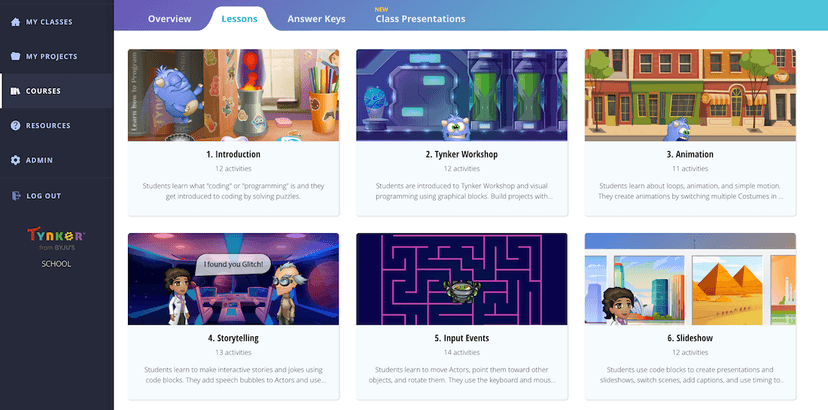
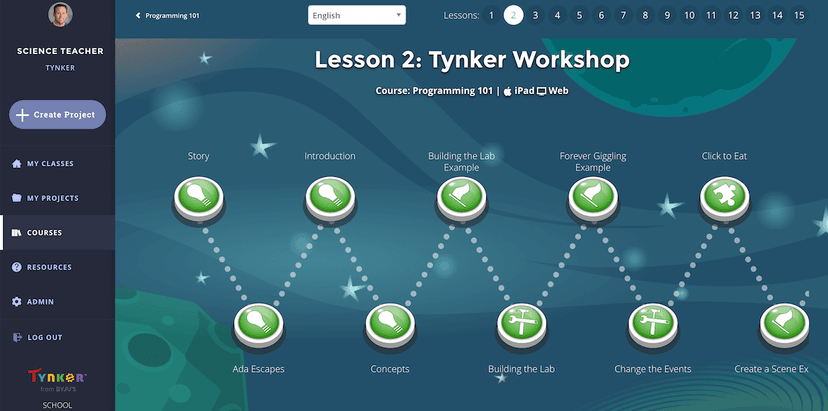
Tynker uses project-based and experiential learning to teach computational thinking through interactive, game-like design modules. Students log into the platform and engage with structured lessons that introduce coding concepts using worked examples, which reduces the cognitive strain of learning new syntax. Following the tutorial phase, your child must apply these concepts to build functional projects like animations, drone flight paths, or interactive social science quizzes. The system tracks progression through a mastery-based model, meaning students must successfully compile and execute their code before unlocking advanced challenges. Teachers assign specific cross-curricular modules that align with their current classroom topics, turning coding into a medium for demonstrating knowledge rather than just a standalone subject. By forcing students to actively construct projects rather than passively consume video lectures, the platform leverages active learning principles to cement procedural knowledge.
Strengths and tradeoffs of Tynker for Schools Premium | Middle School Plan
The biggest strength of Tynker for Schools Premium is its use of cross-curricular project-based learning, while its biggest weakness is the potential for game mechanics to distract from core computational instruction. Strong contextual learning occurs because the platform forces students to apply coding to subjects like humanities and science, which improves knowledge transfer by spacing and mixing different types of problem-solving. This interdisciplinary approach ensures coding is treated as an applied tool rather than an abstract concept. Worked examples are frequently utilized in the initial tutorial phases, providing clear models that help students manage cognitive load when learning complex logic structures like loops and variables. However, the heavy reliance on game-based experiential learning presents a dual-edged sword. While it secures student attention, learning science warns that highly stimulating graphical interfaces can sometimes cause extraneous cognitive load, meaning your child might focus more on making a game character look cool than on optimizing the underlying code. Additionally, because the platform facilitates open-ended projects, students may miss out on rigorous retrieval practice of basic syntax unless the teacher actively implements regular low-stakes quizzing alongside the platform's standard modules.
Who Might Benefit From Tynker for Schools Premium | Middle School Plan?
Tynker for Schools Premium is best for middle school educators who want a structured, cross-curricular coding platform to integrate into their existing science, math, or humanities instruction. The 5th through 8th-grade target audience benefits from the visual block-based to text-based coding transition offered within the platform. It is particularly useful for schools aiming to implement project-based learning at scale, as the centralized dashboard allows teachers to track competency-based progression across hundreds of students. Parents should note this specific premium version is designed for institutional deployment rather than individual at-home supplementation.
Sources and review method
TLS combines product information and editorial analysis to explain how Tynker for Schools Premium | Middle School Plan works, its tradeoffs, and the questions to ask before choosing it. Product features, an instructional rationale and evidence of learning outcomes are different kinds of information.
Formal Learning Standard assessment: not yet completed. Data Transparency findings are reported separately and do not establish learning effectiveness. Read our methodology.
Frequently Asked Questions About Tynker for Schools Premium | Middle School Plan
Is Tynker for Schools Premium | Middle School Plan free?
No. The platform costs $3000 for up to 400 students per school site location, or $20 per student with a minimum requirement of 50 students. Discounts are available for districts unlocking multiple site locations.
Is Tynker for Schools Premium | Middle School Plan good for 5th to 8th graders?
Yes. The middle school plan specifically targets 5th through 8th-grade cognitive levels by bridging the gap between block-based visual coding and actual text-based programming languages. This scaffolds the learning process appropriately for young adolescents.
What does Tynker for Schools Premium | Middle School Plan teach?
Tynker teaches computer science and programming logic through cross-curricular application. Students learn to code by building projects that integrate humanities, social science, math, and applied science concepts, utilizing logic structures like loops, conditionals, and variables.
How does Tynker for Schools Premium | Middle School Plan compare to Scratch?
Tynker offers a structured, standards-aligned curriculum with teacher dashboards and cross-curricular integration, whereas Scratch is a free, open-ended sandbox environment. Tynker's mastery-based progression provides more instructional scaffolding than Scratch's purely exploratory interface.
Has The Learning Standard evaluated Tynker for Schools Premium | Middle School Plan?
TLS has not yet completed a Learning Standard evaluation of how well Tynker for Schools Premium | Middle School Plan teaches. TLS has not published a Data Transparency result for its privacy policy.
Follow TLS Research
Subscribe to future TLS research updates: app reviews, findings, and what the evidence shows.
Screenshots
Take Action
For Tynker for Schools Premium | Middle School Plan
If you represent Byju's and have a correction or new evidence, send the relevant source so we can review and update this page.
Submit a correctionDetails
- Pricing
- $3000 for up to 400 students per school site location. Additional sites can unlock discounts. $20/student (50 student min).
- Platforms
- Web Browser, iOS (Apple mobile), iPadOS (Apple tablet), Android (Google mobile), Windows (Microsoft), macOS (Apple), Chrome OS (Google)
- Grade Levels
- 5th Grade, 6th Grade, 7th Grade, 8th Grade
- Website
- Visit site