Tynker for Schools Premium | Elementary School Plan
Product by Byju's
Facts checked: Not yet checked
Our take (not a Learning Standard rating). This label applies to learning-science judgments throughout this overview.
Our take (not a Learning Standard rating)
Tynker offers a robust, project-based environment for learning block-based coding, but its heavy reliance on discovery learning can leave novices overwhelmed without direct teacher intervention. The platform provides strong experiential practice, yet it lacks consistent worked examples to scaffold complex programming logic for struggling students.
Pros
- Uses project-based learning to contextualize abstract programming concepts within game design and animation.
- Offers immediate visual feedback when code blocks are executed, allowing students to test hypotheses instantly.
- Provides cross-curricular connections by mapping coding projects to specific math and science standards.
- Includes voice-overs in early-reader courses to reduce cognitive load for younger learners.
Cons
- Relies heavily on discovery learning, which can frustrate novices who need direct instruction.
- Lacks sufficient worked examples to demonstrate complex logic before asking students to apply it.
- Fails to use spaced repetition for reviewing older coding syntax, leading to rapid forgetting.
- Requires significant teacher oversight to ensure students understand the underlying logic rather than just guessing block combinations.
What Do We Know About Tynker for Schools Premium | Elementary School Plan?
Tynker is an effective tool for teaching foundational computer science concepts when paired with active instruction, but it is not a standalone self-teaching solution. Your child will use visual code blocks to build games, animate characters, and solve puzzles. This project-based approach keeps engagement high because students see the immediate, tangible results of their code. However, the platform leans heavily on experiential learning. Children are often asked to figure out solutions through trial and error. While this builds persistence, learning science shows that novices benefit more from explicit instruction and worked examples before tackling open-ended problems. Without these scaffolds, your child might resort to mindlessly dragging and dropping blocks until something works, bypassing actual comprehension. The inclusion of voice-overs for early readers is a strong pedagogical choice, successfully lowering the reading barrier so cognitive resources can focus entirely on logical sequencing. Ultimately, Tynker provides an excellent sandbox for applied practice, but you or a classroom teacher must be prepared to step in and explain the core computational thinking concepts when your child gets stuck.
How Does Tynker for Schools Premium | Elementary School Plan Work?
Tynker uses experiential and project-based learning to teach computer science through a progression of visual block-based puzzles and open-ended creation tasks. Students begin by solving structured, gamified challenges where they sequence visual commands to move characters through a maze or complete a specific goal. This provides immediate visual feedback, a critical component of mastery learning, as students can instantly see if their logic is correct. As students advance, the platform removes these constraints and transitions them into an open-ended studio environment. Here, they apply the concepts they just practiced to build original games, animations, and interactive stories. The curriculum relies on a constructivist approach, assuming students will internalize programming syntax and logic by actively building projects rather than passively consuming lectures. For younger students, the platform includes voice-overs and simplified interfaces to manage cognitive load. Teachers can track progression through a centralized dashboard that maps student projects to specific educational standards, ensuring the experiential play aligns with formal academic goals.
Strengths and tradeoffs of Tynker for Schools Premium | Elementary School Plan
Tynker's biggest strength is its ability to make abstract computational logic visible and testable, while its biggest weakness is the lack of explicit scaffolding for absolute beginners. Immediate visual feedback is a cornerstone of the platform. When your child snaps a 'move forward' block to a 'turn right' block, the on-screen character executes the command instantly. This rapid feedback loop allows learners to test, fail, and iterate, which strengthens problem-solving skills. Additionally, the cross-curricular alignment ensures that coding is not taught in a vacuum; students apply coding to demonstrate understanding in math and science. Conversely, the platform's reliance on discovery learning is a significant weakness. Cognitive science indicates that novices learn best through direct instruction and worked examples. Tynker often drops students into problem-solving scenarios without first explicitly modeling the logical steps required. This can lead to cognitive overload and frustration. Furthermore, the program lacks structured retrieval practice. Once a student finishes a module on loops or variables, the platform does not systematically re-test those concepts later to ensure long-term retention.
Who Might Benefit From Tynker for Schools Premium | Elementary School Plan?
Tynker is best for elementary students in grades K-5 who have a teacher or parent available to guide them through complex logic roadblocks. The platform is ideal for visual learners who benefit from hands-on, project-based environments rather than text-heavy instruction. It serves well as a supplemental tool for classrooms looking to integrate STEM and computer science into traditional subjects like math and science. However, it is not ideal for highly independent learning for absolute novices, as the lack of explicit modeling means students easily get stuck. It works best when adults facilitate the initial concepts before letting children experiment.
Sources and review method
TLS combines product information and editorial analysis to explain how Tynker for Schools Premium | Elementary School Plan works, its tradeoffs, and the questions to ask before choosing it. Product features, an instructional rationale and evidence of learning outcomes are different kinds of information.
Formal Learning Standard assessment: not yet completed. Data Transparency findings are reported separately and do not establish learning effectiveness. Read our methodology.
Frequently Asked Questions About Tynker for Schools Premium | Elementary School Plan
Is Tynker for Schools Premium free?
No, the premium school plan is a paid subscription. Pricing is approximately $3,000 for up to 400 students per school site location, or $20 per student with a 50-student minimum. While there is a limited selection of free non-subscription material available for trial purposes, full access to the comprehensive, standards-aligned digital curriculum, assessments, and teacher dashboards requires a paid educational license.
Is Tynker good for preschool and kindergarten students?
Yes, it is well-designed for early childhood education and kindergarten students. The Tynker Jr courses specifically target this younger age group by utilizing voice-overs and picture-based code blocks. This pedagogical choice effectively reduces extraneous cognitive load, allowing pre-readers to focus entirely on learning sequencing and basic computational logic rather than struggling with frustrating text comprehension roadblocks during their foundational learning stages.
What does Tynker teach?
Tynker primarily teaches foundational computer science, computational thinking, and programming logic. Students learn essential programming concepts like sequencing, loops, conditionals, and variables through visual block-based coding. Additionally, the premium school plan integrates these technical coding skills into broader cross-curricular projects. This means your child will practice applied science, math, and humanities standards while simultaneously developing their technical computer science vocabulary.
How does Tynker compare to Scratch?
Tynker provides a highly structured, standards-aligned curriculum with built-in assessments and teacher dashboards, whereas Scratch is an open-ended, free sandbox without formal step-by-step lesson progressions. Tynker is significantly better for schools and parents needing measurable, tracked learning outcomes. Conversely, Scratch is better suited for purely exploratory, self-directed play once a student has already mastered the basics of computational thinking logic.
Has The Learning Standard evaluated Tynker for Schools Premium | Elementary School Plan?
TLS has not yet completed a Learning Standard evaluation of how well Tynker for Schools Premium | Elementary School Plan teaches. TLS has not published a Data Transparency result for its privacy policy.
Follow TLS Research
Subscribe to future TLS research updates: app reviews, findings, and what the evidence shows.
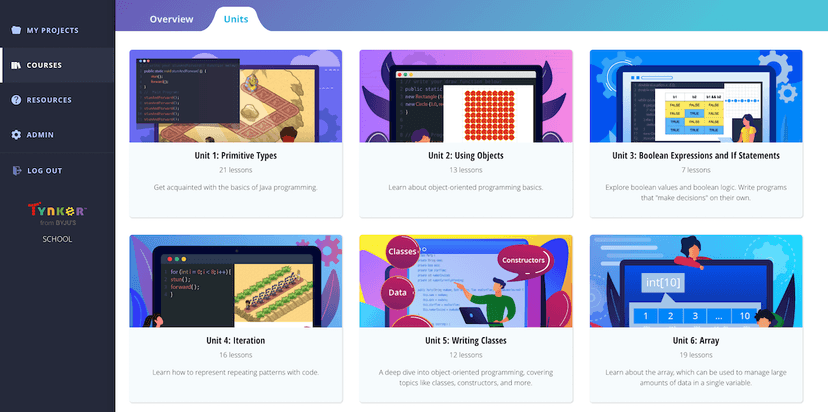
Screenshots

Take Action
For Tynker for Schools Premium | Elementary School Plan
If you represent Byju's and have a correction or new evidence, send the relevant source so we can review and update this page.
Submit a correctionDetails
- Pricing
- $3000 for up to 400 students per school site location. Free for non-subscription material. $20/student (50 student min).
- Platforms
- Web Browser, iOS (Apple mobile), iPadOS (Apple tablet), Android (Google mobile), Windows (Microsoft), macOS (Apple), Chrome OS (Google)
- Grade Levels
- Preschool, Prekindergarten, Transitional Kindergarten, Kindergarten, 1st Grade, 2nd Grade, 3rd Grade, 4th Grade, 5th Grade, 6th Grade
- Website
- Visit site