ThinkCERCA
Product by ThinkCERCA
Facts checked: Not yet checked
Our take (not a Learning Standard rating). This label applies to learning-science judgments throughout this overview.
Our take (not a Learning Standard rating)
ThinkCERCA provides a highly structured framework for argumentative writing and close reading across multiple subjects. While its reliance on the Claim-Evidence-Reasoning model provides excellent scaffolding for novices, the platform requires significant teacher facilitation to provide feedback and is not designed for independent, self-paced student learning.
Pros
- Uses a highly structured framework to break complex writing tasks into manageable cognitive steps.
- Applies cross-curricular reading passages to build domain-specific vocabulary alongside writing skills.
- Provides explicit scaffolding for evidence-based reasoning, a proven method for improving critical thinking.
- Promotes active reading through integrated highlighting and annotation tools.
Cons
- Requires extensive teacher involvement to review and grade open-ended writing assignments.
- Lacks immediate, automated feedback for the complex writing tasks students complete.
- Offers limited engagement features for younger students in the target grade range.
- Features a text-heavy interface that can overwhelm struggling readers.
What Do We Know About ThinkCERCA?
ThinkCERCA is an effective supplemental tool for building academic writing and critical thinking skills when guided by a teacher, but it is not a standalone learning program for your child. The platform focuses heavily on the CERCA framework, which stands for Claim, Evidence, Reasoning, Counterargument, and Audience. This structured approach applies cognitive scaffolding to the writing process, breaking down complex analytical tasks into manageable steps. Your child will read a text, interact with it through highlights and notes, and then construct a formal argument. Because the program spans science, social studies, and English, it builds background knowledge, which is a critical component of reading comprehension. However, parents should understand that this is primarily a school-based tool. It relies heavily on blended learning, meaning an educator must grade, provide feedback on, and guide the actual writing process. Without an adult to assess the reasoning and provide corrective feedback, the learning loop remains incomplete. The platform is not yet evaluated by The Learning Standard, but current evidence suggests it works best as a structured curriculum resource rather than an independent practice app.
How Does ThinkCERCA Work?
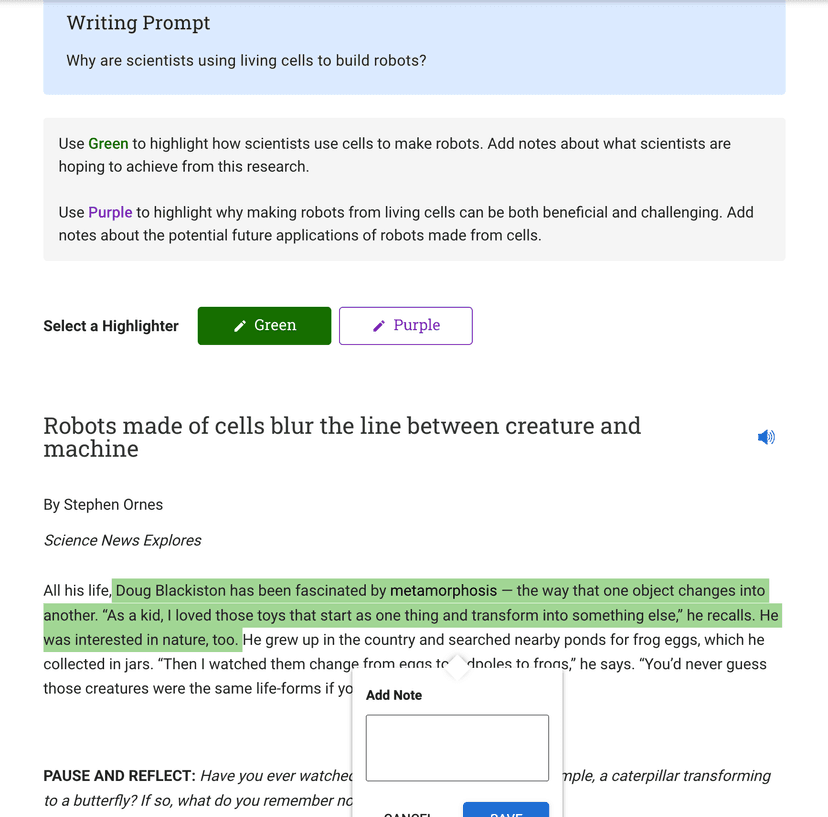
ThinkCERCA uses a structured, inquiry-based learning model focused on explicit writing instruction and close reading. Students begin by reading a subject-specific text and using built-in annotation tools to interact with the material, which promotes active reading and reduces cognitive load during the writing phase. After reading, students progress through the CERCA framework to build an argumentative essay. They first state a Claim, then gather Evidence directly from the text, explain their Reasoning, address a Counterargument, and refine their language for a specific Audience. This step-by-step breakdown functions as a structured schema, moving students from passive consumption to active synthesis. Teachers monitor progress through a dashboard and provide necessary qualitative feedback on the final essays, as the software cannot automatically grade high-level critical thinking and argumentative logic.
Strengths and tradeoffs of ThinkCERCA
The biggest strength of ThinkCERCA is its systematic scaffolding of complex writing tasks, while its biggest weakness is the lack of immediate, automated feedback for student writing. Structured Scaffolding: By forcing students to follow the Claim, Evidence, Reasoning format, the platform minimizes cognitive overload. Novice writers often struggle to organize their thoughts; this explicit structure acts as a cognitive schema, allowing students to focus on the content rather than the mechanics of essay organization. Cross-Curricular Knowledge: Reading comprehension relies heavily on background knowledge. ThinkCERCA provides texts across science, math, and social studies, applying literacy skills in a way that builds domain-specific vocabulary. Feedback Delays: Learning science dictates that immediate, specific feedback is crucial for correcting misconceptions. Because ThinkCERCA requires human grading for its core writing tasks, students may wait days to find out if their reasoning is sound. Interface Heavy: The text-heavy interface demands sustained attention and can frustrate students who struggle with executive function or reading stamina. While effective for structured classroom environments, its reliance on external teacher feedback limits its utility for independent, self-corrected practice.
Who Might Benefit From ThinkCERCA?
Best for middle and high school students who need structured scaffolding to improve their argumentative writing and reading comprehension. ThinkCERCA targets grades 3-12, but its text-heavy interface and rigorous analytical demands are most appropriate for students in grades 6 and above. It is an ideal tool for educators seeking a cross-curricular literacy framework to implement across an entire school. Because it relies heavily on teacher grading and direct instruction to close the feedback loop, it is not well-suited for parents looking for an independent, self-paced learning app for home use.
Data Transparency
Does Not Meet Data Transparency Standard
ThinkCERCA does not meet our data transparency standard. Its privacy policy does not document basic protections, including a COPPA or FERPA commitment and parents' right to delete their child's data.
15 of 35 checks passed
Evaluated October 2026
Privacy Policy & Terms of Service →Level 1 · Basic protections
Does not sell data or target ads at students, limits sharing, and lets parents see and delete their child's data.
Not documented: a COPPA or FERPA commitment, parents' right to delete their child's data
Level 2 · Parent control (meets the standard)
Families can get their data out, know who processes it, and know how long it is kept.
Not documented: a data retention timeline, named service providers, self-service deletion
Level 3 · Direct data access
Families or schools can pull their own data through an API, in a stated format.
Not documented: an API for retrieving their own data, a named export format
View all 35 checks
Parent Access4/8
Does the policy mention parents specifically?
“Parents, legal guardians, or eligible pupils may review personally identifiable information in the pupil’s records and correct erroneous information by contacting us at”
Can parents view their child's data?
“Parents, legal guardians, or eligible pupils may review personally identifiable information in the pupil’s records and correct erroneous information by contacting us at”
Can parents modify their child's data?
“Parents, legal guardians, or eligible pupils may review personally identifiable information in the pupil’s records and correct erroneous information by contacting us at”
Can parents delete their child's account?
The policy lets parents have their child's login credentials terminated or stop further collection, but only teachers and schools are described as able to request deletion.
Is there a dedicated Children's Privacy section?
The policy has no dedicated children's privacy or COPPA section; the only children's heading is a terms clause about parental agreement to use.
Does it reference COPPA compliance?
The policy does not mention COPPA.
Does it reference FERPA compliance?
The policy does not mention FERPA.
Is parental consent required for child accounts?
“Parents must agree to this Agreement on behalf of their children who are Students prior to any use of the ThinkCERCA Services by their children.”
Data Portability3/5
Can users access their personal data?
“If you have any questions about our Privacy Practices or would like to access your records, please contact us at”
Can users download/export their data?
“If you are the parent of a child under the age of 13, you can also instruct us to refrain from the further collection or use of personal information relating to your child, or request a copy of the information collected from your child or student, by emailing us at”
Is there a self-service data access tool?
“Teachers and school officials can view and modify their student’s ThinkCERCA profiles and the information on the Service at any time.”
Is a specific data format mentioned for export?
The policy does not name an export format.
Is there an API for data access?
The policy does not mention an API for data access.
Data Minimization1/6
Is data collection itemized?
“This includes page views, clicks, your computer’s Internet Protocol (IP) address, referring or exit pages, browser software and operating system, as well as the dates and times students and teachers access the Site.”
Can the app be used without a real name?
The policy says students must provide a name.
Can the app be used without an email?
The policy says students must provide an email address.
Does it state collection is limited to what is necessary?
The policy lists the minimum fields students must provide but does not say collection is limited to what is necessary.
Is IP address anonymized or truncated?
The policy says IP addresses are collected and does not say they are anonymized or truncated.
Is location tracking explicitly excluded?
The policy does not address location tracking.
Third-Party Protection5/7
Does it explicitly state no selling of data?
“Protect personal information—not profit from it. We never sell personal information to third parties.”
Are third-party providers named?
The policy describes service provider categories but names none.
Are providers contractually restricted?
“These services are strictly prohibited from using shared information for any reason other than providing their services”
No-targeted-advertising commitment?
“We do not use this data for other marketing purposes, to engage in targeted advertising, or to amass a profile of an individual student other than for K12 educational purposes.”
Is AI/ML data sharing addressed?
The policy does not address AI or machine learning.
Child-specific sharing restriction?
“Without your express permission, we will never sell, rent, share, or disclose student information or student-generated content to a third party for that third party’s commercial use.”
Cookies/tracking limited or opt-out?
“If you want to be notified of the use of cookies or prevent your browser from accepting cookies, the “Help” feature in most web browsers will provide instructions.”
Deletion & Retention1/5
Can users delete their account?
“Moreover, teachers and schools can request the deletion of students’ or teachers’ accounts and information relating to the Service”
Self-service deletion mechanism?
The policy says deletion happens by emailing a request, with no self-service option.
Specific data retention timeline?
The policy gives no specific retention period.
Auto-deletion of inactive accounts?
The policy does not address auto-deleting inactive accounts.
Post-deletion handling described?
The policy says data will be deleted on request subject to legal retention duties but does not describe what happens after deletion.
Advertising1/4
Advertising model explicitly disclosed?
The policy rules out targeted advertising but does not say whether the product shows ads.
Free from third-party advertisements?
The policy does not state that the product is free of third-party ads.
Children excluded from ad targeting?
“We do not use this data for other marketing purposes, to engage in targeted advertising, or to amass a profile of an individual student other than for K12 educational purposes.”
Ad-free option available?
The policy does not state that the product has no advertising or offers an ad-free option.
What This Means
The policy review did not meet our data transparency standard. The checks above show the documented findings and unknowns. A missing statement does not establish how the app handles data in practice.
About this evaluation: Based on automated analysis of Privacy Policy & Terms of Service against 35 policy-disclosure questions, including questions adapted from the Common Sense Privacy Program's published evaluation questions. TLS is not affiliated with Common Sense Media, and this is not a Common Sense rating. Quoted text is copied from the policy; unquoted notes are our summary. Results describe what the policy documents, not the company's actual practices. Privacy policies can change: this review reflects the version we analyzed and does not determine legal compliance.
Sources and review method
TLS combines product information and editorial analysis to explain how ThinkCERCA works, its tradeoffs, and the questions to ask before choosing it. Product features, an instructional rationale and evidence of learning outcomes are different kinds of information.
Formal Learning Standard assessment: not yet completed. Data Transparency findings are reported separately and do not establish learning effectiveness. Read our methodology.
Frequently Asked Questions About ThinkCERCA
Is ThinkCERCA free?
No, ThinkCERCA is a paid platform designed primarily for schools and districts. Pricing is custom and depends on the number of student licenses and the level of professional development required by the school.
Is ThinkCERCA good for elementary students?
Partially. While the platform offers content starting in third grade, the rigorous academic writing framework and text-heavy interface are generally more effective and better suited for middle and high school students who have mastered basic reading fluency.
What does ThinkCERCA teach?
ThinkCERCA teaches close reading, critical thinking, and academic writing. It focuses specifically on argumentative, informational, narrative, and research writing across core subjects like English, science, social studies, and math.
Does ThinkCERCA grade student essays automatically?
No. The platform organizes the writing process and provides scaffolding, but it requires a human teacher to read, evaluate, and provide qualitative feedback on the student's final writing assignments.
Has The Learning Standard evaluated ThinkCERCA?
TLS has not yet completed a Learning Standard evaluation of how well ThinkCERCA teaches. Its privacy policy has been reviewed for Data Transparency and does not yet document the basic protections (Level 1).
Is ThinkCERCA COPPA compliant?
A COPPA reference was not found in the reviewed privacy policy. This does not determine whether the app complies with COPPA. Policy review note: The policy does not mention COPPA.
Is ThinkCERCA FERPA compliant?
A FERPA reference was not found in the reviewed privacy policy. This does not determine whether the app complies with FERPA. Policy review note: The policy does not mention FERPA.
Does ThinkCERCA have a children's privacy policy?
No dedicated children's privacy section was found in the reviewed policy. Policy review note: The policy has no dedicated children's privacy or COPPA section; the only children's heading is a terms clause about parental agreement to use.
Does ThinkCERCA sell student data?
The reviewed policy states that the app does not sell data. This is a policy statement; actual data practices were not verified. Policy review note: ThinkCERCA states it never sells personal information.
Can you delete your data from ThinkCERCA?
The reviewed privacy policy describes account deletion. We have not tested the deletion process. Policy review note: Account deletion can be requested through the school.
Follow TLS Research
Subscribe to future TLS research updates: app reviews, findings, and what the evidence shows.
Screenshots
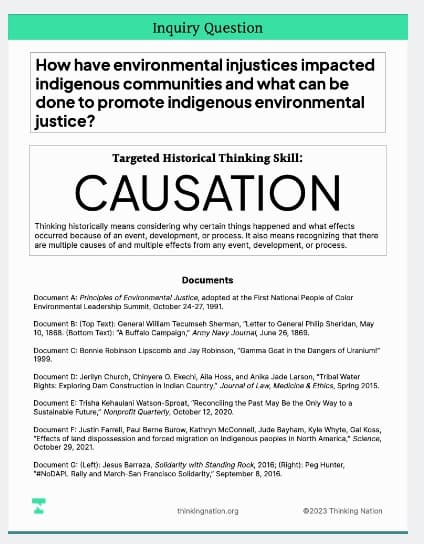
Take Action
For ThinkCERCA
If you represent ThinkCERCA and have a correction or new evidence, send the relevant source so we can review and update this page.
Submit a correctionDetails
- Pricing
- Pricing determined by license type, number of students, and professional development needs. Please inquire for custom pricing models.
- Platforms
- Web Browser, iOS (Apple mobile), iPadOS (Apple tablet), Windows (Microsoft), macOS (Apple), Chrome OS (Google)
- Grade Levels
- 3rd Grade, 4th Grade, 5th Grade, 6th Grade, 7th Grade, 8th Grade, 9th Grade, 10th Grade, 11th Grade, 12th Grade
- Website
- Visit site