Strawbees STEAM Classroom Robotics - micro:bit
Product by Strawbees
Facts checked: Not yet checked
Our take (not a Learning Standard rating). This label applies to learning-science judgments throughout this overview.
Our take (not a Learning Standard rating)
While The Learning Standard has not yet formally evaluated this platform, its design strongly supports experiential learning. It successfully bridges physical building with digital coding, promoting productive struggle and spatial reasoning, though the effectiveness depends heavily on teacher facilitation and classroom implementation.
Pros
- Combines physical manipulatives with block-based coding to strengthen spatial reasoning and computational thinking.
- Utilizes project-based learning to encourage productive struggle and iterative problem-solving.
- Provides structured lesson plans with worked examples that reduce cognitive load for teachers introducing robotics.
Cons
- Effectiveness relies heavily on the quality of teacher facilitation and active classroom management.
- Requires a significant upfront investment in physical hardware and ongoing software subscription costs.
- Younger students may experience working memory overload when managing both physical assembly and coding logic simultaneously.
What Do We Know About Strawbees STEAM Classroom Robotics - micro:bit?
Strawbees STEAM Classroom Robotics - micro:bit is a highly promising tool for project-based learning, though its ultimate effectiveness depends on active adult facilitation. While The Learning Standard has not yet formally evaluated this product, the integration of physical building straws with micro:bit coding aligns closely with established principles of experiential learning. Your child will not just stare at a screen; they will physically manipulate materials, which research shows enhances spatial reasoning and deepens understanding of abstract concepts. This platform requires children to build structures and program their movements, fostering an environment where productive struggle is a central mechanic. When your child writes a piece of code and the physical robot fails to execute the intended action, they receive immediate, tangible feedback. This forces them to debug and revise their thinking, a critical component of computational thinking. However, parents and educators should understand that this is not a self-guided app. It requires a teacher or engaged parent to structure the lessons, manage the physical pieces, and guide the learning process to prevent cognitive overload, particularly for younger learners handling both mechanical engineering and programming logic simultaneously.
How Does Strawbees STEAM Classroom Robotics - micro:bit Work?
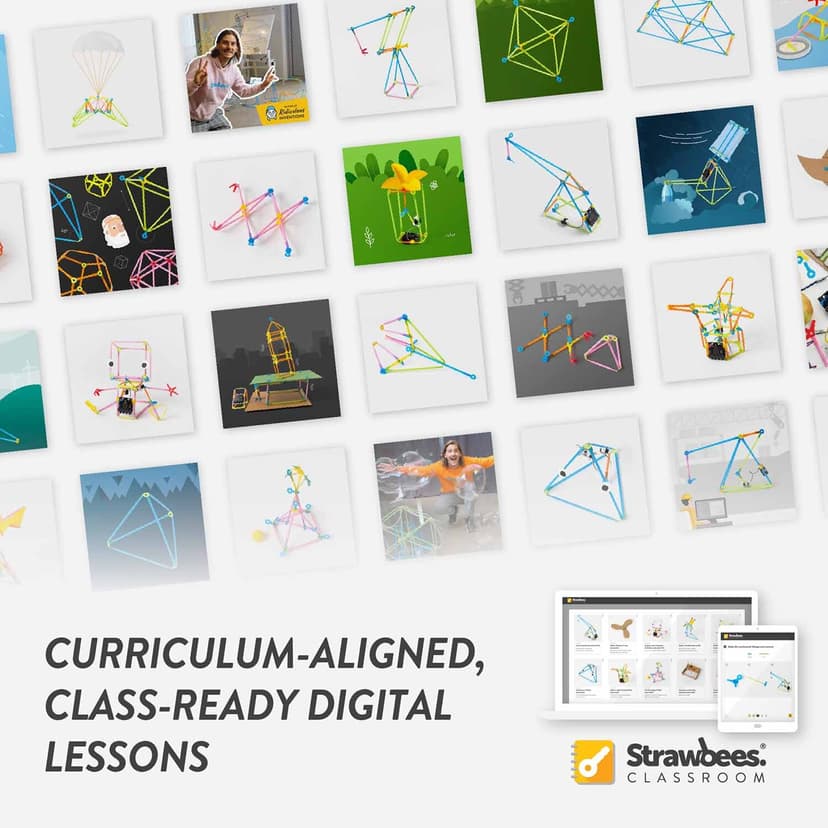
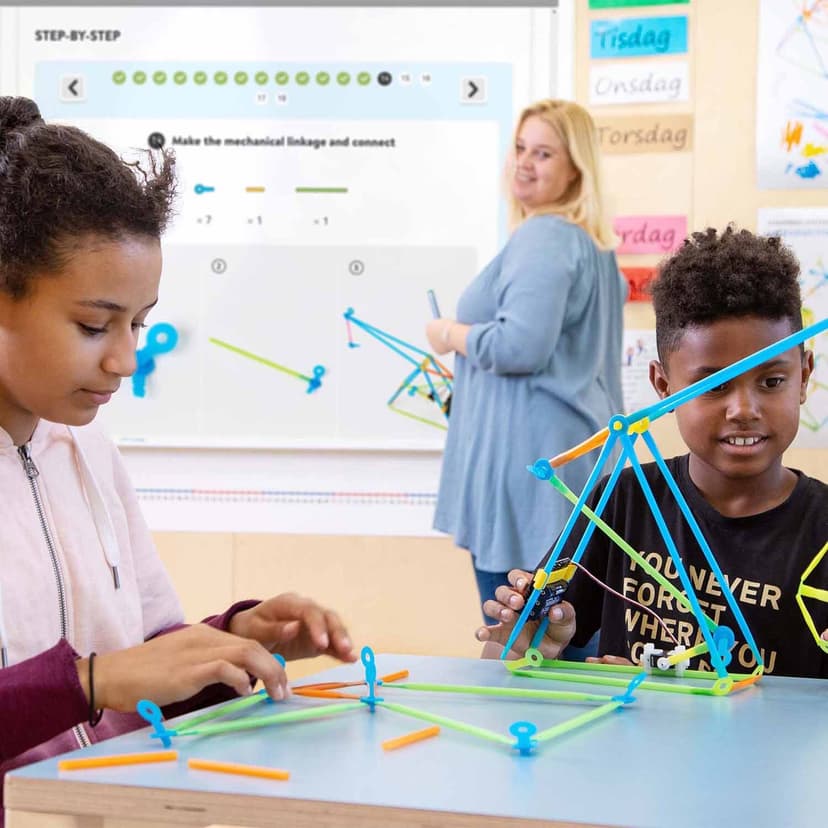
Strawbees STEAM Classroom Robotics utilizes project-based learning where students construct physical models and bring them to life using block-based coding. The ecosystem centers around the Strawbees Classroom digital platform, which provides teachers with a structured library of lessons and worked examples. Students begin by following these guided blueprints to construct geometric shapes and mechanical structures using reusable plastic straws and connectors. Once the physical structure is built, they integrate a robotics board equipped with a micro:bit microcomputer. Using a digital coding interface, students write scripts using drag-and-drop code blocks to control motors, lights, and sensors attached to their physical creation. This dual-modal approach requires students to translate digital logic into physical movement, employing iterative testing. They upload their code to the micro:bit, observe the robot's behavior, and adjust the physical structure or digital code based on the results. By providing explicit instruction through digital lesson plans followed by open-ended challenges, the platform scaffolds the learning process, moving from guided practice to independent application.
Strengths and tradeoffs of Strawbees STEAM Classroom Robotics - micro:bit
The biggest strength of Strawbees STEAM Classroom Robotics is its physical-digital integration that provides immediate, real-world feedback, while its biggest weakness is the high cognitive demand placed on novice learners managing multiple complex tasks. Physical manipulatives anchor the learning experience, translating abstract programming concepts into tangible actions, which effectively leverages embodied cognition to improve spatial reasoning and memory retention. The platform champions productive struggle, as students must iteratively test and debug both their structural engineering and their code. The inclusion of worked examples in the teacher lesson library helps scaffold this process, reducing initial friction when introducing new mechanical concepts. Conversely, the dual requirement of building and programming creates a risk of cognitive overload. Working memory limits can be easily exceeded when a younger student must simultaneously troubleshoot a failing physical joint and a logical error in their code. Furthermore, the reliance on external hardware means the system lacks adaptive software features like spaced repetition or automated corrective feedback; the feedback comes entirely from the physical environment, requiring a teacher to help synthesize the learning and correct underlying misconceptions.
Who Might Benefit From Strawbees STEAM Classroom Robotics - micro:bit?
Strawbees STEAM Classroom Robotics is best for elementary and middle school classrooms that want to integrate hands-on engineering with foundational coding instruction. Specifically targeting Kindergarten through 8th-grade students, the platform serves as an excellent bridge for learners who benefit from kinesthetic activities and tangible outcomes. It is ideal for schools implementing dedicated makerspaces or project-based learning curricula, where teachers have the dedicated time to guide students through extended, multi-step engineering challenges. It is less suited for independent, at-home use without an adult willing to actively facilitate the physical building and digital troubleshooting processes alongside the child.
Data Transparency
Does Not Meet Data Transparency Standard
Strawbees STEAM Classroom Robotics - micro:bit does not meet our data transparency standard. Its privacy policy does not document basic protections, including limits on sharing children's data, parents' right to see their child's data and parents' right to delete their child's data.
19 of 35 checks passed
Evaluated September 2026
CreXo: Privacy Policy →Level 1 · Basic protections
Does not sell data or target ads at students, limits sharing, and lets parents see and delete their child's data.
Not documented: limits on sharing children's data, parents' right to see their child's data, parents' right to delete their child's data
Level 2 · Parent control (meets the standard)
Families can get their data out, know who processes it, and know how long it is kept.
Not documented: a data retention timeline, self-service deletion
Level 3 · Direct data access
Families or schools can pull their own data through an API, in a stated format.
Not documented: an API for retrieving their own data, a named export format
View all 35 checks
Parent Access3/8
Does the policy mention parents specifically?
The policy does not mention parents of students anywhere; the only use of "parent" refers to the parent company.
Can parents view their child's data?
The policy does not give parents any right to view their child's data.
Can parents modify their child's data?
The policy does not give parents any right to change their child's data.
Can parents delete their child's account?
The policy does not give parents any right to delete their child's data or account.
Is there a dedicated Children's Privacy section?
“FERPA, COPPA and SOPPA Compliance RW Thrive products and RW Thrive online are compliant with Family Educational Rights and Privacy Act (FERPA), Children’s Online Privacy Protection Rule (COPPA), and Student Online Personal Protection Act (SOPPA).”
Does it reference COPPA compliance?
“RW Thrive products and RW Thrive online are compliant with Family Educational Rights and Privacy Act (FERPA), Children’s Online Privacy Protection Rule (COPPA), and Student Online Personal Protection Act (SOPPA).”
Does it reference FERPA compliance?
“RW Thrive products and RW Thrive online are compliant with Family Educational Rights and Privacy Act (FERPA), Children’s Online Privacy Protection Rule (COPPA), and Student Online Personal Protection Act (SOPPA).”
Is parental consent required for child accounts?
The policy does not address parental consent; it says students do not need accounts.
Data Portability2/5
Can users access their personal data?
“**Request access to your Personal Information.** This enables you to receive a copy of the Personal Information we hold about you and to check that we are lawfully processing it.”
Can users download/export their data?
“**Request the transfer of your Personal Information to you or another party.** Note that this right only applies to automated information which you initially provided consent for us to use or where we used the information to perform a contract with you.”
Is there a self-service data access tool?
The policy says access requests are made by contacting the company, not through a self-service tool.
Is a specific data format mentioned for export?
The policy does not name any export format.
Is there an API for data access?
The policy does not mention an API for getting data.
Data Minimization4/6
Is data collection itemized?
“When you contact us through the website, we collect from you your personal identifiers (name, email address, phone number, country), your professional information (job title), your product interests and any additional information you choose to include.”
Can the app be used without a real name?
“When you send content links to students, we do not collect any information about the visitors to those links, and students do not require an account to access shared links to content.”
Can the app be used without an email?
“When you send content links to students, we do not collect any information about the visitors to those links, and students do not require an account to access shared links to content.”
Does it state collection is limited to what is necessary?
“That any processing is lawful, fair, transparent and necessary for a specific purpose”
Is IP address anonymized or truncated?
The policy says it collects IP addresses but does not say they are anonymized or truncated.
Is location tracking explicitly excluded?
The policy does not explicitly rule out location tracking.
Third-Party Protection5/7
Does it explicitly state no selling of data?
“We do not currently sell any of your personal information under Nevada law, nor do we plan to do so in the future.”
Are third-party providers named?
“We use Zoom and Microsoft Teams to provide our webinars, which are both associated with RW Thrive accounts.”
Are providers contractually restricted?
“Employees and third parties are contractually prohibited from using collected Personal Information for any other purpose than providing the service used by us, for the purposes described in this Privacy Policy.”
No-targeted-advertising commitment?
“We do not share data for advertising or marketing purposes on our Educational Content Provision only.”
Is AI/ML data sharing addressed?
The policy covers automated decision-making on its websites but does not address sharing data for AI/ML.
Child-specific sharing restriction?
The policy says it does not collect student data but sets no sharing restriction specific to children.
Cookies/tracking limited or opt-out?
“You may opt in or out of non-essential cookies at any time by using the toggles in Your Privacy Rights.”
Deletion & Retention2/5
Can users delete their account?
“You can delete your accounts in our systems at any time, by contacting us and submitting a request to remove your information.”
Self-service deletion mechanism?
The policy says deletion requires contacting the company, not a self-service option.
Specific data retention timeline?
The policy says data is kept for as long as the account exists or is needed, with no specific time period.
Auto-deletion of inactive accounts?
The policy does not address automatic deletion of inactive accounts.
Post-deletion handling described?
“You can delete your accounts in our systems at any time, by contacting us and submitting a request to remove your information. However, we may need to use and retain personal information for a period if any of the following scenarios exist:”
Advertising3/4
Advertising model explicitly disclosed?
“RW Thrive does not carry paid advertisements for anyone else on either our Company Website(s) or our Educational Content.”
Free from third-party advertisements?
“RW Thrive does not carry paid advertisements for anyone else on either our Company Website(s) or our Educational Content.”
Children excluded from ad targeting?
The policy makes no ad-targeting commitment specific to children.
Ad-free option available?
“RW Thrive does not carry paid advertisements for anyone else on either our Company Website(s) or our Educational Content.”
What This Means
The policy review did not meet our data transparency standard. The checks above show the documented findings and unknowns. A missing statement does not establish how the app handles data in practice.
About this evaluation: Based on automated analysis of CreXo: Privacy Policy against 35 policy-disclosure questions, including questions adapted from the Common Sense Privacy Program's published evaluation questions. TLS is not affiliated with Common Sense Media, and this is not a Common Sense rating. Quoted text is copied from the policy; unquoted notes are our summary. Results describe what the policy documents, not the company's actual practices. Privacy policies can change: this review reflects the version we analyzed and does not determine legal compliance.
Sources and review method
TLS combines product information and editorial analysis to explain how Strawbees STEAM Classroom Robotics - micro:bit works, its tradeoffs, and the questions to ask before choosing it. Product features, an instructional rationale and evidence of learning outcomes are different kinds of information.
Formal Learning Standard assessment: not yet completed. Data Transparency findings are reported separately and do not establish learning effectiveness. Read our methodology.
Frequently Asked Questions About Strawbees STEAM Classroom Robotics - micro:bit
Is Strawbees STEAM Classroom Robotics free?
No. The product requires purchasing the physical robotics kits and hardware, which includes a one-year license to the Strawbees Classroom digital library for a single teacher account. Ongoing access to the lesson library requires renewing the subscription annually. Because the curriculum relies heavily on the integration of specific physical manipulatives with the digital lessons, schools must budget for both the upfront material costs and the recurring software access fees to maintain the program's effectiveness.
Is Strawbees STEAM Classroom Robotics good for Kindergarteners?
Yes, but it requires significant and active adult support. While the physical building elements are excellent for developing fine motor skills and basic spatial reasoning in early childhood, the coding and micro:bit integration demands high cognitive load. Kindergarteners will require heavy scaffolding, explicit worked examples, and direct instruction from a teacher to prevent working memory overload when attempting to translate digital code blocks into physical robotic movements.
What does Strawbees STEAM Classroom Robotics teach?
The platform teaches structural engineering, spatial reasoning, and computational thinking. Students learn to construct geometric shapes and mechanical linkages, translating two-dimensional plans into three-dimensional objects. They then apply block-based coding concepts like loops, conditionals, and variables to program physical movement using the micro:bit. This cross-curricular approach requires students to continuously test and refine their hypotheses, utilizing experiential learning mechanics to build a practical understanding of applied physics and computer science.
How does Strawbees STEAM Classroom Robotics compare to LEGO Education SPIKE?
Both platforms utilize project-based learning and physical manipulatives to teach engineering. Strawbees focuses more heavily on rapid prototyping with flexible, low-cost materials like plastic straws and open-source micro:bit hardware, encouraging large-scale, lightweight structural builds. In contrast, LEGO Education SPIKE offers a more rigid, highly structured building environment with proprietary software. LEGO may be easier for complete beginners to navigate independently, while Strawbees offers more flexibility for open-ended, cross-curricular structural design.
Has The Learning Standard evaluated Strawbees STEAM Classroom Robotics - micro:bit?
TLS has not yet completed a Learning Standard evaluation of how well Strawbees STEAM Classroom Robotics - micro:bit teaches. Its privacy policy has been reviewed for Data Transparency and does not yet document the basic protections (Level 1).
Is Strawbees STEAM Classroom Robotics - micro:bit COPPA compliant?
The reviewed privacy policy references COPPA. A policy reference alone does not establish COPPA compliance. Policy review note: The policy says it complies with COPPA.
Is Strawbees STEAM Classroom Robotics - micro:bit FERPA compliant?
The reviewed privacy policy references FERPA. A policy reference alone does not establish FERPA compliance. Policy review note: The policy says it complies with FERPA.
Does Strawbees STEAM Classroom Robotics - micro:bit have a children's privacy policy?
The reviewed policy includes a dedicated children's privacy section. Policy review note: The policy has a section with its own COPPA heading.
Does Strawbees STEAM Classroom Robotics - micro:bit sell student data?
The reviewed policy states that the app does not sell data. This is a policy statement; actual data practices were not verified. Policy review note: The company says it does not sell personal information.
Can you delete your data from Strawbees STEAM Classroom Robotics - micro:bit?
The reviewed privacy policy describes account deletion. We have not tested the deletion process. Policy review note: Users can have their accounts deleted by request.
Follow TLS Research
Subscribe to future TLS research updates: app reviews, findings, and what the evidence shows.
Screenshots
Take Action
For Strawbees STEAM Classroom Robotics - micro:bit
If you represent Strawbees and have a correction or new evidence, send the relevant source so we can review and update this page.
Submit a correctionDetails
- Pricing
- Price includes a 1-year license for accessing the full library of Strawbees Classroom for one teacher account.
- Platforms
- Web Browser, iOS (Apple mobile), iPadOS (Apple tablet), Android (Google mobile), Windows (Microsoft), macOS (Apple), Chrome OS (Google)
- Grade Levels
- Kindergarten, 1st Grade, 2nd Grade, 3rd Grade, 4th Grade, 5th Grade, 6th Grade, 7th Grade, 8th Grade
- Website
- Visit site