
Sketchar App
Product by Sketchar
Facts checked: Not yet checked
Our take (not a Learning Standard rating). This label applies to learning-science judgments throughout this overview.
Our take (not a Learning Standard rating)
Sketchar App effectively uses augmented reality as a visual scaffold to build spatial reasoning and foundational motor skills. However, it relies heavily on tracing without systematically fading these supports, meaning learners may struggle to transfer these skills to independent drawing. Formal evaluation by The Learning Standard is pending.
Pros
- Utilizes augmented reality to provide immediate visual scaffolding for fine motor skill development.
- Breaks complex illustrations into step-by-step worked examples that reduce cognitive load.
- Bridges digital and physical environments to promote tactile, experiential learning on real paper.
Cons
- Over-relies on tracing mechanics without systematically fading visual supports to build independent recall.
- Provides no corrective feedback on physical techniques like pencil grip, pressure, or shading.
- Presents a high financial barrier for home users with its expensive monthly consumer subscription.
What Do We Know About Sketchar App?
Sketchar App serves as an engaging entry point for basic drawing mechanics, but your child will need supplementary instruction to master independent artistic skills. While The Learning Standard has not yet formally evaluated Sketchar App, an initial review of its mechanics reveals a strong reliance on augmented reality to guide the drawing process. The app asks your child to look through their device camera to see a virtual overlay on physical paper. This provides excellent initial scaffolding. By following the virtual lines, your child develops hand-eye coordination and spatial awareness. However, learning science dictates that scaffolds must eventually be removed for true mastery to occur. Because Sketchar App leans heavily on tracing, your child may struggle to reproduce drawings without the app's guidance. The app does not currently test independent retrieval of anatomical proportions or perspective rules. If you want your child to learn how to draw, Sketchar App is a fun experiential tool to build confidence, but it functions more like digital training wheels than a comprehensive art instructor.
How Does Sketchar App Work?
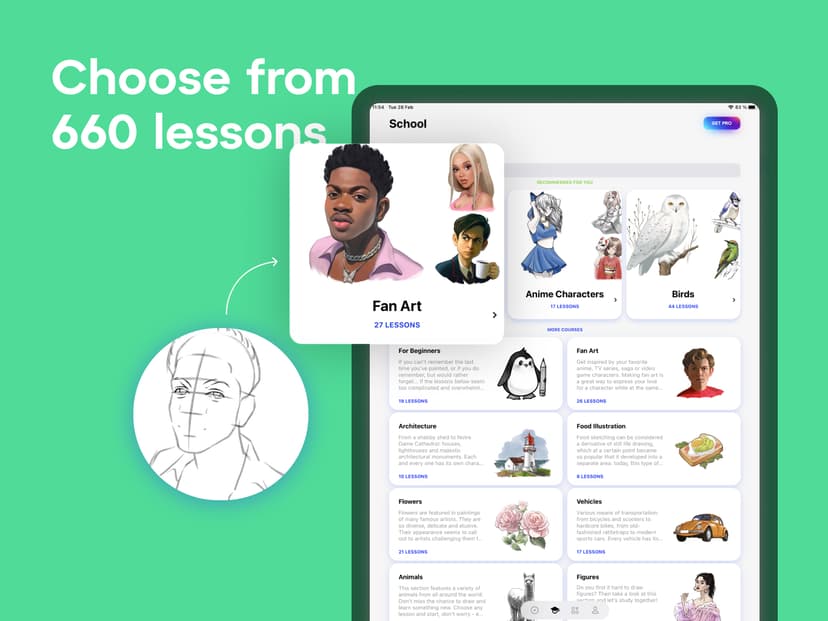
Sketchar App employs experiential learning and worked examples through augmented reality overlays to guide physical drawing. Students place their smartphone or tablet above a blank piece of paper, using a tripod or a tall glass to hold the device steady. Looking through the screen, they see a digital sketch projected onto their physical environment. The app breaks down complex illustrations into sequential, manageable steps. Students trace these virtual lines onto the real paper using a physical pencil or pen. This approach mirrors the pedagogical concept of worked examples, reducing the cognitive load required to conceptualize proportions and perspectives from scratch. In addition to the augmented reality tracing mode, the app offers interactive digital drawing lessons and AI-generated starting points. As students progress through a drawing, the app provides the next visual layer, ensuring they only focus on one discrete step at a time before moving to the final details.
Strengths and tradeoffs of Sketchar App
Sketchar App's biggest strength is its use of augmented reality to lower the barrier to entry for beginners, while its biggest weakness is the lack of structured scaffold-fading to promote independent skill transfer. Augmented reality as a visual scaffold is a powerful tool for novices. By overlaying the final product and intermediate steps onto the physical workspace, Sketchar App minimizes the extraneous cognitive load associated with visualizing proportions. Students can immediately see where a line belongs in relation to the whole image. This provides excellent experiential learning for spatial reasoning and basic fine motor control. However, the app stumbles in fostering long-term retention. Drawing requires retrieval practice: the act of recalling anatomical rules, lighting, and perspective from memory. Because Sketchar App allows continuous tracing, it bypasses the necessary struggle of retrieval. Without fading visual supports, students create a dependency on the app. Furthermore, the app lacks mechanisms for corrective feedback. It cannot detect if a student is holding the pencil incorrectly, applying the wrong pressure, or using improper shading techniques, which are critical elements of formal arts education.
Who Might Benefit From Sketchar App?
Best for students in grades 5 through 12 who want to build initial drawing confidence through structured, tactile practice. Sketchar App is an excellent fit for older children and teens who are intimidated by a blank page and need step-by-step guidance to start creating art. It works well in Career and Technical Education or Humanities settings where educators can use the free school version to supplement foundational design lessons. For home users, it is best suited for highly motivated learners who are willing to treat the app as a starting point and actively practice drawing without the augmented reality overlay to solidify their skills.
Data Transparency
Does Not Meet Data Transparency Standard
Sketchar App does not meet our data transparency standard. Its privacy policy does not document basic protections, including a statement that it does not sell data, a commitment against targeted advertising and limits on sharing children's data.
9 of 35 checks passed
Level 1 · Basic protections
Does not sell data or target ads at students, limits sharing, and lets parents see and delete their child's data.
Not documented: a statement that it does not sell data, a commitment against targeted advertising, limits on sharing children's data, contractual limits on service providers, a COPPA or FERPA commitment, parents' right to see their child's data, parents' right to delete their child's data
Level 2 · Parent control (meets the standard)
Families can get their data out, know who processes it, and know how long it is kept.
Level 3 · Direct data access
Families or schools can pull their own data through an API, in a stated format.
Not documented: an API for retrieving their own data, a named export format
View all 35 checks
Parent Access0/8
Does the policy mention parents specifically?
The policy does not mention parents.
Can parents view their child's data?
The policy does not address parental access to a child's data.
Can parents modify their child's data?
The policy does not address parents modifying a child's data.
Can parents delete their child's account?
The policy does not address parents deleting a child's account or data.
Is there a dedicated Children's Privacy section?
The policy has no children's privacy section.
Does it reference COPPA compliance?
The policy does not reference COPPA.
Does it reference FERPA compliance?
The policy does not reference FERPA.
Is parental consent required for child accounts?
The policy does not address parental consent for child accounts.
Data Portability2/5
Can users access their personal data?
“You have control over your personal data. We are taking reasonable steps in order to enable you to access, receive a copy of, update, amend, delete, or limit the use of your data.”
Can users download/export their data?
“You have control over your personal data. We are taking reasonable steps in order to enable you to access, receive a copy of, update, amend, delete, or limit the use of your data.”
Is there a self-service data access tool?
The policy describes updating and deleting data via the account but no self-service tool for accessing data.
Is a specific data format mentioned for export?
The policy does not mention any export format.
Is there an API for data access?
The policy does not describe an API for users to retrieve their own data.
Data Minimization1/6
Is data collection itemized?
“We collect your name, email address, username, demographic information (such as your gender and occupation), payment method information, feedback and survey responses, as well as other information you directly give Us on our Website or Mobile App.”
Can the app be used without a real name?
The policy states that the vendor collects users' names.
Can the app be used without an email?
The policy states that the vendor collects users' email addresses.
Does it state collection is limited to what is necessary?
The policy does not state that collection is limited to what is necessary.
Is IP address anonymized or truncated?
The policy states IP addresses are collected and does not say they are anonymized or truncated.
Is location tracking explicitly excluded?
The policy does not explicitly exclude location tracking.
Third-Party Protection2/7
Does it explicitly state no selling of data?
The policy does not state that the vendor does not sell personal data.
Are third-party providers named?
“We use third-party cloud providers – specifically, Amazon Web Services – to process and edit photographs.”
Are providers contractually restricted?
The policy says cloud providers do not use data beyond storage but does not state they are contractually restricted.
No-targeted-advertising commitment?
The policy states third-party cookies are used for advertising and makes no no-targeted-advertising commitment.
Is AI/ML data sharing addressed?
The policy does not address AI or machine learning data sharing.
Child-specific sharing restriction?
The policy has no child-specific sharing restriction.
Cookies/tracking limited or opt-out?
“Many of the cookies used on our Website and through emails, and Mobile App can be enabled or disabled through your browser or device.”
Deletion & Retention4/5
Can users delete their account?
“Regardless of your location, you may request the deletion of your personal data at any time by contacting us at hello@sketchar.io.”
Self-service deletion mechanism?
“You can update, amend, delete, or limit the use of your data via your account by yourself.”
Specific data retention timeline?
“You may disconnect your TikTok account at any time from your Ambassadors Platform profile settings, after which we will no longer collect data from your TikTok account. TikTok data collected prior to disconnection will be deleted within 30 days.”
Auto-deletion of inactive accounts?
The policy does not describe auto-deletion of inactive accounts.
Post-deletion handling described?
“In case you deleted your data and then demand to provide the copy of it, you will be able to receive only the current data; we cannot provide you with the deleted information.”
Advertising0/4
Advertising model explicitly disclosed?
The policy mentions third-party cookies for the company's advertising and marketing efforts but does not disclose an advertising model for the product.
Free from third-party advertisements?
The policy does not state that the product is free from third-party advertisements.
Children excluded from ad targeting?
The policy does not exclude children from ad targeting.
Ad-free option available?
The policy does not mention an ad-free option or state that the product has no advertising.
What This Means
The policy review did not meet our data transparency standard. The checks above show the documented findings and unknowns. A missing statement does not establish how the app handles data in practice.
About this evaluation: Based on automated analysis of Privacy Policy and Sketchar Ambassadors against 35 policy-disclosure questions, including questions adapted from the Common Sense Privacy Program's published evaluation questions. TLS is not affiliated with Common Sense Media, and this is not a Common Sense rating. Quoted text is copied from the policy; unquoted notes are our summary. Results describe what the policy documents, not the company's actual practices. Privacy policies can change: this review reflects the version we analyzed and does not determine legal compliance.
Sources and review method
TLS combines product information and editorial analysis to explain how Sketchar App works, its tradeoffs, and the questions to ask before choosing it. Product features, an instructional rationale and evidence of learning outcomes are different kinds of information.
Formal Learning Standard assessment: not yet completed. Data Transparency findings are reported separately and do not establish learning effectiveness. Read our methodology.
Frequently Asked Questions About Sketchar App
Is Sketchar App free?
Sketchar App is free for verified schools and educators. For consumers and parents, it operates on a freemium model. Basic features are available for free, but full access requires a premium subscription costing $25 per month or $79 per year.
Is Sketchar App good for middle and high schoolers?
Yes, Sketchar App is well-suited for students in grades 5 through 12. The interface and subject matter align with the fine motor skills and spatial reasoning capabilities of adolescents. The augmented reality mechanics require a steady hand and device management that younger children might find frustrating.
What does Sketchar App teach?
Sketchar App teaches foundational drawing mechanics, spatial awareness, and proportion. It provides step-by-step instructions for sketching various subjects, ranging from anime characters to realistic portraits. It focuses on experiential learning by having students physically draw on paper while following digital overlays.
Has The Learning Standard evaluated Sketchar App?
TLS has not yet completed a Learning Standard evaluation of how well Sketchar App teaches. Its privacy policy has been reviewed for Data Transparency and does not yet document the basic protections (Level 1).
Is Sketchar App COPPA compliant?
A COPPA reference was not found in the reviewed privacy policy. This does not determine whether the app complies with COPPA. Policy review note: The policy does not reference COPPA.
Is Sketchar App FERPA compliant?
A FERPA reference was not found in the reviewed privacy policy. This does not determine whether the app complies with FERPA. Policy review note: The policy does not reference FERPA.
Does Sketchar App have a children's privacy policy?
No dedicated children's privacy section was found in the reviewed policy. Policy review note: The policy has no children's privacy section.
Does Sketchar App sell student data?
A statement ruling out data selling was not found in the reviewed policy. This does not establish that the app sells student data. Policy review note: The policy does not state that the vendor does not sell personal data.
Can you delete your data from Sketchar App?
The reviewed privacy policy describes account deletion. We have not tested the deletion process. Policy review note: Users can request deletion of their personal data.
Follow TLS Research
Subscribe to future TLS research updates: app reviews, findings, and what the evidence shows.
Screenshots

Take Action
For Sketchar App
If you represent Sketchar and have a correction or new evidence, send the relevant source so we can review and update this page.
Submit a correctionDetails
- Pricing
- Free for schools. Consumers: Freemium, subscription-based ($25 month, $79 Year).
- Platforms
- iOS (Apple mobile), iPadOS (Apple tablet), Android (Google mobile), Tizen (Samsung mobile), Windows (Microsoft)
- Grade Levels
- 5th Grade, 6th Grade, 7th Grade, 8th Grade, 9th Grade, 10th Grade, 11th Grade, 12th Grade
- Website
- Visit site