Shapegrams
Product by Shapegrams
Facts checked: Not yet checked
Our take (not a Learning Standard rating). This label applies to learning-science judgments throughout this overview.
Our take (not a Learning Standard rating)
Shapegrams effectively teaches digital drawing and basic graphic design through direct instruction and worked examples, but its impact on deeper humanities subjects remains limited. The structured Google Slides format forces active engagement rather than passive watching, though the reliance on external video tutorials can split attention and increase cognitive load for younger learners.
Pros
- Uses worked examples in tutorial videos to demonstrate step-by-step digital drawing techniques.
- Requires active manipulation of shapes within Google Slides, preventing passive consumption.
- Scaffolds complex design tasks by breaking them down into manageable, independent challenges.
- Integrates seamlessly into existing classroom workflows using a familiar software environment.
Cons
- Splitting attention between instructional videos and the Google Slides workspace increases cognitive load.
- Lacks automated feedback mechanisms to correct mistakes during the drawing process.
- Requires strong foundational computer literacy, potentially frustrating younger students.
- Does not incorporate retrieval practice or spaced repetition to ensure long-term skill retention.
What Do We Know About Shapegrams?
Shapegrams is an effective tool for building specific digital literacy and graphic design skills, though it is not a comprehensive educational platform. Your child will learn to manipulate digital objects, understand spatial relationships, and build visual literacy through direct instruction. The program operates entirely within Google Slides, requiring your child to watch tutorial videos and immediately apply the demonstrated techniques to recreate complex images using basic shapes. This immediate application of worked examples grounds the learning in active practice rather than passive viewing. However, parents should understand that this app lacks built-in assessment or corrective feedback. If your child makes an error in their digital drawing, the software will not alert them or guide them to the correct action. Success relies heavily on a student's ability to self-monitor and compare their work against the final example. Because the instruction involves watching a video in one window while working in another, the split-attention effect can cause cognitive overload, especially for younger learners or those with executive functioning challenges. While the creator claims the platform builds a growth mindset, the actual mechanics primarily teach software proficiency and basic geometry. It serves best as a specialized supplement for building digital confidence rather than a core academic curriculum.
How Does Shapegrams Work?
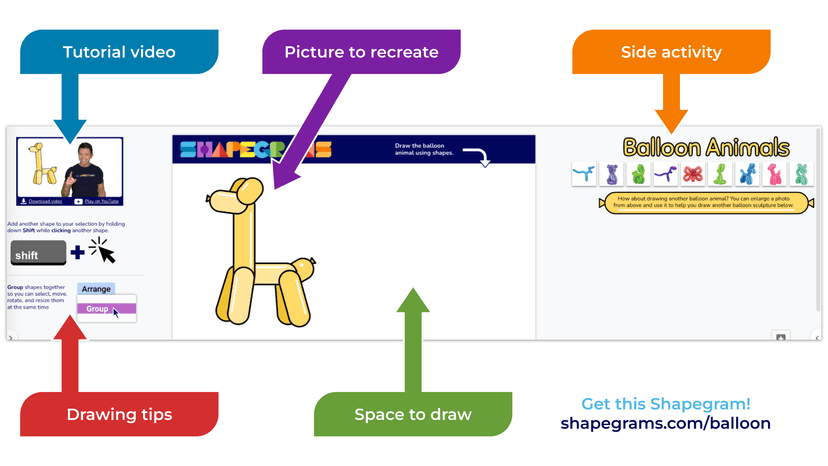
Shapegrams utilizes direct instruction paired with active practice by embedding worked examples directly into Google Slides templates. Students open a customized slide deck that contains a specific visual challenge, such as drawing a house or an animal using only basic geometric shapes. The deck includes embedded tutorial videos where an instructor demonstrates the exact sequence of clicks, drags, and formatting required to achieve the result. Students must alternate between watching the video instruction and actively manipulating the shapes on their own slide. This approach forces immediate application of the skill. The platform categorizes tasks into full lessons and shorter zipper challenges, allowing educators to scaffold instruction based on time and student ability. There is no adaptive algorithm or artificial intelligence driving the progression. Instead, the learning path relies on educator facilitation or student self-pacing. Because it lives entirely within the Google Workspace ecosystem, students also implicitly learn essential software navigation skills, such as keyboard shortcuts, layering, grouping, and color formatting, which transfer directly to other academic and professional tasks.
Strengths and tradeoffs of Shapegrams
The biggest strength of Shapegrams is its reliance on worked examples to reduce ambiguity, while its biggest weakness is the high cognitive load caused by the split-attention effect. By showing students exactly how to construct a complex image from simple parts, the program effectively models the desired behavior before demanding independent practice. This scaffolding helps learners build spatial reasoning and digital dexterity without the frustration of unstructured trial and error. Furthermore, the active manipulation required within the Google Slides environment ensures that students are learning through doing. However, the instructional design requires students to continuously toggle their attention between a tutorial video and their active workspace. Learning science shows that this split attention heavily taxes working memory, which can overwhelm novice learners and lead to careless errors. Additionally, the platform lacks automated feedback. Without a mechanism to highlight mistakes or prompt reflection, students may practice incorrect techniques or fail to notice discrepancies in their work. The program also misses opportunities for spaced repetition; once a technique is taught in a specific lesson, there is no systemic reinforcement built into subsequent modules to guarantee long-term retention.
Who Might Benefit From Shapegrams?
Best for middle-grade students and educators who want to integrate digital design and software literacy into project-based learning. The platform's reliance on Google Slides makes it an excellent fit for classrooms already utilizing the Google Workspace ecosystem. Because it lacks automated feedback, it requires a learning environment where teachers or parents are available to evaluate progress and provide encouragement. It is less suitable for early elementary students who lack the fine motor control for precise mouse manipulation, or for learners who easily experience cognitive overload when managing multiple open windows and simultaneous instructions.
Data Transparency
Does Not Meet Data Transparency Standard
Shapegrams does not meet our data transparency standard. Its privacy policy does not document basic protections, including a commitment against targeted advertising, limits on sharing children's data and contractual limits on service providers.
7 of 35 checks passed
Evaluated September 2026
Terms of Service →Level 1 · Basic protections
Does not sell data or target ads at students, limits sharing, and lets parents see and delete their child's data.
Not documented: a commitment against targeted advertising, limits on sharing children's data, contractual limits on service providers, parents' right to see their child's data, parents' right to delete their child's data, account deletion
Level 2 · Parent control (meets the standard)
Families can get their data out, know who processes it, and know how long it is kept.
Not documented: users' right to access their data, data export, a data retention timeline, self-service deletion
Level 3 · Direct data access
Families or schools can pull their own data through an API, in a stated format.
Not documented: an API for retrieving their own data, a named export format
View all 35 checks
Parent Access2/8
Does the policy mention parents specifically?
“Shapegrams collects no student or child information. Students do not log into Shapegrams. Instead, teachers or parents give students and children links to copy each Shapegrams Google document.”
Can parents view their child's data?
The policy gives parents no right to view a child's data and says no child data is collected.
Can parents modify their child's data?
The policy gives parents no right to change a child's data.
Can parents delete their child's account?
The policy says only that the company will delete information from children under 13 if it learns of it; it gives parents no right to request deletion.
Is there a dedicated Children's Privacy section?
The policy mentions COPPA under a general "Privacy Policy" heading and has no separate children's privacy section.
Does it reference COPPA compliance?
“Therefore, in accordance with the U.S. Children’s Online Privacy Protection Act, if we receive actual knowledge that anyone under the age of 13 has provided personal information to us without the requisite and verifiable parental consent, we will delete that information from the Site as quickly as is reasonably practical.”
Does it reference FERPA compliance?
The policy does not mention FERPA.
Is parental consent required for child accounts?
The policy says students have no accounts and people under 18 may not register, so it sets no parental-consent process for child accounts.
Data Portability0/5
Can users access their personal data?
The policy does not say users can access their personal data.
Can users download/export their data?
The policy does not mention exporting data.
Is there a self-service data access tool?
The policy does not describe a self-service data access tool.
Is a specific data format mentioned for export?
The policy names no export format.
Is there an API for data access?
The policy does not mention an API for data access.
Data Minimization2/6
Is data collection itemized?
The policy does not list the types of data it collects.
Can the app be used without a real name?
“Shapegrams collects no student or child information. Students do not log into Shapegrams.”
Can the app be used without an email?
“Shapegrams collects no student or child information. Students do not log into Shapegrams.”
Does it state collection is limited to what is necessary?
The policy does not say collection is limited to what is necessary.
Is IP address anonymized or truncated?
The policy does not address anonymizing IP addresses.
Is location tracking explicitly excluded?
The policy does not address location tracking.
Third-Party Protection2/7
Does it explicitly state no selling of data?
“User information is never sold or shared with other companies.”
Are third-party providers named?
“Credit card information is stored securely with the Stripe payment service.”
Are providers contractually restricted?
The policy does not describe contract limits on its providers.
No-targeted-advertising commitment?
The policy makes no commitment against targeted advertising.
Is AI/ML data sharing addressed?
The policy does not address AI or machine learning.
Child-specific sharing restriction?
The policy has no sharing restriction specific to children beyond saying no child information is collected.
Cookies/tracking limited or opt-out?
The policy does not address cookies or tracking.
Deletion & Retention0/5
Can users delete their account?
The policy lets users terminate or deactivate their account but does not say the account or its data will be deleted.
Self-service deletion mechanism?
The policy mentions deactivating an account but describes no self-service deletion.
Specific data retention timeline?
The policy gives no data retention timeline.
Auto-deletion of inactive accounts?
The policy does not address auto-deleting inactive accounts.
Post-deletion handling described?
The policy says licenses end when an account is terminated but does not say what happens to the data.
Advertising1/4
Advertising model explicitly disclosed?
The policy does not describe any advertising model.
Free from third-party advertisements?
The policy does not say whether the product has third-party ads.
Children excluded from ad targeting?
“Further, we do not knowingly accept, request, or solicit information from children or knowingly market to children.”
Ad-free option available?
The policy does not say the product is ad-free or offer an ad-free option.
What This Means
The policy review did not meet our data transparency standard. The checks above show the documented findings and unknowns. A missing statement does not establish how the app handles data in practice.
About this evaluation: Based on automated analysis of Terms of Service against 35 policy-disclosure questions, including questions adapted from the Common Sense Privacy Program's published evaluation questions. TLS is not affiliated with Common Sense Media, and this is not a Common Sense rating. Quoted text is copied from the policy; unquoted notes are our summary. Results describe what the policy documents, not the company's actual practices. Privacy policies can change: this review reflects the version we analyzed and does not determine legal compliance.
Sources and review method
TLS combines product information and editorial analysis to explain how Shapegrams works, its tradeoffs, and the questions to ask before choosing it. Product features, an instructional rationale and evidence of learning outcomes are different kinds of information.
Formal Learning Standard assessment: not yet completed. Data Transparency findings are reported separately and do not establish learning effectiveness. Read our methodology.
Frequently Asked Questions About Shapegrams
Is Shapegrams free?
Partially. Shapegrams offers a limited free tier that includes four full lessons and a dozen shorter zipper challenges. To access the complete and growing library of 66 lessons and 36 challenges, educators must purchase a membership. The paid tier costs $35 per year per teacher and includes a license to distribute the materials to students, making it an affordable addition for classroom technology integration.
Is Shapegrams good for elementary students?
Only for older elementary students. While the content is visually appealing, the platform requires significant fine motor skills to manipulate digital shapes, use keyboard shortcuts, and manage multiple browser windows. Students below third grade often experience cognitive overload due to the split-attention effect of watching a video while working in a separate document. Parents should expect to actively assist younger children during initial setup.
What does Shapegrams teach?
Shapegrams teaches digital literacy, basic graphic design, and spatial reasoning. By guiding students through the process of combining basic geometric shapes to create complex images, the program builds proficiency in software navigation. Students learn practical tech skills like grouping, layering, alignment, and formatting within the Google Workspace environment. These competencies directly transfer to standard professional and academic presentation software.
How does Shapegrams compare to traditional drawing apps?
Shapegrams focuses strictly on vector-based shape manipulation rather than freehand drawing. While traditional drawing apps require a stylus or strong freehand mouse skills, Shapegrams teaches students how to construct images using mathematical shapes and software tools. This builds technical software proficiency rather than traditional artistic technique. It serves as an excellent introduction to graphic design principles that rely on precision and spatial reasoning rather than raw artistic talent.
Has The Learning Standard evaluated Shapegrams?
TLS has not yet completed a Learning Standard evaluation of how well Shapegrams teaches. Its privacy policy has been reviewed for Data Transparency and does not yet document the basic protections (Level 1).
Is Shapegrams COPPA compliant?
The reviewed privacy policy references COPPA. A policy reference alone does not establish COPPA compliance. Policy review note: The policy says it acts in line with COPPA.
Is Shapegrams FERPA compliant?
A FERPA reference was not found in the reviewed privacy policy. This does not determine whether the app complies with FERPA. Policy review note: The policy does not mention FERPA.
Does Shapegrams have a children's privacy policy?
No dedicated children's privacy section was found in the reviewed policy. Policy review note: The policy mentions COPPA under a general "Privacy Policy" heading and has no separate children's privacy section.
Does Shapegrams sell student data?
The reviewed policy states that the app does not sell data. This is a policy statement; actual data practices were not verified. Policy review note: The policy says user information is never sold.
Can you delete your data from Shapegrams?
Account deletion was not documented in the reviewed privacy policy. This does not establish whether deletion is available. Policy review note: The policy lets users terminate or deactivate their account but does not say the account or its data will be deleted.
Follow TLS Research
Subscribe to future TLS research updates: app reviews, findings, and what the evidence shows.
Screenshots

Take Action
For Shapegrams
If you represent Shapegrams and have a correction or new evidence, send the relevant source so we can review and update this page.
Submit a correctionDetails
- Pricing
- Four lessons and a dozen zipper challenges are free. Teachers with a membership get access to the growing library of 66 lessons and 36 zippers and have a license to distribute to their students. Membership is $35 per year per teacher.
- Platforms
- Web Browser, Windows (Microsoft), macOS (Apple), Chrome OS (Google)
- Website
- Visit site