Progress Learning
Product by USATestprep
Facts checked: Not yet checked
Our take (not a Learning Standard rating). This label applies to learning-science judgments throughout this overview.
Our take (not a Learning Standard rating)
While Progress Learning aligns closely with state standards and provides extensive practice for K-12 students, its heavy reliance on direct instruction and multiple-choice gamification limits deeper cognitive engagement. It functions well for test preparation and basic retrieval practice, but may not foster complex problem-solving skills without teacher intervention.
Pros
- Aligns assessment questions directly to specific state standards to help teachers track granular mastery.
- Utilizes immediate feedback during practice sessions to correct misconceptions before they encode.
- Employs a mastery-based progression model that requires students to demonstrate competence before advancing.
- Incorporates basic gamification elements to sustain engagement during repetitive retrieval practice.
Cons
- Relies heavily on multiple-choice formats that prioritize recognition over active recall and synthesis.
- Direct instruction videos often lack interactive elements or embedded checks for understanding to sustain attention.
- Extrinsic rewards from gamification may diminish long-term intrinsic motivation for learning.
What Do We Know About Progress Learning?
Progress Learning is an effective tool for helping your child prepare for state tests through structured retrieval practice, but it is not a substitute for deep, inquiry-based learning. Formerly known as USATestprep and Education Galaxy, this platform is designed to align directly with the specific state standards your child's school follows. It delivers content across math, science, social studies, and humanities for grades K-12. If your child's school uses Progress Learning, you will see a system heavily focused on direct instruction videos followed by practice quizzes. This approach leverages mastery-based progression, meaning your child must demonstrate understanding of a concept before moving on. However, because the platform relies primarily on multiple-choice questions, it tests recognition rather than deep synthesis or critical thinking. The inclusion of mini-games serves as an extrinsic motivator, which can help keep your child engaged during long practice sessions, but may not foster a genuine love of the material. Ultimately, it serves best as a supplemental drill-and-practice resource to reinforce what is already being taught in the classroom.
How Does Progress Learning Work?
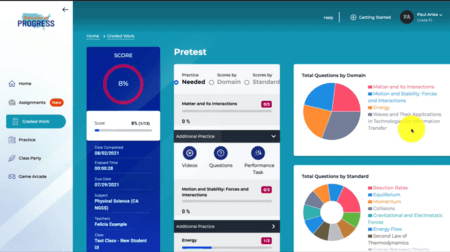
Progress Learning uses a mastery-based progression model combining direct instruction with gamified retrieval practice to target state-specific academic standards. When your child logs in, they are typically assigned specific learning modules by their teacher or placed on an individualized learning path based on a diagnostic assessment. The instruction begins with brief, direct-instruction video lessons or textual explanations outlining the core concepts. Following the instruction, students complete practice sets that heavily feature multiple-choice questions. As they answer correctly, the system tracks their proficiency against specific state standards. The platform incorporates spaced practice by revisiting prior standards in spiral reviews. To maintain engagement, completing academic tasks earns students access to short, arcade-style games. This gamification loop is designed to provide cognitive breaks while incentivizing the completion of drill-based tasks. Teachers monitor this activity through a backend dashboard, allowing them to identify learning gaps and intervene with targeted small-group instruction.
Strengths and tradeoffs of Progress Learning
Progress Learning's biggest strength is its granular alignment to state standards for targeted retrieval practice, while its biggest weakness is an over-reliance on multiple-choice formats that fail to assess higher-order thinking. From a learning science perspective, the platform does several things well. Mastery-based learning ensures students do not advance to complex topics until they have demonstrated foundational competence. Furthermore, the platform utilizes retrieval practice by repeatedly testing students on previously learned material, which is a proven method for strengthening memory traces. The immediate feedback provided after incorrect answers helps correct misconceptions quickly. However, the instructional design has distinct limitations. The heavy use of multiple-choice questions promotes recognition over recall. Students can often guess or eliminate answers without actually generating the knowledge themselves. The direct instruction videos are largely passive, missing opportunities for embedded active learning prompts that keep working memory engaged. Finally, the extrinsic gamification elements, where students play arcade games as a reward for answering questions, can distract from the learning content itself and may decrease intrinsic motivation over time.
Who Might Benefit From Progress Learning?
Progress Learning is best for K-12 students who need structured, standards-aligned practice to prepare for high-stakes state assessments. Because the platform maps its content directly to specific state requirements, it is highly effective for school districts looking to track compliance and basic proficiency across math, science, humanities, and social sciences. It serves as an excellent supplemental tool for teachers who need a reliable source of drill-and-practice activities to reinforce daily classroom instruction. However, it is less suitable for families seeking exploratory, inquiry-based learning experiences, as the environment is highly structured and assessment-focused.
Sources and review method
TLS combines product information and editorial analysis to explain how Progress Learning works, its tradeoffs, and the questions to ask before choosing it. Product features, an instructional rationale and evidence of learning outcomes are different kinds of information.
Formal Learning Standard assessment: not yet completed. Data Transparency findings are reported separately and do not establish learning effectiveness. Read our methodology.
Frequently Asked Questions About Progress Learning
Is Progress Learning free?
No, Progress Learning is not free for individual consumer use. It operates on an institutional subscription model purchased by teachers, school leaders, or district administrators. However, schools can request free trials to evaluate the platform before purchasing.
Is Progress Learning good for elementary students?
Yes, Progress Learning includes content specifically adapted for K-5 students (formerly known as Education Galaxy). It utilizes colorful interfaces and gamified rewards to maintain engagement during foundational skills practice, though parents should monitor to ensure the games do not overshadow the learning.
What does Progress Learning teach?
Progress Learning teaches state-specific standards across four core subjects: Math, Science, Social Science, and Humanities. The content spans from Kindergarten through 12th grade and focuses heavily on the specific benchmarks required by your state's department of education.
Has The Learning Standard evaluated Progress Learning?
TLS has not yet completed a Learning Standard evaluation of how well Progress Learning teaches. TLS has not published a Data Transparency result for its privacy policy.
Follow TLS Research
Subscribe to future TLS research updates: app reviews, findings, and what the evidence shows.
Screenshots
Latest News
All Progress Learning NewsTake Action
For Progress Learning
If you represent USATestprep and have a correction or new evidence, send the relevant source so we can review and update this page.
Submit a correctionDetails
- Pricing
- School subscriptions can be purchased by Teacher, School Leader, or District Administrator. Free trials are available.
- Platforms
- Windows (Microsoft), macOS (Apple), Chrome OS (Google), Other
- Grade Levels
- Kindergarten, 1st Grade, 2nd Grade, 3rd Grade, 4th Grade, 5th Grade, 6th Grade, 7th Grade, 8th Grade, 9th Grade, 10th Grade, 11th Grade, 12th Grade
- Website
- Visit site