Online Resource Bundles and Classroom Command Center
Product by Spider Learning, Inc.
Facts checked: Not yet checked
Our take (not a Learning Standard rating). This label applies to learning-science judgments throughout this overview.
Our take (not a Learning Standard rating)
While this platform provides teachers with flexible digital content for middle and early high school students, The Learning Standard has not yet evaluated its instructional effectiveness. The tool enables personalized assignment of direct instruction and project-based tasks, which supports differentiated learning, but its reliance on teacher implementation means outcomes will vary heavily based on classroom execution.
Pros
- Allows educators to differentiate instruction by assigning specific digital units to individual students or small groups.
- Integrates multiple instructional approaches, including direct instruction and project-based learning, to support diverse cognitive needs.
- Centralizes content delivery and progress monitoring through a single dashboard to reduce cognitive load for teachers managing blended classrooms.
Cons
- Heavily dependent on teacher facilitation, meaning the platform itself does not guarantee student mastery without active educator intervention.
- Lacks automated spaced repetition algorithms to ensure long-term retention of core concepts across the provided units.
- The broad scope across multiple subjects makes it difficult to assess the depth and rigor of specific domain-specific materials without further evaluation.
What Do We Know About Online Resource Bundles and Classroom Command Center?
Online Resource Bundles and Classroom Command Center functions as a digital curriculum delivery tool whose effectiveness depends entirely on how your child's teacher implements it. Because The Learning Standard has not yet evaluated this specific curriculum, there is no guarantee that the underlying content utilizes proven learning science principles like retrieval practice or interleaved practice. This platform is designed to replace or supplement traditional textbooks in grades six through nine across core subjects like math, science, and the humanities. Your child will interact with digital units called Online Resource Bundles, which contain reading materials, direct instruction elements, and project-based tasks. The Command Center aspect allows educators to monitor progress and assign different tasks to different students. If your child struggles with a concept, the teacher can manually assign a remedial unit. Conversely, advanced students can receive enrichment materials. This supports the concept of differentiated learning, ensuring students receive instruction suited to their current mastery level. However, parents should understand that this is not an adaptive artificial intelligence tutor. It does not automatically adjust difficulty based on real-time keystrokes or quiz answers. It is a classroom management and content delivery system that requires an active, engaged educator to analyze the data and make pedagogical decisions.
How Does Online Resource Bundles and Classroom Command Center Work?
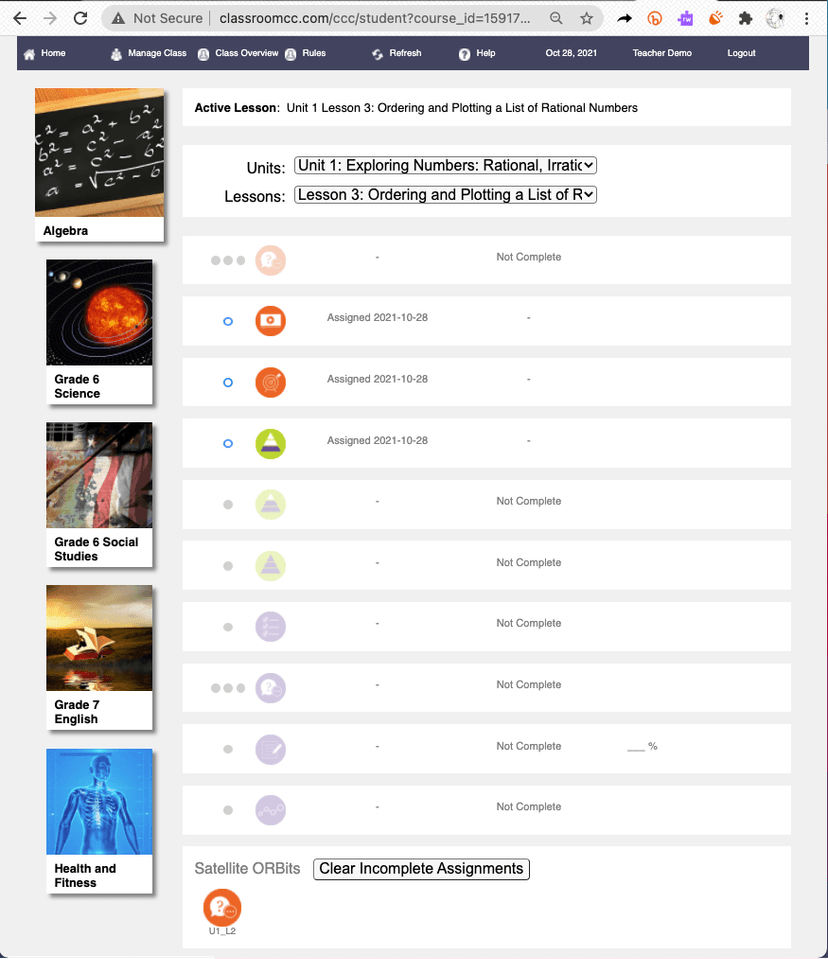
Online Resource Bundles and Classroom Command Center uses a blended learning approach that relies on teacher-directed personalized assignments. Educators access a library of digital units spanning multiple subjects for middle school and early high school. Using the Classroom Command Center dashboard, teachers assign specific Online Resource Bundles to the entire class, small collaborative groups, or individual students based on formative assessment data. When your child logs into the system, they see a customized playlist of instructional activities. These activities mix direct instruction, such as reading texts or reviewing multimedia presentations, with project-based learning tasks that require applying concepts to novel situations. As students complete these activities, the platform tracks their progress and task completion rates. The system does not employ automated adaptive logic. Instead, it surfaces performance data to the teacher. The educator must then use this data to identify knowledge gaps, provide corrective feedback, and assign follow-up bundles to ensure mastery. This design requires the teacher to act as the primary instructional decision-maker rather than relying on software algorithms.
Strengths and tradeoffs of Online Resource Bundles and Classroom Command Center
The biggest strength of Online Resource Bundles is its facilitation of differentiated instruction, while its biggest weakness is the lack of automated retrieval practice and adaptive feedback. By allowing teachers to easily assign different digital units to different students, the platform solves a logistical hurdle in traditional classrooms. Educators can provide targeted remedial content to struggling learners without disrupting the pace of the broader class. This aligns well with the learning science principle of meeting students at their zone of proximal development. The inclusion of project-based learning tasks also encourages deeper cognitive processing by forcing students to synthesize information rather than merely recalling facts. However, the platform relies heavily on manual intervention. It does not appear to utilize built-in spaced repetition, meaning students are not automatically prompted to revisit older material just as they are about to forget it. Furthermore, because the system spans nearly every core subject from sixth to ninth grade, the quality and alignment of the instructional materials remain unverified pending evaluation. Without automated scaffolding or immediate corrective feedback embedded in the lessons, students who misinterpret direct instruction may practice errors unless the teacher intervenes swiftly.
Who Might Benefit From Online Resource Bundles and Classroom Command Center?
This platform is best for middle school educators and school districts seeking a centralized system to deliver and manage blended learning across multiple subjects. It is specifically designed for sixth through ninth-grade classrooms where teachers want to move away from rigid textbook instruction toward more flexible, differentiated digital assignments. The tool serves educators who prefer to manually curate and assign content based on their own formative assessments rather than relying on automated algorithmic tutors. It is not suitable for independent home use by parents, as it requires a school-based license and active teacher management to function effectively.
Sources and review method
TLS combines product information and editorial analysis to explain how Online Resource Bundles and Classroom Command Center works, its tradeoffs, and the questions to ask before choosing it. Product features, an instructional rationale and evidence of learning outcomes are different kinds of information.
Formal Learning Standard assessment: not yet completed. Data Transparency findings are reported separately and do not establish learning effectiveness. Read our methodology.
Frequently Asked Questions About Online Resource Bundles and Classroom Command Center
Is Online Resource Bundles and Classroom Command Center free?
No, the platform is not free. It operates on a commercial licensing model that charges schools and districts per-course rates for both students and teachers. It is not available as a direct-to-consumer purchase for individual families.
Is Online Resource Bundles and Classroom Command Center good for middle schoolers?
Yes, the platform is specifically designed for students in sixth through ninth grades. The content and user interface are tailored to early adolescents, balancing direct instruction with project-based learning activities appropriate for this developmental stage.
What does Online Resource Bundles and Classroom Command Center teach?
The platform provides comprehensive curriculum content across multiple core subjects. It covers Humanities, Social Science, Science, Mathematics, Applied Science, and Career and Technical Education (CTE) for grades six through nine.
Does Online Resource Bundles and Classroom Command Center adapt to my child's learning pace?
Partially. The software does not automatically adapt its difficulty using artificial intelligence. Instead, it provides data to teachers, who must then manually adjust assignments and personalize the learning path based on your child's performance.
Has The Learning Standard evaluated Online Resource Bundles and Classroom Command Center?
TLS has not yet completed a Learning Standard evaluation of how well Online Resource Bundles and Classroom Command Center teaches. TLS has not published a Data Transparency result for its privacy policy.
Follow TLS Research
Subscribe to future TLS research updates: app reviews, findings, and what the evidence shows.
Screenshots

Take Action
For Online Resource Bundles and Classroom Command Center
If you represent Spider Learning, Inc. and have a correction or new evidence, send the relevant source so we can review and update this page.
Submit a correctionDetails
- Pricing
- License model with per-course rates for students and teachers
- Platforms
- Web Browser, iOS (Apple mobile), iPadOS (Apple tablet), Android (Google mobile), Windows (Microsoft), macOS (Apple), Chrome OS (Google)
- Grade Levels
- 6th Grade, 7th Grade, 8th Grade, 9th Grade
- Website
- Visit site