Microsoft MakeCode
Product by Microsoft
Facts checked: Not yet checked
Our take (not a Learning Standard rating). This label applies to learning-science judgments throughout this overview.
Our take (not a Learning Standard rating)
While The Learning Standard has not formally evaluated Microsoft MakeCode, its pedagogical design strongly supports project-based learning. It successfully bridges concrete visual block coding and abstract text-based programming syntax. However, without built-in spaced retrieval practice or automated corrective feedback, students may struggle with syntax retention when working independently.
Pros
- Scaffolds cognitive load by allowing seamless toggling between visual block-based logic and text-based JavaScript or Python.
- Utilizes project-based learning to increase student engagement through tangible outcomes like playable mini-games and hardware integration.
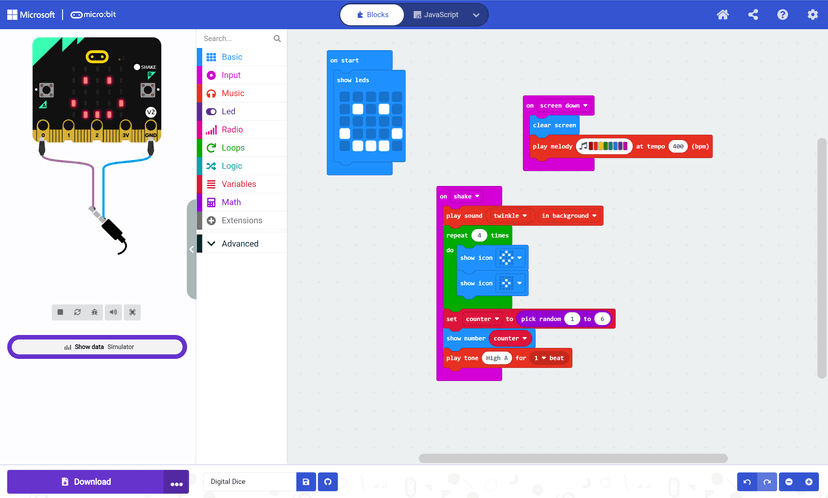
- Provides immediate visual feedback via an on-screen simulator, allowing students to test hypotheses and debug errors in real time.
Cons
- Lacks structured spaced repetition protocols to ensure long-term retention of complex programming syntax.
- Fails to provide explicit worked examples for advanced computational thinking concepts before asking students to apply them.
- Does not include an adaptive learning path, requiring educators or parents to manually sequence project difficulty.
What Do We Know About Microsoft MakeCode?
Microsoft MakeCode is an effective transitional tool for teaching computational thinking, though The Learning Standard has not yet formally rated its outcomes. Your child will use this platform to build functional games and program physical devices. The system relies heavily on experiential learning, requiring students to learn by doing rather than passively absorbing lectures. Because MakeCode allows users to instantly switch between block-based drag-and-drop coding and actual Python or JavaScript, it significantly reduces the cognitive load typically associated with learning programming syntax. When your child forgets how to type a specific command in Python, they can build the logic in blocks and flip the view to see the exact text equivalent. This serves as an on-demand worked example. However, parents should understand that this is a sandbox environment rather than an adaptive tutoring system. It does not automatically assess your child's mastery of variables or loops, nor does it force them to retrieve prior knowledge through spaced practice. To maximize learning, you or a teacher must guide your child through increasingly complex projects and ask them to explain their code aloud to ensure they actually understand the underlying logic.
How Does Microsoft MakeCode Work?
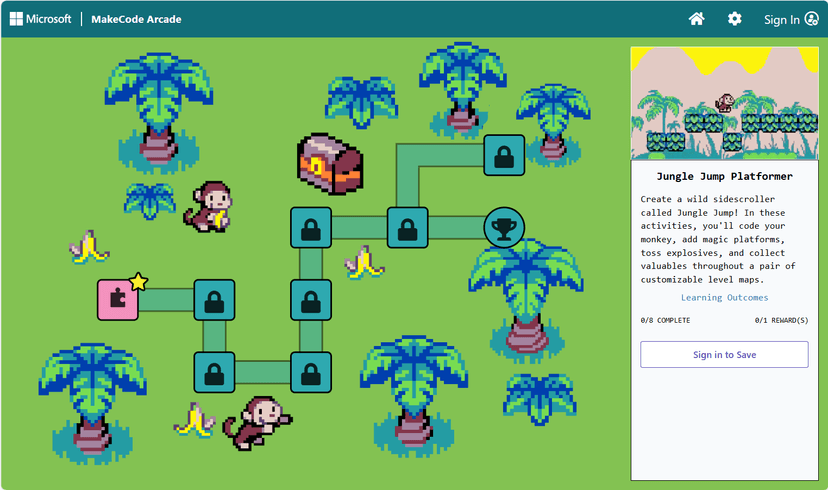
Microsoft MakeCode uses a project-based, constructionist approach where students learn programming by building interactive simulations and games. The platform centers around an integrated development environment equipped with a live simulator. Students begin by snapping together color-coded visual blocks representing programming concepts like loops, conditionals, and variables. As they assemble these blocks, the on-screen simulator instantly updates to reflect their code, providing immediate sensory feedback. This allows students to test hypotheses and debug errors iteratively. The core learning mechanic relies on the dual-modal interface. Students can toggle their workspace from visual blocks to text-based JavaScript or Python at any time. This translates the visual logic into raw syntax, serving as a transitional scaffold. If a student makes an error in the text editor, they can switch back to blocks to correct the logic structure. The platform provides structured tutorials with step-by-step instructions, but it relies on user-driven exploration rather than mastery-based gates. Students must self-monitor their progress and actively decide when to attempt more complex hardware integrations or advanced game mechanics.
Strengths and tradeoffs of Microsoft MakeCode
The biggest strength of Microsoft MakeCode is its cognitive scaffolding through dual-modal code viewing, while its biggest weakness is the absence of structured retrieval practice for syntax memorization. Scaffolding complex concepts is handled exceptionally well. By allowing students to seamlessly transition between block coding and text-based languages like Python, the platform lowers the intrinsic cognitive load of learning programming. Students can focus entirely on computational logic using blocks, and once that schema is established, they can map those concepts directly to text syntax. The live simulator also applies the principle of immediate corrective feedback, letting students see the exact physical or virtual result of their code execution instantly. Conversely, the platform lacks formal mechanisms for spaced retrieval practice. Learning science dictates that students must actively recall information over increasing intervals to embed it in long-term memory. MakeCode does not prompt students to recall syntax or logic structures from previous sessions. Additionally, because the environment is largely exploratory, students can easily rely on trial-and-error rather than engaging in deep cognitive processing. Educators must supplement the platform with direct instruction and formal assessments to ensure students are not just copying tutorials but actually building transferable computational thinking skills.
Who Might Benefit From Microsoft MakeCode?
Microsoft MakeCode is best for students in grades 4 through 12 who need a heavily scaffolded transition from beginner block coding to advanced text-based programming. It serves as an excellent foundational tool for middle school and high school classrooms focusing on computer science, career and technical education, or applied STEM subjects. The platform is ideal for project-based learning environments where educators want students to program physical hardware like micro:bits or build arcade games. Because it lacks built-in mastery assessments, it is best utilized by self-motivated learners or within a structured classroom where a teacher can provide necessary pedagogical oversight and learning verification.
Data Transparency
Meets Data Transparency Standard
Microsoft MakeCode meets our data transparency standard at Level 2 of 3 (Parent control). Level 3 needs the policy to document an API for retrieving their own data and a named export format.
24 of 35 checks passed
Evaluated October 2026
Microsoft Privacy Statement →Level 1 · Basic protections
Does not sell data or target ads at students, limits sharing, and lets parents see and delete their child's data.
Level 2 · Parent control (meets the standard)
Families can get their data out, know who processes it, and know how long it is kept.
Level 3 · Direct data access
Families or schools can pull their own data through an API, in a stated format.
Not documented: an API for retrieving their own data, a named export format
View all 35 checks
Parent Access6/8
Does the policy mention parents specifically?
“When a child is under 13-or a higher age if required in their region-the child will need consent from their parent or guardian to create a Microsoft account. Parents can change or revoke consent at any time.”
Can parents view their child's data?
“For Microsoft products and services that require parental consent, parents can view and delete certain data about their child, such as browsing history, search history, location activity, and app usage by signing into the parent’s [privacy dashboard](https://account.microsoft.com/privacy).”
Can parents modify their child's data?
“As the organizer of a Microsoft family group, the parent or guardian can manage their child’s information and settings on their [Family Safety](https://account.microsoft.com/family) page”
Can parents delete their child's account?
“To delete all your child’s personal information, request deletion of the child’s account using the [close your account form](https://go.microsoft.com/fwlink/?LinkId=523898).”
Is there a dedicated Children's Privacy section?
“### Collection of data from children”
Does it reference COPPA compliance?
The policy does not name COPPA, though it talks about parental consent for children under 13.
Does it reference FERPA compliance?
The policy does not mention FERPA.
Is parental consent required for child accounts?
“When a child is under 13-or a higher age if required in their region-the child will need consent from their parent or guardian to create a Microsoft account.”
Data Portability3/5
Can users access their personal data?
“You can request **access to**, **erasure of**, and **updates** to your personal data.”
Can users download/export their data?
“If you’d like to **port** your data elsewhere, you can use tools Microsoft provides to do so, or if none are available, you can contact Microsoft for assistance.”
Is there a self-service data access tool?
“You can control some of the data Microsoft processes via your Microsoft account on the [Microsoft privacy dashboard](https://account.microsoft.com/privacy). For example, you can view and clear the browsing, search, and location data associated with your Microsoft account.”
Is a specific data format mentioned for export?
The policy mentions export and download tools but names no file format.
Is there an API for data access?
The policy does not describe an API that users or schools can use to get their own data.
Data Minimization2/6
Is data collection itemized?
“**Name and contact details**. Your first and last name, email address, mailing address, phone number, and other similar contact details.”
Can the app be used without a real name?
The policy says it collects names, including children's names for XBOX profiles.
Can the app be used without an email?
The policy says it collects email addresses, including children's for XBOX profiles.
Does it state collection is limited to what is necessary?
“not collect or use student personal data beyond that needed for authorized educational or school purposes;”
Is IP address anonymized or truncated?
The policy says it collects IP addresses and does not say they are anonymized or truncated.
Is location tracking explicitly excluded?
The policy says it collects precise and imprecise location data.
Third-Party Protection7/7
Does it explicitly state no selling of data?
“not sell or rent student personal data;”
Are third-party providers named?
“These companies currently include, but are not limited to: [Facebook](https://www.facebook.com/help/568137493302217), [Media.net](https://www.media.net/adchoices), [Outbrain](https://my.outbrain.com/recommendations-settings/home), [Taboola](https://www.taboola.com/privacy-policy) and [Yahoo](https://legal.yahoo.com/xw/en/yahoo/privacy/intl/index.html).”
Are providers contractually restricted?
“These companies must comply with our data privacy and security standards and may not use your data for other purposes.”
No-targeted-advertising commitment?
“not use or share student personal data for advertising or similar commercial purposes, such as providing personalized advertising to students;”
Is AI/ML data sharing addressed?
“As part of our efforts to improve and develop our products, we may use your data to develop, train, and fine-tune our AI models, including large language models (LLMs).”
Child-specific sharing restriction?
“not use or share student personal data for advertising or similar commercial purposes, such as providing personalized advertising to students;”
Cookies/tracking limited or opt-out?
“Where consent is required, you may withdraw consent to optional cookies by clicking “Manage cookies” in the footer of the website.”
Deletion & Retention4/5
Can users delete their account?
“You can visit the [Microsoft account website](https://account.microsoft.com/) if you want to access, edit, or remove your account’s profile and payment information, change your password, add security information or close your account.”
Self-service deletion mechanism?
“You can visit the [Microsoft account website](https://account.microsoft.com/) if you want to access, edit, or remove your account’s profile and payment information, change your password, add security information or close your account.”
Specific data retention timeline?
“After requesting account closure, the account is marked for deletion, but we will wait 60 days before permanently deleting the account in case you change your mind or need to access information.”
Auto-deletion of inactive accounts?
The policy does not say inactive accounts are deleted automatically.
Post-deletion handling described?
“After requesting account closure, the account is marked for deletion, but we will wait 60 days before permanently deleting the account in case you change your mind or need to access information. After 60 days, the account will be permanently deleted.”
Advertising2/4
Advertising model explicitly disclosed?
“Advertising helps us provide, support, and improve some of our products. Ads may be shown based on your current interactions with us, as well as personalized using information about you over time.”
Free from third-party advertisements?
The policy says Microsoft lets third-party ad companies show ads on its sites.
Children excluded from ad targeting?
“**Children and advertising**. We do not deliver personalized advertising to children whose birthdate in their Microsoft account identifies them as under 18 years of age.”
Ad-free option available?
The policy says users still see ads after opting out of personalized ads and offers no ad-free option.
Meets Data Transparency Standard
The reviewed policy met our data transparency standard. This result describes the policy disclosures we assessed. Actual practices and legal compliance were not verified.
About this evaluation: Based on automated analysis of Microsoft Privacy Statement against 35 policy-disclosure questions, including questions adapted from the Common Sense Privacy Program's published evaluation questions. TLS is not affiliated with Common Sense Media, and this is not a Common Sense rating. Quoted text is copied from the policy; unquoted notes are our summary. Results describe what the policy documents, not the company's actual practices. Privacy policies can change: this review reflects the version we analyzed and does not determine legal compliance.
Sources and review method
TLS combines product information and editorial analysis to explain how Microsoft MakeCode works, its tradeoffs, and the questions to ask before choosing it. Product features, an instructional rationale and evidence of learning outcomes are different kinds of information.
Formal Learning Standard assessment: not yet completed. Data Transparency findings are reported separately and do not establish learning effectiveness. Read our methodology.
Frequently Asked Questions About Microsoft MakeCode
Is Microsoft MakeCode free?
Yes, Microsoft MakeCode is entirely free to use. The platform is accessible via web browser without any subscription fees or hidden premium tiers. Educators and parents can access all tutorials, coding environments, and the live simulator at no cost. However, if your child wants to deploy their code onto actual physical hardware, you will need to purchase third-party microcontrollers or robotics kits separately.
Is Microsoft MakeCode good for elementary and middle school students?
Yes, Microsoft MakeCode is highly appropriate for students in grades 4 through 8. The platform utilizes visual, drag-and-drop code blocks that remove the frustration of typing complex syntax, making computational logic accessible to younger learners. As middle school students develop stronger cognitive capacities, they can easily transition into the text-based JavaScript and Python environments offered within the exact same interface to challenge their growing skills.
What does Microsoft MakeCode teach?
Microsoft MakeCode teaches core computational thinking and computer science principles. Your child will learn foundational programming logic including variables, loops, conditionals, and functions. Beyond software coding, it teaches applied science and engineering concepts by allowing students to program inputs and outputs for physical hardware devices. The curriculum heavily emphasizes project-based learning, teaching students how to design, build, test, and debug interactive games and tangible computing projects.
How does Microsoft MakeCode vs Scratch compare?
Microsoft MakeCode provides a more direct pathway to professional programming languages than Scratch. While both utilize block-based visual coding to teach logic, MakeCode allows students to instantly toggle their block projects into actual JavaScript or Python code. Scratch is strictly limited to the visual block environment. Additionally, MakeCode focuses heavily on integrating code with physical hardware and microcontrollers, whereas Scratch is primarily designed for creating on-screen animations and digital stories.
Has The Learning Standard formally evaluated Microsoft MakeCode?
No, Microsoft MakeCode is currently pending evaluation by The Learning Standard. While our preliminary analysis shows strong alignment with project-based learning and cognitive scaffolding principles, we have not yet run this platform through our comprehensive efficacy rubric. You can read more about how we assess educational technology and measure learning outcomes on our methodology page.
Has The Learning Standard evaluated Microsoft MakeCode?
TLS has not yet completed a Learning Standard evaluation of how well Microsoft MakeCode teaches. Its privacy policy has been reviewed for Data Transparency and reaches Level 2, Parent control.
Is Microsoft MakeCode COPPA compliant?
A COPPA reference was not found in the reviewed privacy policy. This does not determine whether the app complies with COPPA. Policy review note: The policy does not name COPPA, though it talks about parental consent for children under 13.
Is Microsoft MakeCode FERPA compliant?
A FERPA reference was not found in the reviewed privacy policy. This does not determine whether the app complies with FERPA. Policy review note: The policy does not mention FERPA.
Does Microsoft MakeCode have a children's privacy policy?
The reviewed policy includes a dedicated children's privacy section. Policy review note: The policy has its own section titled 'Collection of data from children'.
Does Microsoft MakeCode sell student data?
The reviewed policy states that the app does not sell data. This is a policy statement; actual data practices were not verified. Policy review note: Microsoft commits not to sell K-12 student personal data.
Can you delete your data from Microsoft MakeCode?
The reviewed privacy policy describes account deletion. We have not tested the deletion process. Policy review note: Users can close their account.
Follow TLS Research
Subscribe to future TLS research updates: app reviews, findings, and what the evidence shows.
Screenshots

Latest News
All Microsoft MakeCode NewsTake Action
For Microsoft MakeCode
If you represent Microsoft and have a correction or new evidence, send the relevant source so we can review and update this page.
Submit a correctionDetails
- Pricing
- Free
- Platforms
- Web Browser
- Grade Levels
- 4th Grade, 5th Grade, 6th Grade, 7th Grade, 8th Grade, 9th Grade, 10th Grade, 11th Grade, 12th Grade
- Website
- Visit site