imagiCharm
Product by imagiLabs
Facts checked: Not yet checked
Our take (not a Learning Standard rating). This label applies to learning-science judgments throughout this overview.
Our take (not a Learning Standard rating)
While the imagiCharm effectively motivates coding practice through tangible, project-based learning, its educational efficacy relies heavily on the student's self-direction. By bridging screen-based Python coding with a physical LED display, it leverages constructionist learning principles, but lacks the structured curriculum needed to ensure comprehensive mastery of computer science fundamentals.
Pros
- Connects abstract Python syntax to immediate, tangible physical outputs on an LED matrix.
- Utilizes project-based learning to increase intrinsic motivation for sustained coding practice.
- Provides a sandbox environment that encourages open-ended experimentation and trial-and-error learning.
- Incorporates worked examples in the companion app to help beginners understand basic code structures.
Cons
- Lacks built-in spaced repetition to ensure long-term retention of Python syntax.
- Does not provide systematic, corrective feedback on inefficient code logic beyond basic error messages.
- Relies heavily on learner self-regulation, making it easy for frustrated students to abandon complex projects.
- High upfront cost of $97 creates a barrier to entry compared to fully digital coding platforms.
What Do We Know About imagiCharm?
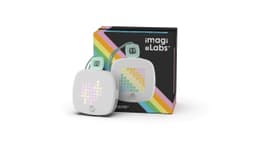
The imagiCharm is an effective supplementary tool for teaching Python, provided your child already possesses some self-motivation to learn coding. You are purchasing a physical 64-LED pixel art device that requires a companion app to program. When your child writes Python code on their tablet or phone, the physical charm lights up to display their programmed designs. This tangible feedback loop is grounded in constructionist learning theory, which shows that students learn best when creating physical artifacts. The app introduces programming logic through gamified challenges and project-based tasks. However, parents must understand that this is not a comprehensive computer science curriculum. While the visual output provides immediate feedback on whether the code worked, the app does not explicitly teach algorithmic efficiency or advanced computational thinking. Your child will learn basic syntax, loops, and variables through trial and error. Because The Learning Standard has not yet formally evaluated imagiCharm, we cannot guarantee specific learning outcomes. Expect to provide occasional adult support, especially when your child encounters complex syntax errors that the app's basic troubleshooting tools do not fully explain.
How Does imagiCharm Work?
The imagiCharm uses a constructionist, project-based approach where digital Python coding produces tangible, physical artifacts. Your child connects the physical LED charm to a smartphone or tablet via Bluetooth. Inside the imagi app, they type real Python syntax rather than using drag-and-drop block coding. The interface provides a split-screen view showing a code editor and a digital preview of the LED matrix. When the code executes successfully, the design flashes onto the physical charm. The platform utilizes worked examples, offering pre-written code snippets that students can modify to see immediate changes in the output. This scaffolding helps beginners understand variables, color matrices, and loops before asking them to write original scripts. Gamification elements, such as earning points and sharing designs in a moderated community, encourage sustained engagement. The learning loop is straightforward: write code, execute, observe the physical light display, debug errors, and iterate.
Strengths and tradeoffs of imagiCharm
The biggest strength of the imagiCharm is its ability to make abstract text-based coding immediately tangible, while its biggest weakness is the lack of structured progression to ensure long-term retention. Tangible computing is a powerful learning science concept; connecting the Python syntax to a flashing physical LED board reduces cognitive load by providing an immediate visual representation of abstract logic. Project-based learning drives the experience, encouraging your child to persist through difficult debugging sessions because they want to see their custom animation. The app effectively uses worked examples to bridge the gap between novice and intermediate coding. Conversely, the platform suffers from a lack of spaced repetition. Once a student learns a specific function, the app does not systematically retest that knowledge to interrupt the forgetting curve. Furthermore, the feedback mechanism is limited. While a failure to light up indicates an error, the system lacks robust corrective feedback to explain exactly why the code failed or how to optimize it. As a result, students may develop functional but highly inefficient coding habits.
Who Might Benefit From imagiCharm?
The imagiCharm is best for middle school students who are ready to transition from block-based coding to text-based Python and need physical engagement to stay motivated. Targeted primarily at learners in 3rd through 8th grades, it serves as an excellent bridge for kids who find purely screen-based tutorials tedious. It is highly effective for visual learners who benefit from immediate sensory feedback. However, it is not ideal for absolute beginners who lack adult support, or advanced programmers looking for complex algorithmic challenges. It works best as an experiential supplement to a more structured computer science curriculum.
Sources and review method
TLS combines product information and editorial analysis to explain how imagiCharm works, its tradeoffs, and the questions to ask before choosing it. Product features, an instructional rationale and evidence of learning outcomes are different kinds of information.
Formal Learning Standard assessment: not yet completed. Data Transparency findings are reported separately and do not establish learning effectiveness. Read our methodology.
Frequently Asked Questions About imagiCharm
Is imagiCharm free?
The companion app is free, but the physical imagiCharm device costs $97. You can use the app to write and simulate Python code without purchasing the physical device, but the experiential learning component requires the hardware.
Is imagiCharm good for middle schoolers?
Yes, the imagiCharm is highly appropriate for students in 6th through 8th grades. The transition from block-based coding to typed Python syntax aligns perfectly with middle school computer science standards, providing a challenging yet accessible learning curve.
What does imagiCharm teach?
The imagiCharm teaches foundational Python programming. Your child will learn core computer science concepts including variables, loops, conditionals, and basic debugging. It also implicitly teaches spatial reasoning and coordinate geometry as students map code to the 64-pixel LED grid.
How does imagiCharm compare to Micro:bit?
Both platforms use tangible computing, but the Micro:bit offers broader hardware integration with sensors and robotics at a lower price point. The imagiCharm focuses specifically on pixel art and Python, offering a more streamlined entry point that appeals strongly to learners intimidated by bare-circuit boards.
Has The Learning Standard evaluated imagiCharm?
TLS has not yet completed a Learning Standard evaluation of how well imagiCharm teaches. TLS has not published a Data Transparency result for its privacy policy.
Follow TLS Research
Subscribe to future TLS research updates: app reviews, findings, and what the evidence shows.
Screenshots

Latest News
All imagiCharm NewsTake Action
For imagiCharm
If you represent imagiLabs and have a correction or new evidence, send the relevant source so we can review and update this page.
Submit a correctionDetails
- Pricing
- $97
- Platforms
- iOS (Apple mobile), Android (Google mobile)
- Grade Levels
- 3rd Grade, 4th Grade, 5th Grade, 6th Grade, 7th Grade, 8th Grade
- Website
- Visit site