GameSalad for Education
Product by GameSalad, Inc.
Facts checked: Not yet checked
Our take (not a Learning Standard rating). This label applies to learning-science judgments throughout this overview.
Our take (not a Learning Standard rating)
While pending formal evaluation, GameSalad for Education appears to teach computer science logic effectively through project-based learning. It successfully engages students by connecting abstract coding concepts to concrete game creation. However, relying purely on visual blocks may delay the transition to text-based syntax required in advanced programming.
Pros
- Applies project-based learning to contextualize abstract computer science logic.
- Reduces cognitive load by using visual drag-and-drop blocks instead of complex syntax.
- Provides immediate visual feedback when students execute and test their games.
Cons
- Heavy reliance on block-based coding may hinder the transfer of skills to text-based languages.
- Lacks built-in spaced repetition mechanisms for reinforcing discrete coding vocabulary.
- Open-ended game creation can lead to cognitive overload without strict teacher scaffolding.
What Do We Know About GameSalad for Education?
GameSalad for Education is an effective tool for teaching foundational computer science logic, though it requires active teacher or parent scaffolding to maximize learning. Instead of forcing your child to memorize abstract syntax, the platform uses project-based learning. Your child builds actual video games, applying concepts like variables, loops, and conditional statements to make characters move or keep score. This experiential approach taps into constructionism, where learners construct knowledge by building tangible artifacts. Because it uses visual blocks, it dramatically reduces the cognitive load associated with typing complex code. Your child can focus on the logic of programming rather than hunting for a missing semicolon. However, parents should note that this is not a standalone tutorial app. It relies on provided lesson plans and requires an educator or motivated parent to guide the process. Without guidance, the open-ended nature of game design can cause cognitive overload, leaving students tinkering without actually mastering the underlying computer science principles. Because it relies entirely on visual blocks, older students may eventually need supplemental tools to bridge the gap to text-based languages like Python.
How Does GameSalad for Education Work?
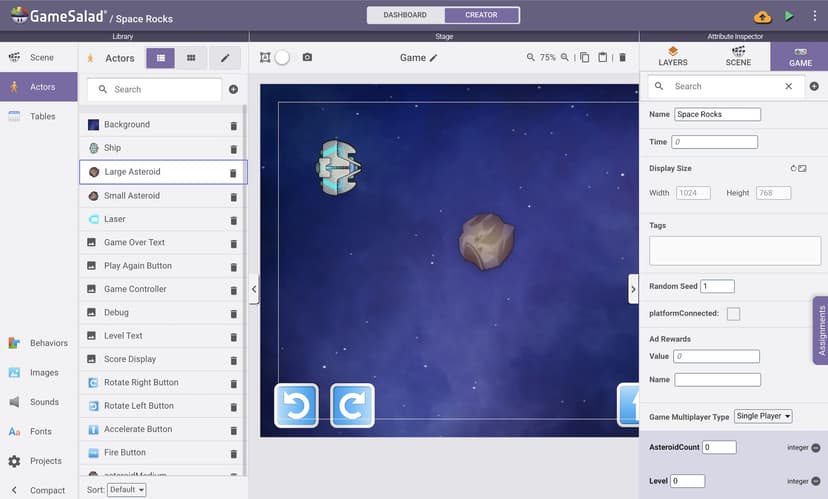
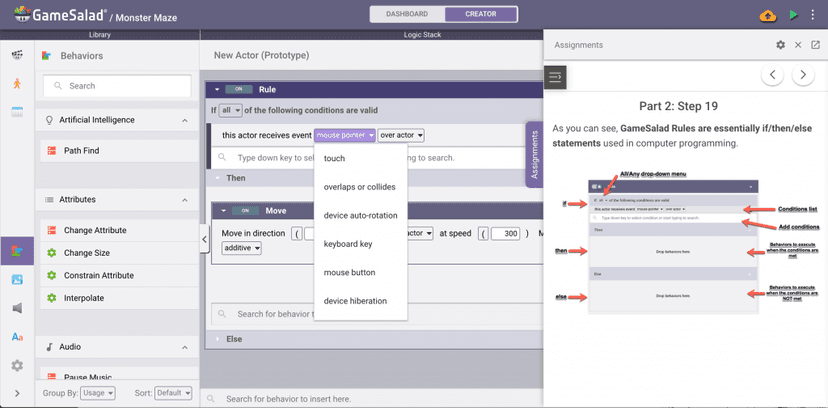
GameSalad for Education uses experiential, project-based learning to teach computer science concepts through the medium of video game design. Students log into a browser-based environment where they interact with a drag-and-drop visual interface. Instead of typing lines of code, learners select rules, behaviors, and attributes from menus and snap them together to dictate how game objects act. The platform operates on an actor-behavior model. Students create an actor, assign it physics properties, and use conditional statements to trigger behaviors. This immediate execution loop allows students to test their games instantly, providing vital corrective feedback. The educational version pairs this sandbox environment with structured lesson plans. These plans provide worked examples that demonstrate a coding concept before asking the student to apply it independently. This progression helps students build complex systems from simple, understandable parts.
Strengths and tradeoffs of GameSalad for Education
GameSalad for Education's biggest strength is its ability to lower the barrier to entry for computer science using visual blocks, while its biggest weakness is the potential for students to struggle transferring these skills to standard text-based programming. Cognitive Load Reduction: By eliminating syntax errors, the platform frees up working memory. Students can focus entirely on computational thinking and logic structures. Immediate Feedback Loop: The platform allows learners to test their game instantly. This rapid feedback cycle is crucial in learning science, allowing students to immediately recognize flaws in their logic and correct them. Worked Examples: The accompanying curriculum heavily utilizes worked examples, scaffolding the learning process so students do not face a blank canvas. However, the visual nature of the engine presents limitations. Skill Transfer: Research shows that students often struggle to transfer logic learned in block-based environments to text-based languages. Open-Ended Distraction: While project-based learning is engaging, highly open environments can lead to productive failure becoming just failure. If a student spends hours drawing a character rather than coding its behavior, the learning objective is missed.
Who Might Benefit From GameSalad for Education?
Best for middle and high school students who need an engaging, visual entry point into computer science before tackling syntax-heavy languages. GameSalad fits well in a classroom or structured homeschool environment where an educator uses the provided lesson plans to guide game creation. It serves students from 5th to 12th grade, effectively teaching the foundational logic of applied science and career technical education pathways. It is especially useful for visual learners or students who show resistance to traditional, lecture-based coding instruction but have a strong interest in gaming.
Data Transparency
Does Not Meet Data Transparency Standard
GameSalad for Education does not meet our data transparency standard. Its privacy policy does not document basic protections, including a statement that it does not sell data and parents' right to delete their child's data.
20 of 35 checks passed
Evaluated September 2026
Privacy Policy • GameSalad →Level 1 · Basic protections
Does not sell data or target ads at students, limits sharing, and lets parents see and delete their child's data.
Not documented: a statement that it does not sell data, parents' right to delete their child's data
Level 2 · Parent control (meets the standard)
Families can get their data out, know who processes it, and know how long it is kept.
Not documented: a data retention timeline
Level 3 · Direct data access
Families or schools can pull their own data through an API, in a stated format.
Not documented: an API for retrieving their own data, a named export format
View all 35 checks
Parent Access6/8
Does the policy mention parents specifically?
“A student, parent or legal guardian of a student may review personally identifiable information contained in student data and correct any erroneous information, if any, in such student data.”
Can parents view their child's data?
“A student, parent or legal guardian of a student may review personally identifiable information contained in student data and correct any erroneous information, if any, in such student data. He or she may do so by sending an email to privacy@gamesalad.com.”
Can parents modify their child's data?
“A student, parent or legal guardian of a student may review personally identifiable information contained in student data and correct any erroneous information, if any, in such student data. He or she may do so by sending an email to privacy@gamesalad.com.”
Can parents delete their child's account?
The policy gives school Administrators the right to delete student data, but only promises parents 'reasonable efforts' to remove identifying information from content, with no parent right to delete the child's account or data.
Is there a dedicated Children's Privacy section?
“Our products and services that make up GameSalad for Education do collect student data, but fully within the bounds of COPPA compliance. Refer to the Children’s Privacy section below.”
Does it reference COPPA compliance?
“Our products and services that make up GameSalad for Education do collect student data, but fully within the bounds of COPPA compliance.”
Does it reference FERPA compliance?
The policy does not mention FERPA.
Is parental consent required for child accounts?
“Therefore, we only collect personal information through the Services from a child under 13 where that student’s school, district, and/or teacher has agreed to obtain parental consent for that child to use the Services and disclose personal information to us or where the parent or legal guardian of a child has signed the child up to use the Services.”
Data Portability3/5
Can users access their personal data?
“Request access to your personal data (commonly known as a “data subject access request”). This enables you to receive a copy of the personal data we hold about you and to check that we are lawfully processing it.”
Can users download/export their data?
“Request the transfer of your personal data to you or to a third party. We will provide to you, or a third party you have chosen, your personal data in a structured, commonly used, machine-readable format.”
Is there a self-service data access tool?
“GameSalad for Education account administrators (“Administrators”) will have the ability to access, delete, or request the deletion of student date in the possession of GameSalad”
Is a specific data format mentioned for export?
The policy only says "a structured, commonly used, machine-readable format" and does not name a specific format.
Is there an API for data access?
The policy mentions third-party platform APIs used for login, but not an API for users to get their own data.
Data Minimization1/6
Is data collection itemized?
“When you create or update your account, we collect and store the data you provide, like your email address, password, username, and occupation, and assign you a unique identifying number ( “Account Data”).”
Can the app be used without a real name?
The policy says names may be collected through payment, promotions, support and third-party login, and it does not say student real names are never collected.
Can the app be used without an email?
The policy collects email addresses; only under-13 student accounts get generated false emails, and administrators can request real student emails.
Does it state collection is limited to what is necessary?
The policy limits how student data is used and how long data is kept, but does not say collection itself is limited to what is necessary.
Is IP address anonymized or truncated?
The policy says IP addresses are collected and does not say they are anonymized or truncated.
Is location tracking explicitly excluded?
The policy says it collects approximate location, including geographic coordinates, based on IP address.
Third-Party Protection5/7
Does it explicitly state no selling of data?
The policy does not say that GameSalad does not sell personal data.
Are third-party providers named?
“We use third-party browser and mobile analytics services like Google Analytics, and Freshdesk on the Site.”
Are providers contractually restricted?
“We do not allow our third party service providers to use your personal data for their own purposes and only permit them to process your personal data for specified purposes and in accordance with our instructions.”
No-targeted-advertising commitment?
“GameSalad for Education student account personal data will only be used as necessary for provided requested services. For GameSalad for Education student accounts, we:”
Is AI/ML data sharing addressed?
The policy does not address AI or machine learning.
Child-specific sharing restriction?
“Will not learn more about you by linking your data with additional data through third-party data providers or analyzing the data with the help of analytics service providers;”
Cookies/tracking limited or opt-out?
“You can set your web browser to alert you about attempts to place cookies on your computer, limit the types of cookies you allow, or refuse cookies altogether.”
Deletion & Retention3/5
Can users delete their account?
“Request erasure of your personal data. This enables you to ask us to delete or remove personal data where there is no good reason for us continuing to process it.”
Self-service deletion mechanism?
“GameSalad for Education account administrators (“Administrators”) will have the ability to access, delete, or request the deletion of student date in the possession of GameSalad”
Specific data retention timeline?
The policy says data is kept "as long as necessary" and gives no specific time period.
Auto-deletion of inactive accounts?
The policy does not address automatic deletion of inactive accounts.
Post-deletion handling described?
“Administrators may request deletion of any such student information, student records or student-generated content if such copy has been used by the operator to repopulate accessible data following a disaster recovery.”
Advertising2/4
Advertising model explicitly disclosed?
“We use your data to do things like provide our Site, communicate with you, troubleshoot issues, secure against fraud and abuse, improve and update our Site, analyze how people use our Site, serve personalized advertising, and as required by law or necessary for safety and integrity.”
Free from third-party advertisements?
The policy says third-party advertisers use tracking tools and that it serves personalized ads.
Children excluded from ad targeting?
“Will not tailor advertisements across devices;”
Ad-free option available?
The policy describes personalized advertising and does not offer an ad-free option.
What This Means
The policy review did not meet our data transparency standard. The checks above show the documented findings and unknowns. A missing statement does not establish how the app handles data in practice.
About this evaluation: Based on automated analysis of Privacy Policy • GameSalad against 35 policy-disclosure questions, including questions adapted from the Common Sense Privacy Program's published evaluation questions. TLS is not affiliated with Common Sense Media, and this is not a Common Sense rating. Quoted text is copied from the policy; unquoted notes are our summary. Results describe what the policy documents, not the company's actual practices. Privacy policies can change: this review reflects the version we analyzed and does not determine legal compliance.
Sources and review method
TLS combines product information and editorial analysis to explain how GameSalad for Education works, its tradeoffs, and the questions to ask before choosing it. Product features, an instructional rationale and evidence of learning outcomes are different kinds of information.
Formal Learning Standard assessment: not yet completed. Data Transparency findings are reported separately and do not establish learning effectiveness. Read our methodology.
Frequently Asked Questions About GameSalad for Education
Is GameSalad for Education free?
No. GameSalad for Education is not a free platform, as it requires a paid subscription to access the lesson plans and creation tools. The developer offers per-student and site licenses, providing flexibility for different school sizes and districts. They also offer special pilot pricing for schools and educational institutions that want to test the curriculum before fully committing. Parents looking for an individual home license should contact the developer directly.
Is GameSalad for Education good for middle schoolers?
Yes. GameSalad for Education is highly appropriate for middle schoolers, as the curriculum is specifically designed for students in 5th grade and older. Middle school is an ideal time to introduce computational thinking, and the platform's visual block-based interface reduces the frustration typically associated with typing complex code syntax. This allows young teenagers to focus entirely on learning the underlying logic of computer science while remaining engaged through the highly motivating process of creating their own playable video games.
What does GameSalad for Education teach?
GameSalad for Education teaches foundational computer science principles, applied science, and computational logic. Students learn essential programming concepts like conditional statements, variables, loops, state management, and basic physics algorithms by building fully functional video games. Because it utilizes project-based learning, students also practice critical soft skills such as systems thinking, iterative design, debugging, and problem-solving. The curriculum aligns with Career and Technical Education pathways, preparing students for more advanced text-based programming.
GameSalad for Education vs. Scratch: Which is better?
Scratch is an excellent, free introductory tool that is widely used for younger elementary learners, while GameSalad for Education provides a more robust engine geared toward middle and high school students. GameSalad aligns closely with Career and Technical Education programs, offering structured lesson plans that simulate professional game development workflows. While Scratch focuses on open-ended creative exploration, GameSalad requires a paid license but delivers a more formalized, structured pathway into advanced computer science principles.
Has GameSalad for Education been evaluated by The Learning Standard?
No. GameSalad for Education is currently pending evaluation and has not yet been rated by our team. The Learning Standard relies on empirical evidence and learning science to determine if educational technology effectively improves student outcomes. The Learning Standard's rigorous, science-based evaluation methodology can be reviewed at /methodology to understand exactly how educational tools are independently tested, analyzed, and rated for pedagogical effectiveness and classroom utility.
Has The Learning Standard evaluated GameSalad for Education?
TLS has not yet completed a Learning Standard evaluation of how well GameSalad for Education teaches. Its privacy policy has been reviewed for Data Transparency and does not yet document the basic protections (Level 1).
Is GameSalad for Education COPPA compliant?
The reviewed privacy policy references COPPA. A policy reference alone does not establish COPPA compliance. Policy review note: The policy states that it complies with COPPA.
Is GameSalad for Education FERPA compliant?
A FERPA reference was not found in the reviewed privacy policy. This does not determine whether the app complies with FERPA. Policy review note: The policy does not mention FERPA.
Does GameSalad for Education have a children's privacy policy?
The reviewed policy includes a dedicated children's privacy section. Policy review note: The policy has its own Children’s Privacy section, including a "Children Under 13" subsection.
Does GameSalad for Education sell student data?
A statement ruling out data selling was not found in the reviewed policy. This does not establish that the app sells student data. Policy review note: The policy does not say that GameSalad does not sell personal data.
Can you delete your data from GameSalad for Education?
The reviewed privacy policy describes account deletion. We have not tested the deletion process. Policy review note: Users can ask for their personal data to be erased.
Follow TLS Research
Subscribe to future TLS research updates: app reviews, findings, and what the evidence shows.
Screenshots
Take Action
For GameSalad for Education
If you represent GameSalad, Inc. and have a correction or new evidence, send the relevant source so we can review and update this page.
Submit a correctionDetails
- Pricing
- Per student and site licenses available as well as special pilot pricing.
- Platforms
- iPadOS (Apple tablet), Android (Google mobile), Windows (Microsoft), macOS (Apple), Chrome OS (Google)
- Grade Levels
- 5th Grade, 6th Grade, 7th Grade, 8th Grade, 9th Grade, 10th Grade, 11th Grade, 12th Grade, Associate's degree, Bachelor's degree
- Website
- Visit site