
Edulastic
Product by GoGuardian
Facts checked: Not yet checked
Our take (not a Learning Standard rating). This label applies to learning-science judgments throughout this overview.
Our take (not a Learning Standard rating)
Edulastic functions primarily as an assessment and retrieval practice engine rather than a direct instruction tool. It excels at providing educators with granular data on standards mastery through diverse question types. However, its effectiveness depends entirely on the quality of teacher-created assessments, as it lacks built-in instructional scaffolding.
Pros
- Enables rigorous retrieval practice through over 50 interactive question formats rather than standard multiple-choice alone.
- Provides immediate data to educators, allowing for timely instructional adjustments based on class-wide knowledge gaps.
- Organizes assessments around specific learning standards to track competency-based progression accurately.
- Supports spaced repetition strategies by allowing teachers to easily remix past questions into new benchmark tests.
Cons
- Relies heavily on the teacher to design effective assessments, offering no autonomous learning pathways.
- Lacks built-in worked examples or explanatory feedback when a student answers a question incorrectly.
- Functions entirely as a testing platform rather than a teaching tool, providing measurement without inherent instruction.
What Do We Know About Edulastic?
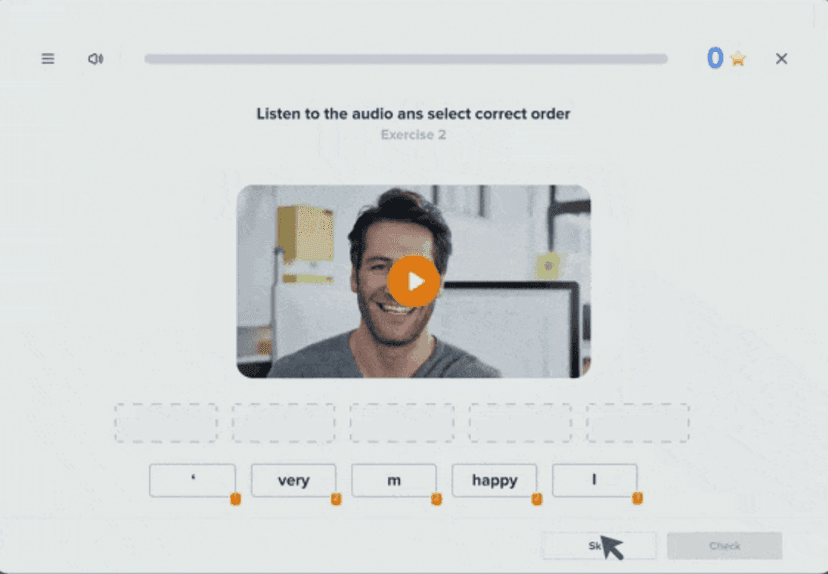
Edulastic is effective for measuring what your child already knows, but it does not independently teach new concepts. This platform operates as a digital testing and assessment tool used by schools to track academic progress. When your child logs into Edulastic, they will primarily encounter quizzes, benchmark tests, and assignments distributed directly by their teacher. The platform utilizes retrieval practice, a proven learning science strategy where pulling information from memory strengthens retention. Because Edulastic offers dozens of question types (such as drag-and-drop, graphing, and matching) your child engages in deeper cognitive processing than traditional multiple-choice tests require. However, if your child struggles with a concept, Edulastic will not provide a tutorial or a worked example to guide them to the correct answer. The learning happens after the test, when the teacher uses the platform's data to adjust classroom instruction. Parents should view Edulastic as a diagnostic instrument rather than a tutor. Its value lies entirely in how your child's teacher uses the data to identify knowledge gaps and deliver targeted support. The Learning Standard has not yet rated this app.
How Does Edulastic Work?
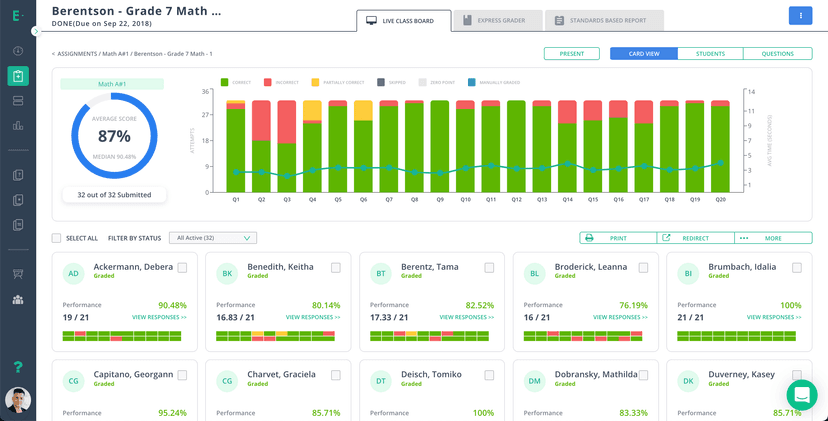
Edulastic uses a competency-based assessment model to facilitate targeted retrieval practice and track standards mastery. Teachers create or select assessments from a digital question bank aligned with specific state or national standards. Students log in to complete these assignments, interacting with technology-enhanced items that mimic the formatting of modern standardized tests. As students submit their answers, the platform automatically grades the objective questions and populates a data dashboard for the teacher. This dashboard highlights individual and class-wide performance metrics. Educators use this immediate feedback loop to identify which specific standards require reteaching. The platform itself does not generate adaptive learning sequences based on student inputs. Instead, it serves as the mechanism for teachers to implement formative assessment: measuring comprehension in real-time so they can modify their direct instruction accordingly.
Strengths and tradeoffs of Edulastic
Edulastic's biggest strength is its capacity for rigorous, varied retrieval practice, while its biggest weakness is the complete absence of independent instructional scaffolding. Formative Assessment Power: The platform excels at diagnostic measurement. By offering over 50 distinct question types, Edulastic forces students to actively construct answers rather than simply recognizing them. This active recall strengthens memory traces far more effectively than passive review. Teachers receive immediate data, enabling them to close the feedback loop quickly: a critical component of effective learning. Lack of Instructional Feedback: However, cognitive science dictates that assessment without explanatory feedback limits learning. When a student answers incorrectly, Edulastic simply records the error. It does not provide worked examples, hints, or step-by-step breakdowns to correct the misconception. Teacher Dependency: The platform is entirely dependent on the educator. If a teacher uses the tool to implement spaced repetition by consistently retesting older concepts, it is highly effective. If used merely for summative grading, it loses its pedagogical value. It measures learning accurately but relies entirely on external human intervention to facilitate it.
Who Might Benefit From Edulastic?
Best for K-12 teachers and school districts seeking a robust diagnostic tool to track standards mastery and administer benchmark assessments. Edulastic serves educators who need granular data to drive their direct instruction and identify class-wide knowledge gaps. While technically available for learners from early childhood through adult education, its interface and testing formats are optimized for elementary through high school students preparing for standardized exams. It is not suitable for parents seeking an independent tutoring app, as it requires a teacher to curate content, assign tests, and interpret the resulting data.
Sources and review method
TLS combines product information and editorial analysis to explain how Edulastic works, its tradeoffs, and the questions to ask before choosing it. Product features, an instructional rationale and evidence of learning outcomes are different kinds of information.
Formal Learning Standard assessment: not yet completed. Data Transparency findings are reported separately and do not establish learning effectiveness. Read our methodology.
Frequently Asked Questions About Edulastic
Is Edulastic free?
Edulastic is free for individual teachers. The free tier allows educators to create assessments, access the question bank, and track basic student progress. Premium features, including advanced data analytics and district-wide administrative controls, require a paid subscription from a school or district. Students never pay to use the platform.
Is Edulastic good for K-12 students?
Yes, but only as a testing interface. Edulastic provides K-12 students with excellent practice for modern, technology-enhanced standardized tests. It requires them to interact with charts, graphs, and drag-and-drop elements. However, it does not teach them the underlying material, so it is only beneficial when paired with strong classroom instruction.
What does Edulastic teach?
Edulastic does not teach any specific subject matter directly. Instead, it is a testing platform that allows teachers to assess knowledge across all subjects, including math, science, humanities, and career technical education. The platform measures mastery of specific academic standards but relies on the teacher to deliver the actual instruction.
Edulastic vs. Kahoot: Which is better?
Edulastic is better for formal, standards-based benchmark testing, while Kahoot is better for engaging, low-stakes classroom review. Edulastic offers complex, multi-step question types designed to mirror state exams and provides granular data on academic mastery. Kahoot relies on speed and gamification, making it superior for quick engagement but less effective for deep diagnostic assessment.
Has The Learning Standard evaluated Edulastic?
TLS has not yet completed a Learning Standard evaluation of how well Edulastic teaches. TLS has not published a Data Transparency result for its privacy policy.
Follow TLS Research
Subscribe to future TLS research updates: app reviews, findings, and what the evidence shows.
Screenshots


Take Action
For Edulastic
If you represent GoGuardian and have a correction or new evidence, send the relevant source so we can review and update this page.
Submit a correctionDetails
- Pricing
- Edulastic is free for teachers and affordable for schools and districts.
- Platforms
- Web Browser, iOS (Apple mobile), iPadOS (Apple tablet), Windows (Microsoft), macOS (Apple), Chrome OS (Google)
- Grade Levels
- Infant/Toddler, Preschool, Prekindergarten, Transitional Kindergarten, Kindergarten, 1st Grade, 2nd Grade, 3rd Grade, 4th Grade, 5th Grade, 6th Grade, 7th Grade, 8th Grade, 9th Grade, 10th Grade, 11th Grade, 12th Grade, Associate's degree, Bachelor's degree, Adult Education, Professional or Technical Credential
- Website
- Visit site