
CommonLit 360
Product by CommonLit
Facts checked: Not yet checked
Our take (not a Learning Standard rating). This label applies to learning-science judgments throughout this overview.
Our take (not a Learning Standard rating)
While The Learning Standard has not yet formally evaluated CommonLit 360, its design strongly aligns with evidence-based literacy instruction. It successfully integrates knowledge-building with vocabulary and reading comprehension practice. However, because it relies heavily on teacher facilitation, its effectiveness depends entirely on how it is implemented in the classroom rather than functioning as a standalone digital tutor.
Pros
- Integrates reading, writing, and vocabulary into cohesive thematic units to build prior knowledge, a critical component of reading comprehension.
- Uses text-dependent questions that require students to retrieve specific evidence, supporting active recall and deeper processing.
- Provides explicit vocabulary instruction embedded within authentic texts rather than isolated drill exercises.
- Features built-in read-aloud and translation tools that reduce cognitive load for emerging bilingual students and struggling readers.
Cons
- Requires significant teacher facilitation and cannot function as an independent learning tool.
- Lacks spaced repetition mechanics for long-term retention of grammar and vocabulary rules.
- Does not provide automated, specific feedback on student writing assignments beyond basic grammar checks.
- Relies on school-level purchasing, making the full curriculum inaccessible for individual parent subscriptions.
What Do We Know About CommonLit 360?
CommonLit 360 is highly effective for building adolescent literacy skills when guided by a trained educator, but it is not designed to be a standalone app for independent home use. Your child will benefit from its knowledge-rich, thematic units that deeply integrate reading, writing, and vocabulary. Learning science shows that reading comprehension relies heavily on prior knowledge; CommonLit 360 leverages this by grouping texts around specific, high-interest topics, allowing students to build a mental schema that makes complex texts easier to understand. Instead of practicing isolated reading strategies, your child will encounter vocabulary in context and answer text-dependent questions that force them to return to the source material. This retrieval practice strengthens their ability to analyze evidence and construct arguments. However, parents should understand that this is a comprehensive school curriculum, not an adaptive software program that automatically adjusts to your child's reading level. The platform provides excellent accessibility tools, including text-to-speech and translation, which lower the cognitive barrier for struggling readers. Because The Learning Standard has not yet formally evaluated the platform's efficacy data, we base this assessment on its alignment with established cognitive science principles regarding how students acquire advanced literacy skills.
How Does CommonLit 360 Work?
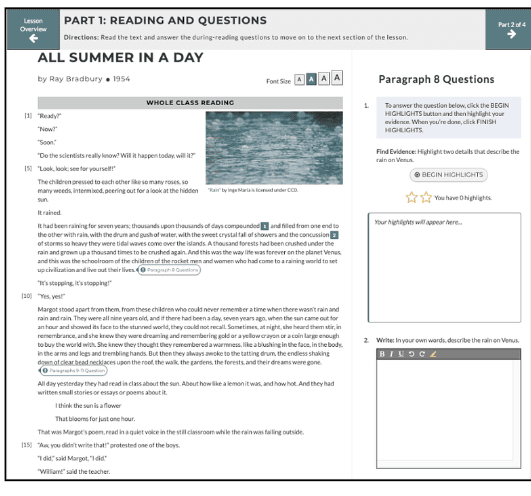
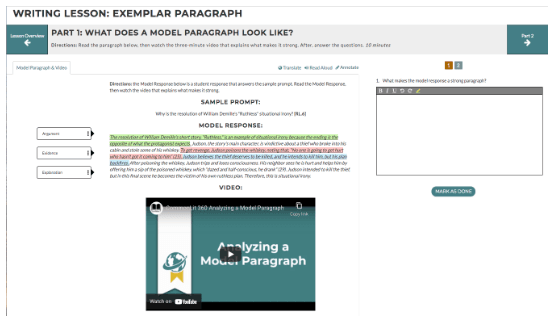
CommonLit 360 uses direct instruction paired with project-based learning to guide students through rigorous, multi-genre reading and writing units. The curriculum is structured around thematic modules where students read a series of interconnected texts, including novels, articles, and primary sources. As students read, the platform prompts them with formative assessment questions that require them to identify evidence directly from the text. This scaffolding prevents students from passively skimming and forces active engagement with the material. Vocabulary and grammar lessons are explicitly taught and then immediately applied within the context of the reading, preventing the rapid forgetting that occurs with isolated flashcards. For writing assignments, the platform provides graphic organizers and evidence-based argument templates to reduce the working memory load required to structure an essay. Teachers can track student mastery through an analytics dashboard, allowing them to provide targeted interventions for students who are struggling with specific literacy domains.
Strengths and tradeoffs of CommonLit 360
CommonLit 360's biggest strength is its knowledge-building approach to reading comprehension, while its biggest weakness is the lack of automated, adaptive feedback for independent student writing. From a learning science perspective, the platform excels by anchoring skill practice in rich content. Cognitive research clearly demonstrates that background knowledge is the primary driver of reading comprehension. By keeping students within a specific thematic unit for weeks, the platform builds a robust vocabulary and knowledge base that makes subsequent texts in the unit easier to decode and analyze. The use of embedded, text-dependent questions serves as an excellent form of retrieval practice, interrupting the forgetting curve and ensuring students monitor their own understanding as they read. However, the platform is limited by its format as a digital curriculum rather than an intelligent tutoring system. It does not utilize spaced repetition algorithms to ensure long-term retention of grammar rules over the course of the school year. Furthermore, while it provides excellent scaffolds for writing, it cannot provide the immediate, corrective feedback on essay drafts that a human tutor or advanced AI would offer. The effectiveness of the writing instruction relies entirely on the teacher's capacity to review and grade student work.
Who Might Benefit From CommonLit 360?
CommonLit 360 is best for middle and high school classrooms that need a rigorous, knowledge-building English curriculum led by a teacher. It is specifically designed for students in grades 6 through 12 who are transitioning from basic reading instruction to complex literary analysis and evidence-based writing. The platform is highly effective for diverse classrooms, as its built-in translation and read-aloud tools make rigorous grade-level texts accessible to emerging bilinguals and students with learning differences. It is not suitable for parents seeking an independent, adaptive reading app for home tutoring, as the curriculum requires extensive teacher facilitation to guide discussions and grade essays.
Data Transparency
Does Not Meet Data Transparency Standard
CommonLit 360 does not meet our data transparency standard. Its privacy policy does not document basic protections, including a statement that it does not sell data and contractual limits on service providers.
19 of 35 checks passed
Evaluated September 2026
Privacy Policy →Level 1 · Basic protections
Does not sell data or target ads at students, limits sharing, and lets parents see and delete their child's data.
Not documented: a statement that it does not sell data, contractual limits on service providers
Level 2 · Parent control (meets the standard)
Families can get their data out, know who processes it, and know how long it is kept.
Not documented: self-service deletion
Level 3 · Direct data access
Families or schools can pull their own data through an API, in a stated format.
Not documented: an API for retrieving their own data, a named export format
View all 35 checks
Parent Access7/8
Does the policy mention parents specifically?
“Parents: To review your Child User’s data you must request the information from your child’s teacher.”
Can parents view their child's data?
“Parents: To review your Child User’s data you must request the information from your child’s teacher.”
Can parents modify their child's data?
The policy lets parents review their child's data and request deletion, but it does not give parents a right to modify it.
Can parents delete their child's account?
“please contact your child’s school and alert CommonLit at security@commonlit.org and request that we delete that child’s personal information from our systems.”
Is there a dedicated Children's Privacy section?
“Protecting the privacy of young children is especially important to CommonLit.”
Does it reference COPPA compliance?
“CommonLit does not knowingly permit Child Users to use our Services without prior, express consent from a parent or legal guardian, except through agreements with schools or districts or as otherwise permitted under the Children’s Online Privacy Protection Rule (”
Does it reference FERPA compliance?
“Certain personal information processed on behalf of our customers may be subject to the Family Educational Rights and Privacy Act (" FERPA"), meaning we will only use personal information that is considered to be “personally identifiable information” maintained as part of “education records””
Is parental consent required for child accounts?
“children under the age of 13 in the U.S. (and a higher age if required by the applicable law in another country) may only use our Service with the express prior consent of a parent or legal guardian unless (and where permitted by applicable law) a school, district, or other institutional customer consents on behalf of a parent or legal guardian”
Data Portability3/5
Can users access their personal data?
“If you have registered for an account with us through the Service, you may review and update certain account information by logging into the account.”
Can users download/export their data?
“Port a machine-readable copy of your personal information to you or a third party of your choice, in certain circumstances.”
Is there a self-service data access tool?
“If you have registered for an account with us through the Service, you may review and update certain account information by logging into the account.”
Is a specific data format mentioned for export?
The policy mentions only a "machine-readable copy" and names no specific export format.
Is there an API for data access?
The policy does not describe an API for users or schools to get their data.
Data Minimization1/6
Is data collection itemized?
“Contact data, such as your first and last name, email address, and organization name.”
Can the app be used without a real name?
The policy says it collects contact data including first and last name.
Can the app be used without an email?
The policy says it collects contact data including email address.
Does it state collection is limited to what is necessary?
The policy does not say collection is limited to what is necessary; it only says data is retained as long as necessary.
Is IP address anonymized or truncated?
The policy says IP addresses are collected and does not say they are anonymized or truncated.
Is location tracking explicitly excluded?
The policy says it collects general location data and device location when authorized.
Third-Party Protection4/7
Does it explicitly state no selling of data?
The policy only limits sharing that would let third parties sell user data; it never says CommonLit itself does not sell data.
Are third-party providers named?
“Any payment card information you use to make a purchase on the Service is collected and processed directly by our payment processors, such as Stripe.”
Are providers contractually restricted?
The policy does not say service providers are contractually restricted in how they use data.
No-targeted-advertising commitment?
“with respect to our Student and School Official users of the Platform, we will not share their personal information with third parties to allow those third parties to advertise or market their own products or services to such users, display targeted advertisements to such users”
Is AI/ML data sharing addressed?
The policy does not address sharing data for AI or machine learning.
Child-specific sharing restriction?
“No Child User’s profile is made available or visible to the public through CommonLit.”
Cookies/tracking limited or opt-out?
“Note that we do not use third party cookies or any other third-party tracking technologies within the Platform for tracking our Student or School Official users, including tracking such users across apps.”
Deletion & Retention3/5
Can users delete their account?
“If you wish to close your account with the Service, please send your request via email by clicking here and we will remove your personal information and account, if applicable, from the active databases for the Service you request.”
Self-service deletion mechanism?
The policy requires an email request to close an account and offers no self-service deletion.
Specific data retention timeline?
“Upon termination of your account, CommonLit will take commercially reasonable steps to delete any personal information from its live databases in a reasonable amount of time not to exceed ninety (90) days.”
Auto-deletion of inactive accounts?
The policy does not address automatic deletion of inactive accounts.
Post-deletion handling described?
“You understand and agree that CommonLit may continue to have personal information in archive files or similar databases.”
Advertising1/4
Advertising model explicitly disclosed?
The policy limits the use of student data for advertising but does not state the product's advertising model or say it has no advertising.
Free from third-party advertisements?
The policy does not explicitly say the product carries no third-party advertisements.
Children excluded from ad targeting?
“Note that we will not use Student data to advertise or market to Students or their parents.”
Ad-free option available?
The policy does not say the product has no advertising or offer an ad-free option.
What This Means
The policy review did not meet our data transparency standard. The checks above show the documented findings and unknowns. A missing statement does not establish how the app handles data in practice.
About this evaluation: Based on automated analysis of Privacy Policy against 35 policy-disclosure questions, including questions adapted from the Common Sense Privacy Program's published evaluation questions. TLS is not affiliated with Common Sense Media, and this is not a Common Sense rating. Quoted text is copied from the policy; unquoted notes are our summary. Results describe what the policy documents, not the company's actual practices. Privacy policies can change: this review reflects the version we analyzed and does not determine legal compliance.
Sources and review method
TLS combines product information and editorial analysis to explain how CommonLit 360 works, its tradeoffs, and the questions to ask before choosing it. Product features, an instructional rationale and evidence of learning outcomes are different kinds of information.
Formal Learning Standard assessment: not yet completed. Data Transparency findings are reported separately and do not establish learning effectiveness. Read our methodology.
Frequently Asked Questions About CommonLit 360
Is CommonLit 360 free?
No, the full 360 curriculum features and school-wide analytics cost between $2,000 and $5,500 per school per year. While CommonLit offers a free library of individual reading passages for teachers and parents, the comprehensive 360 curriculum, which includes unit pacing, interactive lessons, and district-level data tracking, requires a paid school or district subscription.
Is CommonLit 360 good for middle and high school students?
Yes, it is highly effective for students in grades 6 through 12. The platform provides age-appropriate, high-interest thematic units that challenge adolescents to analyze complex texts, build academic vocabulary, and construct evidence-based arguments, aligning well with adolescent cognitive development.
What does CommonLit 360 teach?
CommonLit 360 teaches comprehensive English Language Arts, including reading comprehension, evidence-based writing, grammar, vocabulary, and speaking and listening skills. Instead of teaching these skills in isolation, it integrates them into thematic units, novel studies, and research projects to build broad background knowledge.
How does CommonLit 360 compare to standard reading apps?
CommonLit 360 functions as a complete, teacher-led curriculum rather than an adaptive, independent reading game. While standard reading apps often drill isolated skills using gamification, CommonLit 360 relies on direct instruction and deep reading of multi-genre texts to build lasting reading comprehension through knowledge acquisition.
Has The Learning Standard evaluated CommonLit 360?
TLS has not yet completed a Learning Standard evaluation of how well CommonLit 360 teaches. Its privacy policy has been reviewed for Data Transparency and does not yet document the basic protections (Level 1).
Is CommonLit 360 COPPA compliant?
The reviewed privacy policy references COPPA. A policy reference alone does not establish COPPA compliance. Policy review note: The policy references COPPA.
Is CommonLit 360 FERPA compliant?
The reviewed privacy policy references FERPA. A policy reference alone does not establish FERPA compliance. Policy review note: The policy references FERPA compliance.
Does CommonLit 360 have a children's privacy policy?
The reviewed policy includes a dedicated children's privacy section. Policy review note: The policy has a dedicated section headed "Children".
Does CommonLit 360 sell student data?
A statement ruling out data selling was not found in the reviewed policy. This does not establish that the app sells student data. Policy review note: The policy only limits sharing that would let third parties sell user data; it never says CommonLit itself does not sell data.
Can you delete your data from CommonLit 360?
The reviewed privacy policy describes account deletion. We have not tested the deletion process. Policy review note: Users can ask by email to have their account closed.
Follow TLS Research
Subscribe to future TLS research updates: app reviews, findings, and what the evidence shows.
Screenshots

Take Action
For CommonLit 360
If you represent CommonLit and have a correction or new evidence, send the relevant source so we can review and update this page.
Submit a correctionDetails
- Pricing
- $2,000-$5,500 per school per year as well as multi-year discounts.
- Platforms
- Web Browser
- Grade Levels
- 6th Grade, 7th Grade, 8th Grade, 9th Grade, 10th Grade, 11th Grade, 12th Grade
- Website
- Visit site