
uKit Explore
Product by UBTECH Education
Facts checked: Not yet checked
Our take (not a Learning Standard rating). This label applies to learning-science judgments throughout this overview.
Our take (not a Learning Standard rating)
While uKit Explore provides hands-on robotics and coding experiences that support constructivist learning, The Learning Standard has not yet fully evaluated its pedagogical effectiveness. The platform integrates physical building with software programming, which can enhance spatial reasoning and computational thinking, but its high price point requires careful consideration.
Pros
- Pairs physical robotics with digital programming to reinforce computational thinking through tangible feedback.
- Supports constructivist learning environments where students build and test physical models iteratively.
- Bridges the gap between basic logic and advanced computer science by transitioning students from block-based to text-based coding.
Cons
- The $649.95 price point presents a significant barrier to entry for individual families and underfunded classrooms.
- Lacks immediate, automated instructional feedback on coding errors without the user testing the physical robot.
- Heavy reliance on physical hardware means lost components or dead batteries completely halt the learning process.
What Do We Know About uKit Explore ?
uKit Explore appears to be an effective tool for teaching computational thinking and robotics, though The Learning Standard has not yet formally evaluated its curriculum. Your child will use physical building blocks and sensors to construct robots, then write code to control them. This hardware-software integration relies heavily on constructivist learning theory, where students build their own understanding through active, hands-on experimentation.
Because the kit targets middle and high school students, the learning curve is steep. Your child will transition from block-based coding to more complex text-based programming as they progress. The physical nature of the kit provides immediate, tangible feedback. If a line of code is wrong, the robot will not perform the intended action. This forces your child to engage in iterative problem-solving and debugging.
However, at $649.95, this is a major investment. Parents should understand that this is not a standalone app but a comprehensive hardware kit. It requires significant self-motivation or educator guidance to maximize its value. Without structured scaffolding, novice coders may struggle to move beyond basic assembly into advanced artificial intelligence programming.
How Does uKit Explore Work?
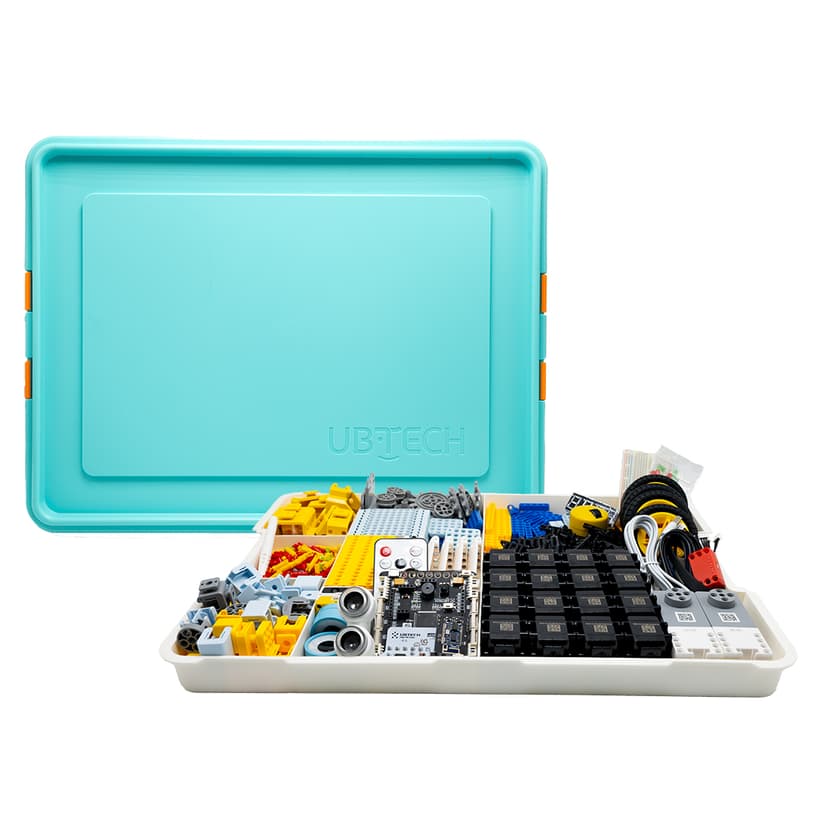
uKit Explore uses a project-based, constructivist approach where students build physical robots and program their behaviors using a companion coding platform. Your child starts by assembling a robot using the provided physical components, which include servos, sensors, and structural pieces. They then connect the hardware to the digital interface.
The software allows your child to program the robot using either block-based coding or text-based languages like Python or C/C++. This progression supports cognitive scaffolding, allowing beginners to understand logic flows before grappling with exact syntax. When your child runs their code, the physical robot executes the commands. This creates a tight feedback loop. Errors in logic result in incorrect physical movements, prompting the student to return to the code, debug the sequence, and try again. The inclusion of AI components allows students to program complex behaviors, such as object recognition or autonomous navigation, bridging the gap between basic coding and advanced computer science.
Strengths and tradeoffs of uKit Explore
The biggest strength of uKit Explore is its tight integration of physical engineering with digital coding, while its biggest weakness is the prohibitive cost and hardware dependency that limits accessibility.
Tangible problem-solving: By requiring students to build physical robots, the platform grounds abstract programming concepts in reality. This physical-digital link leverages embodied cognition, helping students understand computational logic through physical movement and spatial reasoning. When a student writes a loop, they watch the robot perform the loop, cementing the concept through multiple modalities.
Iterative debugging: The platform excels at forcing retrieval practice and error correction. If the code is flawed, the robot fails. This creates an immediate need for debugging, which strengthens cognitive pathways related to computational thinking.
Hardware limitations: The reliance on physical parts introduces friction. Lost pieces, dead batteries, or broken sensors disrupt the learning process entirely. Furthermore, without built-in worked examples directly addressing specific hardware failures, students may struggle to determine if an error is caused by their code or a physical malfunction, leading to cognitive overload and frustration.
Who Might Benefit From uKit Explore ?
uKit Explore is best for middle and high school students who have a strong interest in robotics and need hands-on projects to grasp complex computer science concepts. It works particularly well in structured classroom environments or STEM clubs where an educator can guide the curriculum. For parents, it is ideal for highly motivated teenagers who have outgrown basic coding apps and are ready to tackle physical engineering, Python programming, and introductory artificial intelligence. It is not suitable for casual learners or those seeking a purely digital coding experience.
Data Transparency
Does Not Meet Data Transparency Standard
uKit Explore does not meet our data transparency standard. Its privacy policy does not document basic protections, including a commitment against targeted advertising, limits on sharing children's data and parents' right to see their child's data.
10 of 35 checks passed
Evaluated September 2026
Privacy Policy →Level 1 · Basic protections
Does not sell data or target ads at students, limits sharing, and lets parents see and delete their child's data.
Not documented: a commitment against targeted advertising, limits on sharing children's data, parents' right to see their child's data, parents' right to delete their child's data
Level 2 · Parent control (meets the standard)
Families can get their data out, know who processes it, and know how long it is kept.
Not documented: data export, a data retention timeline, named service providers, self-service deletion
Level 3 · Direct data access
Families or schools can pull their own data through an API, in a stated format.
Not documented: an API for retrieving their own data, a named export format
View all 35 checks
Parent Access5/8
Does the policy mention parents specifically?
“We rely on our Customers to notify parents of our Privacy Policy and obtain parental consent to our collection and use of personal information from Users who are under the age of 13.”
Can parents view their child's data?
The policy gives access rights to Customers and Users but does not say parents can view their child's data.
Can parents modify their child's data?
The policy lets Educator Users modify account data but does not give parents a right to modify it.
Can parents delete their child's account?
The policy gives deletion rights to Customers, Users and Educator Users but does not mention parents.
Is there a dedicated Children's Privacy section?
“**Children Users** We are committed to protecting the privacy of children who use our products and on complying with COPPA.”
Does it reference COPPA compliance?
“We are committed to protecting the privacy of children who use our products and on complying with COPPA.”
Does it reference FERPA compliance?
“We are committed to complying with regulations applicable to the collection and use of the personal information of minors such as the Children’s Online Privacy Protection Act (“COPPA”), Family Education Rights and Privacy Act (“FERPA”)”
Is parental consent required for child accounts?
“We rely on our Customers to notify parents of our Privacy Policy and obtain parental consent to our collection and use of personal information from Users who are under the age of 13.”
Data Portability1/5
Can users access their personal data?
“Customers and Users may request access and/or deletion of the personal information We collect by contacting us using the contact information at the end of this privacy policy.”
Can users download/export their data?
The policy does not address downloading or exporting data.
Is there a self-service data access tool?
The policy provides access only by contacting the company, with no self-service access tool.
Is a specific data format mentioned for export?
The policy does not mention any export format.
Is there an API for data access?
The policy does not mention an API for data access.
Data Minimization1/6
Is data collection itemized?
“including some or all of the following personal information of the teacher or administrator that is setting up the account or Student User: username, whether the user is over or under the age of 16, an email address for receiving a verification code, and, optionally, an avatar or image to be associated with the User account.”
Can the app be used without a real name?
The policy does not state that a student's real name is not collected, and it collects names from those who contact the company.
Can the app be used without an email?
The policy says an email address is collected during account setup.
Does it state collection is limited to what is necessary?
The policy does not say collection is limited to what is necessary.
Is IP address anonymized or truncated?
The policy does not say IP addresses are anonymized or truncated.
Is location tracking explicitly excluded?
The policy says it may collect approximate location based on IP address.
Third-Party Protection2/7
Does it explicitly state no selling of data?
“We only use information as directed by our education customers and/or disclosed in this privacy policy and do not sell UKIT Customer or User personal information.”
Are third-party providers named?
The policy describes categories of service providers but names none apart from its parent company.
Are providers contractually restricted?
“We contractually require that any third-party service providers limit their use of your information solely to providing services to us and that they maintain the confidentiality, security, and integrity of your information and not make unauthorized use or disclosure of the information.”
No-targeted-advertising commitment?
The policy does not address targeted advertising.
Is AI/ML data sharing addressed?
The policy does not address sharing data for AI/ML.
Child-specific sharing restriction?
The policy has no sharing restriction specific to children.
Cookies/tracking limited or opt-out?
The policy says it does not honor Do Not Track signals and offers no tracking opt-out.
Deletion & Retention1/5
Can users delete their account?
“Customers and Users may request access and/or deletion of the personal information We collect by contacting us using the contact information at the end of this privacy policy.”
Self-service deletion mechanism?
The policy says Educator Users delete accounts by cancelling them in the App and also contacting the company, so deletion is not fully self-service.
Specific data retention timeline?
The policy gives no data retention timeline.
Auto-deletion of inactive accounts?
The policy does not address automatic deletion of inactive accounts.
Post-deletion handling described?
The policy does not describe what happens to data after deletion.
Advertising0/4
Advertising model explicitly disclosed?
The policy does not address advertising.
Free from third-party advertisements?
The policy does not address third-party advertising.
Children excluded from ad targeting?
The policy does not address ad targeting of children.
Ad-free option available?
The policy does not address advertising or an ad-free option.
What This Means
The policy review did not meet our data transparency standard. The checks above show the documented findings and unknowns. A missing statement does not establish how the app handles data in practice.
About this evaluation: Based on automated analysis of Privacy Policy against 35 policy-disclosure questions, including questions adapted from the Common Sense Privacy Program's published evaluation questions. TLS is not affiliated with Common Sense Media, and this is not a Common Sense rating. Quoted text is copied from the policy; unquoted notes are our summary. Results describe what the policy documents, not the company's actual practices. Privacy policies can change: this review reflects the version we analyzed and does not determine legal compliance.
Sources and review method
TLS combines product information and editorial analysis to explain how uKit Explore works, its tradeoffs, and the questions to ask before choosing it. Product features, an instructional rationale and evidence of learning outcomes are different kinds of information.
Formal Learning Standard assessment: not yet completed. Data Transparency findings are reported separately and do not establish learning effectiveness. Read our methodology.
Frequently Asked Questions About uKit Explore
Is uKit Explore free?
No, uKit Explore is not free. It is a premium hardware and software package that costs $649.95. This price includes the physical robotics kit, sensors, structural pieces, and access to the companion programming environment.
Is uKit Explore good for middle and high schoolers?
Yes, uKit Explore is explicitly designed for students in grades 6 through 12. The platform scales in difficulty, allowing younger students to start with block-based coding while high schoolers can progress to text-based programming languages like Python and C/C++.
What does uKit Explore teach?
uKit Explore teaches applied computer science, robotics engineering, and computational thinking. Your child will learn hardware assembly, sensor integration, coding logic, debugging, and introductory artificial intelligence concepts through hands-on project building.
How does uKit Explore compare to LEGO Mindstorms?
uKit Explore focuses heavily on integrating modern AI concepts and open-source programming languages like C/C++ alongside its hardware. While LEGO Mindstorms is a staple in classroom robotics, uKit Explore attempts to offer a more advanced pathway for older teens preparing for actual career and technical education fields.
Has The Learning Standard evaluated uKit Explore?
TLS has not yet completed a Learning Standard evaluation of how well uKit Explore teaches. Its privacy policy has been reviewed for Data Transparency and does not yet document the basic protections (Level 1).
Is uKit Explore COPPA compliant?
The reviewed privacy policy references COPPA. A policy reference alone does not establish COPPA compliance. Policy review note: The policy commits to complying with COPPA.
Is uKit Explore FERPA compliant?
The reviewed privacy policy references FERPA. A policy reference alone does not establish FERPA compliance. Policy review note: The policy commits to complying with FERPA.
Does uKit Explore have a children's privacy policy?
The reviewed policy includes a dedicated children's privacy section. Policy review note: The policy has a dedicated "Children Users" section.
Does uKit Explore sell student data?
The reviewed policy states that the app does not sell data. This is a policy statement; actual data practices were not verified. Policy review note: The policy states the company does not sell personal information.
Can you delete your data from uKit Explore ?
The reviewed privacy policy describes account deletion. We have not tested the deletion process. Policy review note: Users can ask for their personal information to be deleted.
Follow TLS Research
Subscribe to future TLS research updates: app reviews, findings, and what the evidence shows.
Screenshots
Take Action
For uKit Explore
If you represent UBTECH Education and have a correction or new evidence, send the relevant source so we can review and update this page.
Submit a correctionDetails
- Pricing
- 649.95
- Platforms
- Windows (Microsoft), macOS (Apple), Chrome OS (Google)
- Grade Levels
- 6th Grade, 7th Grade, 8th Grade, 9th Grade, 10th Grade, 11th Grade, 12th Grade
- Website
- Visit site